
WinSleep by MollieSoft 1.4.12.0
Windows utility that keeps your computer asleep when it's not busy; a timeline shows when your computer was asleep or awake over the last several days. Define wake timers and tasks. Windows 7, 8.1 or 10. More info at www.molliesoft.com/winsleep.
Download
1.13 MB · WinSleepSetup.msi
656downloads
0this week
$14.95Shareware
0reviews
Screenshots
About WinSleep by MollieSoft
WINSLEEP by MollieSoft keeps your computer asleep (while not too busy) as much as possible during periods you specify.
** Runs on Windows 7, Windows 8.1 or Windows 10.
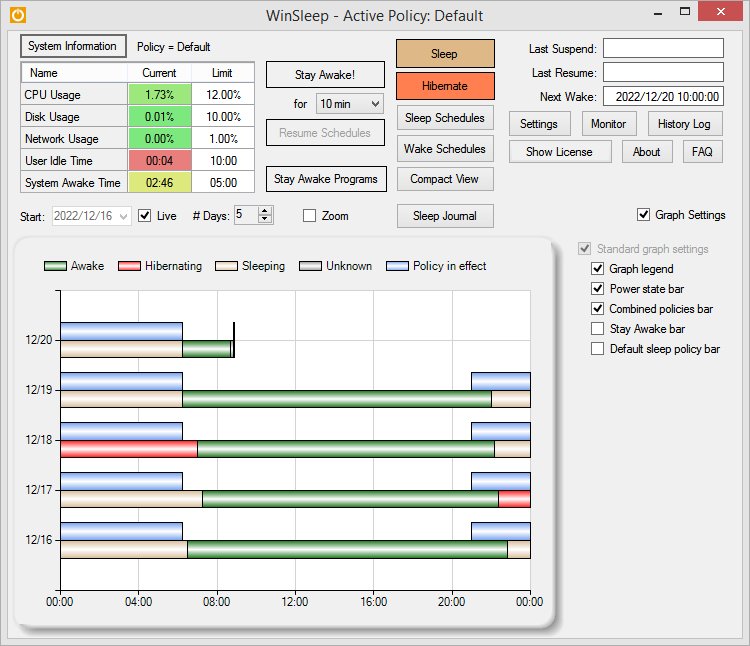
** Provides a detailed time-line graph showing when your computer was awake, asleep, or hibernating.
** Sleep Journal shows when/why your computer woke up or went to sleep.
** Provides convenient Sleep and Hibernate buttons for manual use when desired.
** Use remote viewer WinSleep Monitor to connect from anywhere!
** Shows the current CPU/Disk/Network usage percentages for your computer.
** Define multiple sleep schedules (daily, weekly, or monthly time slot), each with a designated sleep policy with its own CPU/Disk/Network usage limits.
** Set wake schedules and an optional task (program) to be run at each wake.
** Helps prolong the life of your desktop computer. Your disk drive is not spinning, motherboard is not powered, fan is not running (and accumulating dust inside the computer casing), and your monitors are in standby mode.
** Saves money! A typical desktop uses 250 watts of electricity when awake, but only a few watts while asleep. Power companies (in the US) may bill at say 10 cents per kWH. This is .25 kWH @ 10 cents = 2.5 cents/hr you are saving while asleep. Say WinSleep sleeps your computer for half the day; this is $.30/day = $109.50 per year. The more you sleep, the more you save. (We didn't even count the power consumption of the computer monitor here.)
** Runs on Windows 7, Windows 8.1 or Windows 10.
** Provides a detailed time-line graph showing when your computer was awake, asleep, or hibernating.
** Sleep Journal shows when/why your computer woke up or went to sleep.
** Provides convenient Sleep and Hibernate buttons for manual use when desired.
** Use remote viewer WinSleep Monitor to connect from anywhere!
** Shows the current CPU/Disk/Network usage percentages for your computer.
** Define multiple sleep schedules (daily, weekly, or monthly time slot), each with a designated sleep policy with its own CPU/Disk/Network usage limits.
** Set wake schedules and an optional task (program) to be run at each wake.
** Helps prolong the life of your desktop computer. Your disk drive is not spinning, motherboard is not powered, fan is not running (and accumulating dust inside the computer casing), and your monitors are in standby mode.
** Saves money! A typical desktop uses 250 watts of electricity when awake, but only a few watts while asleep. Power companies (in the US) may bill at say 10 cents per kWH. This is .25 kWH @ 10 cents = 2.5 cents/hr you are saving while asleep. Say WinSleep sleeps your computer for half the day; this is $.30/day = $109.50 per year. The more you sleep, the more you save. (We didn't even count the power consumption of the computer monitor here.)
| Requirements | Windows 7, Windows 8.1 or Windows 10 |
|---|---|
| Release info | Major Update on May 09, 2018 |
| Release notes | 1.4.12.0 - Various minor stability fixes. |
| Related tags | windows sleep program saves electricity schedules sleep by usage graphic timeline computer sleep periods |
Reviews
No reviews yet. Be the first to review WinSleep by MollieSoft.
Used WinSleep by MollieSoft? Tell other visitors what you thought.
Log in to write a reviewOther products by this publisher
-
 BitCopy by MollieSoft 1.1.8.0
** File copy program for Windows; control files using AND/OR/NOT filter expressions containing file name/path/date/size. ** Try It! mode. ** Verify files after copying. ** Use schedules to run copy jobs automatically daily/weekly/monthly.
-
 BitSilo by MollieSoft 1.2.2.0
BitSIlo creates timestamped backups for files and directories you specify. Create multiple backup sets, each containing different set of files or directories to be backed up on a daily/weekly/monthly schedule.
-
 DriveSnap by MollieSoft 1.1.2.0
** Search for files on USB drives, DVDs or network shares even when they are not available. ** Create a searchable catalog of the files on any disk (fixed disk, USB drive, optical disk). ** Find file duplicates and file differences.
-
 FileBadger by MollieSoft 1.1.2.0
* FileBadger is a FREE utility from MollieSoft that performs fast file searches. * Find files in multiple folders on any disk or network share, using MollieSoft File Query Language. * Use regular expressions for file/folder name matches (optional).
-
 FileMancer by MollieSoft 1.1.2.0
** Creates a personal website on your computer allowing you to download your files through any web browser, on any device! ** Transfer files using any web browser, on iPad/iPhone/Android. ** Windows IIS setup is not required - it just works!
Most viewed Windows System Maintenance
- 1 Diskeeper Professional 2011 Diskeeper is a fast, simple solution designed to optimize the performance of your PC, while maximizing file access speeds. Diskeeper is the only solution that can prevent performance-robbing fragmentation before it happens, so your PC is always fast.
- 2 V-locity 2.0 V-locity 2 optimizes the entire virtual platform with new technology that operates invisibly with zero system resource conflicts.
-
3
 CCleaner 7.11.1522.1958
CCleaner is a freeware system optimization, privacy and cleaning tool. It removes unused files from your system - allowing Windows to run faster and freeing up valuable hard disk space.
-
4
 Asmw PC-Optimizer pro 8.0
Power Full Tools To Keep Your PC Running Smoothly and with out Errors.
-
5
 NetScream 2.5.26.2014
NetScream is a tool for all that allows you to modify your modem settings to increase internet performance up to 200 percent!! No modifications to your hardware are made and all adjustments and settings are done in an easy to use interface.
- 6 Carambis Driver Updater 2.0.0.6003 You do not need to be a system administrator or even an experienced user to secure the stability of your computer. You do not need to search for drivers all over the Internet; all you have to do is download Carambis Driver Updater to find drivers.
-
7
 DriverMax 9.37
Driver update for any hardware device! Update your Windows 10, 8, 7, Vista or Windows XP computer easily and automatically. Find drivers even for devices that Windows doesn't recognize and backup or restore all your installed drivers.
- 8 Active Password Changer 10.0.0 Forgotten password recovery software has a simple user interface, supports multiple hard disk drives, detects several SAM databases (if multiple OS were installed on one volume) and more. New Ultimate package includes linux-based Active@ LiveCD.
-
9
 SIW 2026.10.14.7
SIW is a tool that gathers detailed information about your system properties and settings. A utility that includes detailed specs for Hardware, Software and Network as well as real-time monitors for CPU and Memory Usage.
-
10
 Hardware Helper 3.2
Hardware Helper's device identification engine automatically determines the exact components and peripherals installed on your PC or laptop and quickly pings our Smart Update software location system for available stability and performance updates
Most downloaded Windows System Maintenance
-
1
CCleaner 7.11.1522.1958
CCleaner is a freeware system optimization, privacy and cleaning tool. It removes unused files from your system - allowing Windows to run faster and freeing up valuable hard disk space.
- 2 Diskeeper Professional 2011 Diskeeper is a fast, simple solution designed to optimize the performance of your PC, while maximizing file access speeds. Diskeeper is the only solution that can prevent performance-robbing fragmentation before it happens, so your PC is always fast.
- 3 V-locity 2.0 V-locity 2 optimizes the entire virtual platform with new technology that operates invisibly with zero system resource conflicts.
-
4
Asmw PC-Optimizer pro 8.0
Power Full Tools To Keep Your PC Running Smoothly and with out Errors.
- 5 Carambis Driver Updater 2.0.0.6003 You do not need to be a system administrator or even an experienced user to secure the stability of your computer. You do not need to search for drivers all over the Internet; all you have to do is download Carambis Driver Updater to find drivers.
-
6
DriverMax 9.37
Driver update for any hardware device! Update your Windows 10, 8, 7, Vista or Windows XP computer easily and automatically. Find drivers even for devices that Windows doesn't recognize and backup or restore all your installed drivers.
- 7 Active Password Changer 10.0.0 Forgotten password recovery software has a simple user interface, supports multiple hard disk drives, detects several SAM databases (if multiple OS were installed on one volume) and more. New Ultimate package includes linux-based Active@ LiveCD.
-
8
 PerfectUpdater 2.0
PerfectUpdater is the perfect tool to update your device drivers.
-
9
NetScream 2.5.26.2014
NetScream is a tool for all that allows you to modify your modem settings to increase internet performance up to 200 percent!! No modifications to your hardware are made and all adjustments and settings are done in an easy to use interface.
-
10
SIW 2026.10.14.7
SIW is a tool that gathers detailed information about your system properties and settings. A utility that includes detailed specs for Hardware, Software and Network as well as real-time monitors for CPU and Memory Usage.