RemoteSysInfo 4.0.4004
RemoteSysInfo collects comprehensive system hardware and software information from a local or remote computer. RemoteSysInfo can be used for computer inventory, auditing and diagnostic purposes. List out all hardware devices and software in a system.
Product Specifications
| User Rating: | item has less then 1 vote |
|
| FileCart Rating | ||
| Submitted by: | workmoment | |
| License | Shareware | |
| Price | $29 | |
| Downloads | 726 | |
| OS Support | Windows Install and Uninstall | |
| File Name | RemoteSysInfo.zip | |
| File Size | 2.83 MB ( 2,899 KB ) | |
| Published | Apr 15, 2009 (17 years ago) | |
| Updated | Dec 13, 2013 (13 years ago) | |
Latest Searches
is the heartland canadian series doing another season? 6 minutes ago
HUI DUA TRADING KLUANG 7 minutes ago
7 02 04 9 minutes ago
valores de revision tecnica para maquinaria pesada en chile 10 minutes ago
In the _____________, individuals complete their self reported screening in the provider’s office via iPad technology.WAST screening toolPVS questionnaireHITS screening toolTESSA program 11 minutes ago
estado de cuenta banco industrial 11 minutes ago
instagram story viewer 11 minutes ago
Mayfair funerals leave them a review 12 minutes ago
q music geluid 2025 13 minutes ago
Popular Searches
id cards 602 times
2025 494 times
2024 386 times
Softperfect 328 times
2026 279 times
5g spf sonicwall compatible copper module 262 times
Database Workbench Pro 258 times
TeraByte Drive Image Backup and Restore 255 times
targetamazon credit card.asp?highlight=0 254 times
Product Details
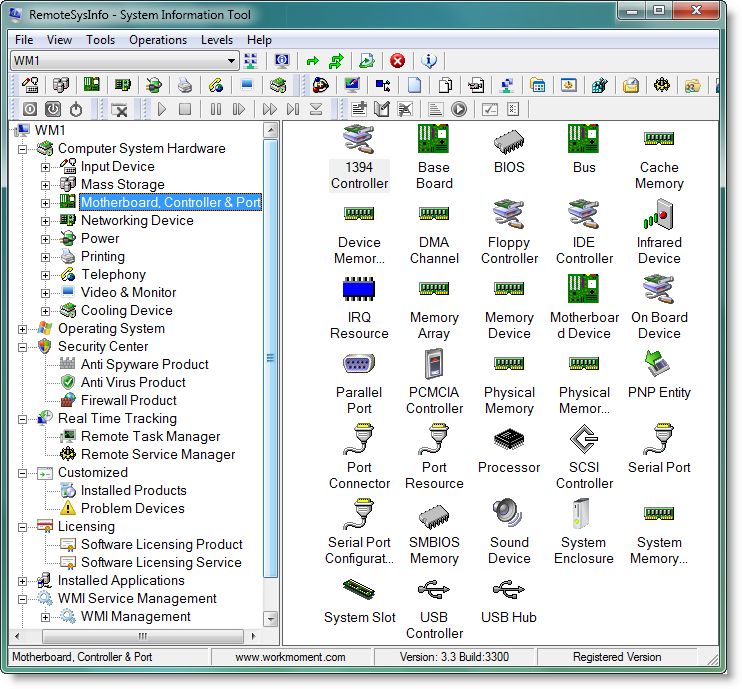
The hardware information report categories includes Input Devices, Mass Storage Devices, Motherboard, Controllers, Ports, Networking Devices, Power Devices, Printing Devices, Telephony, Video & Monitor and Cooling Device.
Software information include the Drivers, COM, Desktop Information, File System Information, Memory and Page Files, Multimedia Related Information, Network Drivers, Detailed Operating System Settings Information, Processes, Threads, Registry, Services, Shares, Start Menu, Event Log, Windows Product Information etc.
RemoteSysInfo now contains Remote Task Manager and Remote Service Manager. You can gather information like Universally Unique Serial Number of the Computer, Processor ID of the CPU, Serial Numbers of Hard Disk Drives, MotherBoard, BIOS and Operating System using RemoteSysInfo. You can shutdown or reboot a remote computer using RemoteSysInfo. Control the Services like Start, Stop, Disable or Enable Services using the Remote Service Manager feature. Kill a process through the Remote Task Manager.
Addition of export formats, .CSV (Comma Separated), .TXT (Limited Width Printer Friendly), all formats are import friendly to EXCEL, Databases etc.
You can also view the System Summary of a PC, which reports the general profile of the computer of your choice and compare resources of PCs.
RemoteSysInfo supports a wide range of Windows versions from the old Windows 9x to the latest Windows Vista & Windows 7. It supports x32 and x64 versions of Windows.
It is recommended for all users who wish to know more about their computer internals. It's a MUST tool for network and hardware engineers.
| Requirements: | Windows Operating System |
| Release Info: | Minor Update on Mar 12, 2012 |
| Release Notes: | New Version Auto Check, Remote Task Manager, Remote Service Manager, Memory Optimization, Bug Fixes, Licensing, Saving the Last Expanded State, Service StartMode Bug Fix, Customizable Tabular Reports, Scanning Reports, Wake-ON-Lan, Fully Customizable Reports, Adding Your Own New Reports |
Reviews
You must be logged in to write a review
Reviews of RemoteSysInfo 4.0.4004
You can be the first to write a review of RemoteSysInfo!Other products submitted by this publisher
CybSecure is an Internet Filtering, Application Blocking, Email Filtering,Device Security & Power Management Tool. CybSecure can help organizations to safeguard employee internet misuse by blocking internet access to browsers, instant messengers etc.
CybSecureTSCybSecureTS is an Internet Filtering, Application Blocking and Email Filtering Tool. CybSecureTS can help organizations to safeguard employee internet misuse by blocking internet access to browsers, instant messengers etc.