Uninstall Tool 3.5.4
Quick, powerful and reliable alternative to standard Windows Add/Remove Program. It's a fast, secure and convenient way to remove unneeded applications and improve your computer efficiency. The program can also remove System and Hidden applications.
Product Specifications
| User Rating: | item has less then 1 vote |
|
| FileCart Rating | ||
| Submitted by: | xpisik | |
| License | Shareware | |
| Expires | 30 Days | |
| Price | $24.95 | |
| Downloads | 1,076 | |
| OS Support | Windows Install and Uninstall | |
| File Name | uninstalltool_setup.exe | |
| File Size | 3.55 MB ( 3,633 KB ) | |
| Published | Mar 14, 2007 (19 years ago) | |
| Updated | Jul 29, 2018 (8 years ago) | |
Latest Searches
is ac blackflag resynced availble to play right now? 28 seconds ago
estacion de servicio de impresora canon maxify gx7010 3 minutes ago
Complete the table below for the function y=3xy=3x. xy00123 6 minutes ago
Objects are organized into groups called _____.Group of answer choicesobject collectionsobject poolsobject bucketsobject topologies 6 minutes ago
Functional Metabolism of Aromatic Precursors in Hanseniaspora: A Source of Natural Bioactive Compounds 6 minutes ago
neovia nutrição animal site 6 minutes ago
why did the oplane crash buddy holly ritchie valens 9 minutes ago
sino si homer 9 minutes ago
when do the athletics start playing in vegas 12 minutes ago
Popular Searches
id cards 602 times
2025 486 times
2024 386 times
Softperfect 327 times
2026 271 times
Database Workbench Pro 258 times
TeraByte Drive Image Backup and Restore 255 times
Elcomsoft Phone Breaker 251 times
ia que faz video com imagem 18 246 times
Product Details
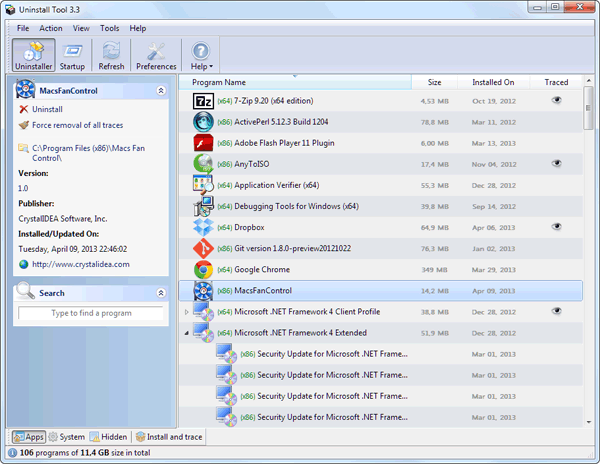
You can easily browse your software using three application categories (Software, System and Hidden.) A Fast Search Feature allows you to quickly find any application you need. Remove programs that could not be removed by Add/Remove Program! Uninstall Tool also removes programs, that automatically run at system startup - a great option to get complete control on your computer.
You will never miss any application installed with new feature of highlighting recently installed applications and displaying them in a cool popup window.
The user interface is easy-to-use, modern and multilingual (more than 15 languages supported). You can view detailed information about applications installed on your computer and navigate to its Registry Entry, Installation Folder and its Web Site. Many other features are included such as the option to replace Add/Remove Program, saving (exporting to HTML) detailed reports about currently installed applications, and more.
| Requirements: | 500 MHz CPU, 3 MB disk space, 128 MB memory |
| Release Info: | Major Update on Jan 12, 2017 |
| Release Notes: | Fixed detection of an app install location and date in some scenarios. Fixed incorrect names for some Windows Store Apps. Better RTL (Hebrew & Arabic languages) support |
Reviews
You must be logged in to write a review
Reviews of Uninstall Tool 3.5.4
You can be the first to write a review of Uninstall Tool!