HDDlife for Notebooks 3.1.170
HDDlife for Notebooks protects data from being lost. The constant control allows detecting and solving hard drive problems early. The notification system always keeps you informed about the state of the drive.
Product Specifications
| User Rating: | item has less then 1 vote |
|
| FileCart Rating | ||
| Submitted by: | binarysense | |
| License | Shareware | |
| Expires | 14 Days | |
| Price | $29 | |
| Downloads | 375 | |
| OS Support | Windows Install and Uninstall | |
| File Name | hddlife_notebooks.exe | |
| File Size | 7.16 MB ( 7,332 KB ) | |
| Published | May 26, 2006 (20 years ago) | |
| Updated | Jan 20, 2013 (13 years ago) | |
Latest Searches
burger "beard" ai voice generator tts spongebob movie 21 seconds ago
"Estefania Ramirez del Real" site:facebook.com 2 minutes ago
win 11 excel win k not working 3 minutes ago
greg solden acrylic artist georgia 10 minutes ago
frigidaire gcfg3661af griddle 10 minutes ago
.mydeaf 14 minutes ago
k mag fertilizante precio 15 minutes ago
samsung a56 256gb 17 minutes ago
is the unniversity of tennessee track open to the public 20 minutes ago
Popular Searches
id cards 602 times
2025 436 times
2024 385 times
Softperfect 323 times
Database Workbench Pro 258 times
TeraByte Drive Image Backup and Restore 255 times
Elcomsoft Phone Breaker 251 times
ia que faz video com imagem 18 241 times
Elcomsoft Phone Viewer 232 times
Product Details
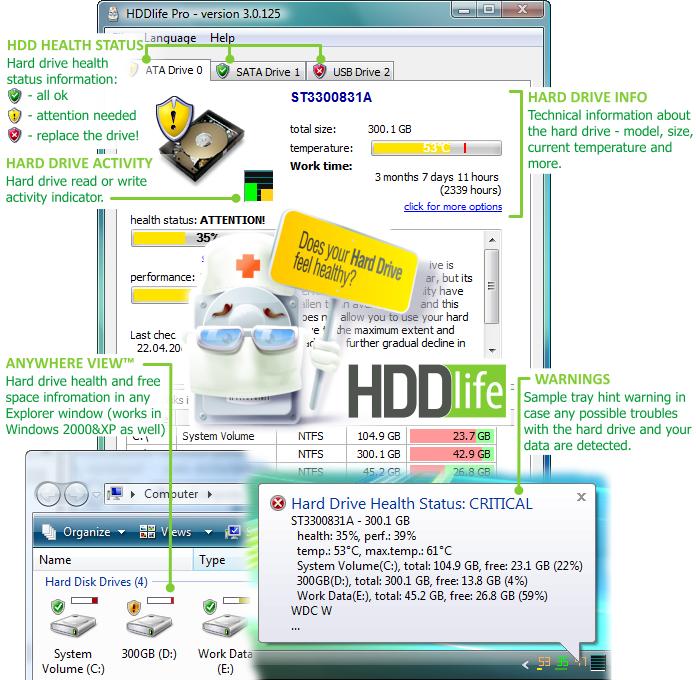
When HDDlife controls the work of the hard drive, it informs you about hard drive overheating or a decrease in its performance. It regularly measures the temperature and performance of the hard drive at the specified intervals. The state of the drive is displayed in the tray as a percentage of health and performance together with its temperature. The results of each check are displayed as a brief notification. Data about available disk space is also displayed there. Additional data about the drive, such as its total working time and structure, is available in the program window. HDDlife always keeps you informed about the state of the hard drive.
Besides displaying the current state of the drive, the program also gives recommendations on how to improve its work, when to back up data and prepare a replacement. In critical cases, it allows the user to automatically switch the system to the standby mode or to the power saving mode. It protects the system when it runs in the autonomous mode. When you control the system remotely, HDDlife can send messages with the results of the last check via the network or by e-mail. It will run in the background mode, regularly check the state of the hard drive and send reports to a remote computer.
| Requirements: | standard PC, IDE, Serial ATA, SCSI, USB hard drives |
| Release Info: | Minor Update on Jun 09, 2010 |
| Release Notes: | * some bugs in registration wizard fixed. |
Reviews
You must be logged in to write a review
Reviews of HDDlife for Notebooks 3.1.170
You can be the first to write a review of HDDlife for Notebooks!Other products submitted by this publisher
A rise in temperature by 10 degrees may halve your drive's life expectancy! HDDlife is a freeware indicator that installs into your Google Sidebar. It will monitor your hard drive condition and temperatures.
SSDLife ProAutomatic scheduled health control for SSD drives in the background mode. Notifications about any changes in the health condition. Estimated SSD drive lifetime. Support of virtually any SSD drives. Comfortable interface and reports available online.