
9downloads
1this week
FreeFreeware
0reviews
Screenshots
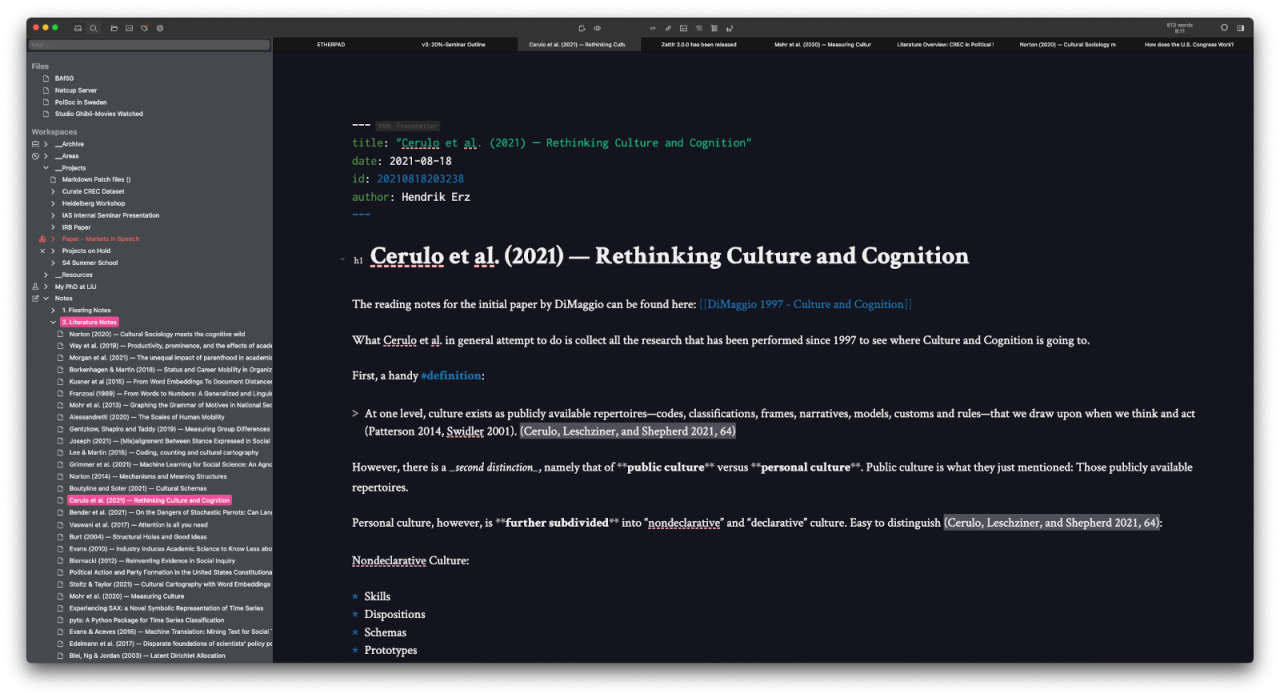
About Zettlr
Writing is an essential part of our everyday life. Why make it complicated? Zettlr redefines what writing means. It is slim, fast, and versatile. Focus on what matters to you. Publish, not perish.
In modern times, getting a hold of the flood of information is almost as hard as inserting a USB drive the right way on the first attempt. Zettlr allows you to connect pieces of information using state of the art Zettelkasten methodology. Links? Check. File IDs? Check. File tagging? Also check. And the best is: Unlike many competitors, Zettlr never locks you in. Zettlr supports almost every conceivable way to create links and identify your files. In other words: No matter where you come from — all Zettelkästen are beautiful and supported by Zettlr. Out of the box.
Zettlr integrates well with reference managers such as Zotero, JabRef, or Juris-M. Simply load your library into Zettlr, and begin to cite. Zettlr strictly adheres to established standards and does not reinvent the wheel. Citations can be loaded using CSL-JSON or BibTex and the citation processor only uses Citation Style Language, the de-facto industry standard for citations. This enables you to use one of over 9,000 different styles from the official Zotero repository!
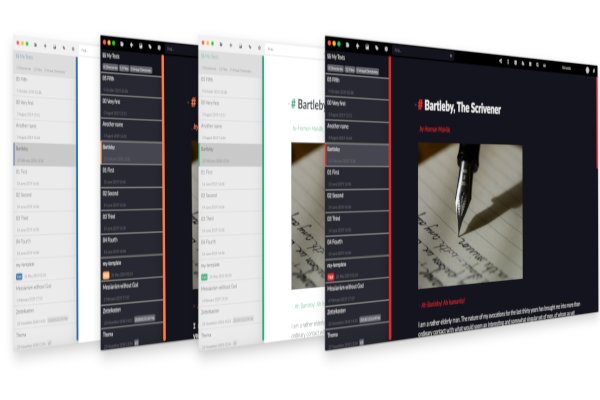
Due to its designing flexibility, Zettlr supports dark mode out of the box, as well as many different themes, suited to your needs. Switching is as easy as pressing a button. Not satisfied with the provided themes? No problem: Zettlr allows full customization of every single element; you can even create completely new themes using Custom CSS!
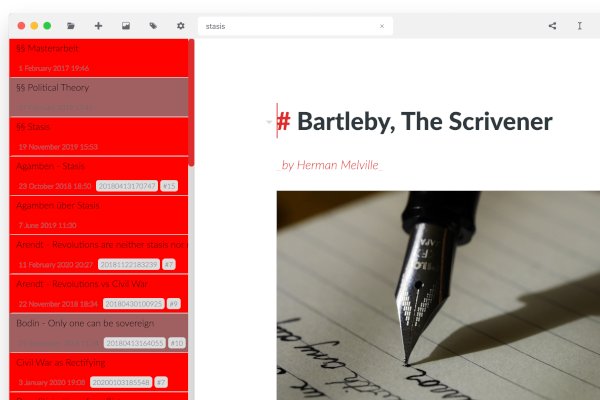
No matter whether you work with a lot of notes, such as a Zettelkasten, or simply have a lot of files with different important contents: Zettlr's revolutionary heatmap search lets you find every single note you've ever written. No more confusion over where that one citation was!
Twitter invented them and, since then, everybody adopted them: Hashtags! Zettlr goes one step further, not only allowing you to link and categorize your notes using tags, but using its tag-manager you can assign colors to tags to visualize your notes immediately!
Zettlr scales well with your aspirations. From the first texts in university to your dissertation thesis: Using the advanced features of Zettlr tailored to researchers, journalists, and novelists writing whole books is as easy as creating a new project. Zettlr will never stand in your way, just like a good app should.
Note: In order to be able to export to PDF via LaTeX you need to additionally install the extension org.freedesktop.Sdk.Extension.texlive
License: GPL-3.0-or-later
In modern times, getting a hold of the flood of information is almost as hard as inserting a USB drive the right way on the first attempt. Zettlr allows you to connect pieces of information using state of the art Zettelkasten methodology. Links? Check. File IDs? Check. File tagging? Also check. And the best is: Unlike many competitors, Zettlr never locks you in. Zettlr supports almost every conceivable way to create links and identify your files. In other words: No matter where you come from — all Zettelkästen are beautiful and supported by Zettlr. Out of the box.
Zettlr integrates well with reference managers such as Zotero, JabRef, or Juris-M. Simply load your library into Zettlr, and begin to cite. Zettlr strictly adheres to established standards and does not reinvent the wheel. Citations can be loaded using CSL-JSON or BibTex and the citation processor only uses Citation Style Language, the de-facto industry standard for citations. This enables you to use one of over 9,000 different styles from the official Zotero repository!
Due to its designing flexibility, Zettlr supports dark mode out of the box, as well as many different themes, suited to your needs. Switching is as easy as pressing a button. Not satisfied with the provided themes? No problem: Zettlr allows full customization of every single element; you can even create completely new themes using Custom CSS!
No matter whether you work with a lot of notes, such as a Zettelkasten, or simply have a lot of files with different important contents: Zettlr's revolutionary heatmap search lets you find every single note you've ever written. No more confusion over where that one citation was!
Twitter invented them and, since then, everybody adopted them: Hashtags! Zettlr goes one step further, not only allowing you to link and categorize your notes using tags, but using its tag-manager you can assign colors to tags to visualize your notes immediately!
Zettlr scales well with your aspirations. From the first texts in university to your dissertation thesis: Using the advanced features of Zettlr tailored to researchers, journalists, and novelists writing whole books is as easy as creating a new project. Zettlr will never stand in your way, just like a good app should.
Note: In order to be able to export to PDF via LaTeX you need to additionally install the extension org.freedesktop.Sdk.Extension.texlive
License: GPL-3.0-or-later
| Release info | Update on Oct 24, 2026 |
|---|---|
| Listing data | Flathub |
Reviews
No reviews yet. Be the first to review Zettlr.
Used Zettlr? Tell other visitors what you thought.
Log in to write a reviewOther products by this publisher
- "No Distractions" for YouTube 4.10 ----
- #Bible 11.6 "Incredible App - My sister shared this app with me a few weeks ago and it is truly incredible.
- #filmphotography 1.4.2 So, you decided to shoot on film?
- $quirrel 1.5.1 $quirrel Budget & Finance helps you plan each paycheck, track spending, manage debt, and see what is safe to spend before the next payday.
- % Percentage Calculator Pro 1.41 This is the Pro version of % Percentage Calculator.
Most viewed Linux Office
-
1
 WPS 365 12.1.2.29183_807310
WPS 365 Suite
-
2
 Scrolex 0.13.1
Read PDFs and ebooks horizontally
-
3
 Scribe 0.3.35
Markdown editor with live rendering
-
4
 Feishu 7.72.23
A collaboration platform
-
5
 Foliate 3.3.0
Read e-books in style
- 6 Adobe Reader 9.5.5 PDF viewer
-
7
 Super Productivity v20.0.0
To-do list and time tracker
-
8
 Actual Budget 26.11.0
Your Finances made simple
- 9 Textosaurus 0.9.13 Simple cross-platform text editor based on Qt and QScintilla
-
10
 Blockstream 3.6.1
A simple and secure Bitcoin and Liquid Network wallet
Most downloaded Linux Office
- 1 sleek 2.1.1 todo manager based on the todo.txt syntax for Linux, free and open-source (FOSS)
- 2 Textosaurus 0.9.13 Simple cross-platform text editor based on Qt and QScintilla
-
3
 Fingrom 7.3.2
Platform-agnostic financial accounting application for personal finance management
-
4
 TreeSheets 2.23.10
Free Form Data Organizer
-
5
 Invoice Ninja 5.0.204
Create invoices, accept payments, track expenses & time tasks
-
6
 Skribisto 3.3.0
Plan, write, manage your novels
-
7
 Linwood Butterfly 2.6.2
Infinite-canvas notes and sketches
-
8
 Nottodbox 0.2.3
Organize notes, to-dos and diaries
-
9
Scribe 0.3.35
Markdown editor with live rendering
-
10
 Readest 0.12.20
Modern, feature-rich ebook reader