43downloads
19this week
FreeFreeware
0reviews
Screenshots
About Nottodbox
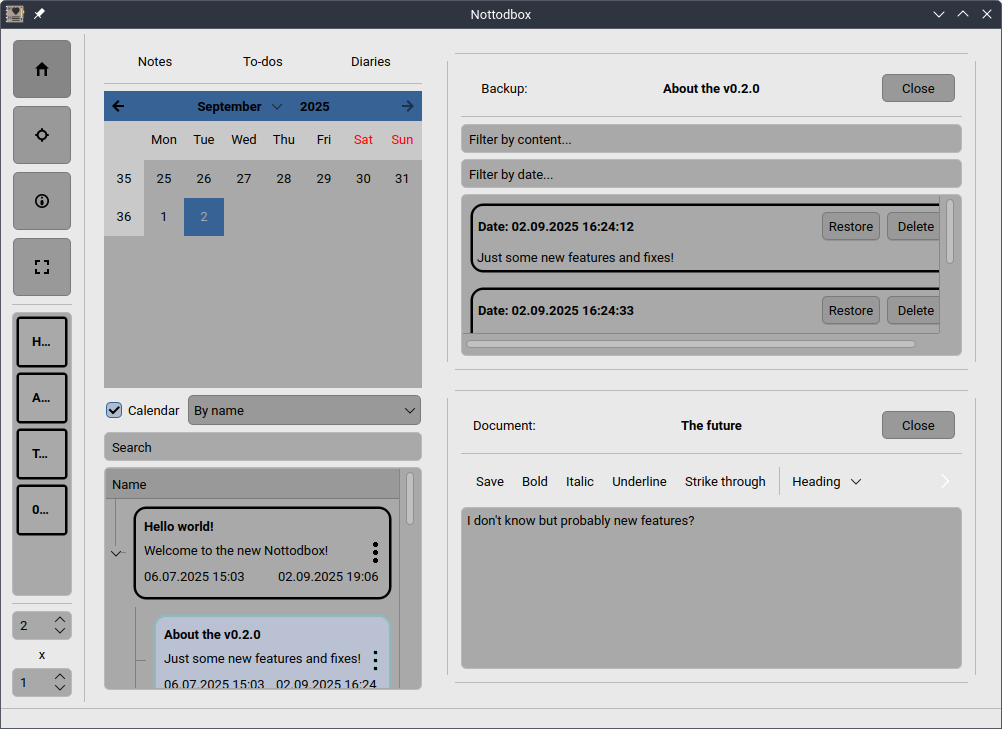
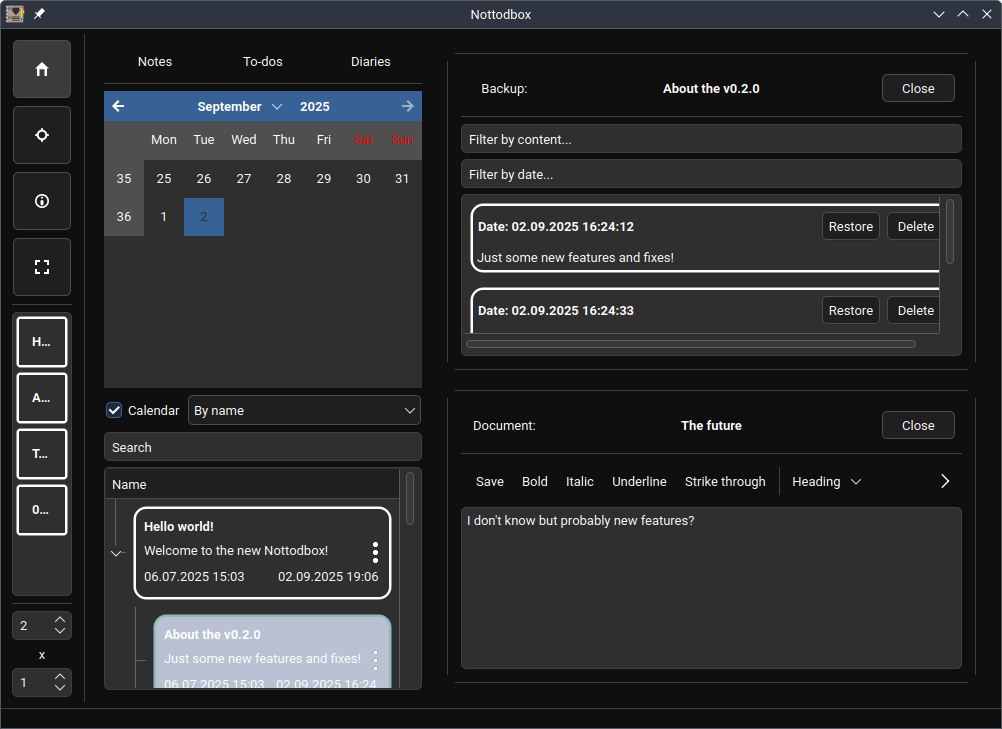
Nottodbox allows you to create and organize notes, to-dos, and diaries with rich text support in popular formats.
In today's fast-paced world, we often have multiple tasks to handle simultaneously. That's why you can open multiple documents at once in the desired row x column layout.
You can change the style and color scheme of the application to make it feel more like home.
All customization options for documents/notebooks:
• You can mark a to-do as completed or uncompleted.
• You can add a content lock to a document to turn it into a diary. This prevents the backup from being changed.
• Documents are automatically saved unless you are editing a outdated diary and have disabled this feature. Additionally, a backup of the old content is always retained. Furthermore, auto-saves do not overwrite backups, meaning your manual changes remain intact.
• Documents can be in three formats: Markdown, HTML, and plain-text.
• Documents can be exported in multiple formats to your 'Documents' or 'Desktop' folder if you enable this feature. This allows you to edit them in other applications as well.
• You can pin your favorite documents/notebooks to the sidebar for easy access.
• You can change the background, text, and border colors of the document/notebook in three different states: normal, hover, and click
And here's the most important part! All documents are associated with a notebook, and all options can follow it. All documents/notebooks can use the default settings or follow the global settings. With them, you can to customize so many things with ease.
License: GPL-3.0-or-later
In today's fast-paced world, we often have multiple tasks to handle simultaneously. That's why you can open multiple documents at once in the desired row x column layout.
You can change the style and color scheme of the application to make it feel more like home.
All customization options for documents/notebooks:
• You can mark a to-do as completed or uncompleted.
• You can add a content lock to a document to turn it into a diary. This prevents the backup from being changed.
• Documents are automatically saved unless you are editing a outdated diary and have disabled this feature. Additionally, a backup of the old content is always retained. Furthermore, auto-saves do not overwrite backups, meaning your manual changes remain intact.
• Documents can be in three formats: Markdown, HTML, and plain-text.
• Documents can be exported in multiple formats to your 'Documents' or 'Desktop' folder if you enable this feature. This allows you to edit them in other applications as well.
• You can pin your favorite documents/notebooks to the sidebar for easy access.
• You can change the background, text, and border colors of the document/notebook in three different states: normal, hover, and click
And here's the most important part! All documents are associated with a notebook, and all options can follow it. All documents/notebooks can use the default settings or follow the global settings. With them, you can to customize so many things with ease.
License: GPL-3.0-or-later
| Release info | Update on Oct 06, 2026 |
|---|---|
| Release notes | What's Changed • Fix translations not working for Options class (remove usage of self.parent_.tr) • Try to create Desktop/Nottodbox and Documents/Nottodbox folders when needed • Do not try to check page mode if the page is none Full Changelog: v0.2.2...v0.2.3 |
| Related tags | nottodbox editor wysiwyg |
| Listing data | Flathub |
Reviews
No reviews yet. Be the first to review Nottodbox.
Used Nottodbox? Tell other visitors what you thought.
Log in to write a reviewOther products by this publisher
- "No Distractions" for YouTube 4.10 ----
- #Bible 11.6 "Incredible App - My sister shared this app with me a few weeks ago and it is truly incredible.
- #filmphotography 1.4.2 So, you decided to shoot on film?
- $quirrel 1.5.1 $quirrel Budget & Finance helps you plan each paycheck, track spending, manage debt, and see what is safe to spend before the next payday.
- % Percentage Calculator Pro 1.41 This is the Pro version of % Percentage Calculator.
Most viewed Linux Office
-
1
 WPS 365 12.1.2.29183_807310
WPS 365 Suite
-
2
 Scrolex 0.13.1
Read PDFs and ebooks horizontally
-
3
 Scribe 0.3.35
Markdown editor with live rendering
-
4
 Feishu 7.72.23
A collaboration platform
-
5
 Foliate 3.3.0
Read e-books in style
- 6 Adobe Reader 9.5.5 PDF viewer
-
7
 Super Productivity v20.0.0
To-do list and time tracker
-
8
 Actual Budget 26.11.0
Your Finances made simple
- 9 Textosaurus 0.9.13 Simple cross-platform text editor based on Qt and QScintilla
-
10
 Blockstream 3.6.1
A simple and secure Bitcoin and Liquid Network wallet
Most downloaded Linux Office
- 1 sleek 2.1.1 todo manager based on the todo.txt syntax for Linux, free and open-source (FOSS)
- 2 Textosaurus 0.9.13 Simple cross-platform text editor based on Qt and QScintilla
-
3
 Fingrom 7.3.2
Platform-agnostic financial accounting application for personal finance management
-
4
 TreeSheets 2.23.10
Free Form Data Organizer
-
5
 Invoice Ninja 5.0.204
Create invoices, accept payments, track expenses & time tasks
-
6
 Skribisto 3.3.0
Plan, write, manage your novels
-
7
 Linwood Butterfly 2.6.2
Infinite-canvas notes and sketches
-
8
 Nottodbox 0.2.3
Organize notes, to-dos and diaries
-
9
Scribe 0.3.35
Markdown editor with live rendering
-
10
 Readest 0.12.20
Modern, feature-rich ebook reader