wList 2.1.0
Create list of files and subfolders of a given folder (directory). In one click, create a list of contents of any CD/DVD/USB flash drive, or any hard disc. List all your music files (MP3, WAV), pictures (GIF,JPG,PNG) or video (AVI,MP4,MPEG).
Product Specifications
| User Rating: |
wList 2.1.0
5
out of 5
(based on 1 ratings)
|
|
| FileCart Rating | ||
| Submitted by: | sharktime | |
| Homepage | Visit Homepage | |
| License | Shareware | |
| Expires | 30 Days | |
| Price | $15 | |
| Downloads | 1,372 | |
| OS Support | Windows Install and Uninstall | |
| File Name | wList21.exe | |
| File Size | 0.74 MB ( 753 KB ) | |
| Published | Mar 13, 2009 (18 years ago) | |
| Updated | Dec 13, 2013 (13 years ago) | |
Follow Us!
Latest Searches
francesca.cristiano@fcbroker.it 2 minutes ago
cupon descuento mercado libre 5 minutes ago
versiculo onde colocar a planta dos teus pés prosperará onde colocar as mãos 5 minutes ago
infieles chilevision cuatro rancheras y ningunfuneral 6 minutes ago
ds1628 compatible 10gb sfp cards 8 minutes ago
kathrine_simons Onlyfans Leaked Photos 8 minutes ago
logo puskesmas payangan 11 minutes ago
pagan do they all believe in god 13 minutes ago
Codigo SAT cinta antiderrpante 14 minutes ago
Popular Searches
id cards 602 times
2025 495 times
2024 386 times
Gypsy 2.0 Onlyfans Leaked Photos 339 times
5g spf sonicwall compatible copper module 336 times
Softperfect 331 times
2026 313 times
ds1628 compatible 10gb sfp cards 287 times
Who is Music 281 times
Product Details
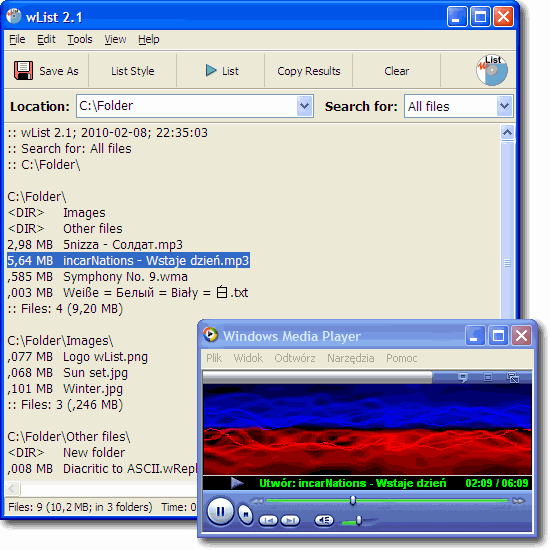
With one click, you can create a list of the contents of any CD/DVD/USB flash drive, or any hard disk.
You can easily search through or print this list.
wList includes the functionality of the DOS dir and Unix ls commands.
It supports file names which include Unicode characters.
Applications:
* Searching - Essential for finding the file(s) you want when you have a lot of them.
* Printing - You can print a directory list and use it - perhaps as a CD cover.
* Documentation/Archiving - Thanks to wList, you can easily document the contents of folders.
* Playlists - wList can make playlist and save it to m3u8.
wList is extremely useful if you have a large number of CD/DVD discs. After saving a list of the contents of each disc one just once, you can choose to search multiple lists at the same time, whenever you need to. You'll never need to try one CD after another looking for the right file again.
You save time:
With wList, you can make simple file lists from large, complicated folders in no time. Just choose the location holding all the files you want to list, and click the 'List' button.
wList has a very simple interface, and many carefully chosen features.
You can open any file from the list with wList: just double click on the filename to open and view the selected file.
wList gives you control:
You can control the style of your list.
You can control the content of your list by choosing to skip certain types of files.
You can easily choose to list only files of certain types, like: archive files, audio, documents, executable files, pictures, music playlists, programming, text files, video, and saved web pages.
List all your pictures (GIF,JPG,PNG) or video (AVI,MP4,MPEG).
List all your MP3/WAV music files. You can create a list of all the MP3 songs on your hard disk or on a CD/DVD. Create a complete list of all of your music files!
| Release Info: | Minor Update on Feb 08, 2010 |
| Related Tags: | wlist file list list files dir filelist |
Reviews
You must be logged in to write a review
Reviews of wList 2.1.0
You can be the first to write a review of wList!Other products submitted by this publisher
Neural network classification results live view (like a movie). Free software for playing with neural networks classification. Many network architectures, different shapes of training data sets. Learning with backpropagation algorithm.
wReplaceFree program, which allows you to change/replace multiple letters and phrases at a time. It is easy to create and save lists of changes/replacements, so that you can reuse them. Applications: character conversion, ROT13, ROT47, Morse code conversion.