
58downloads
1this week
FreeFreeware
0reviews
Screenshots

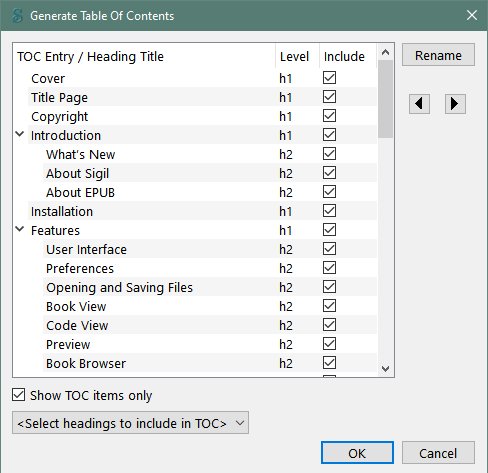
About Sigil
Sigil was designed to make it easy to create great ebooks using the EPUB format. If you are
formatting books for your own use, or you are a professional editor publishing books on multiple
platforms, then Sigil is for you. You can use Sigil to format and package your books into an EPUB
that looks exactly the way you want it to using an advanced set of features that have made Sigil
one of most popular EPUB editors available.
This open-source and completely free software is written and supported entirely by volunteers.
The current Sigil development team includes Doug Massay and Kevin Hendricks as co-lead developers
and maintainers. Previous developers/authors include John Schember, Grant Drake and Dave Heiland.
Sigil was originally created by Strahinja Markovic in 2009 and remains completely free to download
and use. Support is also provided by other volunteers who contribute code, translations and helpful
answers to user’s questions. See the Help=>About menu in Sigil for a complete list of contributors.
Some Sigil features:
• Free and open source software under GPLv3
• Multi-platform: runs on Windows, Mac, and Linux
• Full UTF-16 support
• EPUB 2 and EPUB 3 spec support
• Multiple Views: Code View and Preview View
• Complete control over directly editing EPUB syntax in Code View
• Table of Contents generator with multi-level heading support
• Metadata editor
• User interface translated into many languages
• Themeable icons
• Spell checking with default and user configurable dictionaries
• Full Regular Expression (PCRE) support for Find & Replace
• Supports import of EPUB and HTML files, images, and style sheets
• All imported files can have their formatting mended, and your code can be optionally “prettified”
• Plugin Support
• Checkpoint support (compare “snapshots” of changes)
• Pies and Puppies!
License: GPL-3.0+
| Release info | Update on Nov 09, 2026 |
|---|---|
| Release notes | Sigil 2.8.6 is a bugfix release. Sigil 2.8.5 has a bug that can cause damage to the EPUB's opf file if you try to change the cover image of an Epub3. It is recommended that you update to 2.8.6 to avoid this issue. Bug Fixes • fix incorrect Aria Clips icon in the Fluent Theme (Thankyou BeckyEbook) • fix bug in python plugin wrapper.py that caused application/javascript and application/pls+xml files to be returned as bytes (utf-8) instead of normal python strings (Thank you BeckyEbook) • fix bug in PluginRunner and python wrapper.py in handling oebps-page-map+xml and application/vnd.adobe-page-map.xml (Thank you BeckyEbook) • remove duplicate entry for Recording Engineer in MarcRelators list (Thank you BeckyEbook) • fix endnote backlink in Aria Clips and remove deprecated epub:type endnote use (Thank you BeckyEbook) • fix bug in epub3 when updating or changing the cover image that can cause OPF manifest entry damage (Thank you ABeater) Notes: The Sigil Linux AppImage is built on Ubuntu Jammy (22.04) and is targeting glibc 2.35 and higher. Use ldd --version to see if your system at least has a shot at being able to use the AppImage. Don't forget to make sure the AppImage is executable after downloading. Trouble is not expected but be safe and backup your existing Sigil preferences (if you have any) before trying the AppImage. The latest version of the Sigil User Guide can always be downloaded from the Sigil website, or from its own GitHub repository. Please check the Sigil website for important Sigil support links, additional resource downloads, and platform-specific trouble-shooting tips/requirements. The MacOS builds are signed AND notarized. PGP Fingerprint (for signed tags and source archives): B5A5 6206 AB0F BC1A 24EF AB8A A166 D29A 8FCD AC63 |
| Listing data | Flathub |
Reviews
No reviews yet. Be the first to review Sigil.
Used Sigil? Tell other visitors what you thought.
Log in to write a reviewOther products by this publisher
- "No Distractions" for YouTube 4.10 ----
- #Bible 11.6.1 "Incredible App - My sister shared this app with me a few weeks ago and it is truly incredible.
- #filmphotography 1.4.2 So, you decided to shoot on film?
- #LookBusy Fake Calendar Events 1.0.6 Look Busy scans your work calendar for open time slots and fills them with realistic-looking (but secretly fake) work events.
- #Small Talk Is Canceled 1.0.2 #Small Talk Is Canceled — Conversations That Matter
Most viewed Linux Office
-
1
 Scrolex 0.13.1
Read PDFs and ebooks horizontally
-
2
 WPS 365 12.1.2.29183_807310
WPS 365 Suite
- 3 Textosaurus 0.9.13 Simple cross-platform text editor based on Qt and QScintilla
-
4
 Readest 0.12.20
Modern, feature-rich ebook reader
-
5
 Super Productivity v20.1.0
To-do list and time tracker
-
6
 Feishu 7.72.23
A collaboration platform
-
7
 Scribe 0.3.50
Markdown editor with live rendering
-
8
 Foliate 3.3.0
Read e-books in style
-
9
 Adobe Reader 9.5.5
PDF viewer
-
10
 Quick Lookup 2.1.2
Look up words quickly
Most downloaded Linux Office
- 1 sleek 2.1.1 todo manager based on the todo.txt syntax for Linux, free and open-source (FOSS)
- 2 Textosaurus 0.9.13 Simple cross-platform text editor based on Qt and QScintilla
-
3
 Nottodbox 0.2.3
Organize notes, to-dos and diaries
-
4
 Fingrom 7.3.2
Platform-agnostic financial accounting application for personal finance management
-
5
 Linwood Butterfly 2.6.3
Infinite-canvas notes and sketches
-
6
 TreeSheets 2.24.6
Free Form Data Organizer
-
7
 OpenDeck 2.14.2
Use stream controllers
-
8
 Thoughts 0.20.0
Simple and powerful mind map
- 9 Koodo Reader 2.4.7 All-in-one ebook reader
-
10
Scribe 0.3.50
Markdown editor with live rendering