
13downloads
1this week
FreeLicense
0reviews
Screenshots
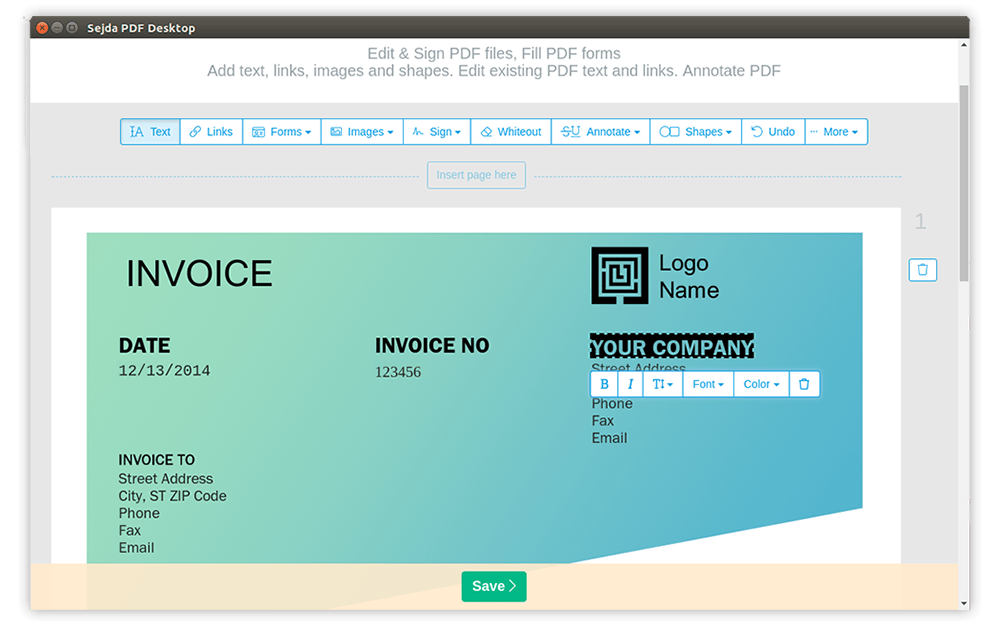
About Sejda PDF Desktop
Sejda PDF Desktop is a fast, user-friendly PDF application for editing, merging, splitting,
compressing, and signing PDFs offline.
Supports text editing, form filling, page reordering, OCR, and secure encryption; designed
for both casual and power users with a clean, touch-friendly interface.
Sejda PDF Desktop is free to use with daily limits.
It supports a wide range of document tasks, including:
• Merge files into one PDF file
• Split PDF files by pages or size, extract documents, bookmarks, or text occurrences
• Convert PDFs to Word, Excel, or image formats
• Compress PDF files by optimizing images and other resources
•
Edit PDF files — Add, edit, or move text; change font, size, and style; insert, reorder,
move, or delete pages; add signatures, highlights, and shapes
• Add password protection and set copy/edit restrictions to documents
• Add image or text watermarks to documents
• Convert text and images to grayscale
• Trim margins, adjust visible page area, and change page size
License: Proprietary
compressing, and signing PDFs offline.
Supports text editing, form filling, page reordering, OCR, and secure encryption; designed
for both casual and power users with a clean, touch-friendly interface.
Sejda PDF Desktop is free to use with daily limits.
It supports a wide range of document tasks, including:
• Merge files into one PDF file
• Split PDF files by pages or size, extract documents, bookmarks, or text occurrences
• Convert PDFs to Word, Excel, or image formats
• Compress PDF files by optimizing images and other resources
•
Edit PDF files — Add, edit, or move text; change font, size, and style; insert, reorder,
move, or delete pages; add signatures, highlights, and shapes
• Add password protection and set copy/edit restrictions to documents
• Add image or text watermarks to documents
• Convert text and images to grayscale
• Trim margins, adjust visible page area, and change page size
License: Proprietary
| Release info | New Release on Aug 20, 2026 |
|---|---|
| Related tags | editor merge pdf |
| Listing data | Flathub |
Reviews
No reviews yet. Be the first to review Sejda PDF Desktop.
Used Sejda PDF Desktop? Tell other visitors what you thought.
Log in to write a reviewOther products by this publisher
- "No Distractions" for YouTube 4.10 ----
- #Bible 11.6 "Incredible App - My sister shared this app with me a few weeks ago and it is truly incredible.
- #filmphotography 1.4.2 So, you decided to shoot on film?
- $quirrel 1.5.1 $quirrel Budget & Finance helps you plan each paycheck, track spending, manage debt, and see what is safe to spend before the next payday.
- % Percentage Calculator Pro 1.41 This is the Pro version of % Percentage Calculator.
Most viewed Linux Office
-
1
 WPS 365 12.1.2.29183_807310
WPS 365 Suite
-
2
 Scrolex 0.13.1
Read PDFs and ebooks horizontally
-
3
 Scribe 0.3.35
Markdown editor with live rendering
-
4
 Feishu 7.72.23
A collaboration platform
-
5
 Foliate 3.3.0
Read e-books in style
- 6 Adobe Reader 9.5.5 PDF viewer
-
7
 Super Productivity v20.0.0
To-do list and time tracker
-
8
 Actual Budget 26.11.0
Your Finances made simple
- 9 Textosaurus 0.9.13 Simple cross-platform text editor based on Qt and QScintilla
-
10
 Blockstream 3.6.1
A simple and secure Bitcoin and Liquid Network wallet
Most downloaded Linux Office
- 1 sleek 2.1.1 todo manager based on the todo.txt syntax for Linux, free and open-source (FOSS)
- 2 Textosaurus 0.9.13 Simple cross-platform text editor based on Qt and QScintilla
-
3
 Fingrom 7.3.2
Platform-agnostic financial accounting application for personal finance management
-
4
 TreeSheets 2.23.10
Free Form Data Organizer
-
5
 Invoice Ninja 5.0.204
Create invoices, accept payments, track expenses & time tasks
-
6
 Skribisto 3.3.0
Plan, write, manage your novels
-
7
 Linwood Butterfly 2.6.2
Infinite-canvas notes and sketches
-
8
 Nottodbox 0.2.3
Organize notes, to-dos and diaries
-
9
Scribe 0.3.35
Markdown editor with live rendering
-
10
 Readest 0.12.20
Modern, feature-rich ebook reader