
SecureYourChats 10
Text & File Encryption/Decryption with new OverlayTechnology
Download
5.34 MB · com.encrypt.bwt_10.apk
24downloads
1this week
FreeFreeware
0reviews
Screenshots
About SecureYourChats
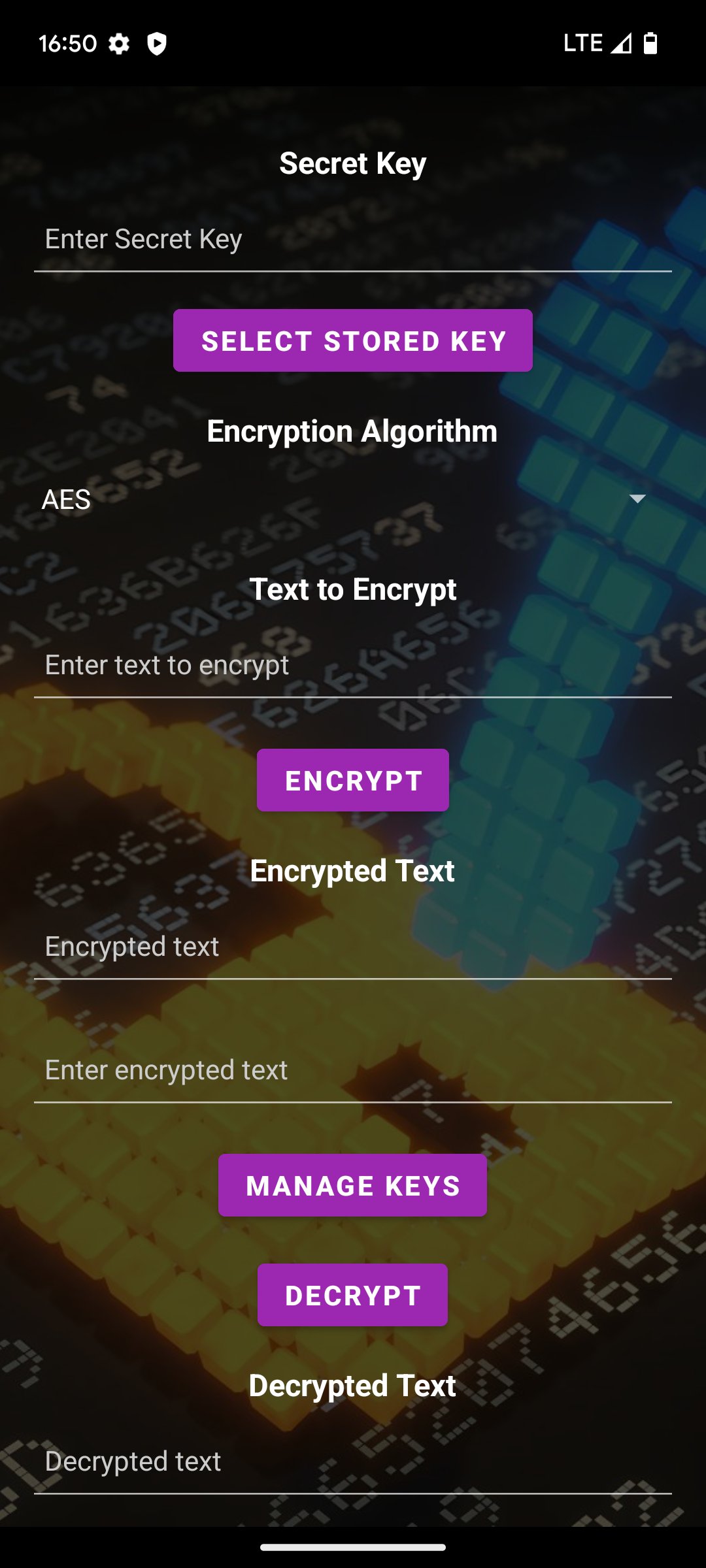
Text Encryption/Decryption
Supported algorithms: AES, DES, CAMELLIA, ChaCha20-Poly1305, XChaCha20-Poly1305, and Aegis256.
Intuitive interface to enter text, choose an algorithm, and get the encrypted or decrypted result.
Generate 256-bit Key Automatically
Automatically generate random 256-bit keys in the Manage Keys section.
Ideal for encrypting/decrypting without manually creating keys.
Share/Import Encryption Keys via QR
Share any key you've created so others can use the same encryption key.
Export your key by pressing it in the list and choosing "Export."
Import a key using a QR code in "Import key via QR" under key management.
File Encryption/Decryption
Select files from your device.
Encrypt or decrypt them using the same algorithms.
The output file name is automatically labeled ".encrypted" or ".decrypted."
Built-In Key Manager :key:
Add, delete, or generate random keys.
Import keys from QR codes or export them as QR codes too.
Keys are stored securely (using EncryptedSharedPreferences).
Share Encryption Flow
Use the Share action in other apps -> choose "Encrypt" or "Decrypt" for text/files.
Quick and convenient for multi-app workflows.
Optional Accessibility Service :handshake:
Detects selected text (when you highlight text on-screen).
Detects copied text (clipboard).
Displays a notification to encrypt/decrypt on the fly, opening the same activity (DialogFlowEncryptionActivity) with "Choose Operation."
Toggle Accessibility Logic
A "BurbujaEncryption" button (or similar) enables/disables the logic internally without turning off the service in Android Settings.
Perfect for pausing detection without leaving system settings.
Dialog Flow (DialogFlowEncryptionActivity) :speech_balloon:
A step-by-step sequence:
"Choose Operation" (Encrypt/Decrypt)
"Choose Cipher"
"Pick/Enter Key"
Final result
Offers a guided, user-friendly experience.
Android 13+ Support
Requests POST_NOTIFICATIONS permission if you want to see notifications when text is selected or copied.
Basic Usage :rocket:
Main Screen
Enter text and a key (or pick a saved key).
Select the algorithm from the spinner.
Tap Encrypt or Decrypt.
Copy or share the resulting text.
File Encryption :file_folder:
Tap "FILE ENCRYPTION" on the main screen (MainActivity).
Choose a file and an output folder.
Pick the algorithm and a key.
Tap EXECUTE.
Accessibility (Optional)
Enable it in Settings -> Accessibility -> "Encrypt-DecrypT Service."
Once enabled, selecting or copying text in any app triggers a notification.
Tap it to open the DialogFlow ("Choose Operation").
In MainActivity, use "BurbujaEncryption" to enable or disable detection without turning the service off in Settings.
Frequently Asked Questions (FAQ) :question:
How do I enable/disable the accessibility service logic without going to system settings?
Use the "BurbujaEncryption" button in MainActivity. It toggles an internal SharedPreferences flag. If disabled, the service won't process events even if it's still enabled in system settings.
What if I forget my key?
You won't be able to decrypt your text/file. Make sure you keep a record of your keys or store them in the Key Manager.
Why am I not seeing notifications when copying text?
On Android 13+, you must grant the POST_NOTIFICATIONS permission.
Check that the accessibility service is enabled and the internal logic is not toggled off.
License: GPL-3.0-only
Supported algorithms: AES, DES, CAMELLIA, ChaCha20-Poly1305, XChaCha20-Poly1305, and Aegis256.
Intuitive interface to enter text, choose an algorithm, and get the encrypted or decrypted result.
Generate 256-bit Key Automatically
Automatically generate random 256-bit keys in the Manage Keys section.
Ideal for encrypting/decrypting without manually creating keys.
Share/Import Encryption Keys via QR
Share any key you've created so others can use the same encryption key.
Export your key by pressing it in the list and choosing "Export."
Import a key using a QR code in "Import key via QR" under key management.
File Encryption/Decryption
Select files from your device.
Encrypt or decrypt them using the same algorithms.
The output file name is automatically labeled ".encrypted" or ".decrypted."
Built-In Key Manager :key:
Add, delete, or generate random keys.
Import keys from QR codes or export them as QR codes too.
Keys are stored securely (using EncryptedSharedPreferences).
Share Encryption Flow
Use the Share action in other apps -> choose "Encrypt" or "Decrypt" for text/files.
Quick and convenient for multi-app workflows.
Optional Accessibility Service :handshake:
Detects selected text (when you highlight text on-screen).
Detects copied text (clipboard).
Displays a notification to encrypt/decrypt on the fly, opening the same activity (DialogFlowEncryptionActivity) with "Choose Operation."
Toggle Accessibility Logic
A "BurbujaEncryption" button (or similar) enables/disables the logic internally without turning off the service in Android Settings.
Perfect for pausing detection without leaving system settings.
Dialog Flow (DialogFlowEncryptionActivity) :speech_balloon:
A step-by-step sequence:
"Choose Operation" (Encrypt/Decrypt)
"Choose Cipher"
"Pick/Enter Key"
Final result
Offers a guided, user-friendly experience.
Android 13+ Support
Requests POST_NOTIFICATIONS permission if you want to see notifications when text is selected or copied.
Basic Usage :rocket:
Main Screen
Enter text and a key (or pick a saved key).
Select the algorithm from the spinner.
Tap Encrypt or Decrypt.
Copy or share the resulting text.
File Encryption :file_folder:
Tap "FILE ENCRYPTION" on the main screen (MainActivity).
Choose a file and an output folder.
Pick the algorithm and a key.
Tap EXECUTE.
Accessibility (Optional)
Enable it in Settings -> Accessibility -> "Encrypt-DecrypT Service."
Once enabled, selecting or copying text in any app triggers a notification.
Tap it to open the DialogFlow ("Choose Operation").
In MainActivity, use "BurbujaEncryption" to enable or disable detection without turning the service off in Settings.
Frequently Asked Questions (FAQ) :question:
How do I enable/disable the accessibility service logic without going to system settings?
Use the "BurbujaEncryption" button in MainActivity. It toggles an internal SharedPreferences flag. If disabled, the service won't process events even if it's still enabled in system settings.
What if I forget my key?
You won't be able to decrypt your text/file. Make sure you keep a record of your keys or store them in the Key Manager.
Why am I not seeing notifications when copying text?
On Android 13+, you must grant the POST_NOTIFICATIONS permission.
Check that the accessibility service is enabled and the internal logic is not toggled off.
License: GPL-3.0-only
| Release info | New Release on Feb 11, 2025 |
|---|---|
| Listing data | F-Droid |
Reviews
No reviews yet. Be the first to review SecureYourChats.
Used SecureYourChats? Tell other visitors what you thought.
Log in to write a reviewOther products by this publisher
- "No Distractions" for YouTube 4.10 ----
- #Bible 11.6 "Incredible App - My sister shared this app with me a few weeks ago and it is truly incredible.
- #filmphotography 1.4.2 So, you decided to shoot on film?
- $quirrel 1.5.1 $quirrel Budget & Finance helps you plan each paycheck, track spending, manage debt, and see what is safe to spend before the next payday.
- % Percentage Calculator Pro 1.41 This is the Pro version of % Percentage Calculator.
Most viewed Android Security & Privacy
- 1 OTG Master 0.5.1 Mount VeraCrypt, LUKS, BitLocker and APFS USB drives on non-rooted Android
- 2 Vault Explorer 1.50.0 Encrypted container explorer: VeraCrypt, LUKS, BitLocker, Cryptomator, gocryptfs
-
3
 Passchain 1.1.2-rc2
Use security key with Bluetooth, NFC, USB or your phone secure element
-
4
 ICdetection 3.1.8
Offline cellular anomaly auditor and radio monitor for Android
- 5 CimBar Scanner 0.13.0 Send and receive files and text as animated color barcodes — offline
-
6
 Arcanum 1.7.0
Encrypted container manager compatible with VeraCrypt
-
7
 Pass 0.4.7
Private tools: deterministic passwords, 2FA codes, calculator and clock.
-
8
 PaperCript 1.3.5
Encrypted passwords on printable QR cards. No network, stores nothing.
- 9 KeePassVault 2.1.0 Client app for KeePass databases
- 10 Sidestep 1.2.7 Intercept URLs, remove tracking, and redirect to privacy-friendly frontends.
Most downloaded Android Security & Privacy
-
1
Arcanum 1.7.0
Encrypted container manager compatible with VeraCrypt
-
2
 Acutis Firewall 1.0.11
Parental control app that blocks adult content and dangerous sites on-device.
- 3 Flauth 1.2.0 Privacy-first, open-source TOTP authenticator for 2FA token management.
-
4
 PassPony: Git Password Manager 2.1.0
Password manager for pass and passage stores, synced with git
-
5
 Keyholm 0.1.0
Single-device passkeys on secure hardware
- 6 Zodl: Zcash Wallet 3.19.0-3234 The most private crypto wallet. Built for financial sovereignty.
-
7
 Pocket2FA 0.11.0
Secure 2FA code client of 2FAuth server that works offline
-
8
 Tokn - MFA / 2FA authenticator 1.8.3
Open-source 2FA authenticator. Encrypted on-device. No accounts.
- 9 HiddenProtectedWorkProfile 94.0 Hidden Profile owner Android security app.
-
10
 AWAGAM TLD and Domain Blocker 1.1.1
Block TLDs and domains at the DNS level using your own blocklists