ManageEngine Desktop Central 9.0
This Enterprise Desktop & Mobile Device Management Software provides Software Deployment, Patch Management, Service Pack Deployment, Asset Management, Remote Desktop Sharing, Configurations, Active Directory Reports & Windows Tools, Power Management.
Download
102.00 MB
1.1Kdownloads
8this week
$545Commercial
0reviews
Screenshots
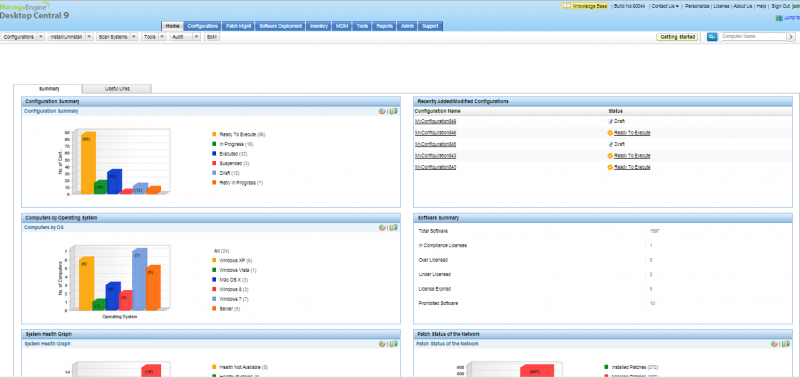
About ManageEngine Desktop Central
Enterprise Desktop & Mobile Device Management Software providing Role based Administration, Software Deployment, Creating Software Repostories, Patch Management, Service Pack Deployment, Asset Management, Warranty Tracking, Remote Control, Configurations, Active Directory Reports, User Logon Reports and Windows System Tools.
With its network-neutral architecture, the administrator can easily manage any networks like Active Directory, Workgroup & Novell eDirectory.
Key Features
Supports Windows 2000, XP,Vista, Windows 7, Windows 8, Windows 8.1, 2000, 2003, 2008 & 2012 Server, Mac 10.6, 10.7, 10.8, 10.9, iOS4 & above
Web-based server manages Computers/Mobile Devices in LAN and across WAN from a central point
Deploy Software to computers at a scheduled time
Automated Vunerability Assessment, Patch Management and scheduled deployment of OS service packs
Software and Hardware Inventory with License Management and Software Metering
Take control of remote desktops in LAN and across WAN for instant troubleshooting
Enables collaboration using Remote control by allowing multi-monitor support, remote file transfer and recording remote sessions
Predefined configurations to achieve most of the desktop management tasks where targets can be defined using include/exclude criteria and with custom groups of users and computers
Collection helps to group configurations, which can be applied to same set of targets
Provides the status of the applied configurations
Over 90+ ready-made reports of the Active Directory infrastructure
User Logon Reports for an up-to-date user logon details and history
System Tools like Disk Defragmenter, Check Disk, and Disk Cleanup that can be scheduled to run on multiple desktops
Optimize WAN Bandwidth using Distribution Servers
Robust management of mobile devices- corporate owned or personal device
Over-the-air enrollment of mobile devices including self-enrollment and bulk enrollment
Advanced profile management, mobile asset tracking, app management and location tracking
With its network-neutral architecture, the administrator can easily manage any networks like Active Directory, Workgroup & Novell eDirectory.
Key Features
Supports Windows 2000, XP,Vista, Windows 7, Windows 8, Windows 8.1, 2000, 2003, 2008 & 2012 Server, Mac 10.6, 10.7, 10.8, 10.9, iOS4 & above
Web-based server manages Computers/Mobile Devices in LAN and across WAN from a central point
Deploy Software to computers at a scheduled time
Automated Vunerability Assessment, Patch Management and scheduled deployment of OS service packs
Software and Hardware Inventory with License Management and Software Metering
Take control of remote desktops in LAN and across WAN for instant troubleshooting
Enables collaboration using Remote control by allowing multi-monitor support, remote file transfer and recording remote sessions
Predefined configurations to achieve most of the desktop management tasks where targets can be defined using include/exclude criteria and with custom groups of users and computers
Collection helps to group configurations, which can be applied to same set of targets
Provides the status of the applied configurations
Over 90+ ready-made reports of the Active Directory infrastructure
User Logon Reports for an up-to-date user logon details and history
System Tools like Disk Defragmenter, Check Disk, and Disk Cleanup that can be scheduled to run on multiple desktops
Optimize WAN Bandwidth using Distribution Servers
Robust management of mobile devices- corporate owned or personal device
Over-the-air enrollment of mobile devices including self-enrollment and bulk enrollment
Advanced profile management, mobile asset tracking, app management and location tracking
| Requirements | P IV 1.5 GHz, 1 GB RAM |
|---|---|
| Release info | Major Update on Apr 10, 2014 |
| Release notes | Mobile Device Management |
| Related tags | Remote Desktop Management Desktop Administration Mobile Device Management Role Based Administration Patch Management |
Reviews
No reviews yet. Be the first to review ManageEngine Desktop Central.
Used ManageEngine Desktop Central? Tell other visitors what you thought.
Log in to write a reviewOther products by this publisher
- ManageEngine Desktop Central MSP 7.0 Desktop Central MSP is a web-based Windows Desktop Management software that helps managed service providers to efficiently manage their customers' desktops and servers.
Most viewed Windows Shell Enhancements
-
1
 Auto Window Manager 1.5
Auto Window Manager resize your programs automatically, such as maximize, minimize, normal, minimize to tray. It also set application windows transparency, minimize them to tray, keep them stay on top, automatic refresh for Internet Explorer.
Auto Window Manager 1.5
Auto Window Manager resize your programs automatically, such as maximize, minimize, normal, minimize to tray. It also set application windows transparency, minimize them to tray, keep them stay on top, automatic refresh for Internet Explorer.
- 2 Comfort On-Screen Keyboard Pro 10.1.1.0 The software displays a unique virtual keyboard on the screen and enables you to use the mouse cursor or the touch screen to type text in any available language. Ideal for using on Ultra-Mobile PC (UMPC), TabletPC and kiosk.
-
3
 MobaXterm 26.5.0.5542
MobaXterm is a set of network tools included in a single portable exe file. MobaXterm integrates an X server and several network clients (SSH, RDP, VNC, telnet, rlogin, sftp, ftp, ...) accessible through a tab-based terminal.
MobaXterm 26.5.0.5542
MobaXterm is a set of network tools included in a single portable exe file. MobaXterm integrates an X server and several network clients (SSH, RDP, VNC, telnet, rlogin, sftp, ftp, ...) accessible through a tab-based terminal.
-
4
 Aston 2.0.3
Aston will turn your Desktop into the more powerful, fast and beautiful operating environment. Aston contains all the basic shell components as well as widgets, which enable advanced Desktop features. Aston supports themes, live wallpapers.
Aston 2.0.3
Aston will turn your Desktop into the more powerful, fast and beautiful operating environment. Aston contains all the basic shell components as well as widgets, which enable advanced Desktop features. Aston supports themes, live wallpapers.
-
5
 Actual Window Minimizer 8.11.1
Use Actual Window Minimizer for more practical and effortless window management. The tool offers various ways of manual and automatic window minimization to the system tray or any desktop spot. Avoid taskbar clutter - minimize your windows anywhere!
Actual Window Minimizer 8.11.1
Use Actual Window Minimizer for more practical and effortless window management. The tool offers various ways of manual and automatic window minimization to the system tray or any desktop spot. Avoid taskbar clutter - minimize your windows anywhere!
-
6
 Aml Maple 5.37
Aml Maple has a new kind of view on keyboard layout indicators: simple, modern, flexible. In addition, you can change the text cursor color, move it beneath the cursor instead from the right, adjust the text cursor width (in pixels).
Aml Maple 5.37
Aml Maple has a new kind of view on keyboard layout indicators: simple, modern, flexible. In addition, you can change the text cursor color, move it beneath the cursor instead from the right, adjust the text cursor width (in pixels).
- 7 3D Tray Clock Ex. 2.2.2 3D Tray Clock Ex. is the advanced replacement for standard Windows tray clock with 3D looks, and different alarms alert important events. It also include desktop alpha transparent clock and alpha transparent calendar. and easily using todolist edit.
- 8 ManageEngine Desktop Central 9.0 This Enterprise Desktop & Mobile Device Management Software provides Software Deployment, Patch Management, Service Pack Deployment, Asset Management, Remote Desktop Sharing, Configurations, Active Directory Reports & Windows Tools, Power Management.
-
9
 UEFA Informer 1.8.0.4
The UEFA Informer Gadget tracks football matches scores, fixtures and teams standing in real time for World Cup, all UEFA Competitions and domestic leagues from UEFA region like English, Italian, German, French, Spanish, and more (51 countries).
UEFA Informer 1.8.0.4
The UEFA Informer Gadget tracks football matches scores, fixtures and teams standing in real time for World Cup, all UEFA Competitions and domestic leagues from UEFA region like English, Italian, German, French, Spanish, and more (51 countries).
-
10
 Start Menu 7 5.87
A convenient and superior alternative to the Start menu for Windows 7. With Start Menu 7 easy interface, you will quickly forget about the system start menu. Every detail in Start Menu 7 is a pleasure.
Start Menu 7 5.87
A convenient and superior alternative to the Start menu for Windows 7. With Start Menu 7 easy interface, you will quickly forget about the system start menu. Every detail in Start Menu 7 is a pleasure.
Most downloaded Windows Shell Enhancements
-
1
Actual Window Minimizer 8.11.1
Use Actual Window Minimizer for more practical and effortless window management. The tool offers various ways of manual and automatic window minimization to the system tray or any desktop spot. Avoid taskbar clutter - minimize your windows anywhere!
-
2
 Clock Tray Skins 4.3
Advanced replacement for standard Windows tray clock. See the time, day, date and system UpTime in different skins. Displays the time for any of the time zones. Over 100 skins are included in the distribution.
It's also an atomic-time synchronizer.
Clock Tray Skins 4.3
Advanced replacement for standard Windows tray clock. See the time, day, date and system UpTime in different skins. Displays the time for any of the time zones. Over 100 skins are included in the distribution.
It's also an atomic-time synchronizer.
- 3 3D Tray Clock Ex. 2.2.2 3D Tray Clock Ex. is the advanced replacement for standard Windows tray clock with 3D looks, and different alarms alert important events. It also include desktop alpha transparent clock and alpha transparent calendar. and easily using todolist edit.
-
4
Aml Maple 5.37
Aml Maple has a new kind of view on keyboard layout indicators: simple, modern, flexible. In addition, you can change the text cursor color, move it beneath the cursor instead from the right, adjust the text cursor width (in pixels).
- 5 Comfort On-Screen Keyboard Pro 10.1.1.0 The software displays a unique virtual keyboard on the screen and enables you to use the mouse cursor or the touch screen to type text in any available language. Ideal for using on Ultra-Mobile PC (UMPC), TabletPC and kiosk.
-
6
MobaXterm 26.5.0.5542
MobaXterm is a set of network tools included in a single portable exe file. MobaXterm integrates an X server and several network clients (SSH, RDP, VNC, telnet, rlogin, sftp, ftp, ...) accessible through a tab-based terminal.
-
7
Aston 2.0.3
Aston will turn your Desktop into the more powerful, fast and beautiful operating environment. Aston contains all the basic shell components as well as widgets, which enable advanced Desktop features. Aston supports themes, live wallpapers.
-
8
UEFA Informer 1.8.0.4
The UEFA Informer Gadget tracks football matches scores, fixtures and teams standing in real time for World Cup, all UEFA Competitions and domestic leagues from UEFA region like English, Italian, German, French, Spanish, and more (51 countries).
-
9
 DesktopX 3.2
Use DesktopX to enhance your standard desktop icons; animate your desktop; put calendars, weather objects, MP3 players, performance meters, and more on your desktop at a fraction of the memory footprint of stand alone programs.
DesktopX 3.2
Use DesktopX to enhance your standard desktop icons; animate your desktop; put calendars, weather objects, MP3 players, performance meters, and more on your desktop at a fraction of the memory footprint of stand alone programs.
-
10
Auto Window Manager 1.5
Auto Window Manager resize your programs automatically, such as maximize, minimize, normal, minimize to tray. It also set application windows transparency, minimize them to tray, keep them stay on top, automatic refresh for Internet Explorer.