
Barcode Creator Software Barcode Studio 15.1.3
With Barcode Studio you create and print all 1D, GS1, 2D Barcodes in perfect quality - even in batch operation! More than 100 barcode symbologies are generated, printed or saved as EPS and images files: Code128, EAN, UPC, GTIN, DataMatrix, QRCode
Download
11.15 MB · BarCode_Studio.msi
1.8Kdownloads
0this week
$115Demo
0reviews
Screenshots
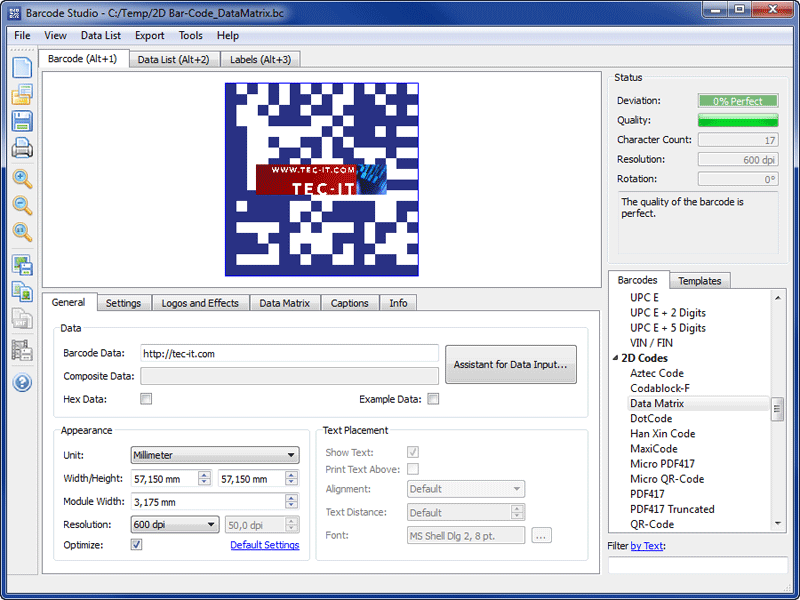
About Barcode Creator Software Barcode Studio
BARCODE MAKER / BARCODE CREATOR
With Barcode Studio you generate high-quality barcode images (also for 2D codes like QR Code or DataMatrix) ideally suited for pre-press requirements, desktop publishing applications, print-shops and artwork studios. Barcode Studio is featuring simple barcode label printing functionality.
OUTPUT FORMAT
Barcode Studio exports barcode images as BMP, PNG, GIF, JPG and TIFF. In addition the barcode maker creates vector EPS & PDF output.
BARCODE QUALITY
Barcode Studio guarantees perfect barcode quality. The expected barcode quality is computed & displayed during the barcode design.
BARCODE SUPPORT
More than 100 different barcode symbologies are supported. The product creates linear as well as 2D barcodes, stacked codes & composite barcodes (GS1 DataBar etc.).
READY-TO-USE TEMPLATES
Pre-defined templates for compliance bar-coding (Deutsche Post Premiumadress, EAN, UPC) are included.
SPECIAL FEATURES
Barcode Studio offers many convenient features, just to name a few: data import, serial number generator, input assistant with URL shortening (goo.gl, bitly) and SPARQCode support, barcodes with embedded logo, etc.
HIGHLIGHTS
+ No Barcode Fonts are required
+ Supported Barcodes: PDF417, MicroPDF, DataMatrix (ECC200), MaxiCode, QR-Code, Codablock, RSS, GS1 DataBar, Aztec, Code39, HIBC Codes, EAN, UPC, Code128, Han Xin, DotCode, GS1 GCN ...
+ Data Import: Create bar code series with external data (txt/CSV)
+ Advanced Design: Embed logos or graphics, change the drawing mode
+ Output Format: Direct printing, raster and vector image export, PostScript, PCL, EPS
+ Barcode quality is constantly computed
+ Data Input Assistant simplifies the creation of barcodes for mobile tagging like events, Twitter tweets, Facebook likes, vCard/meCard business cards ...
+ Label Printing: Choose from pre-defined templates or define custom labels
+ Areas of Application: Pre-Press, Desktop Publishing, Barcode Testing, Coupons, Vouchers
With Barcode Studio you generate high-quality barcode images (also for 2D codes like QR Code or DataMatrix) ideally suited for pre-press requirements, desktop publishing applications, print-shops and artwork studios. Barcode Studio is featuring simple barcode label printing functionality.
OUTPUT FORMAT
Barcode Studio exports barcode images as BMP, PNG, GIF, JPG and TIFF. In addition the barcode maker creates vector EPS & PDF output.
BARCODE QUALITY
Barcode Studio guarantees perfect barcode quality. The expected barcode quality is computed & displayed during the barcode design.
BARCODE SUPPORT
More than 100 different barcode symbologies are supported. The product creates linear as well as 2D barcodes, stacked codes & composite barcodes (GS1 DataBar etc.).
READY-TO-USE TEMPLATES
Pre-defined templates for compliance bar-coding (Deutsche Post Premiumadress, EAN, UPC) are included.
SPECIAL FEATURES
Barcode Studio offers many convenient features, just to name a few: data import, serial number generator, input assistant with URL shortening (goo.gl, bitly) and SPARQCode support, barcodes with embedded logo, etc.
HIGHLIGHTS
+ No Barcode Fonts are required
+ Supported Barcodes: PDF417, MicroPDF, DataMatrix (ECC200), MaxiCode, QR-Code, Codablock, RSS, GS1 DataBar, Aztec, Code39, HIBC Codes, EAN, UPC, Code128, Han Xin, DotCode, GS1 GCN ...
+ Data Import: Create bar code series with external data (txt/CSV)
+ Advanced Design: Embed logos or graphics, change the drawing mode
+ Output Format: Direct printing, raster and vector image export, PostScript, PCL, EPS
+ Barcode quality is constantly computed
+ Data Input Assistant simplifies the creation of barcodes for mobile tagging like events, Twitter tweets, Facebook likes, vCard/meCard business cards ...
+ Label Printing: Choose from pre-defined templates or define custom labels
+ Areas of Application: Pre-Press, Desktop Publishing, Barcode Testing, Coupons, Vouchers
| Requirements | Nothing special |
|---|---|
| Release info | New Release on Jan 15, 2014 |
| Release notes | New in V15: Han Xin, DotCode, USPS Intelligent Mail Package, GCN (Global Coupon Code), EPS Overprint option for perfect pre-press quality. Please find the update details in the version history. |
| Related tags | Barcode Bar Code Barcodes Bar Codes Barcode Maker |
Reviews
No reviews yet. Be the first to review Barcode Creator Software Barcode Studio.
Used Barcode Creator Software Barcode Studio? Tell other visitors what you thought.
Log in to write a reviewOther products by this publisher
-
 Barcode Generator ActiveX/OCX TBarCode 11.1.2
The BarCode ActiveX TBarCode generates, prints and creates ALL 1D + 2D BARCODES (EAN, UPC, 2of5, Code128, QR-Code, Datamatrix, ...) in Office (Word,Excel,Access,InfoPath) and software projects (C, C++, VB, C#, VB.NET, PHP, ASP, ASP.NET, Delphi)
-
 Barcode Label Printing Software TFORMer 7.5.6
Barcode label software for printing labels, forms and reports in perfect quality. With visual layout-editor, barcode-support (1D, 2D, GS1), ready-to-use labels (VDA, AIAG, Galia, Odette, ...), instant printing, PDF and image export, labeling SDK, ..
-
 Barcode Word/Excel Add-In TBarCode Office 10.5.5
TBarCode Office is a barcode add-in for Microsoft Office Word and Excel. Create barcode lists, barcode documents and barcode serial letters in seconds.
-
 Data Acquisition Component TConnector 2.4.4
This data acquisition software component makes data acquisition and data collection easy! Automate data collection with devices like barcode readers, scanners, gauges and scales. For Visual Basic, C/C++, .NET, Excel, Access, Word, Delphi, IE and more
-
 Keyboard Software Wedge TWedge 3.0.0
The data acquisition software TWedge extends software systems with real-time data collection. Device data (USB, RS232, RS485, UDP, TCP/IP, Bluetooth) is captured automatically and forwarded to applications (ODBC databases, files, virtual keystrokes).
Most viewed Windows Font Tools
-
1
Barcode Creator Software Barcode Studio 15.1.3
With Barcode Studio you create and print all 1D, GS1, 2D Barcodes in perfect quality - even in batch operation! More than 100 barcode symbologies are generated, printed or saved as EPS and images files: Code128, EAN, UPC, GTIN, DataMatrix, QRCode
-
2
 Birth Day Cards Designing Software 8.2.0.1
Want to create cards for kids? Don?t panic, just click at www.businessbarcode.com website to get Birthday Cards Designing Software which create b?day card as per user requirements.
-
3
 Scanahand 3.1
Scanahand allows you to generate fonts without the need to know all of the technical details involved. All you need is a printer, a scanner, and a black marker or felt-tipped pen. Scanahand creates fonts that you can use in any application.
-
4
 CrossFont 7.2
CrossFont converts TrueType and PostScript Type1 fonts between Macintosh and PC platforms. Converts Type 1 to OpenType. Features: Zip archive support, font preview, drag and drop, font outlines and hints are preserved, support WOFF, EOT, OS X dfont.
-
5
 Advanced Font Viewer 5.15
Advanced Font Viewer is a program with the user-friendly interface that allows simultaneous viewing of all fonts installed on a system. An example text for each font is displayed alongside. The program allows managing and printing your fonts as well.
-
6
 X-Fonter 8.3.0
X-Fonter is an advanced font manager and font viewer for Windows that supports all font types. The clear font previews make selecting the right font an easy task. You can also organize your fonts into custom collections and print font overviews.
-
7
 Typograf font manager 5.2c
Typograf is an intelligent way to keep all of your typefaces in one single place, listed and easy to find. With all of your font in one location, you can view the different characteristics of each style, and find the one which is most suitable.
- 8 FontCreator 6.5 With FontCreator you can easily create and edit TrueType and OpenType fonts. This font editor has the powerful font-creation tools that type designers require, and an intuitive interface that even allows beginners to become productive immediately.
- 9 FontExpert 2018 15.0 Font manager: allows you to preview and manage both installed and uninstalled typefaces and examine your system for font errors. You can display the list of installed font faces, customizable font samples and advanced font properties.
-
10
 MainType 4.0
MainType is a powerful but easy to use font manager and font viewer, that takes the frustration out of managing your fonts. You can use it to install, uninstall, preview and group your fonts, print reports, reveal detailed font information and more.
Most downloaded Windows Font Tools
-
1
X-Fonter 8.3.0
X-Fonter is an advanced font manager and font viewer for Windows that supports all font types. The clear font previews make selecting the right font an easy task. You can also organize your fonts into custom collections and print font overviews.
-
2
CrossFont 7.2
CrossFont converts TrueType and PostScript Type1 fonts between Macintosh and PC platforms. Converts Type 1 to OpenType. Features: Zip archive support, font preview, drag and drop, font outlines and hints are preserved, support WOFF, EOT, OS X dfont.
-
3
Advanced Font Viewer 5.15
Advanced Font Viewer is a program with the user-friendly interface that allows simultaneous viewing of all fonts installed on a system. An example text for each font is displayed alongside. The program allows managing and printing your fonts as well.
-
4
Barcode Creator Software Barcode Studio 15.1.3
With Barcode Studio you create and print all 1D, GS1, 2D Barcodes in perfect quality - even in batch operation! More than 100 barcode symbologies are generated, printed or saved as EPS and images files: Code128, EAN, UPC, GTIN, DataMatrix, QRCode
-
5
Typograf font manager 5.2c
Typograf is an intelligent way to keep all of your typefaces in one single place, listed and easy to find. With all of your font in one location, you can view the different characteristics of each style, and find the one which is most suitable.
- 6 FontExpert 2018 15.0 Font manager: allows you to preview and manage both installed and uninstalled typefaces and examine your system for font errors. You can display the list of installed font faces, customizable font samples and advanced font properties.
- 7 FontCreator 6.5 With FontCreator you can easily create and edit TrueType and OpenType fonts. This font editor has the powerful font-creation tools that type designers require, and an intuitive interface that even allows beginners to become productive immediately.
-
8
MainType 4.0
MainType is a powerful but easy to use font manager and font viewer, that takes the frustration out of managing your fonts. You can use it to install, uninstall, preview and group your fonts, print reports, reveal detailed font information and more.
- 9 BBT 1.001 A FREE FONT FOR PERSONAL, COMMERCIAL OR NON-COMMERCIAL USE
-
10
Scanahand 3.1
Scanahand allows you to generate fonts without the need to know all of the technical details involved. All you need is a printer, a scanner, and a black marker or felt-tipped pen. Scanahand creates fonts that you can use in any application.