
Actual Transparent Window 8.11.1
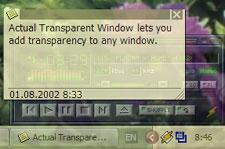
Actual Transparent Window offers new ways of working with multiple windows: it lets you easily set and vary transparency level of any window, either manually via title button or automatically depending on a window state (active/inactive/moved/etc.).
Download
7.91 MB · atwsetup.exe
1.4Kdownloads
0this week
$19.95Shareware
0reviews
Screenshots
About Actual Transparent Window
Actual Transparent Window serves the purpose of facilitating work with several windows at a time. It lets you forget about window minimization and maximization routine by enabling the transparency feature applicable to any single window. It gives you means for efficient workspace usage along with productivity boost. Simple and convenient controls will help you take advantage of new technologies for reaching optimal organization of your work.
You can turn on transparency via different short manipulations. It's possible to use the extra button on the window title bar, double click the title bar or activate transparency by a hotkey. Also you can switch to a handy Ghost mode to get direct access to underlying data through a transparent window (in this mode all mouse clicks go "through" the window) or enable "Always on Top" mode to have the selected window always at hand.
The program has been refined for years, so it delivers the impeccable interface and it's absolutely easy-to-use. You will find it very friendly from the very moment you try it. Rich adjustment options provide additional comfort. The program lets you change options that affect all window types or create individual settings for particular types of windows. Moreover, you can also define different transparency rates for a particular window in different states, like when it's active or inactive, being moved, resized or pointed by mouse. Using the intuitive controls it'll be very simple to make all windows look the way it fits you best.
You can turn on transparency via different short manipulations. It's possible to use the extra button on the window title bar, double click the title bar or activate transparency by a hotkey. Also you can switch to a handy Ghost mode to get direct access to underlying data through a transparent window (in this mode all mouse clicks go "through" the window) or enable "Always on Top" mode to have the selected window always at hand.
The program has been refined for years, so it delivers the impeccable interface and it's absolutely easy-to-use. You will find it very friendly from the very moment you try it. Rich adjustment options provide additional comfort. The program lets you change options that affect all window types or create individual settings for particular types of windows. Moreover, you can also define different transparency rates for a particular window in different states, like when it's active or inactive, being moved, resized or pointed by mouse. Using the intuitive controls it'll be very simple to make all windows look the way it fits you best.
| Requirements | P-III 600+ CPU, 128+ Mb RAM, 10+ Mb free space on HDD |
|---|---|
| Release info | Minor Update on Jul 27, 2017 |
| Release notes | 1) Improved auto-detection of free space for extra title buttons in Google Chrome. 2) Improved Windows 10 compatibility: a) fixed crashes of various apps (like Visual Studio 2010, 2012, 2013 installers and components, iTunes Helper, iPod Service, and others); b) fixed hung Magnifier in Lens mode. |
| Related tags | transparent window translucent semi-transparent taskbar |
Reviews
No reviews yet. Be the first to review Actual Transparent Window.
Used Actual Transparent Window? Tell other visitors what you thought.
Log in to write a reviewOther products by this publisher
-
 Actual Multiple Monitors 8.10
Actual Multiple Monitors clones the Windows Taskbar, Start button, system tray and the Alt-Tab Task Switcher on secondary monitors, and also offers new multi-monitor window management services, such as switching windows between monitors in a flash.
Actual Multiple Monitors 8.10
Actual Multiple Monitors clones the Windows Taskbar, Start button, system tray and the Alt-Tab Task Switcher on secondary monitors, and also offers new multi-monitor window management services, such as switching windows between monitors in a flash.
-
 Actual Title Buttons 8.11.1
Actual Title Buttons is a suite of the most essential tools added to the title bars of windows once installed, with many exciting functions for windows control: minimize them to tray, set up priority, apply transparency, keep always-on-top, and more!
Actual Title Buttons 8.11.1
Actual Title Buttons is a suite of the most essential tools added to the title bars of windows once installed, with many exciting functions for windows control: minimize them to tray, set up priority, apply transparency, keep always-on-top, and more!
-
 Actual Virtual Desktops 8.10
Create an activity-focused work environment - scatter the piled up application windows over independent desktops, showing one desktop at a time. Move windows between desktops, set custom wallpapers, automatically maintain your workspace using rules.
Actual Virtual Desktops 8.10
Create an activity-focused work environment - scatter the piled up application windows over independent desktops, showing one desktop at a time. Move windows between desktops, set custom wallpapers, automatically maintain your workspace using rules.
-
 Actual Window Manager 8.11.1
Actual Window Manager is a suite of over 50 innovative tools, letting users change their interaction with windows in many new exciting ways: minimize windows to tray or to an icon on the desktop, apply transparency, roll up, pin on top, resize, etc.
Actual Window Manager 8.11.1
Actual Window Manager is a suite of over 50 innovative tools, letting users change their interaction with windows in many new exciting ways: minimize windows to tray or to an icon on the desktop, apply transparency, roll up, pin on top, resize, etc.
-
 Actual Window Menu 8.11.1
Actual Windows Menu is a suite of the most essential tools for versatile windows control: minimize them to tray, set up priority, keep always-on-top, apply transparency, etc. Once installed, the extra options are added to each window's system menu.
Actual Window Menu 8.11.1
Actual Windows Menu is a suite of the most essential tools for versatile windows control: minimize them to tray, set up priority, keep always-on-top, apply transparency, etc. Once installed, the extra options are added to each window's system menu.
Most viewed Windows Desktop Utilities
-
1
 Speed Test 1.0.736
Actual Maximum Speed Test Monitor for FREE. Full Bandwidth speed test Meter.
Speed Test 1.0.736
Actual Maximum Speed Test Monitor for FREE. Full Bandwidth speed test Meter.
-
2
 Ardamax Keylogger 4.8
Ardamax Keylogger is a small, easy-to-use keylogger that captures user activity and saves it to a logfile. The logfile can be viewed as a text or web page. Use this tool to find out what is happening on your computer while you're away.
Ardamax Keylogger 4.8
Ardamax Keylogger is a small, easy-to-use keylogger that captures user activity and saves it to a logfile. The logfile can be viewed as a text or web page. Use this tool to find out what is happening on your computer while you're away.
- 3 Copernic Desktop Search Professional 3.4.0.25 Designed for small & medium size business owners and professionals who want to free up their time so they can focus on their clients. CDS Professional lets you quickly find the stuff that helps you do business - files, emails, contracts, presentations and more.
-
4
 Window Hide Tool 1.9
Window Hide Tool will help you to quickly hide a window of any application. You can set hotkeys for basic program commands: hide a window; hide all windows; hide a group of windows.
Window Hide Tool 1.9
Window Hide Tool will help you to quickly hide a window of any application. You can set hotkeys for basic program commands: hide a window; hide all windows; hide a group of windows.
-
5
 Key Transformation 201111131821
Key Transformation can customize your keyboard layout, change any key on the keyboard to other keys. Its on-screen-keyboard ( soft keyboard ) is very easy to use. Want the F1 key to type B? Want the D key to type f? Want the Shift+Enter key to press
Key Transformation 201111131821
Key Transformation can customize your keyboard layout, change any key on the keyboard to other keys. Its on-screen-keyboard ( soft keyboard ) is very easy to use. Want the F1 key to type B? Want the D key to type f? Want the Shift+Enter key to press
- 6 Active Keyboard 3.1 Launch applications, documents, and URLs, and over 80 other actions to hot keys - Control your Winamp player - Hide application windows - Open, Play and close your CD-ROM - Change the volume, mute - Empty recycle bin - Lock/Unlock Desktop
-
7
 Clever Keyboard Indicator 5.0
The Clever Keyboard Indicator is a program which stays in your Windows system tray and displays "Caps Lock", "Num Lock" and "Scroll Lock" status, allows you to switch key status, plays a sound when the key status changed and many more.
Clever Keyboard Indicator 5.0
The Clever Keyboard Indicator is a program which stays in your Windows system tray and displays "Caps Lock", "Num Lock" and "Scroll Lock" status, allows you to switch key status, plays a sound when the key status changed and many more.
-
8
 Data Extractor 3.3
Do you have a group of files that contains important data that you can't get to? Using Data Extractor you can simply extract any information from any files on your computer or from webpages. Simply extract email addresses or URLs, or your own data.
Data Extractor 3.3
Do you have a group of files that contains important data that you can't get to? Using Data Extractor you can simply extract any information from any files on your computer or from webpages. Simply extract email addresses or URLs, or your own data.
-
9
 A Form Filler 3.5.1
A Form Filler automatically fill in windows as quickly as they appear on your screen!
A Form Filler 3.5.1
A Form Filler automatically fill in windows as quickly as they appear on your screen!
-
10
 ObjectDock 1.9
ObjectDock is a free program that allows you to have a nice animated launchbar/taskbar on your screen that reacts to your mouse when you mouse over it. Organize your short-cuts and running tasks onto this customizable dock.
ObjectDock 1.9
ObjectDock is a free program that allows you to have a nice animated launchbar/taskbar on your screen that reacts to your mouse when you mouse over it. Organize your short-cuts and running tasks onto this customizable dock.
Most downloaded Windows Desktop Utilities
-
1
Speed Test 1.0.736
Actual Maximum Speed Test Monitor for FREE. Full Bandwidth speed test Meter.
-
2
Ardamax Keylogger 4.8
Ardamax Keylogger is a small, easy-to-use keylogger that captures user activity and saves it to a logfile. The logfile can be viewed as a text or web page. Use this tool to find out what is happening on your computer while you're away.
-
3
Window Hide Tool 1.9
Window Hide Tool will help you to quickly hide a window of any application. You can set hotkeys for basic program commands: hide a window; hide all windows; hide a group of windows.
-
4
A Form Filler 3.5.1
A Form Filler automatically fill in windows as quickly as they appear on your screen!
- 5 Copernic Desktop Search Professional 3.4.0.25 Designed for small & medium size business owners and professionals who want to free up their time so they can focus on their clients. CDS Professional lets you quickly find the stuff that helps you do business - files, emails, contracts, presentations and more.
- 6 Active Keyboard 3.1 Launch applications, documents, and URLs, and over 80 other actions to hot keys - Control your Winamp player - Hide application windows - Open, Play and close your CD-ROM - Change the volume, mute - Empty recycle bin - Lock/Unlock Desktop
-
7
ObjectDock 1.9
ObjectDock is a free program that allows you to have a nice animated launchbar/taskbar on your screen that reacts to your mouse when you mouse over it. Organize your short-cuts and running tasks onto this customizable dock.
-
8
Key Transformation 201111131821
Key Transformation can customize your keyboard layout, change any key on the keyboard to other keys. Its on-screen-keyboard ( soft keyboard ) is very easy to use. Want the F1 key to type B? Want the D key to type f? Want the Shift+Enter key to press
-
9
 Clock Tray Skins Lite 2.1
View the time, day, and date in different skins in the Windows system tray clock. Clock Tray Skins is the advanced replacement for standard Windows tray clock. Over 50 skins are included in the distribution.
It's also an atomic-time synchronizer.
Clock Tray Skins Lite 2.1
View the time, day, and date in different skins in the Windows system tray clock. Clock Tray Skins is the advanced replacement for standard Windows tray clock. Over 50 skins are included in the distribution.
It's also an atomic-time synchronizer.
-
10
 Talisman Desktop 3.4
Desktop Manager and Shell Replacement for Windows
Talisman Desktop 3.4
Desktop Manager and Shell Replacement for Windows