
Useful File Utilities 3.8
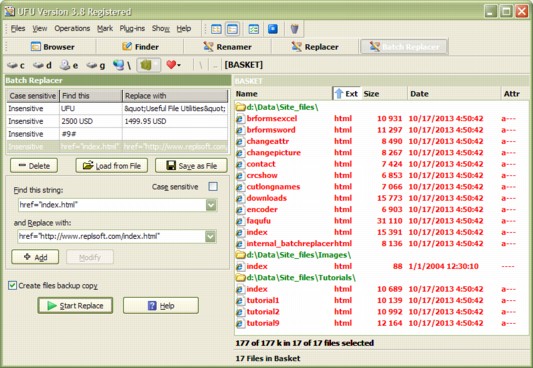
File browser with standard utilities: Replacer, Renamer, Finder, Batch Replacer, Case converter, Change attributes, Batch Replacer's for MS Word, for MS Excel, for MS PowerPoint. Browser can be extended with additional utilities.
Download
3.59 MB · ufu.zip
1.2Kdownloads
0this week
$39.99Shareware
0reviews
Screenshots
About Useful File Utilities
Multifunction program for searching, replacing, renaming and batch replacing in many files on local disks and over the network. The standard file browser allows you to specify great numbers of files before processing them using a built-in or plug-in utility. The Finder utility allows you to search documents by file mask, by date, by file size, by attributes and even by text strings as if you are using an Internet search engine. The Renamer utility lets you rename multiple types of files quickly and easily using an assortment of options. The Replacer utility allows you to insert, replace and remove entire fragments of text consisting of more than one line in multiple files. The Replace utility supports the processing of MS Word files. The batch replacer is a multi-string search-and-replace filter. The Plug-in change attributes utility allows you to change the attributes and change the created, modified and last accessed date and time of the files.
| Requirements | No special requirements |
|---|---|
| Release info | Major Update on Oct 18, 2013 |
| Release notes | Some changes in interface for the better look; Some improvements in algorithms; New options were added. |
| Related tags | Batch Replace Search files by text Change date Rename multiply files OEM to Ansi |
Reviews
No reviews yet. Be the first to review Useful File Utilities.
Used Useful File Utilities? Tell other visitors what you thought.
Log in to write a reviewOther products by this publisher
-
 Batch Replacer 4.0
Batch Replacer is a multi-string search-and-replace converter necessary for webmasters, programmers and everybody who is concerned with computers. Both text and binary files can be processed by the program. Many options are available.
Batch Replacer 4.0
Batch Replacer is a multi-string search-and-replace converter necessary for webmasters, programmers and everybody who is concerned with computers. Both text and binary files can be processed by the program. Many options are available.
-
 Batch Replacer for MS Excel 2.5
This utility allows you to make a multi-replacement operation in MS Excel files. Strings for search and replace can be specified in an Excel document.
Batch Replacer for MS Excel 2.5
This utility allows you to make a multi-replacement operation in MS Excel files. Strings for search and replace can be specified in an Excel document.
-
 Batch Replacer for MS Word 3.4
This utility allows you to make a multi-replacement operation in MS Word files. Strings for search and replace can be specified in an Excel document.
Batch Replacer for MS Word 3.4
This utility allows you to make a multi-replacement operation in MS Word files. Strings for search and replace can be specified in an Excel document.
-
 Replace and Rename 1.9
Replace and Rename allows you to perform both file renaming AND text replacing in one easy batch file from one "keyword" import file. The software works with files from directories and subdirectories.
Replace and Rename 1.9
Replace and Rename allows you to perform both file renaming AND text replacing in one easy batch file from one "keyword" import file. The software works with files from directories and subdirectories.
Most viewed Windows File Renamers
-
1
 MultiRenamer 2.3
Multi Renamer allows renaming multiple files with a couple of mouse clicks. Simply design the new naming pattern and click the button. Naming patterns are created basing on your own criteria and may include date, time, numbering. Download it now!
MultiRenamer 2.3
Multi Renamer allows renaming multiple files with a couple of mouse clicks. Simply design the new naming pattern and click the button. Naming patterns are created basing on your own criteria and may include date, time, numbering. Download it now!
-
2
 Employee Tour Management Software 4.0.1.5
Employee Tour Management Software is easily available on website www.employeeattendance.org which facilitates to record tour and training information in database.
Employee Tour Management Software 4.0.1.5
Employee Tour Management Software is easily available on website www.employeeattendance.org which facilitates to record tour and training information in database.
-
3
 FileMonkey 10.98
FileMonkey automates common time consuming file operations. FileMonkey can copy, move, split, search, replace, rename, alter case, list or delete duplicates, trim, truncate, crop, chop, set attributes, encrypt, decrypt, wipe, delete, extract and more
FileMonkey 10.98
FileMonkey automates common time consuming file operations. FileMonkey can copy, move, split, search, replace, rename, alter case, list or delete duplicates, trim, truncate, crop, chop, set attributes, encrypt, decrypt, wipe, delete, extract and more
-
4
 Bad CD Repair Pro 4.14
Bad CD Repair allows to copy files from bad CD or HDD. If your text or mp3 or any other type of file is corrupted then use Bad CD Repair to save it!
Bad CD Repair Pro 4.14
Bad CD Repair allows to copy files from bad CD or HDD. If your text or mp3 or any other type of file is corrupted then use Bad CD Repair to save it!
-
5
 NameWiz 4.111
NameWiz rename files and a batch file renaming tool. A powerful interface with an advanced file renaming utility. Select any group of files / folders and do what you want. Any files or folders can be renamed, no restrictions
NameWiz 4.111
NameWiz rename files and a batch file renaming tool. A powerful interface with an advanced file renaming utility. Select any group of files / folders and do what you want. Any files or folders can be renamed, no restrictions
-
6
 Recovery Toolbox for Access 2.0.9
The program can efficiently repair Microsoft Access databases after the damage of mdb files, caused by any reason. It is compatible with all supported versions of this application and easy to use. Owing to its data recovery engine, it works faster.
Recovery Toolbox for Access 2.0.9
The program can efficiently repair Microsoft Access databases after the damage of mdb files, caused by any reason. It is compatible with all supported versions of this application and easy to use. Owing to its data recovery engine, it works faster.
-
7
 Ashampoo Internet Accelerator 3 3.30
Instant Clickfix for Your Internet Connection
Ashampoo Internet Accelerator 3 3.30
Instant Clickfix for Your Internet Connection
-
8
 Unprotect PDF 4.0
Try the most easy to use Unprotect PDF program to unprotect PDF files instantly. Unprotect PDF program performs to unprotect PDF files in just 2-3 clicks. Now users can easily unprotect PDF rights of copy, edit, print, modify from PDF upto Acrobat 9.
Unprotect PDF 4.0
Try the most easy to use Unprotect PDF program to unprotect PDF files instantly. Unprotect PDF program performs to unprotect PDF files in just 2-3 clicks. Now users can easily unprotect PDF rights of copy, edit, print, modify from PDF upto Acrobat 9.
-
9
 Visual Renamer 1.9
Visual Renamer is unique batch renaming tool. Apart from common features of batch renaming, it can rename karaoke files, supports THM, EXIF, MP3 tags, and has lots of different filters to sort out files. You can also create your own custom scripts.
Visual Renamer 1.9
Visual Renamer is unique batch renaming tool. Apart from common features of batch renaming, it can rename karaoke files, supports THM, EXIF, MP3 tags, and has lots of different filters to sort out files. You can also create your own custom scripts.
-
10
 DiskInternals Partition Recovery 8.18.1
Corrupted, deleted or reformatted partitions pose no problem for you if you have DiskInternals Partition Recovery, which supports: FAT12, FAT16, FAT32, VFAT, NTFS, NTFS4 and NTFS5. The program also brings to life all deleted files or lost disks.
DiskInternals Partition Recovery 8.18.1
Corrupted, deleted or reformatted partitions pose no problem for you if you have DiskInternals Partition Recovery, which supports: FAT12, FAT16, FAT32, VFAT, NTFS, NTFS4 and NTFS5. The program also brings to life all deleted files or lost disks.
Most downloaded Windows File Renamers
-
1
FileMonkey 10.98
FileMonkey automates common time consuming file operations. FileMonkey can copy, move, split, search, replace, rename, alter case, list or delete duplicates, trim, truncate, crop, chop, set attributes, encrypt, decrypt, wipe, delete, extract and more
-
2
Bad CD Repair Pro 4.14
Bad CD Repair allows to copy files from bad CD or HDD. If your text or mp3 or any other type of file is corrupted then use Bad CD Repair to save it!
-
3
NameWiz 4.111
NameWiz rename files and a batch file renaming tool. A powerful interface with an advanced file renaming utility. Select any group of files / folders and do what you want. Any files or folders can be renamed, no restrictions
-
4
Useful File Utilities 3.8
File browser with standard utilities: Replacer, Renamer, Finder, Batch Replacer, Case converter, Change attributes, Batch Replacer's for MS Word, for MS Excel, for MS PowerPoint. Browser can be extended with additional utilities.
-
5
DiskInternals Partition Recovery 8.18.1
Corrupted, deleted or reformatted partitions pose no problem for you if you have DiskInternals Partition Recovery, which supports: FAT12, FAT16, FAT32, VFAT, NTFS, NTFS4 and NTFS5. The program also brings to life all deleted files or lost disks.
-
6
Ashampoo Internet Accelerator 3 3.30
Instant Clickfix for Your Internet Connection
- 7 File and mp3 tag renamer 2.2 File And MP3 Tag Renamer is a powerful, easy-to-use multiple file and mp3 renaming utility. With this powerful program ,you can quickly and easily batch rename files and mp3's with a number of possibilities and options.
- 8 FileCase - Change Case of Filenames 1.0 A Windows Console program to simplify mass changes to text case of the names and/or extensions of sets of files. Allows programmers, web designers and system administrators to enforce uniformity in the names or extensions of large groups of files.
- 9 Rename Us 4.0.8 Rename Us is a free batch file renaming utility. It allows to rename or copy multiple files at once.
-
10
 Pics Organizer 1.6
Pics Organizer has all the features you need to create a meaningful photo files structure. Batch rename files, bulk resize, auto create folders structure, move or copy photo files, split by date in folders, advanced exif filters and duplicates finder
Pics Organizer 1.6
Pics Organizer has all the features you need to create a meaningful photo files structure. Batch rename files, bulk resize, auto create folders structure, move or copy photo files, split by date in folders, advanced exif filters and duplicates finder