
31downloads
1this week
FreeFreeware
0reviews
Screenshots
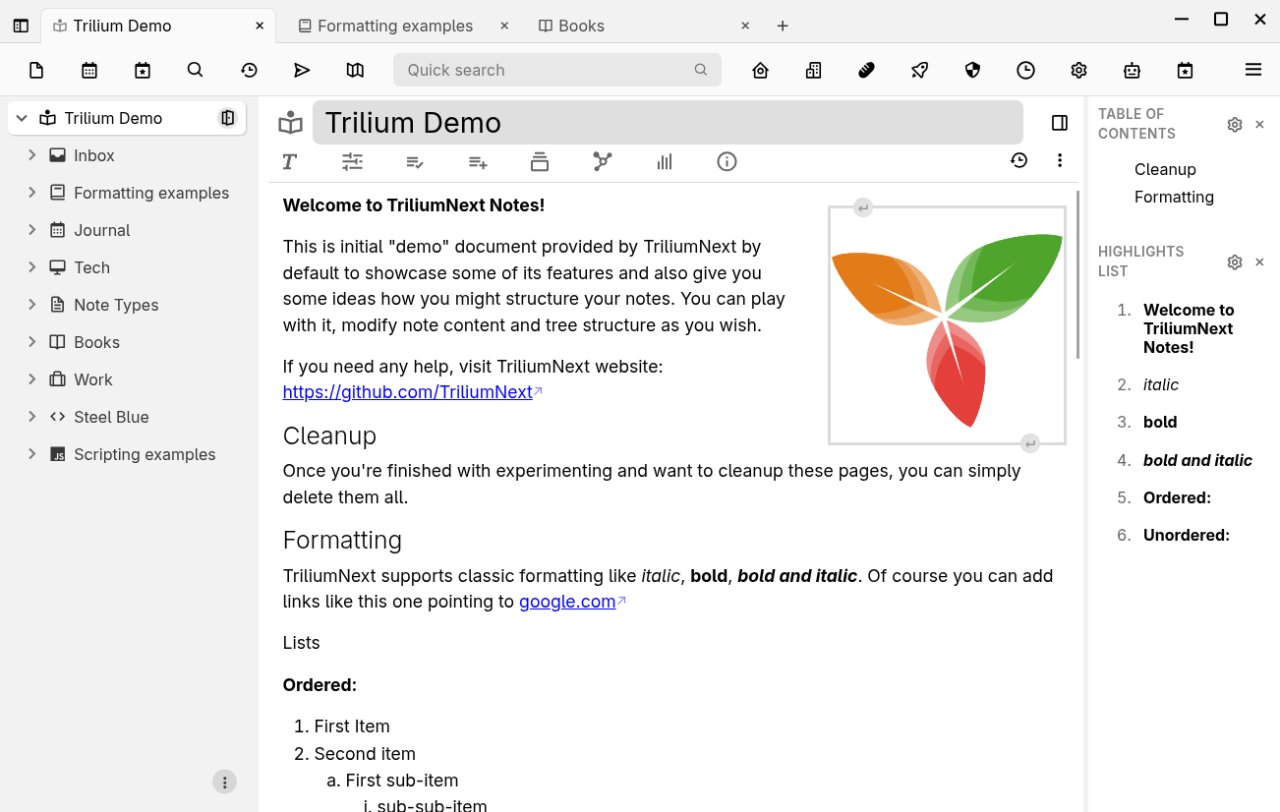
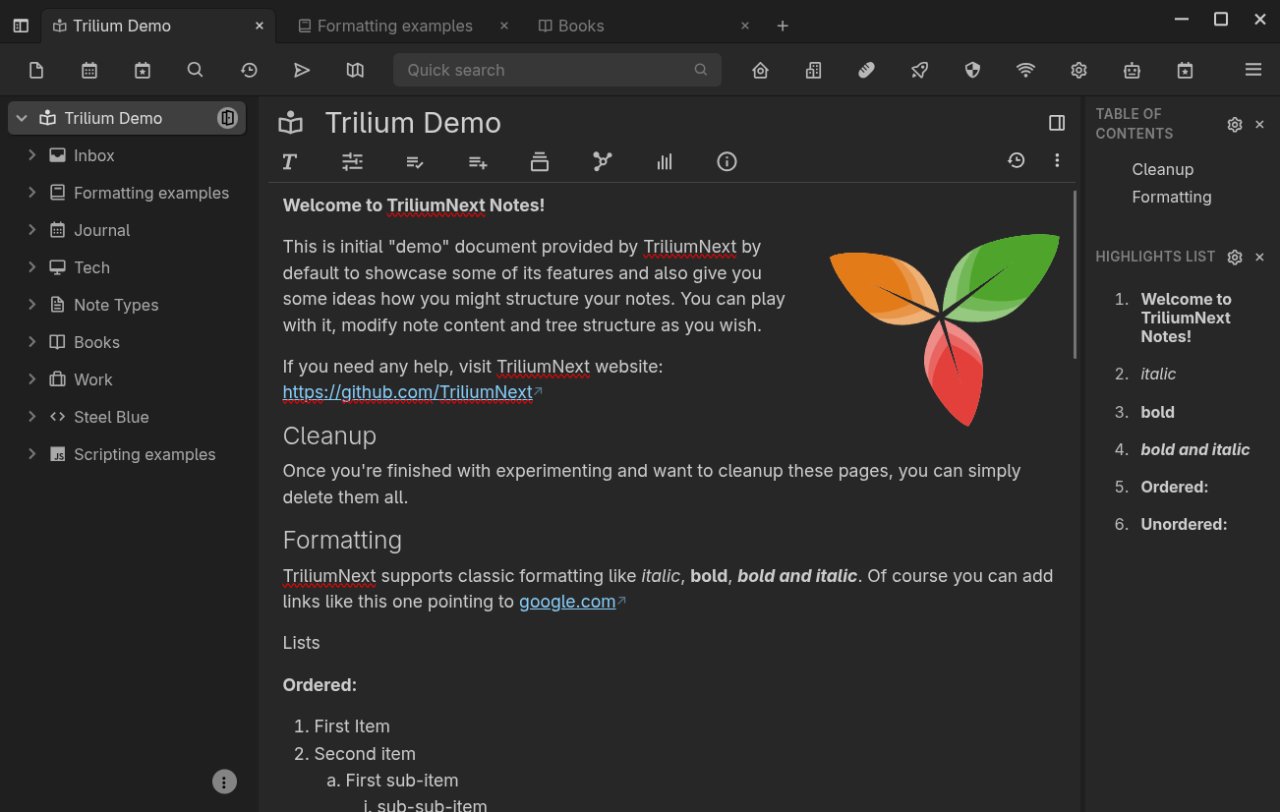
About Trilium Notes
Trilium Notes is a hierarchical note-taking application with focus on building large personal
knowledge bases.
Features:
• Rich WYSIWYG note editing including e.g. tables, images and math with markdown autoformat
• Support for editing notes with source code, including syntax highlighting
• Notes can be arranged into arbitrarily deep tree
• A single note can be placed into multiple places in the tree (see cloning)
• Fast and easy navigation between notes, full text search and note hoisting
• Seamless note versioning
• Note attributes can be used for note organization, querying and advanced scripting
• Synchronization with self-hosted sync server
• Sharing (publishing) notes to public internet
• Strong note encryption with per-note granularity
• Relation maps and link maps for visualizing notes and their relations
• Scales well in both usability and performance upwards of 100 000 notes
• Evernote and Markdown import & export
• Web Clipper for easy saving of web content
• REST API for automation
License: AGPL-3.0-or-later
knowledge bases.
Features:
• Rich WYSIWYG note editing including e.g. tables, images and math with markdown autoformat
• Support for editing notes with source code, including syntax highlighting
• Notes can be arranged into arbitrarily deep tree
• A single note can be placed into multiple places in the tree (see cloning)
• Fast and easy navigation between notes, full text search and note hoisting
• Seamless note versioning
• Note attributes can be used for note organization, querying and advanced scripting
• Synchronization with self-hosted sync server
• Sharing (publishing) notes to public internet
• Strong note encryption with per-note granularity
• Relation maps and link maps for visualizing notes and their relations
• Scales well in both usability and performance upwards of 100 000 notes
• Evernote and Markdown import & export
• Web Clipper for easy saving of web content
• REST API for automation
License: AGPL-3.0-or-later
| Release info | Update on Nov 08, 2026 |
|---|---|
| Release notes | v0.107.0 > [!NOTE] > If you enjoyed this release, consider showing a token of appreciation by: > > * Pressing the “Star” button on GitHub (top-right). > * Considering a one-time or recurrent donation to the lead developer via GitHub Sponsors or PayPal. > [!TIP] > For Linux users: Trilium is now available on Flathub! This is the release where a text note stops being a single document. Notes can be embedded, quoted and referenced inside other notes and edited where they appear, laid out in columns and tabs, and mixed with drawings, attached files and video. Tables in text notes get the tools they had been missing, from merged cells to sorting, and the old layout is gone, a year after the new one replaced it. Around the editor, the parts of the app that everyone touches were rebuilt: the context menus and the note autocomplete, the full search and the jump dialog, the launch bar and the tree. Shared pages look like the app again and render collections with their own views, and the calendar and geo map collections get the properties dialogs the board already had. The AI integration becomes something to trust with a real database: every tool call asks before it reads or changes a note, a ChatGPT Codex subscription can stand in for an API key, and local models get web search through a search engine of your choice. On phones, iOS has a new layout and both apps navigate without a sidebar. Key highlights The text editor became a block editor A text note used to be a document: one body of rich text, with other notes reachable only through links. It is now a composition. A note can embed another note and let you edit it where it sits, quote a few of its blocks and keep the quote current, or point at one paragraph of it instead of at the whole note. • Editable transclusion: an included text or code note is edited inside the host note with the full editor, and one undo history covers both. • Live excerpts quote blocks of another note. They stay in sync, and an edit made… |
| Related tags | Trillium |
| Listing data | Flathub |
Reviews
No reviews yet. Be the first to review Trilium Notes.
Used Trilium Notes? Tell other visitors what you thought.
Log in to write a reviewOther products by this publisher
- "No Distractions" for YouTube 4.10 ----
- #Bible 11.6.1 "Incredible App - My sister shared this app with me a few weeks ago and it is truly incredible.
- #filmphotography 1.4.2 So, you decided to shoot on film?
- $quirrel 1.5.1 $quirrel Budget & Finance helps you plan each paycheck, track spending, manage debt, and see what is safe to spend before the next payday.
- % Percentage Calculator Pro 1.41 This is the Pro version of % Percentage Calculator.
Most viewed Linux Office
-
1
 Scrolex 0.13.1
Read PDFs and ebooks horizontally
-
2
 WPS 365 12.1.2.29183_807310
WPS 365 Suite
-
3
 Super Productivity v20.0.0
To-do list and time tracker
-
4
 Feishu 7.72.23
A collaboration platform
-
5
 Scribe 0.3.50
Markdown editor with live rendering
-
6
 Foliate 3.3.0
Read e-books in style
- 7 Textosaurus 0.9.13 Simple cross-platform text editor based on Qt and QScintilla
-
8
 Adobe Reader 9.5.5
PDF viewer
-
9
 Readest 0.12.20
Modern, feature-rich ebook reader
-
10
 Quick Lookup 2.1.2
Look up words quickly
Most downloaded Linux Office
- 1 sleek 2.1.1 todo manager based on the todo.txt syntax for Linux, free and open-source (FOSS)
- 2 Textosaurus 0.9.13 Simple cross-platform text editor based on Qt and QScintilla
-
3
 TreeSheets 2.23.10
Free Form Data Organizer
-
4
 Fingrom 7.3.2
Platform-agnostic financial accounting application for personal finance management
-
5
 Nottodbox 0.2.3
Organize notes, to-dos and diaries
-
6
 Linwood Butterfly 2.6.2
Infinite-canvas notes and sketches
-
7
Scribe 0.3.50
Markdown editor with live rendering
-
8
 Skribisto 3.3.2
Plan, write, manage your novels
-
9
 OpenDeck 2.14.2
Use stream controllers
- 10 Thoughts 0.20.0 Simple and powerful mind map