
20downloads
1this week
FreeFreeware
0reviews
Screenshots
About SayWhen
No forms, no fields. Just say when.
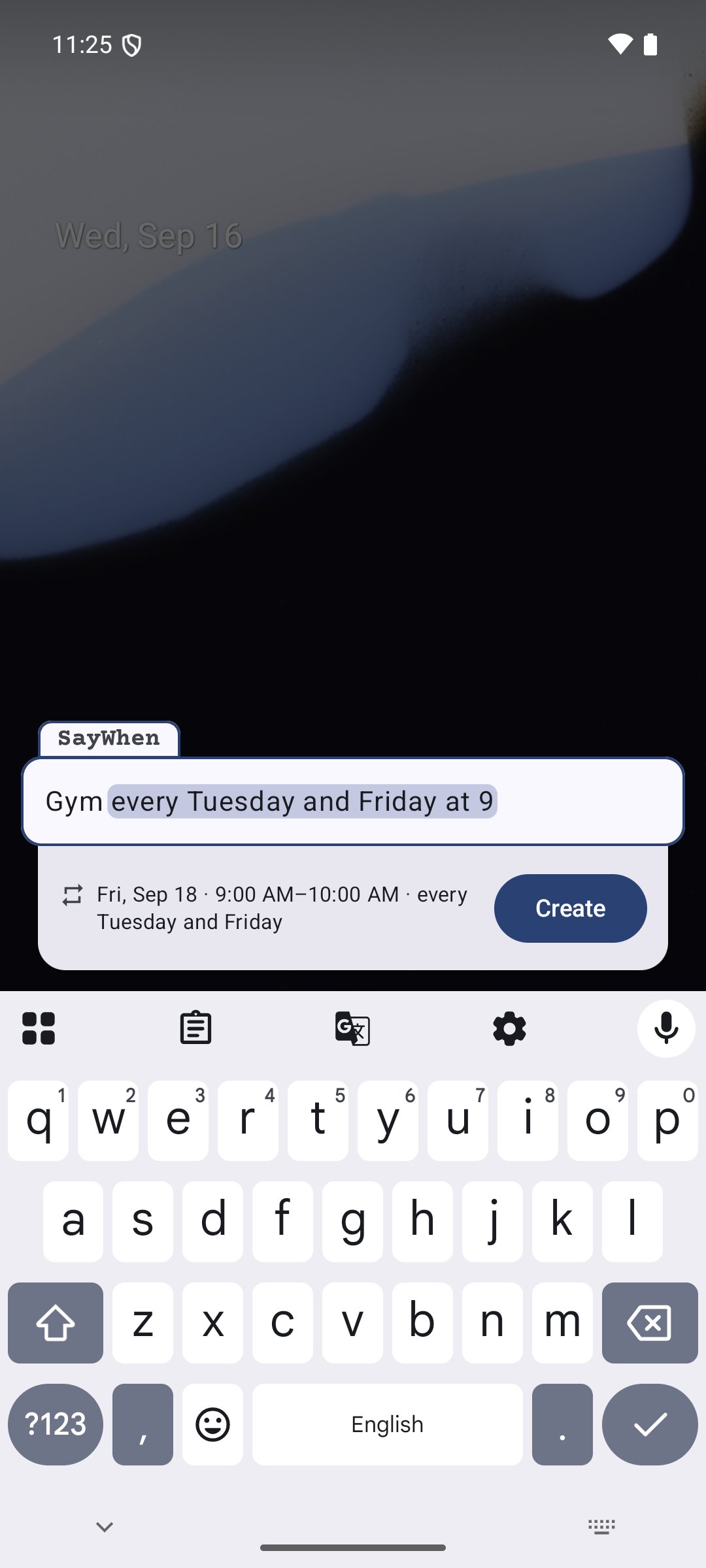
Type an event the way you'd say it, in English, Russian, Italian, Spanish, German, or French:
• Gym every tuesday and friday at 9
• Movie tomorrow at 11 for 1.5h !10
• Dentist june 3 at 12:30
SayWhen parses the phrase as you type: date, time, duration, recurrence, a "!10" reminder. It shows a live preview of what it understood and writes the event straight to the calendar you chose. An alias in the phrase, like #work, sends one event to another calendar. Aliases come from your calendar names, and typing # brings up suggestions. With the Tasks.org integration turned on, a phrase can create a task in a Tasks.org list instead of an event: the lists appear next to your calendars. Tap the home-screen widget, type, done.
Private by construction:
• No sign-up, no server, no analytics, no identifiers
• No network access at all: the app doesn't even declare the INTERNET permission
• Two calendar permissions: read your calendar list, write the event you asked for. Two more for Tasks.org, asked only if you turn that integration on
Events go to your calendar and nowhere else. If your calendar belongs to a synced account, its own sync engine uploads the event, exactly as with any other calendar app.
License: GPL-3.0-only
| Release info | Update on Nov 17, 2026 |
|---|---|
| Release notes | SayWhen now turns on the languages you write in by itself, and it no longer writes to just one calendar. • An alias in the phrase: "lunch #work" sends the event to another calendar. • Tasks in Tasks.org: its lists appear next to your calendars. • Settings on one screen. • Time with a dot: "16.00" is read as 16:00. • "+ event" shortcut for launchers. • Understands "tmrw", "tmr" and "tdy" in English. Details are on the GitHub release page. |
| Listing data | F-Droid |
Reviews
No reviews yet. Be the first to review SayWhen.
Used SayWhen? Tell other visitors what you thought.
Log in to write a reviewOther products by this publisher
- "No Distractions" for YouTube 4.10 ----
- #Bible 11.6.1 "Incredible App - My sister shared this app with me a few weeks ago and it is truly incredible.
- #filmphotography 1.4.2 So, you decided to shoot on film?
- #LookBusy Fake Calendar Events 1.0.6 Look Busy scans your work calendar for open time slots and fills them with realistic-looking (but secretly fake) work events.
- #Small Talk Is Canceled 1.0.2 #Small Talk Is Canceled — Conversations That Matter
Most viewed Android Productivity
-
1
 Nikki 1.5.0
Native Memos client with task management and a typography-first design
- 2 TaskDav 1.0.1 Tasks, notes and calendar over CalDAV — or local-only on your phone.
-
3
 Mindwtr - GTD Task Manager 1.3.8
Clear your head: capture tasks fast, see your next step. Offline, free, GTD.
- 4 PDF Inspector 0.3.2 Inspect, select, edit and delete the elements inside any PDF
-
5
 Mission 1.3
Daily habit tracker, as simple as possible
-
6
 Markor 2026.10.0
Text editor - Notes & ToDo. Lightweight. Markdown and todo.txt support.
- 7 Timetable 1.7 An App for students to save their timetable, homework, notes and exams.
-
8
 VerveDo 3.6.1
A concise to-do app that follows Material 3 Expressive.
-
9
 Cfait 1.2.1
Powerful, fast and elegant TODO / task manager. (CalDAV and local)
- 10 0x54ask 1.1.2 (fork of Simpletask Todo.txt manager. Offline, works with Syncthing. Fork of SimpleTask Cloudless
Most downloaded Android Productivity
-
1
 ntodotxt 0.20.0
Manage your todos in a todo.txt file
-
2
 Kairos 4.0.0
Tasks in the right order, fitted into your day, with on-device machine learning.
-
3
 NC Collectives 3.2.0
Unofficial Android client for Nextcloud Collectives wiki notebooks.
-
4
VerveDo 3.6.1
A concise to-do app that follows Material 3 Expressive.
- 5 GitNote 26.10.2 Take note, using a git backend
- 6 Karui ToDo 2.2 145kB aesthetic todo list app with calendar, reminders, sync and widgets
-
7
 Notes Tech 3.3.0
Encrypted Markdown notes, 100% local. No Internet permission.
-
8
 Tine 0.8.4
Fast local-first Logseq-compatible outliner
- 9 DoNotNotify 7.1 Block unwanted notifications. Fast, private, and fully offline.
-
10
 SkillApp 4.2.0
Simple, fully offline time-tracking app