
Mindwtr - GTD Task Manager 1.3.8
Clear your head: capture tasks fast, see your next step. Offline, free, GTD.
Download
38.78 MB · mindwtr-1.3.8-foss.apk
16downloads
2this week
FreeFreeware
0reviews
Screenshots
About Mindwtr - GTD Task Manager
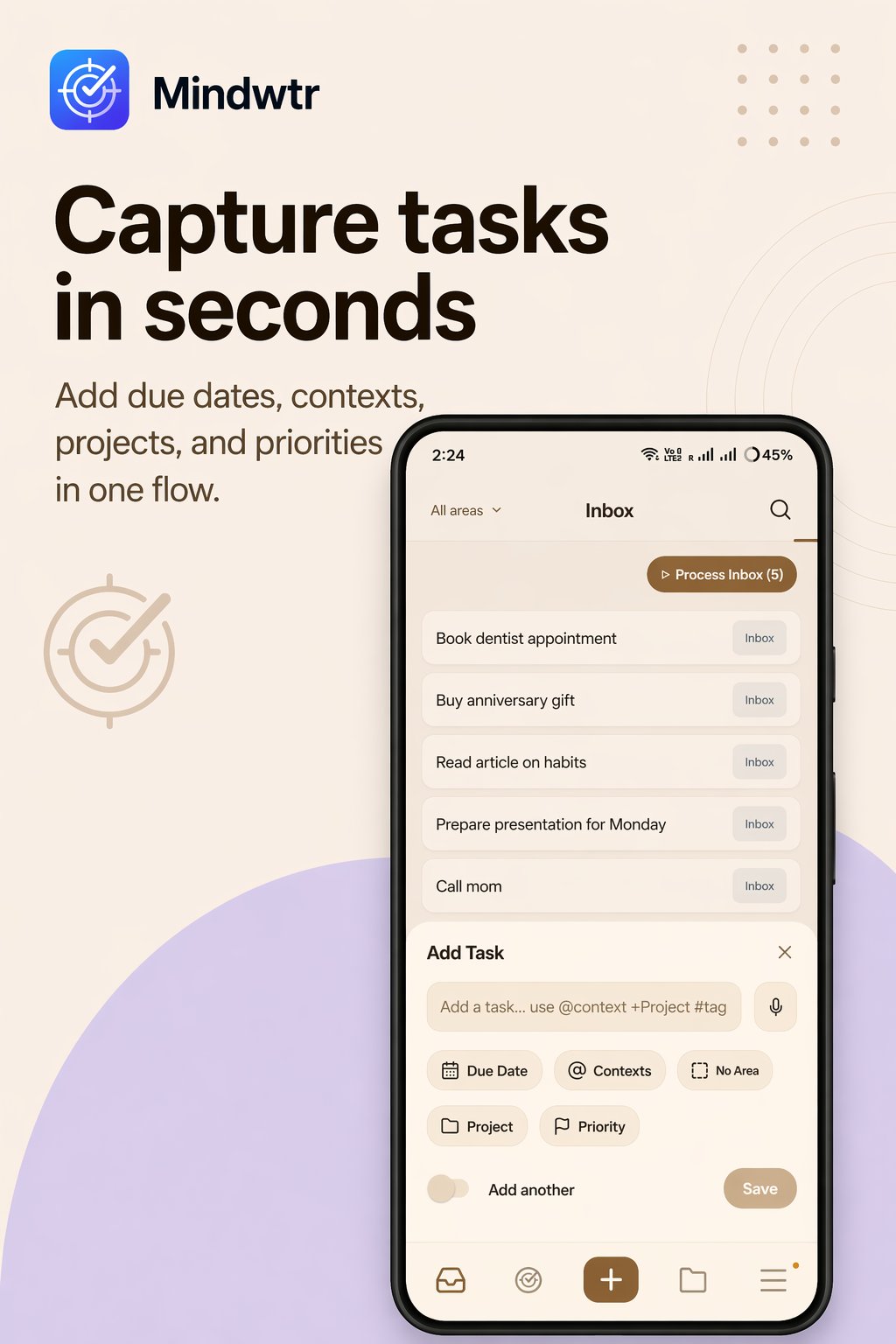
Your head keeps reminding you of things at the worst times. Mindwtr gives them a safe home.
Mindwtr (pronounced "mind water") is a free, open-source to-do app built on the Getting Things Done (GTD) method. Write down every task and idea the moment it appears, sort it in seconds, and see only what you can do right now. No account, no subscription, and your data stays on your device.
HOW IT WORKS
1. Dump it. A task, an idea, a worry: type it or speak it, and it lands in your Inbox.
2. Sort it. A short guided pass: do it now, schedule it, hand it off, or shelve it for someday.
3. Do it. The Focus view shows only what you can act on right now, nothing else.
4. Reset weekly. A guided review catches loose ends, so the list stays trustworthy and your head stays clear.
New to GTD? The idea is simple: your head is for having ideas, not for holding them. Mindwtr walks you through every step.
WHY MINDWTR
- Works completely offline. No account required.
- Your tasks stay on your device. Sync is optional and you choose where: Dropbox, a folder you control, WebDAV, your own server, or iCloud on Apple devices.
- The full GTD method built in: Inbox, Next, Waiting For, Someday/Maybe, Projects, Areas, Contexts, and reviews.
- Capture from anywhere: quick add, widgets, sharing from other apps, or voice.
- Plan your way: list, calendar, and kanban board views.
- Reminders, repeating tasks, checklists, Markdown notes, and attachments.
- Import from Todoist, TickTick, OmniFocus, and more.
- Free and open source. No ads or lock-in.
SIMPLE BY DEFAULT, POWERFUL WHEN YOU NEED IT
Fewer fields, fewer knobs, no clutter. Advanced tools, like the kanban board, automation, and an optional AI assistant that uses your own AI account, stay out of sight until you want them.
Mindwtr means "mind like water": the calm you get when nothing is rattling around in your head.
License: AGPL-3.0-only
Mindwtr (pronounced "mind water") is a free, open-source to-do app built on the Getting Things Done (GTD) method. Write down every task and idea the moment it appears, sort it in seconds, and see only what you can do right now. No account, no subscription, and your data stays on your device.
HOW IT WORKS
1. Dump it. A task, an idea, a worry: type it or speak it, and it lands in your Inbox.
2. Sort it. A short guided pass: do it now, schedule it, hand it off, or shelve it for someday.
3. Do it. The Focus view shows only what you can act on right now, nothing else.
4. Reset weekly. A guided review catches loose ends, so the list stays trustworthy and your head stays clear.
New to GTD? The idea is simple: your head is for having ideas, not for holding them. Mindwtr walks you through every step.
WHY MINDWTR
- Works completely offline. No account required.
- Your tasks stay on your device. Sync is optional and you choose where: Dropbox, a folder you control, WebDAV, your own server, or iCloud on Apple devices.
- The full GTD method built in: Inbox, Next, Waiting For, Someday/Maybe, Projects, Areas, Contexts, and reviews.
- Capture from anywhere: quick add, widgets, sharing from other apps, or voice.
- Plan your way: list, calendar, and kanban board views.
- Reminders, repeating tasks, checklists, Markdown notes, and attachments.
- Import from Todoist, TickTick, OmniFocus, and more.
- Free and open source. No ads or lock-in.
SIMPLE BY DEFAULT, POWERFUL WHEN YOU NEED IT
Fewer fields, fewer knobs, no clutter. Advanced tools, like the kanban board, automation, and an optional AI assistant that uses your own AI account, stay out of sight until you want them.
Mindwtr means "mind like water": the calm you get when nothing is rattling around in your head.
License: AGPL-3.0-only
| Release info | Update on Nov 04, 2026 |
|---|---|
| Release notes | Mindwtr 1.3.8 Highlights • Keep separate desktop workspaces for personal and work tasks, with independent data, sync settings and sign-ins. (#1473) • Lock the desktop app with Windows Hello or Touch ID, and open mobile widget links through App Lock without flashing. (#1472, #1475) • Move a simple Inbox item into another task’s checklist with Undo, choose project sections while processing, and complete projects during mobile Weekly Review. (#1467, #1461, #1395) • Set advance start and due reminders, keep each Saved Search’s sort order, and drag project section headers to reorder them. (#1386, #1453) • Widgets gain transparent backgrounds and optional available actions; Upcoming dates refresh at midnight and Inbox widgets show every Inbox task. (#1468, #1455, #1458) • Safer sync and startup keep missing attachments, recover interrupted database migrations, and preserve calendar events Mindwtr did not create. • Desktop editing is more responsive, system formats follow your regional settings, and Local API/MCP task writes can detect stale edits and safe retries. (#1454, #1500, #1506) • Improved IME input, e-ink selections, checklist dragging and Markdown links across the apps. (#1490, #1494, #1483) Full change list (grouped by area) Projects, tasks and reviews • An Inbox item that is just a title can go straight into another task's checklist: Add to checklist… in the desktop task menu, or in the row's Organize menu on mobile. The item becomes one unchecked checklist entry and moves to Trash, and Undo puts both back. Items with notes, dates, tags or other details do not offer it, so nothing is lost. Project pickers on desktop and mobile now list active projects first and Someday / Waiting projects under their own heading, each in the order you arranged them in Projects (areas in their order, then your drag order) instead of A-Z (#1467). • Inbox processing: after you choose a project that has sections, you can also choose its section, on desktop and mobile. On… |
| Listing data | F-Droid |
Reviews
No reviews yet. Be the first to review Mindwtr - GTD Task Manager.
Used Mindwtr - GTD Task Manager? Tell other visitors what you thought.
Log in to write a reviewOther products by this publisher
- "No Distractions" for YouTube 4.10 ----
- #Bible 11.6 "Incredible App - My sister shared this app with me a few weeks ago and it is truly incredible.
- #filmphotography 1.4.2 So, you decided to shoot on film?
- $quirrel 1.5.1 $quirrel Budget & Finance helps you plan each paycheck, track spending, manage debt, and see what is safe to spend before the next payday.
- % Percentage Calculator Pro 1.41 This is the Pro version of % Percentage Calculator.
Most viewed Android Productivity
-
1
 Markor 2026.10.0
Text editor - Notes & ToDo. Lightweight. Markdown and todo.txt support.
- 2 Timetable 1.7 An App for students to save their timetable, homework, notes and exams.
- 3 PDF Inspector 0.3.2 Inspect, select, edit and delete the elements inside any PDF
-
4
 VerveDo 3.6.1
A concise to-do app that follows Material 3 Expressive.
-
5
 Mission 1.3
Daily habit tracker, as simple as possible
- 6 0x54ask 1.1.2 (fork of Simpletask Todo.txt manager. Offline, works with Syncthing. Fork of SimpleTask Cloudless
-
7
 Markdownr 1.6.1
Converts an URL to markdown and share it
-
8
 Cfait 1.2.1
Powerful, fast and elegant TODO / task manager. (CalDAV and local)
- 9 Text Launcher 1.4.1 A lightweight Android Launcher.
-
10
 Nocean 0.2.0
Offline rich-text notes with fonts, media and no cloud
Most downloaded Android Productivity
- 1 GPA Whiz 1.2.1 Offline academic tracker: GPA, CGPA, timetable, and scholarship deadlines
-
2
 ntodotxt 0.20.0
Manage your todos in a todo.txt file
- 3 GitNote 26.10.2 Take note, using a git backend
-
4
 Faz agora! 2.3.15
Tasks, subtasks and reminders with optional WebDAV synchronization.
-
5
 DavNotes 1.2.1
Simple notes synced with your own CalDAV server, such as Radicale
-
6
 neutriNote CE 4.6.9
A hub of written thoughts in fast searchable plain text
- 7 Encly: Encrypted Offline Notes 2.3.1 Secure notepad with a PIN lock: notes & tasks. No account, no internet, no ads.
- 8 Karui ToDo 2.2 145kB aesthetic todo list app with calendar, reminders, sync and widgets
-
9
 PlaneTxt 2.3.0
Todo, agenda, journal and notes in plain Markdown files
- 10 keepIT 1.0.0 Notes, checklists and voice notes. Offline-first, synced on your own server.