
NC Collectives 3.2.0
Unofficial Android client for Nextcloud Collectives wiki notebooks.
Download
4.95 MB · app-release.apk
44downloads
18this week
FreeFreeware
0reviews
Screenshots
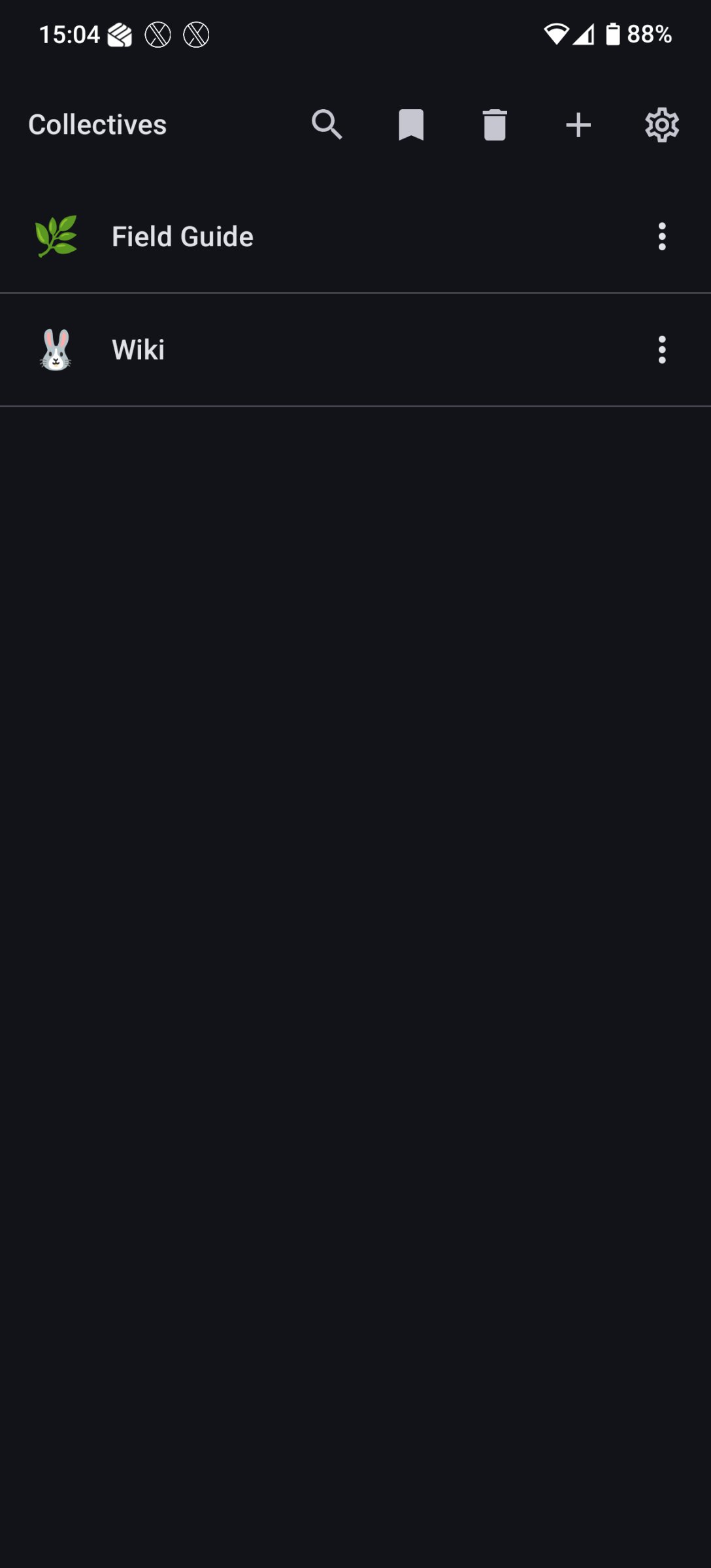
About NC Collectives
An unofficial native Android client for the Nextcloud Collectives app -- wiki-style markdown notebooks hosted on your own Nextcloud server.
Features:
* Five tabs: Home, Collectives, Search, Favorites and Alerts, each keeping its place. Phones get a bottom navigation bar; wide screens get a navigation rail.
* Home, from the local cache so it works offline: edits waiting to sync or in conflict, new alerts, and cards for the pages you opened recently, pages changed since you read them, recently updated pages and your own edits, each with See all for the full list. Plus the tags across every collective.
* Alerts: mentions of you, and changes to pages in collectives set to notify you. Dismissing one clears it on the server too. In-app only: no system notifications.
* Collectives and nested page trees, sorted A-Z, Z-A, newest or oldest first. Pages can also follow the custom order shared with the web app, and be dragged within their parent.
* Markdown rendering with images, links, task lists, tables, syntax-highlighted code blocks, Nextcloud Text callouts (INFO / WARN / ERROR / SUCCESS) and ==highlight== marks. [[Page Name]] wikilinks and relative .md links open in the app.
* Each page lists its subpages, the pages that link to it, and its headings.
* View-first, with a floating Edit button; the bars slide away as you scroll. Pages can open straight into the editor instead: as each collective is set on the web, or always, under Settings -> Editor. Two editors: a native markdown editor with a formatting toolbar and a preview, which works offline (the default), and a collaborative editor backed by Nextcloud Text (beta -- real-time editing with others) when the server offers it and you're online.
* Offline reading and editing. Edits made offline are queued, and each is sent against the version it was written from: when the server reports that someone else changed the page meanwhile, your text is kept as a draft beside theirs and you choose which wins.
* Search across every collective through Nextcloud's unified search, with recent searches and tags offered before you type.
* Favorites, grouped by collective.
* Page tags, emoji, rename, move and duplicate; trash and restore, with Undo. Create collectives, change their emoji, and trash, restore or delete them.
* Attachments: inline images, and uploads from the camera or gallery.
* Quick capture from any app's Share menu: text, links, or images.
* Several Nextcloud accounts, switched without signing out.
* Light, Dark or System theme, and a page text size for pages and both editors.
* Background sync every 1, 6 or 12 hours, daily, or never; pull to refresh; and Sync now.
* Manual update check for installs from GitHub: Settings -> About asks GitHub for the latest release only when you tap it. F-Droid users can ignore it -- F-Droid updates the app as normal.
Requirements:
* Android 10 (API 29) or newer.
* A Nextcloud instance with the Collectives app installed, served over HTTPS. Plain http:// server addresses are refused.
Signing in uses Nextcloud Login Flow v2: you approve the app in your browser, and your server gives it a device-scoped app password. The app never sees your account password, and you can revoke the device at any time from your Nextcloud security settings.
Privacy:
* The app talks only to the Nextcloud server you configure. The one exception is the update check, which contacts api.github.com only when you tap it, on a separate HTTP client that never carries your Nextcloud credentials.
* No Google Play Services. No Firebase. No analytics. No telemetry. No crash reporters. No advertising IDs.
* The app password is stored in EncryptedSharedPreferences (Tink-backed). Signing out deletes it, along with every cached page and setting.
This project is not affiliated with, endorsed by, or supported by Nextcloud GmbH or the Nextcloud Collectives team. "Nextcloud" and "Collectives" are trademarks of their respective owners.
License: AGPL-3.0-only
Features:
* Five tabs: Home, Collectives, Search, Favorites and Alerts, each keeping its place. Phones get a bottom navigation bar; wide screens get a navigation rail.
* Home, from the local cache so it works offline: edits waiting to sync or in conflict, new alerts, and cards for the pages you opened recently, pages changed since you read them, recently updated pages and your own edits, each with See all for the full list. Plus the tags across every collective.
* Alerts: mentions of you, and changes to pages in collectives set to notify you. Dismissing one clears it on the server too. In-app only: no system notifications.
* Collectives and nested page trees, sorted A-Z, Z-A, newest or oldest first. Pages can also follow the custom order shared with the web app, and be dragged within their parent.
* Markdown rendering with images, links, task lists, tables, syntax-highlighted code blocks, Nextcloud Text callouts (INFO / WARN / ERROR / SUCCESS) and ==highlight== marks. [[Page Name]] wikilinks and relative .md links open in the app.
* Each page lists its subpages, the pages that link to it, and its headings.
* View-first, with a floating Edit button; the bars slide away as you scroll. Pages can open straight into the editor instead: as each collective is set on the web, or always, under Settings -> Editor. Two editors: a native markdown editor with a formatting toolbar and a preview, which works offline (the default), and a collaborative editor backed by Nextcloud Text (beta -- real-time editing with others) when the server offers it and you're online.
* Offline reading and editing. Edits made offline are queued, and each is sent against the version it was written from: when the server reports that someone else changed the page meanwhile, your text is kept as a draft beside theirs and you choose which wins.
* Search across every collective through Nextcloud's unified search, with recent searches and tags offered before you type.
* Favorites, grouped by collective.
* Page tags, emoji, rename, move and duplicate; trash and restore, with Undo. Create collectives, change their emoji, and trash, restore or delete them.
* Attachments: inline images, and uploads from the camera or gallery.
* Quick capture from any app's Share menu: text, links, or images.
* Several Nextcloud accounts, switched without signing out.
* Light, Dark or System theme, and a page text size for pages and both editors.
* Background sync every 1, 6 or 12 hours, daily, or never; pull to refresh; and Sync now.
* Manual update check for installs from GitHub: Settings -> About asks GitHub for the latest release only when you tap it. F-Droid users can ignore it -- F-Droid updates the app as normal.
Requirements:
* Android 10 (API 29) or newer.
* A Nextcloud instance with the Collectives app installed, served over HTTPS. Plain http:// server addresses are refused.
Signing in uses Nextcloud Login Flow v2: you approve the app in your browser, and your server gives it a device-scoped app password. The app never sees your account password, and you can revoke the device at any time from your Nextcloud security settings.
Privacy:
* The app talks only to the Nextcloud server you configure. The one exception is the update check, which contacts api.github.com only when you tap it, on a separate HTTP client that never carries your Nextcloud credentials.
* No Google Play Services. No Firebase. No analytics. No telemetry. No crash reporters. No advertising IDs.
* The app password is stored in EncryptedSharedPreferences (Tink-backed). Signing out deletes it, along with every cached page and setting.
This project is not affiliated with, endorsed by, or supported by Nextcloud GmbH or the Nextcloud Collectives team. "Nextcloud" and "Collectives" are trademarks of their respective owners.
License: AGPL-3.0-only
| Release info | Update on Nov 10, 2026 |
|---|---|
| Release notes | NC Collectives 3.2 lets you select and copy page text, opens search results it couldn't before, and indents subpages. What's new • Select and copy text: long-press a page's text in read mode, or in the editor's preview, to select it and copy it. Links still open on a tap. • Search opens more pages (#85): pages created, renamed, moved or copied on Collectives 3.0 or newer have a different kind of link, and their search results couldn't be opened. They now open when the page is on your device. A result for a page that isn't says so, and one the app can't identify says it can't be opened from search. • Subpages are indented (#75), only slightly: 8dp a level, at most three levels. Collapse all in a collective's top bar closes every open folder. • Files kept in a page's folder: on a page with subpages, Collectives 4.0 and newer also list the other files in that page's folder as attachments. They now open, and they aren't offered for deletion, which the server doesn't allow there. • A page or attachment list that has gone, or that you can no longer reach, now says "Not found (404). It may have been deleted, or you may no longer have access." instead of "Server returned 404". Upgrading 3.2.0 installs over 3.1.0 or older in place, keeping your accounts, cached pages and queued edits. F-Droid users get it through F-Droid once F-Droid has built it. For a GitHub install, download app-release.apk below and open it. Both carry the same signature, so a newer version from either installs over the other. --- Written by Claude Code (AI) under the maintainer's direction. |
| Listing data | F-Droid |
Reviews
No reviews yet. Be the first to review NC Collectives.
Used NC Collectives? Tell other visitors what you thought.
Log in to write a reviewOther products by this publisher
- "No Distractions" for YouTube 4.10 ----
- #Bible 11.6 "Incredible App - My sister shared this app with me a few weeks ago and it is truly incredible.
- #filmphotography 1.4.2 So, you decided to shoot on film?
- $quirrel 1.5.1 $quirrel Budget & Finance helps you plan each paycheck, track spending, manage debt, and see what is safe to spend before the next payday.
- % Percentage Calculator Pro 1.41 This is the Pro version of % Percentage Calculator.
Most viewed Android Productivity
-
1
 VerveDo 3.6.1
A concise to-do app that follows Material 3 Expressive.
- 2 Timetable 1.7 An App for students to save their timetable, homework, notes and exams.
- 3 PDF Inspector 0.3.2 Inspect, select, edit and delete the elements inside any PDF
-
4
 Mission 1.3
Daily habit tracker, as simple as possible
-
5
 Markor 2026.10.0
Text editor - Notes & ToDo. Lightweight. Markdown and todo.txt support.
- 6 0x54ask 1.1.2 (fork of Simpletask Todo.txt manager. Offline, works with Syncthing. Fork of SimpleTask Cloudless
-
7
 Nocean 0.2.0
Offline rich-text notes with fonts, media and no cloud
-
8
 Markdownr 1.6.1
Converts an URL to markdown and share it
- 9 Text Launcher 1.4.1 A lightweight Android Launcher.
-
10
 Cfait 1.2.1
Powerful, fast and elegant TODO / task manager. (CalDAV and local)
Most downloaded Android Productivity
-
1
 Alarmetrics 2.5.1
Track your snoozes
- 2 GPA Whiz 1.2.1 Offline academic tracker: GPA, CGPA, timetable, and scholarship deadlines
-
3
 ntodotxt 0.20.0
Manage your todos in a todo.txt file
- 4 Al-Azan - Prayer Times 2.4.1 Privacy focused open-source muslim Adhan (islamic prayer times) and qibla app
-
5
VerveDo 3.6.1
A concise to-do app that follows Material 3 Expressive.
- 6 GitNote 26.10.2 Take note, using a git backend
-
7
 DavNotes 1.2.1
Simple notes synced with your own CalDAV server, such as Radicale
-
8
 Faz agora! 2.3.15
Tasks, subtasks and reminders with optional WebDAV synchronization.
-
9
 CClauncher 10.7.20
Minimal home launcher that hides apps by default to reduce distractions
-
10
 neutriNote CE 4.6.9
A hub of written thoughts in fast searchable plain text