Privacy Protector for Windows 10 1.5
Privacy Protector for Windows 10 helps to block sending personal user's data to Microsoft servers. It is possible delete or disable services that causes Windows 10 privacy concerns. A system restore point is created before any changes come in force.
Product Specifications
| User Rating: | item has less then 1 vote |
|
| FileCart Rating | Not yet Rated | |
| Submitted by: | SoftOrbits | |
| Homepage | Visit Homepage | |
| License | Shareware | |
| Price | $39.99 | |
| Downloads | 686 | |
| OS Support | Windows Install and Uninstall | |
| File Size | 3.64 MB ( 3,732 KB ) | |
| Published | Nov 06, 2015 (11 years ago) | |
| Updated | Oct 30, 2016 (10 years ago) | |
Follow Us!
Latest Searches
kling3 free gen 2 minutes ago
vbnm.o*0 4 7 6 minutes ago
Hypocrisy Machine 6 minutes ago
newcger 12 minutes ago
sbv central exchange rate 25 august 13 minutes ago
a b**c (a 14 minutes ago
cleaning thinset haze from composite decking 15 minutes ago
comic.x 15 minutes ago
marvel contest of champions where to put codes 15 minutes ago
Popular Searches
id cards 602 times
2025 495 times
2024 386 times
Softperfect 329 times
2026 297 times
5g spf sonicwall compatible copper module 292 times
Gypsy 2.0 Onlyfans Leaked Photos 276 times
targetamazon credit card.asp?highlight=0 267 times
Data Protection Strategy (Sweet 260 times
Product Details
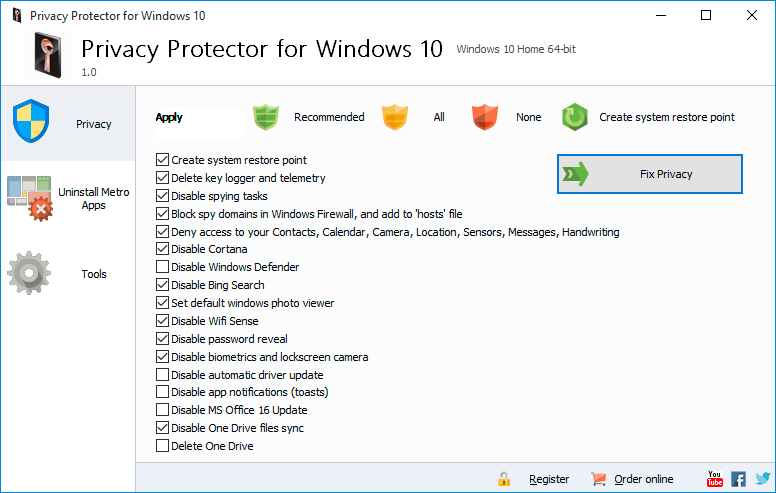
By means of a simple-to-use interface a Privacy protector user can tune his system to block the unwanted traffic to Microsoft servers. It is possible to delete certain elements of Telemetry and Data Collection system, while the rest is simply disabled. A user is able to act at his own discretion choosing the services for disabling to eliminate specific Windows 10 privacy concerns. There are about 40 services (some of them work on the background) tracking and collecting personal user data. It is possible delete, disable or block the following tools:
- Contrana;
- Office Telemetry;
- Media Center;
- Power Efficiency Diagnostics;
- Customer Experience Improvement Program;
- Windows Search.
These are only a part of services that become manageable with the help of Privacy Protector for Windows 10. It also disables Keylogger that sends all data typed on the keyboard to MS servers (that may also contain credit card numbers, passwords, personal details, etc.). To prevent the appearance of new unwanted crawlers and Windows 10 privacy spies, the program allows to disable Windows Update. This feature is also available for Windows ver. 7-8. The program blocks Microsoft IP addresses and helps to add rules for them in Windows Firewall.
The most of spying programs work in the background, consuming a decent part of available system resources. That is why disabling will not only provide you proper privacy, but will also improve your system performance. Privacy Protector for Windows 10 always creates a system restore point before establishing any changes.
| Requirements: | Windows PC |
| Release Info: | Major Update on Oct 21, 2015 |
| Release Notes: | 50+ new Microsoft IPs added, 2 new spying updates blocked, TH2 update support, Japanese language, support for large fonts. |
| Related Tags: | windows 10 privacy windows 10 privacy issues windows 10 privacy concerns windows 10 tracking windows tracking software |
Reviews
You must be logged in to write a review
Reviews of Privacy Protector for Windows 10 1.5
You can be the first to write a review of Privacy Protector for Windows 10!Other products submitted by this publisher
ACIO Ovulation Calendar is easy-to-use personal ovulation calendar of firtility, ovulations and menstrual cycles. It helps you to achieve or avoid pregnancy, or even enhance gender prediction.
Batch Watermark PhotosBatch Watermark Photos is a tool for people who looking for how to watermark photos. It protects your pictures and artwork by adding professional transparent watermarks that combine illustrations, text and graphics.
Remove Watermark from PDFSoftOrbit's PDF Logo Remover is the ideal tool for removing unwanted images, logos, watermarks and backgrounds from PDF documents. Batch conversion mode and built-in step-by-step wizard make this program quick, efficient and easy-to-use.