Phantom Burner 2.0
Phantom Burner is a virtual Blu-ray BD-RE/DVD+RW/CD-R burner drive. It allows you create BD/DVD/CD disc image files from any disc burning software, and mount them later as BD-ROM/DVD-ROM and CD-ROM. It supports virtual data CD and audio CD.
Product Specifications
| User Rating: |
Phantom Burner 2.0
2.5
out of 5
(based on 1 ratings)
|
|
| FileCart Rating | ||
| Submitted by: | phantombility | |
| License | Shareware | |
| Price | $29.95 | |
| Downloads | 574 | |
| OS Support | Windows Install and Uninstall | |
| File Name | phantomburner_setup.exe | |
| File Size | 2.86 MB ( 2,929 KB ) | |
| Published | Apr 15, 2008 (18 years ago) | |
| Updated | Dec 15, 2013 (12 years ago) | |
Latest Searches
komiksy w lodzi 3 minutes ago
nous vous souhaitons bonne annee sante 4 minutes ago
c:USE 5 minutes ago
young models sex pics 6 minutes ago
imma just wake up and do it early meme 14 minutes ago
drawing dog chains together 16 minutes ago
villain deutsch 20 minutes ago
aplicativivo dde digitação online 24 minutes ago
Data[5] == 0x01 24 minutes ago
Popular Searches
id cards 602 times
2025 398 times
2024 385 times
Softperfect 316 times
Database Workbench Pro 258 times
TeraByte Drive Image Backup and Restore 255 times
Elcomsoft Phone Breaker 251 times
Elcomsoft Phone Viewer 232 times
SAM Broadcaster Cloud 223 times
Product Details
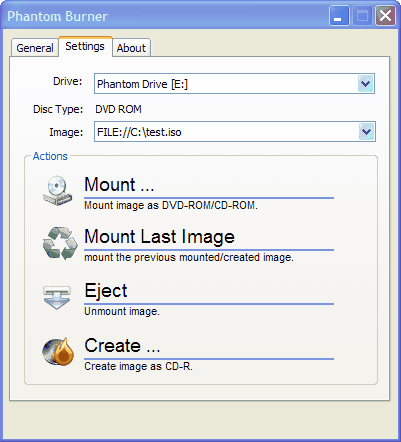
Many people understand the benefits of using disc image files (like ISO) instead of real optical discs. It is cheaper, faster, and you don't need to worry about scratches or the storage and organization of discs.
However, not all burning software supports disc image file creation. Even if it does, most likely it only supports data discs. Very few burning software support disc images for audio CD's.
Use Phantom Burner instead. It is a virtual burner, and allows you to create disc images from any burning software, including Blu-ray, DVD, data CD and audio CD. By supporting standard SCSI commands, it is compatible with most burning software, whether it is Nero or Roxio, Yahoo Music, Rhapsody, Windows Media Player or iTunes, myDVD or WinDVD Creator. It is extremely easy to use. It appears as a hardware burner in your Windows Explorer. Right click on the icon to mount a BD/DVD/CD image or to create a new image. There is nothing special for you to do in the burning software, except selecting Phantom Burner as the drive.
Compatible with Nero Ultra, Roxio Easy Media Creator, Sonic RecordNow, WMP, iTunes, RealPlayer, Rhapsody, Yahoo Music, WinDVD Creator, Power2Go and more, too many to list.
Supports 32-bit XP and Vista. No Spyware. 64-bit support coming soon.
| Requirements: | Windows XP, 2003, Vista |
| Release Info: | New Release on Jun 15, 2010 |
| Release Notes: | Added DVD+RW and Blu-ray BD-RE emulation. Supports 32-bit Windows Vista. |
Reviews
You must be logged in to write a review
Reviews of Phantom Burner 2.0
You can be the first to write a review of Phantom Burner!Most Viewed Windows CD Burning & Ripping
Express Burn Plus CD and DVD Burner 6.16
Ashampoo Burning Studio 18 18.0.3
Xilisoft iPod Magic Platinum 5.5.4.20131101
Engelmann Media MovieSaver 4
CDA to MP3 Converter 3.2.1159
ABC DVD Copy 3.0
WinX Blu-Ray Decrypter 3.4.1
ACDR 5.0
Ashampoo Movie Shrink & Burn 4 4.0.2
Most Downloaded Windows CD Burning & Ripping
Audio Transcoder 2.9.0.1332
Express Rip Plus CD Ripper 2.00
CDA to MP3 Converter 3.2.1159
Ashampoo Burning Studio 18 18.0.3
Express Burn Plus CD and DVD Burner 6.16
ACDR 5.0
WinX Blu-Ray Decrypter 3.4.1
ABC DVD Copy 3.0
Xilisoft iPod Magic Platinum 5.5.4.20131101