Convert PDF To Text Desktop Software 1.7.0
Convert PDF to Text Desktop Software is a desktop software for windows users. It allows you to convert all your PDF (include Scanned PDF) files into Text format (.Txt) without internet connection.
Product Specifications
| User Rating: | item has less then 1 vote |
|
| FileCart Rating | Not yet Rated | |
| Submitted by: | bil801 | |
| Homepage | Visit Homepage | |
| License | Shareware | |
| Expires | 14 Days | |
| Price | $19.95 | |
| Downloads | 611 | |
| OS Support | Windows Install and Uninstall | |
| File Size | 5.02 MB ( 5,136 KB ) | |
| Published | Jan 30, 2013 (14 years ago) | |
| Updated | Apr 29, 2014 (12 years ago) | |
Follow Us!
Latest Searches
he Harmonized European Time Use Survey codes time use into 49 categories and provides sex disaggregated data on time usage 5 minutes ago
when did kids start using backpacks for school 5 minutes ago
estacao anates do alto alegre 9 minutes ago
annie schaefer cu boulder 10 minutes ago
kiss or kill bl ep 8 sub espanol 11 minutes ago
hacer podia en power point 15 minutes ago
adc visitation 16 minutes ago
Se houver necessidade, estão autorizador também os seguintes pessoas 17 minutes ago
sopa de letra de los niños héroes 18 minutes ago
Popular Searches
id cards 602 times
2025 495 times
2024 386 times
Softperfect 330 times
5g spf sonicwall compatible copper module 305 times
Gypsy 2.0 Onlyfans Leaked Photos 301 times
2026 300 times
targetamazon credit card.asp?highlight=0 273 times
ds1628 compatible 10gb sfp cards 269 times
Product Details
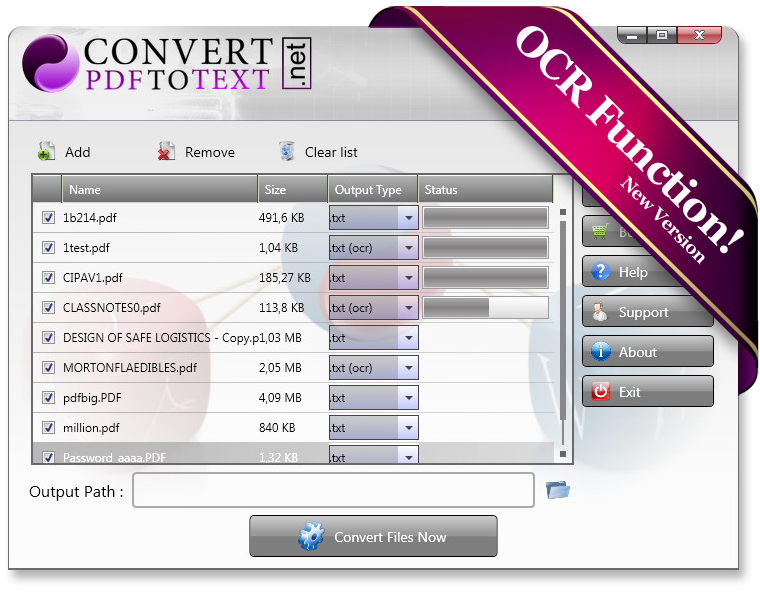
Convert PDF to Text Desktop Software is very easy to use and can convert a scanned PDF files, in this case you need to choose the .txt (ocr) format from the software.
You could open multiple files and convert them in one click.
Features:
- Convert PDF into Text(.Txt).
- Convert scanned PDF into Text format. OCR function!
- Convert more quickly!
- Convert multiple PDF files in one click!
- No need internet connection!
- No other standalone program or software is needed.
- Platforms supported by the Convert PDF to Text Desktop Software include Win98/ME/NT/2000/XP/2003/Vista/7/2008/etc.
- Both 32 bit and 64 bit systems are supported with our Software.
- Convert PDF to Text Desktop Software supports several languages including English, German, Chinese, French, Italian, Czech, Dutch, Japanese, Danish, Japanese, Norwegian, Russian, Portuguese, etc.
| Requirements: | Both 32 bit and 64 bit systems are supported with our Software. |
| Release Info: | Major Update on Jan 05, 2013 |
| Release Notes: | Add more converter type on 09/01/2012 |
| Related Tags: | convert pdf to Text convert pdf to TXT pdf to Text converter pdf to Text converter pdf to TXT converter |
Reviews
Reviews of Convert PDF To Text Desktop Software 1.7.0
You can be the first to write a review of Convert PDF To Text Desktop Software!Other products submitted by this publisher
Convert PDF to Image Desktop Software is a desktop software for windows users. It allows you to convert all your PDF files into Image format without internet connection. The converted images files will be easily edited via any Photo editor software.
Convert PDF To Word Desktop SoftwareConvert PDF to Word Software is an amazing new pdf-to-word super converter. It converts pdf to doc, rtf, and txt formats. The software preserves the original format, layout, and bitmap images of the pdf document.
Image CartoonizerNow with our software you can convert all your images and pictures into cartoon effect more quickly. You can convert large photos for best result! You can apply multiple adjustments on your photos before converting them.
iToonCartoon yourself with iToon like a real artist!
JiNa OCR ConverterNo need to retype or reformat!Just convert them! JiNa OCR is the fastest and most precise way to convert paper, PDF files, and even digital camera pictures into documents you can edit in your favorite PC applications.