
COM Port Splitter 5.0.119
COM Port Splitter allows managing your virtual and real ports by using different variations of port bundles creation. Split, join, redirect, and share serial ports the way you need. The applications can switch among the free ports with the same names
Download
6.54 MB · ser_splitter.exe
962downloads
0this week
$99.95Shareware
0reviews
Screenshots
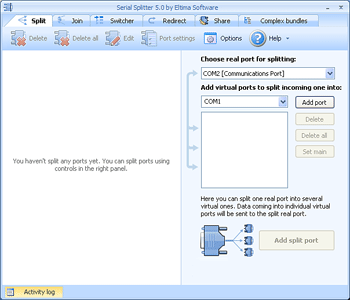
About COM Port Splitter
With COM Port Splitter you can split one real port into several virtual ports, join real ports into one virtual, and redirect the serial traffic from real port to another real or virtual. You can also share one real serial port among several applications so that they will receive the same data from one serial port simultaneously. You can also join several ports under one name and let applications switch among the free ones.
COM Port Splitter is very good at splitting any hardware COM port into multiple virtual COM ports, so that each of them behaves exactly like the original port and has the same name. All virtual ports receive any data that is received by the original port at the same time. For example, COM Port Splitter can let a single serial device interact with multiple applications at the same time.
Another job COM Port Splitter can do for you is join some real COM ports into one virtual port, which is rather useful when you need some application to handle multiple serial devices simultaneously. All data received by one of the joined COM ports is instantly forwarded to the joining virtual port and to the application, and vice versa.
It is also possible to redirect all serial traffic from a hardware COM port to another COM port (hardware or virtual) with COM Port Splitter, meaning that any data sent to the redirected port is immediately received on the port you redirected it to. You may need this in case you are using some software with very strict serial-port settings and instead of figuring out how to modify those settings you can just redirect the data traffic to it.
Besides, COM Port Splitter is essential for creating complex bundles of real and virtual serial ports and interconnecting them as you wish, therefore enabling data exchange between those ports.
COM Port Splitter is very good at splitting any hardware COM port into multiple virtual COM ports, so that each of them behaves exactly like the original port and has the same name. All virtual ports receive any data that is received by the original port at the same time. For example, COM Port Splitter can let a single serial device interact with multiple applications at the same time.
Another job COM Port Splitter can do for you is join some real COM ports into one virtual port, which is rather useful when you need some application to handle multiple serial devices simultaneously. All data received by one of the joined COM ports is instantly forwarded to the joining virtual port and to the application, and vice versa.
It is also possible to redirect all serial traffic from a hardware COM port to another COM port (hardware or virtual) with COM Port Splitter, meaning that any data sent to the redirected port is immediately received on the port you redirected it to. You may need this in case you are using some software with very strict serial-port settings and instead of figuring out how to modify those settings you can just redirect the data traffic to it.
Besides, COM Port Splitter is essential for creating complex bundles of real and virtual serial ports and interconnecting them as you wish, therefore enabling data exchange between those ports.
| Requirements | Windows 2000/XP/2003/Vista/Win7 |
|---|---|
| Release info | New Release on Aug 02, 2012 |
| Release notes | - Possibility to connect to any free port from a bunch using the same name for these ports - Possibility to set read and write rights for every port - History log of the usage of ports by applications |
| Related tags | com port splitter share com port com splitter redirect com port split com port |
Reviews
No reviews yet. Be the first to review COM Port Splitter.
Used COM Port Splitter? Tell other visitors what you thought.
Log in to write a reviewOther products by this publisher
-
 Eltima Serial Splitter Mobile 3.0
With Serial Splitter Mobile by Eltima you can split real or virtual serial port into several others, join several serial ports into one, share its dataflow between applications and even disable existing com ports.
Eltima Serial Splitter Mobile 3.0
With Serial Splitter Mobile by Eltima you can split real or virtual serial port into several others, join several serial ports into one, share its dataflow between applications and even disable existing com ports.
-
 Eltima Virtual Serial Port Driver 6.9
VSPD emulates RS232 serial ports connected via virtual null-modem cable.
Eltima Virtual Serial Port Driver 6.9
VSPD emulates RS232 serial ports connected via virtual null-modem cable.
- Serial over Ethernet 6.0 Shares up to 255 serial port devices over TCP/IP network.
-
 Serial Port Tester 7.0
Monitor, display, log and analyze all of your system's serial port activity using Serial Port Monitor. This professional serial port tester allows you to test any RS232/422/485 COM port on your system and log transmission data for further analysis.
Serial Port Tester 7.0
Monitor, display, log and analyze all of your system's serial port activity using Serial Port Monitor. This professional serial port tester allows you to test any RS232/422/485 COM port on your system and log transmission data for further analysis.
- USB over IP Connector 6.2 USB over IP Connector is the essential solution when you need to share USB over network. You can easily work with remote USB devices as if they were physically connected to your local computer.
Most viewed Windows Automation Tools
-
1
 VisualCron 8.2.1
An advanced task scheduler / automation tool for Windows. Client/Server architecture. Remote, secure control across the Internet. Start processes, copy files, remote scripts. Triggers that starts jobs can either be based on time or system events.
VisualCron 8.2.1
An advanced task scheduler / automation tool for Windows. Client/Server architecture. Remote, secure control across the Internet. Start processes, copy files, remote scripts. Triggers that starts jobs can either be based on time or system events.
-
2
 Febooti Automation Workshop 9.5.0
Automate recurring tasks. Monitors system for defined state and automatically runs a set of specified processes. Includes advanced Task scheduler, File / Folder Watcher utility, powerful email tool, file actions, and more.
Febooti Automation Workshop 9.5.0
Automate recurring tasks. Monitors system for defined state and automatically runs a set of specified processes. Includes advanced Task scheduler, File / Folder Watcher utility, powerful email tool, file actions, and more.
- 3 Macro Scheduler - Macro Recorder 14.2.01 Save time and automate your PC. Record macros and build scripts with the powerful, easy to use scripting language. Assign macros to schedules, hotkeys or desktop shortcuts, or compile to standalone EXEs. Automate those mundane, repetitive tasks.
-
4
 Advanced Serial Port Monitor 4.4.11.707
This unique serial port monitoring and data handling solution allows developers to focus on their task. It features manual, automatic and spy modes which allow developers to monitor all data received from/sent to a COM port. Download FREE trial now!
Advanced Serial Port Monitor 4.4.11.707
This unique serial port monitoring and data handling solution allows developers to focus on their task. It features manual, automatic and spy modes which allow developers to monitor all data received from/sent to a COM port. Download FREE trial now!
-
5
 Auto Clicker 2.0
Mouse Clicker to Click Mouse Automatically at Mouse Location. Start and Stop Mouse Clicking with a configurable Keyboard Shortcut. Download Mouse Clicker to keep your mouse clicking untill you stop it or for configurable mouse clicks.
Auto Clicker 2.0
Mouse Clicker to Click Mouse Automatically at Mouse Location. Start and Stop Mouse Clicking with a configurable Keyboard Shortcut. Download Mouse Clicker to keep your mouse clicking untill you stop it or for configurable mouse clicks.
-
6
 Advanced Key and Mouse Recorder 4.3.1
It is designed to record and replay the keyboard and mouse activities for automating the plodding and repetitive tasks. You can record mouse movements, mouse clicks, keyboard keystrokes, and save them for replay later.
Advanced Key and Mouse Recorder 4.3.1
It is designed to record and replay the keyboard and mouse activities for automating the plodding and repetitive tasks. You can record mouse movements, mouse clicks, keyboard keystrokes, and save them for replay later.
-
7
 Auto Power-on Shut-down 2.83
Allows your computer go into the save energy states included standby, hibernation as well as power-off at a specified date and time. It also allows you to auto-start up your computer to work even if the system was stopped in hibernation or standby.
Auto Power-on Shut-down 2.83
Allows your computer go into the save energy states included standby, hibernation as well as power-off at a specified date and time. It also allows you to auto-start up your computer to work even if the system was stopped in hibernation or standby.
-
8
 1 Smart Protector Pro - Internet Eraser 16.3
Erase history, cookies, temporary Internet files, recycle bins, typed URLs, auto-complete addresses and forms automatically.
Other features: Cookie Manager, Save/Restore State, Scheduling, Stealth mode, Emergency Key and more.
1 Smart Protector Pro - Internet Eraser 16.3
Erase history, cookies, temporary Internet files, recycle bins, typed URLs, auto-complete addresses and forms automatically.
Other features: Cookie Manager, Save/Restore State, Scheduling, Stealth mode, Emergency Key and more.
-
9
 Advanced Serial Data Logger 4.2.7.927
Advanced Serial Data Logger is the unique serial port data logging and communication spying solution that supports various interfaces and features convenient user interface as well as flexibly configured modes of operation. Download FREE trial now!
Advanced Serial Data Logger 4.2.7.927
Advanced Serial Data Logger is the unique serial port data logging and communication spying solution that supports various interfaces and features convenient user interface as well as flexibly configured modes of operation. Download FREE trial now!
-
10
 Easy Macro Recorder 4.5
Easy Macro Recorder is a handy utility that makes your computers automatically do work for you. It records all operation of mouse and keystrokes and saves them as macros, then Easy Macro Recorder can play back recorded macros to automate your work.
Easy Macro Recorder 4.5
Easy Macro Recorder is a handy utility that makes your computers automatically do work for you. It records all operation of mouse and keystrokes and saves them as macros, then Easy Macro Recorder can play back recorded macros to automate your work.
Most downloaded Windows Automation Tools
-
1
Febooti Automation Workshop 9.5.0
Automate recurring tasks. Monitors system for defined state and automatically runs a set of specified processes. Includes advanced Task scheduler, File / Folder Watcher utility, powerful email tool, file actions, and more.
-
2
VisualCron 8.2.1
An advanced task scheduler / automation tool for Windows. Client/Server architecture. Remote, secure control across the Internet. Start processes, copy files, remote scripts. Triggers that starts jobs can either be based on time or system events.
-
3
Advanced Serial Port Monitor 4.4.11.707
This unique serial port monitoring and data handling solution allows developers to focus on their task. It features manual, automatic and spy modes which allow developers to monitor all data received from/sent to a COM port. Download FREE trial now!
-
4
Auto Clicker 2.0
Mouse Clicker to Click Mouse Automatically at Mouse Location. Start and Stop Mouse Clicking with a configurable Keyboard Shortcut. Download Mouse Clicker to keep your mouse clicking untill you stop it or for configurable mouse clicks.
- 5 A-AUTO 7.1.0Lv12 Job scheduling software A-AUTO integrates batch automation across different platforms, for various applications, from information systems to mission-critical systems, providing nonstop job scheduling 24 hours a day, 365 days a year.
-
6
Advanced Key and Mouse Recorder 4.3.1
It is designed to record and replay the keyboard and mouse activities for automating the plodding and repetitive tasks. You can record mouse movements, mouse clicks, keyboard keystrokes, and save them for replay later.
-
7
Auto Power-on Shut-down 2.83
Allows your computer go into the save energy states included standby, hibernation as well as power-off at a specified date and time. It also allows you to auto-start up your computer to work even if the system was stopped in hibernation or standby.
-
8
 KeyText 3.20
Keyboard macro program with multiple clipboard and Windows automation features. Stores texts for typing or pasting into any application, run programs, set alarms, completely automate password dialogs and more. Elimate those repetitive tasks!
KeyText 3.20
Keyboard macro program with multiple clipboard and Windows automation features. Stores texts for typing or pasting into any application, run programs, set alarms, completely automate password dialogs and more. Elimate those repetitive tasks!
- 9 Macro Scheduler - Macro Recorder 14.2.01 Save time and automate your PC. Record macros and build scripts with the powerful, easy to use scripting language. Assign macros to schedules, hotkeys or desktop shortcuts, or compile to standalone EXEs. Automate those mundane, repetitive tasks.
-
10
Easy Macro Recorder 4.5
Easy Macro Recorder is a handy utility that makes your computers automatically do work for you. It records all operation of mouse and keystrokes and saves them as macros, then Easy Macro Recorder can play back recorded macros to automate your work.