
ClipMagic 4.1
ClipMagic is a powerful Clipboard Extender and Information Manager for recording, storing and sorting text and images, either automatically or manually, with special tools for recording URL's if the text is from an Internet site.
Download
5.58 MB · cmsetup.exe
1.8Kdownloads
0this week
$14.99Shareware
0reviews
Screenshots
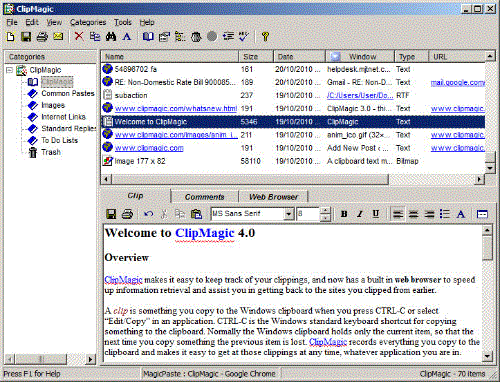
About ClipMagic
ClipMagic offers everything you would expect from a powerful clipboard extender. But it also goes much further than that to provide a powerful yet easy to use research and information management tool. ClipMagic can work with all web browsers to record the URL's with text and images that you take from the web. It also has its own internal web browser, to make net research even faster. For clips taken from the web, you can then launch their originating URLs in your main browser or in the ClipMagic browser, to get back to the original page. Clips can also be edited using the integrated editor. Rules allow you to have clips categorized (or ignored) automatically the moment they are grabbed. You can create new entries, store comments against your clips, copy back to the clipboard, assign hot keys to them, paste them quickly into the current app with MagicPaste, send by email, print merge, search, sort, export and save them ... within minutes, you won't know how you ever managed without it! A freeware Lite version is also available.
| Release info | New Release on Jul 06, 2011 |
|---|---|
| Release notes | Unicode Support; New More Robust Database Format; Vista/Win7 Support and More |
| Related tags | clipboard extender information CTRL-C |
Reviews
No reviews yet. Be the first to review ClipMagic.
Used ClipMagic? Tell other visitors what you thought.
Log in to write a reviewOther products by this publisher
- Macro Scheduler - Macro Recorder 14.2.01 Save time and automate your PC. Record macros and build scripts with the powerful, easy to use scripting language. Assign macros to schedules, hotkeys or desktop shortcuts, or compile to standalone EXEs. Automate those mundane, repetitive tasks.
-
 QuickButtons 1.61
QuickButtons lets you make Buttons and AppBars to Simulate Keystrokes and Run Applications. Convert awkward keystrokes to single mouse clicks. Ideal for Tablet PCs or situations where a keyboard is not always available.
QuickButtons 1.61
QuickButtons lets you make Buttons and AppBars to Simulate Keystrokes and Run Applications. Convert awkward keystrokes to single mouse clicks. Ideal for Tablet PCs or situations where a keyboard is not always available.
Most viewed Windows Clipboard Enhancement
- 1 Logix Clipboard URL Monitor 1.2.2.4 Logix Clipboard URL Monitor is a free software designed to save your internet addresses
- 2 Clipboard Swiss-Knife 1.0 Tool to enhance your Productivity when composing documents, e-mails or word docs
-
3
 ClipMate Clipboard Extender 7.5.26
Popular Clipboard Extender Holds Thousands of Clips, across reboots. Searching, Screen Capture, editing, re-formatting, combining, change case, drag and drop, encryption, internet features, E-Mail clean-up, and even a spellchecker!
ClipMate Clipboard Extender 7.5.26
Popular Clipboard Extender Holds Thousands of Clips, across reboots. Searching, Screen Capture, editing, re-formatting, combining, change case, drag and drop, encryption, internet features, E-Mail clean-up, and even a spellchecker!
-
4
 Screen OCR 13.5
Converts anything you can read on the screen into editable text, with astonishing accuracy. A web page, an image, a scanned page or even a PDF file, Screen OCR recognizes the letters and copies them to the clipboard.
Screen OCR 13.5
Converts anything you can read on the screen into editable text, with astonishing accuracy. A web page, an image, a scanned page or even a PDF file, Screen OCR recognizes the letters and copies them to the clipboard.
-
5
ClipMagic 4.1
ClipMagic is a powerful Clipboard Extender and Information Manager for recording, storing and sorting text and images, either automatically or manually, with special tools for recording URL's if the text is from an Internet site.
-
6
 Clip Plus 5.0
An easy to use and powerful Clipboard extender. It automatically grabs and saves text and images as they are copied to the Windows Clipboard - making them available for saving, reuse, and printing.
Clip Plus 5.0
An easy to use and powerful Clipboard extender. It automatically grabs and saves text and images as they are copied to the Windows Clipboard - making them available for saving, reuse, and printing.
- 7 Spartan Portable Multi Clipboard Manager 16.00 Have you ever needed information on one computer that you have on another? Forget transferring files. Spartan is a clipboard manager that runs entirely from a plug in flash drive. Plug into one PC and copy. Plug into another and paste. Its that easy.
-
8
 Clipboard Magic 5.05
Clipboard Magic is a freeware Windows Clipboard enhancement tool. Any text copied to the Windows clipboard is automatically archived in Clipboard Magic. This text may be copied back to the clipboard with a click of the mouse.
Clipboard Magic 5.05
Clipboard Magic is a freeware Windows Clipboard enhancement tool. Any text copied to the Windows clipboard is automatically archived in Clipboard Magic. This text may be copied back to the clipboard with a click of the mouse.
- 9 Clip Strip Clip Strip is a windows utility that will convert the contents of the windows clipboard into plain text. All formatting such as bold, italics, underline as well as any images or other graphic information will be stripped away. Clip Strip works great when you want to copy information from a web site and paste it into an e-mail message or into a new word processing/html document. You don't have to manually remove the original formatting. To use, simply copy the text into the clipboard. Double click on the Clip Strip icon. Clip Strip will then strip away any formatting information and put the "plain text" version back into the windows clipboard. You can then paste the plain text anywhere. Here are some of the ways you can use Clip Strip: * E-mailing information to a co-worker - Let's say you find some interesting information on a web page and you want to e-mail a friend. The information contains lots of formatted text as well as many images. When you select the information and try to paste it into an e-mail message, the information becomes badly formatted. To fix, double-click on the Clip Strip program and you can now paste the information into the e-mail. All of the formatting information will be automatically stripped away and the images will be no longer pasted. * Creating web pages and other documents - As with the e-mail example listed above, when you paste the formatted text into a new document, sometimes the formatting can get in the way. Using Clip Strip, you can start with plain text and do your own formatting. * And many other ways you can use the program.
-
10
 Clipboard History 1.0
Remember that text that was on the Clipboard 20 minutes ago, but was gone when you needed it? With Clipboard History, a Clipboard manager you can access texts previously copied to Clipboard, using the usually idle Caps Lock key or a tray icon.
Clipboard History 1.0
Remember that text that was on the Clipboard 20 minutes ago, but was gone when you needed it? With Clipboard History, a Clipboard manager you can access texts previously copied to Clipboard, using the usually idle Caps Lock key or a tray icon.
Most downloaded Windows Clipboard Enhancement
-
1
ClipMagic 4.1
ClipMagic is a powerful Clipboard Extender and Information Manager for recording, storing and sorting text and images, either automatically or manually, with special tools for recording URL's if the text is from an Internet site.
-
2
Screen OCR 13.5
Converts anything you can read on the screen into editable text, with astonishing accuracy. A web page, an image, a scanned page or even a PDF file, Screen OCR recognizes the letters and copies them to the clipboard.
-
3
 Comfort Clipboard Lite 7.5
Your personal safe clipboard manager. Comfort Clipboard Lite will revolutionize the way you look at the computer clipboard. It provides full control over 'clipped' data and saves it so that you can use it again and again and again.
Comfort Clipboard Lite 7.5
Your personal safe clipboard manager. Comfort Clipboard Lite will revolutionize the way you look at the computer clipboard. It provides full control over 'clipped' data and saves it so that you can use it again and again and again.
-
4
ClipMate Clipboard Extender 7.5.26
Popular Clipboard Extender Holds Thousands of Clips, across reboots. Searching, Screen Capture, editing, re-formatting, combining, change case, drag and drop, encryption, internet features, E-Mail clean-up, and even a spellchecker!
-
5
Clipboard History 1.0
Remember that text that was on the Clipboard 20 minutes ago, but was gone when you needed it? With Clipboard History, a Clipboard manager you can access texts previously copied to Clipboard, using the usually idle Caps Lock key or a tray icon.
-
6
Clip Plus 5.0
An easy to use and powerful Clipboard extender. It automatically grabs and saves text and images as they are copied to the Windows Clipboard - making them available for saving, reuse, and printing.
- 7 Clipboard Swiss-Knife 1.0 Tool to enhance your Productivity when composing documents, e-mails or word docs
-
8
Clipboard Magic 5.05
Clipboard Magic is a freeware Windows Clipboard enhancement tool. Any text copied to the Windows clipboard is automatically archived in Clipboard Magic. This text may be copied back to the clipboard with a click of the mouse.
- 9 Logix Clipboard URL Monitor 1.2.2.4 Logix Clipboard URL Monitor is a free software designed to save your internet addresses
-
10
 textBEAST clipboard manager 3.6.2
Stop wasting time typing the same things over and over again! Save text clips in textBEAST clipboard manager and click to paste them when needed, free of typos. Use it as an expanded clipboard or as a database to increase productivity.
textBEAST clipboard manager 3.6.2
Stop wasting time typing the same things over and over again! Save text clips in textBEAST clipboard manager and click to paste them when needed, free of typos. Use it as an expanded clipboard or as a database to increase productivity.