WirelessMon 4.0.1009
WirelessMon 2.0 detects and monitors wireless (WiFi) networks. Unsecure access points can be identified, as can channel usage. The Professional Ed. enables users to generate a coverage map by either manually plotting points, or using a GPS device.
Product Specifications
| User Rating: | item has less then 1 vote |
|
| FileCart Rating | ||
| Submitted by: | info@passmark.com | |
| Homepage | Visit Homepage | |
| License | Shareware | |
| Expires | 30 Days | |
| Price | $49 | |
| Downloads | 907 | |
| OS Support | Windows Install and Uninstall | |
| File Name | wirelessmon.exe | |
| File Size | 2.96 MB ( 3,026 KB ) | |
| Published | May 28, 2005 (21 years ago) | |
| Updated | Mar 19, 2015 (12 years ago) | |
Follow Us!
Latest Searches
_ImageHeaderFactory raise UnrecognizedImageErrordocx.image.exceptions.UnrecognizedImageError 6 minutes ago
"October 23, 2011" blog "8th grade" "anxiety attacks" movie crush mother 7 minutes ago
What date was the first blog post by the anonymous 8th grader who got anxiety attacks watching The Ring and couldnt tell crush 8 minutes ago
garuda indoesia ski bag 8 minutes ago
train to adelaide from melbourne 9 minutes ago
psu tier list 14 minutes ago
anonymous first blog post 8th grade mother crush watched movie anxiety attacks October 2006 15 minutes ago
opusclip 19 minutes ago
first electric train in india 21 minutes ago
Popular Searches
id cards 602 times
2025 495 times
2024 386 times
Softperfect 331 times
Gypsy 2.0 Onlyfans Leaked Photos 331 times
5g spf sonicwall compatible copper module 327 times
2026 311 times
ds1628 compatible 10gb sfp cards 282 times
Who is Music 280 times
Product Details
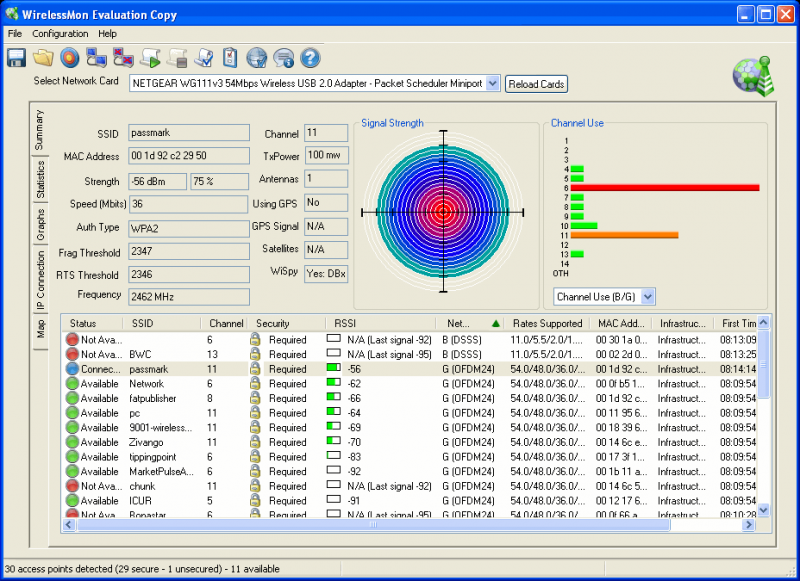
A live 'channel usage' chart provides information on the level of traffic for each available channel. This information will assist network managers by indicating channels that could be used to reduce interference and improve throughput.
Users of the Professional Edition will have the additional bonus of being able to generate 'coverage maps' based upon the signal strength of all detected APs. To use this function, users need to import a map created by an another application (e.g. scanning). Once the map is loaded, users can either plot points manually on the map, or use a Global Positioning System (GPS) device. If done manually, the user selects a point on the map and the program automatically stores information on every AP it can detect there. GPS users need to establish two reference points, then they can leave it to the program to detect their location on the map and store the AP information for each point.
Network managers, laptop users and wardrivers will all find WirelessMon 2.0 to be the perfect tool for their wireless network requirements.
| Requirements: | 64 MB RAM, 3 MB of disk space, compatible 802.11 wireless adapter(s). |
| Release Info: | Minor Update on Mar 19, 2015 |
| Release Notes: | Added support to display when a network is 802.11AC Increased size of "Select AP" dialog window Decreased memory use when saving a signal strength image Fixed a display/synchronisation issue with the access point list Improved information element processing |
| Related Tags: | wireless wifi monitor detect monitoring |
Reviews
Reviews of WirelessMon 4.0.1009
You can be the first to write a review of WirelessMon!Other products submitted by this publisher
Monitor the performance of laptop computer batteries and uninterruptible power supplies (UPS). Graphically see the charge / discharge rate, diagnose problem battery cells and compare your batteries performance with expected discharge rates.
BurnInTest ProfessionalBurnInTest is an easy to use software tool that simultaneously exercises the major components of a computer, to test for endurance and reliability. Tests include CPU, RAM, Disk, Video, CD, DVD, Blu-Ray, Printer, Sound, Network and video playback.
OSFCloneOSFClone lets you create or clone exact raw disk images quickly and independent of the installed operating system.
OSFMountOSFMount allows you to mount local dd image files (bit-for-bit copies of a disk partition) and CD images in Windows.
OSForensicsOSForensics lets you extract forensic data and uncover hidden information from computers quickly and easily.
Most Viewed Windows Networking Tools
Antamedia HotSpot Software 7.4.3
10-Strike Network Inventory Explorer 7.5
Boson Netsim for CCNP (Network Simulator) 6.x
Forum Proxy Leecher 1.11
Total Network Inventory 3.4.1
Atomic Email Hunter 7.40
Bandwidth Manager Software 4.0.2
Advanced IP Scanner 2.4.3021
Digeus Online TV Player 2.7
Most Downloaded Windows Networking Tools
Boson Netsim for CCNP (Network Simulator) 6.x
Antamedia HotSpot Software 7.4.3
Forum Proxy Leecher 1.11
UltraAdmin 6.0.80
10-Strike Network Inventory Explorer 7.5
Total Network Inventory 3.4.1
Atomic Email Hunter 7.40
Bandwidth Manager Software 4.0.2
Advanced IP Scanner 2.4.3021