13downloads
3this week
FreeCommercial
0reviews
Screenshots
About Terminal File Manager Advanced
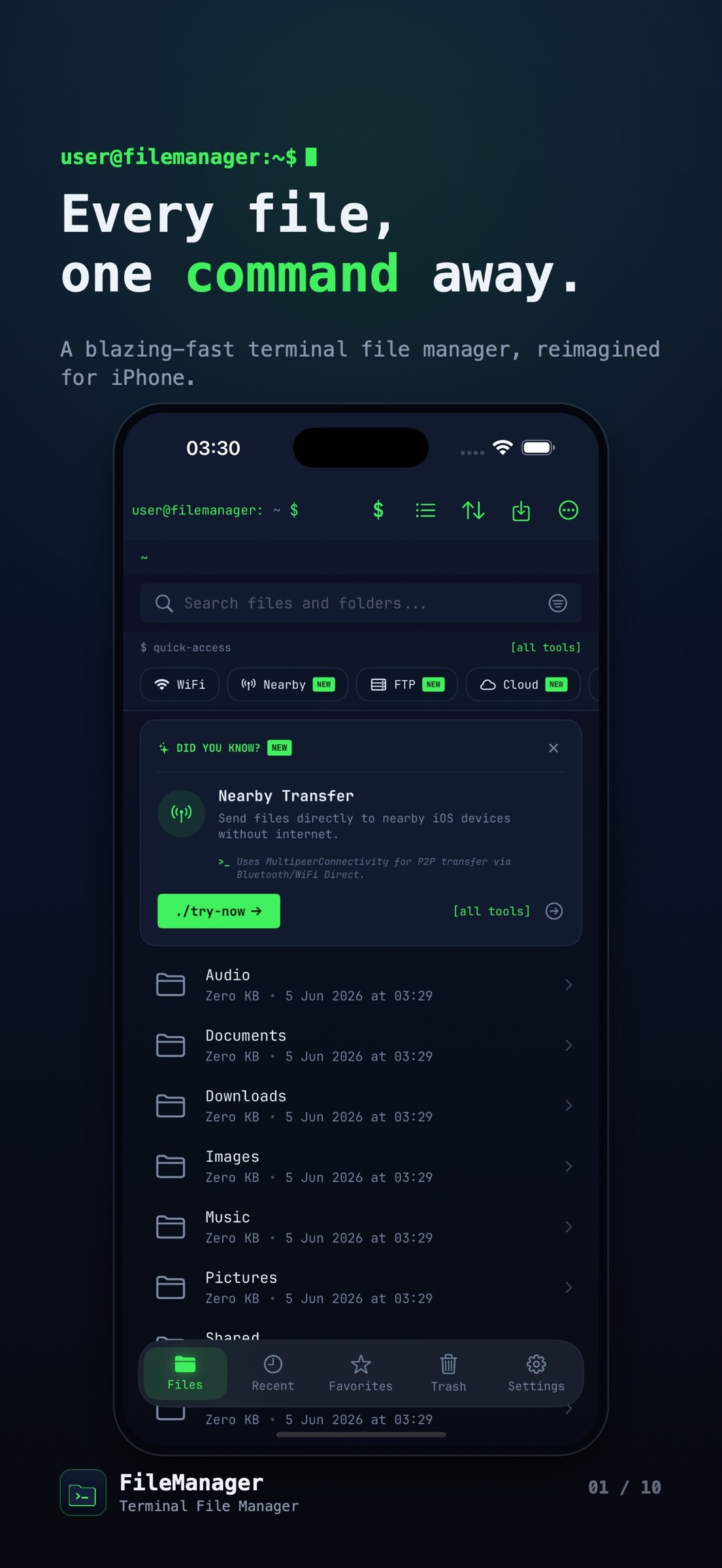
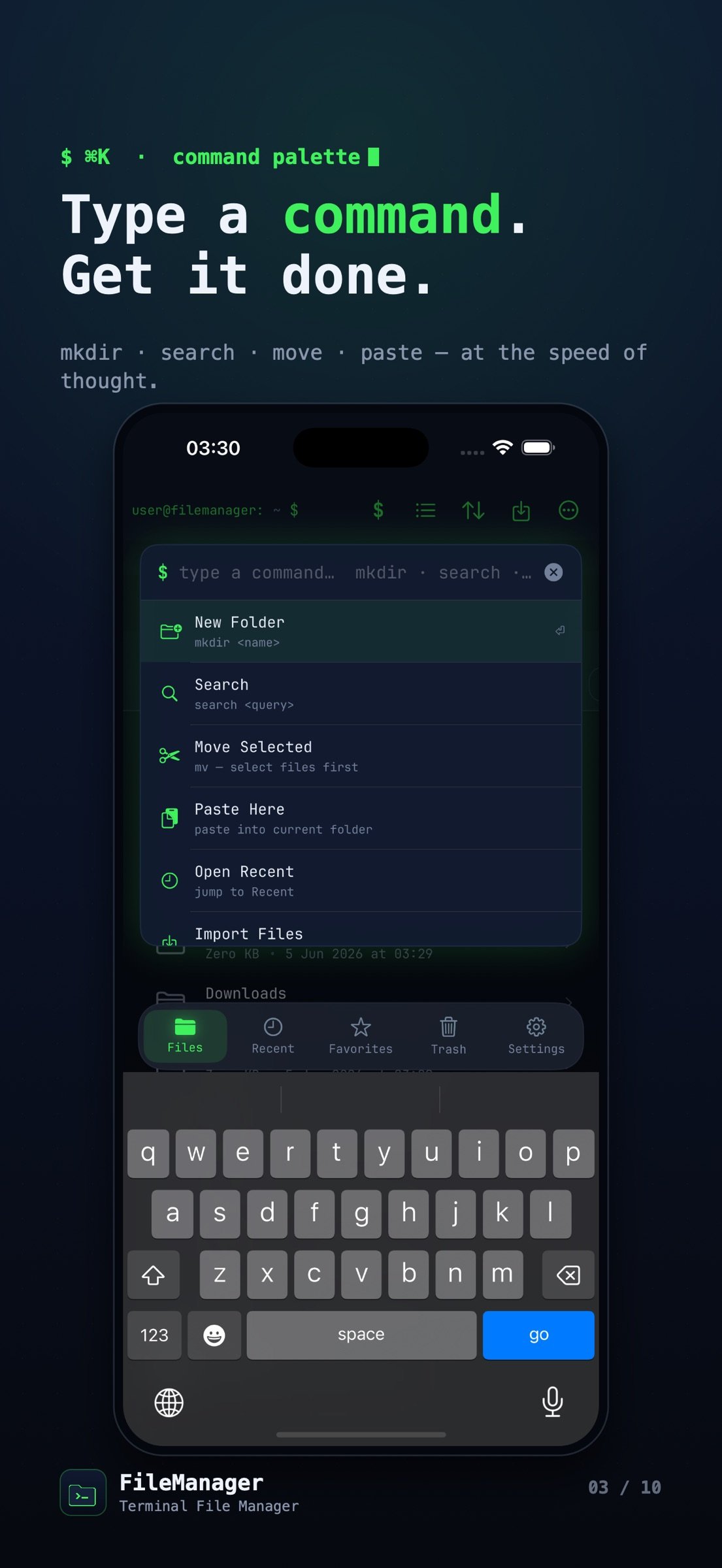
The ultimate file manager for power users. Organize, secure, and transfer files with a sleek terminal-inspired interface. Turn your iPhone and iPad into a wireless file server. Browse, transfer, encrypt, and edit any file -- fast, private, and wrapped in a slick terminal-inspired interface. No account. No ads. Your files never leave your device unless you choose to send them.
KEY FEATURES
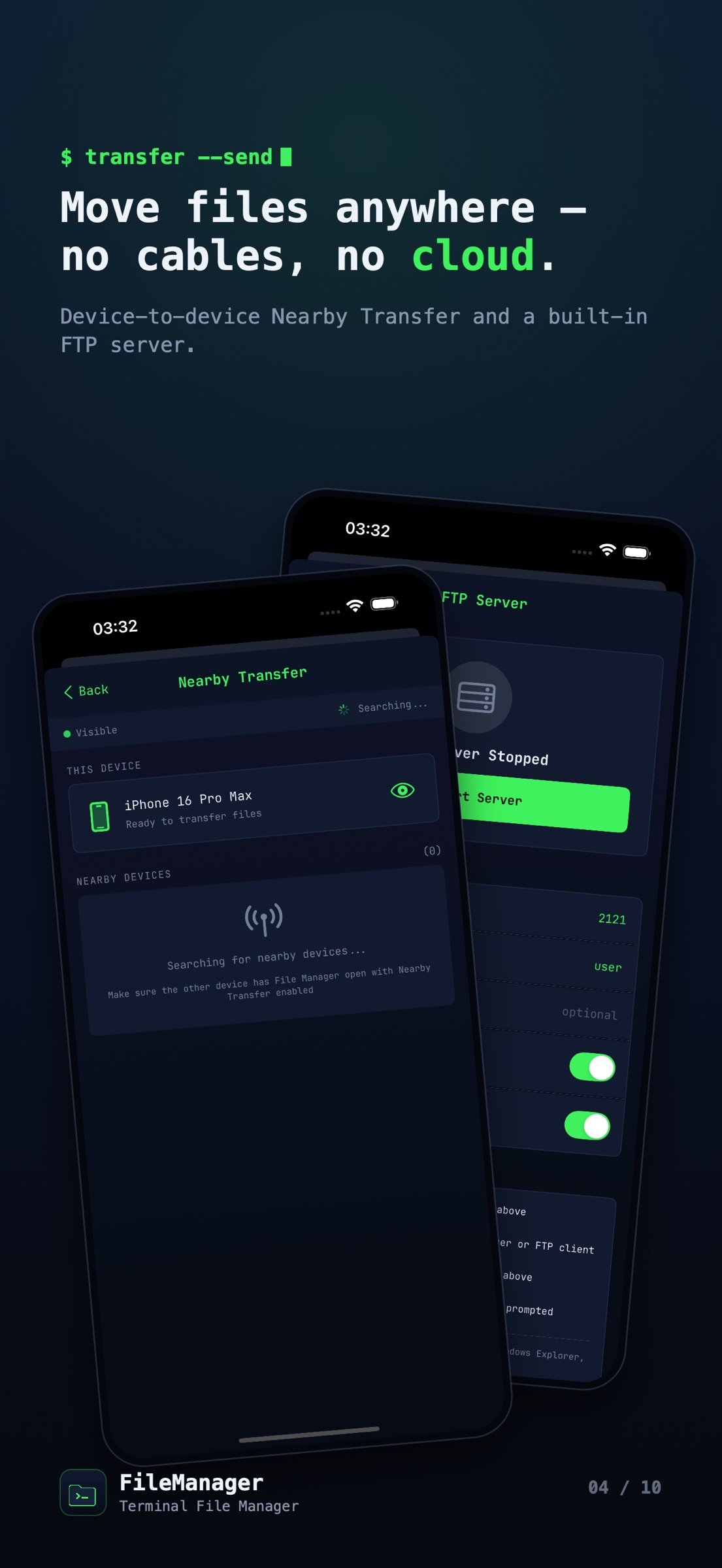
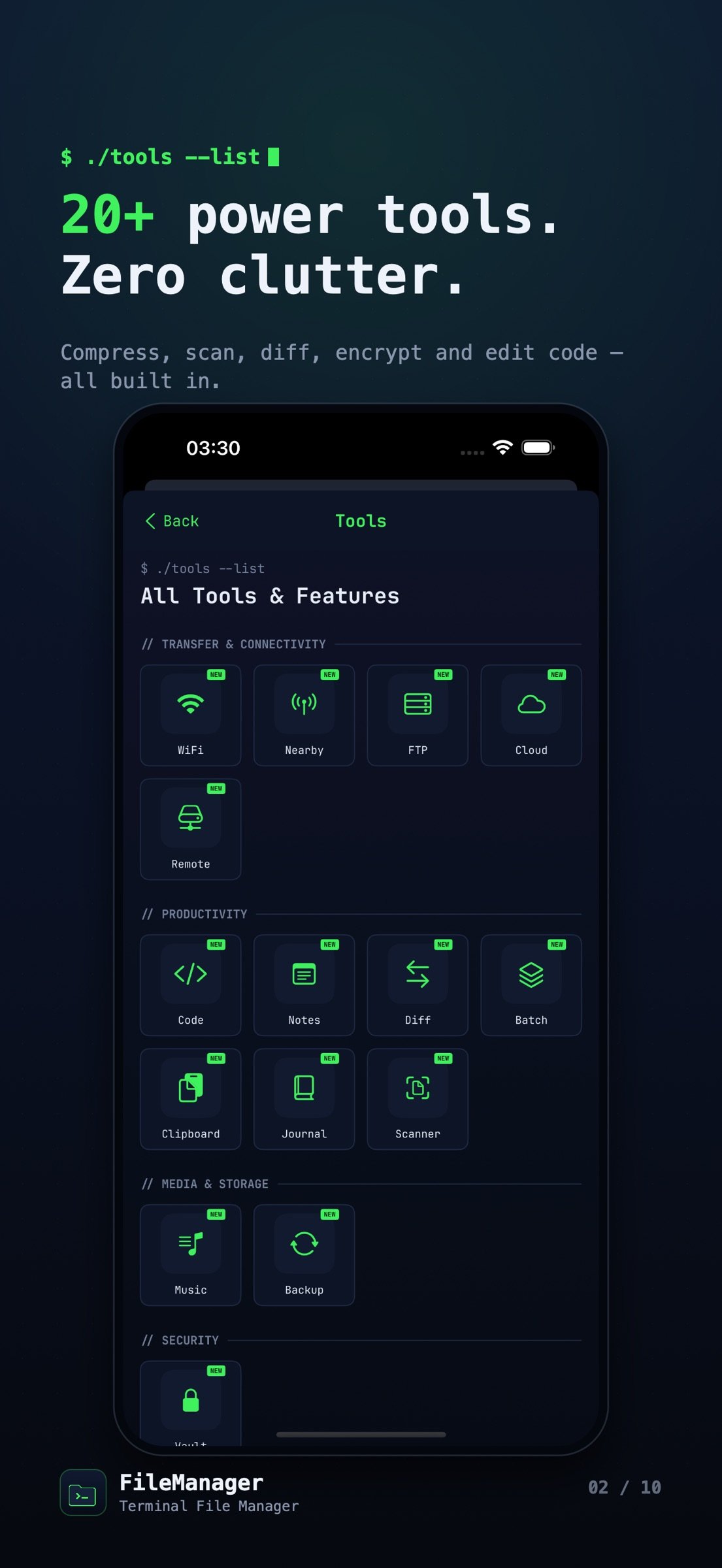
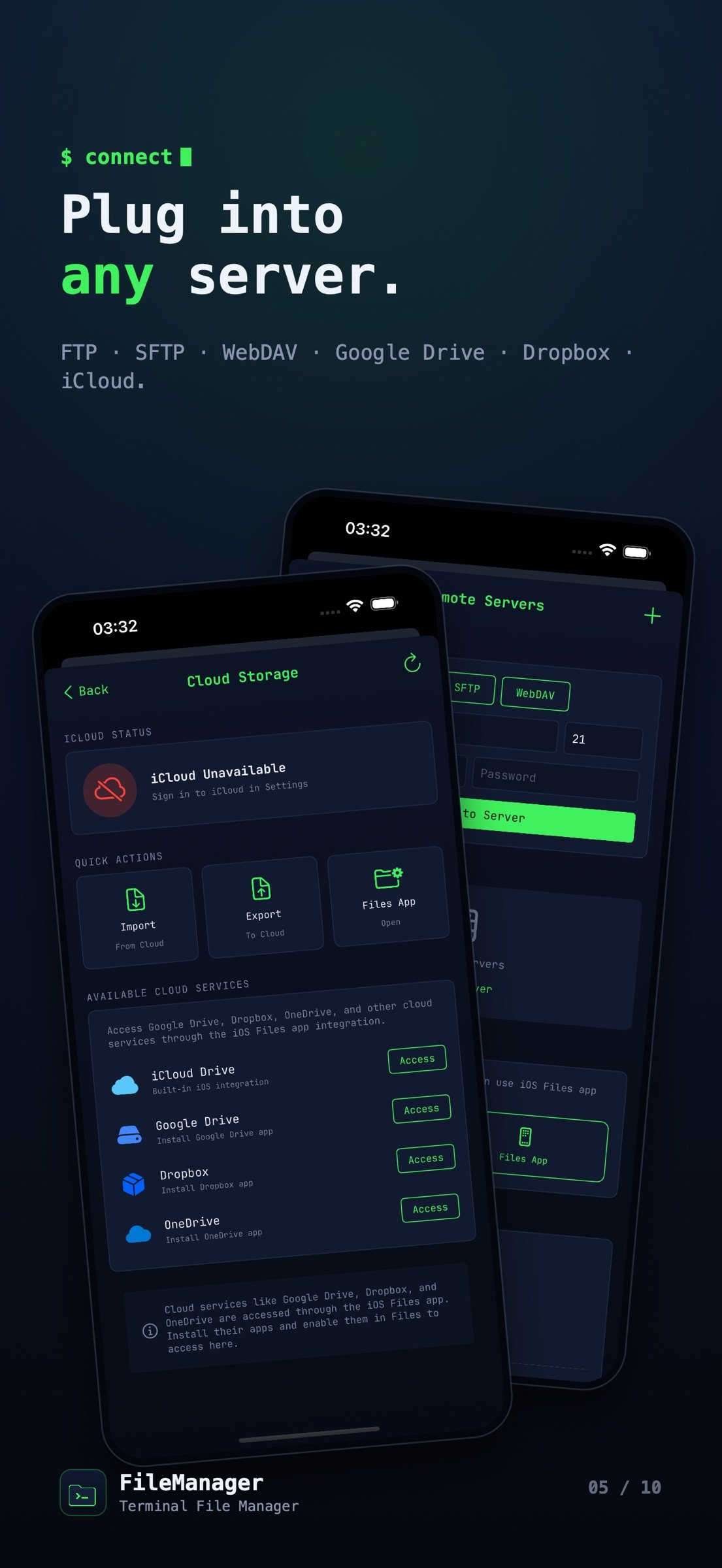
o FTP Server - Turn your iPhone into an FTP server. Transfer files wirelessly from any computer
o WiFi File Transfer - Share files between devices on the same network instantly
o Secure Vault - Protect sensitive files with Face ID, Touch ID, or passcode
o Code Editor - Edit Swift, Python, JavaScript, HTML, CSS & 20+ languages with syntax highlighting
o Cloud Integration - Access iCloud, Google Drive, Dropbox & OneDrive through iOS Files
o Nearby Transfer - Send files to nearby Apple devices using peer-to-peer connectivity
FILE MANAGEMENT
o Browse, copy, move, rename & delete files
o Create folders and organize your documents
o Compress & extract ZIP archives
o Batch operations for multiple files
o Smart search across all your files
o Sort by name, date, size or type
o Grid and list view options
MEDIA & DOCUMENTS
o Built-in photo & video viewer
o PDF reader with page thumbnails
o Music player with background playback
o Image editor with filters & adjustments
o Markdown viewer
o Document preview for Office files
PRODUCTIVITY TOOLS
o Notes app with rich text formatting
o Bookmarks for quick folder access
o Recent files for fast access
o Trash bin with recovery option
o File information & metadata viewer
o Duplicate file finder
SECURITY
o App lock with biometric authentication
o Private vault for sensitive documents
o Secure file encryption
o No cloud dependency - files stay on device
CUSTOMIZATION
o Multiple themes including dark mode
o Terminal-style green interface
o Adjustable font sizes
o Customizable home screen layout
TRANSFER OPTIONS
o FTP server with configurable port & credentials
o WiFi HTTP server for browser access
o Nearby device discovery
o Import from Photos, Files & other apps
o Share extension support
Perfect for developers, students, professionals & anyone who needs powerful file management on iOS.
Download now and take control of your files!
License: Commercial
KEY FEATURES
o FTP Server - Turn your iPhone into an FTP server. Transfer files wirelessly from any computer
o WiFi File Transfer - Share files between devices on the same network instantly
o Secure Vault - Protect sensitive files with Face ID, Touch ID, or passcode
o Code Editor - Edit Swift, Python, JavaScript, HTML, CSS & 20+ languages with syntax highlighting
o Cloud Integration - Access iCloud, Google Drive, Dropbox & OneDrive through iOS Files
o Nearby Transfer - Send files to nearby Apple devices using peer-to-peer connectivity
FILE MANAGEMENT
o Browse, copy, move, rename & delete files
o Create folders and organize your documents
o Compress & extract ZIP archives
o Batch operations for multiple files
o Smart search across all your files
o Sort by name, date, size or type
o Grid and list view options
MEDIA & DOCUMENTS
o Built-in photo & video viewer
o PDF reader with page thumbnails
o Music player with background playback
o Image editor with filters & adjustments
o Markdown viewer
o Document preview for Office files
PRODUCTIVITY TOOLS
o Notes app with rich text formatting
o Bookmarks for quick folder access
o Recent files for fast access
o Trash bin with recovery option
o File information & metadata viewer
o Duplicate file finder
SECURITY
o App lock with biometric authentication
o Private vault for sensitive documents
o Secure file encryption
o No cloud dependency - files stay on device
CUSTOMIZATION
o Multiple themes including dark mode
o Terminal-style green interface
o Adjustable font sizes
o Customizable home screen layout
TRANSFER OPTIONS
o FTP server with configurable port & credentials
o WiFi HTTP server for browser access
o Nearby device discovery
o Import from Photos, Files & other apps
o Share extension support
Perfect for developers, students, professionals & anyone who needs powerful file management on iOS.
Download now and take control of your files!
License: Commercial
| Release info | Update on Oct 15, 2026 |
|---|---|
| Release notes | NEW FOR iPHONE DUO • List on one side, preview on the other • Book pose: two folders side by side • Drag files across the fold to move them • Folded, it opens in your last folder • Controls move to the side bar NEW FOR iPAD • Preview column beside your files • Drag files onto Trash, Favorites or folders • Favorite folders in the sidebar • Arrow keys to browse • Return to open, Space for Quick Look SEARCH & ORGANIZE • Search every folder at once • Results show where each file lives • One tap to search just this folder • Sort & view remembered per folder • Folder colors and emoji • Favorites & tags follow renamed files FASTER ACTIONS • Undo delete, rename or move in one tap • New selection bar: Move, Share, Trash • "Move to…" folder picker • Long-press menu now opens every time • Swipe to rename, delete or favorite • Hold the path bar to jump up folders • Share a whole folder as ZIP NEW TOOLS • Duplicate Finder: free up space safely • Recently Added in the Recent tab • Save to File Manager from any share sheet POLISH • Hide quick tools for more room • Last file in every list now reachable • Dark launch screen, no white flash • Compact rename & new folder sheets • Keyboard ready to type • Change just the capitals in a name • Imports check free space first • Clearer delete & sort messages • Notes: new empty state, blank titles • Optional tip to support the developer |
| Listing data | App Store |
Reviews
No reviews yet. Be the first to review Terminal File Manager Advanced.
Used Terminal File Manager Advanced? Tell other visitors what you thought.
Log in to write a reviewOther products by this publisher
- "No Distractions" for YouTube 4.10 ----
- #Bible 11.6 "Incredible App - My sister shared this app with me a few weeks ago and it is truly incredible.
- #filmphotography 1.4.2 So, you decided to shoot on film?
- $quirrel 1.5.1 $quirrel Budget & Finance helps you plan each paycheck, track spending, manage debt, and see what is safe to spend before the next payday.
- % Percentage Calculator Pro 1.41 This is the Pro version of % Percentage Calculator.
Most viewed iOS Developer Tools
-
1
 ZScripter 12.2.0
ZScripter plays compatible Ren'Py, RealLive, NScripter, (PONS)ONScripter-EN/RU/JH/Yuri, Artemis, Siglus, AI5 and UK2 games as well as KiriKiri (+Kirikiroid2 patches) and RPG Maker MV/MZ & XP, VX and VX Ace support.
-
2
 GitHub 1.284.0
There’s a lot you can do on GitHub that doesn’t require a complex development environment – like sharing feedback on a design discussion, or reviewing a few lines of code.
-
3
 Agents Anywhere 2.1.0
Agents Anywhere is a developer tools mobile application for remotely controlling your local computer to complete coding tasks.
-
4
 Shader Playground 1.0
Shader Playground is a powerful real-time shader editor built for iPhone and iPad.
-
5
 Code Workspace 0.9.1
Code Workspace is a free, agent-first development environment for iPad and iPhone.
-
6
 LocalDevVPN 1.3.0
LocalDevVPN is a developer tool for creating and managing local network tunnels directly on iOS.
-
7
 Termius 8.2.0
Termius is a modern SSH client designed for productivity and collaboration.
-
8
 TestFlight 4.4.1
TestFlight makes it easy to test beta versions of apps and App Clips to provide valuable feedback to developers before they release their apps on the App Store.
-
9
 Cursor 1.18.0
Introducing Cursor for iOS: the best way to build, review, and ship software from anywhere.
-
10
 HTTP Debugger+ 1.2.3
HTTP Debugger+ is a professional HTTP traffic inspector designed for developers and QA engineers.
Most downloaded iOS Developer Tools
-
1
Agents Anywhere 2.1.0
Agents Anywhere is a developer tools mobile application for remotely controlling your local computer to complete coding tasks.
-
2
 a-Shell mini 2.3.2
a-Shell mini is a complete local terminal emulator, allowing to run most Unix commands on you iOS device.
-
3
 Rulify 1.0.7
Rulify ????? iOS App ????,???????? App ????,???????????????
-
4
 LadderTouch 2.1.5
LadderTouch is an app to learn the basics of ladder logic, which is a graphical programming language.
-
5
 FSNotes 7.6.0
FSNotes is a fast, modern notes manager for macOS and iOS.
-
6
 C/C++$-LLVM Clang 2.7
This is a learning tool for efficient C/C++ learning, fast programming, ?(LLVM+Clang)offline compilation and local execution?, Git fetching, iCloud storage, and efficient transfer and sharing via LAN HTTP/FTP multi-point connections.
-
7
 Markdown2PDF 1.0
Easily Convert Markdown to PDF with Markdown2PDF
-
8
 python3$ 6.6
This is a Python 3.13 learning tool for efficient learning, fast programming, local execution, breakpoint debugging, precise error reporting, Git fetching, iCloud access, and efficient transfer and sharing via LAN HTTP/FTP multi-point connections.
-
9
 Herdy 1.4.0
Herdy puts your remote terminal and long-running coding-agent sessions in your pocket.
-
10
 websta$-learn html css and js 3.2
This is a learning tool for efficient HTML, CSS, and JS learning, fast programming, local execution, Git retrieval, iCloud storage, efficient transfer and sharing via LAN HTTP/FTP multi-point connections.