
SnapFade 0.4
Screenshots go to the clipboard, not the gallery, and expire on a timer
Download
0.49 MB · app.snapfade_4.apk
11downloads
0this week
FreeFreeware
0reviews
Screenshots
About SnapFade
Most screenshots are throwaway: a quick share, a reference, a one-time paste. SnapFade makes them temporary by default and permanent only when you choose.
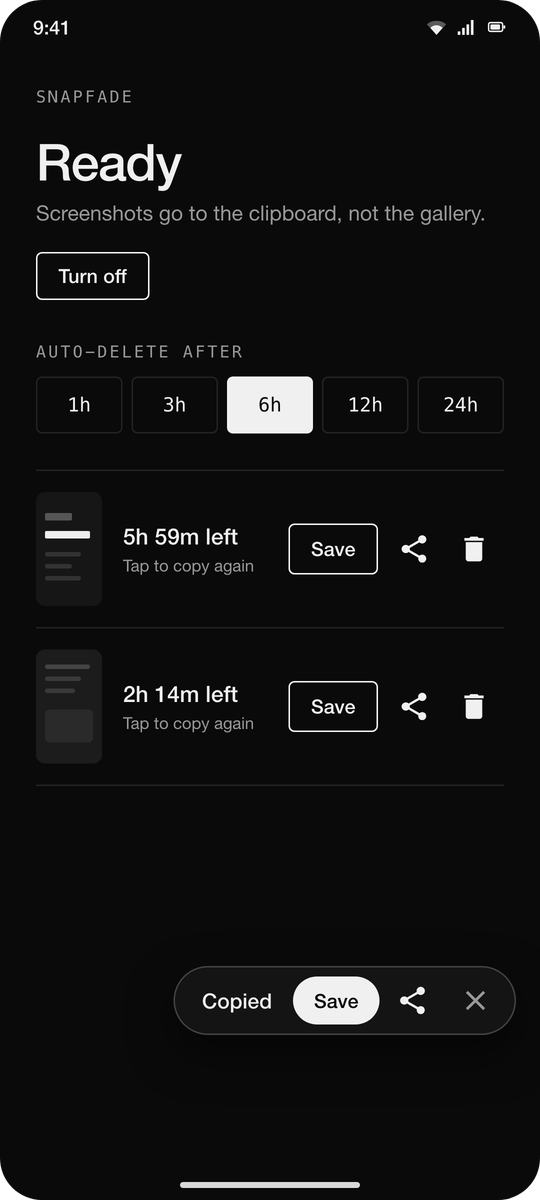
Take a screenshot the normal way. SnapFade moves it out of your gallery into its own private cache and puts it on the clipboard, so you can paste it straight into any app that accepts images. A small popup offers Save and Share. If you do nothing, the screenshot is deleted after the time you pick (1, 3, 6, 12 or 24 hours) and the clipboard entry goes dead with it.
How it works
• Uses the default screenshot shortcut. No new gesture to learn.
• Watches the media store for new screenshots and removes them from the gallery.
• The clipboard holds a content URI; the image lives in the app's private cache until it expires.
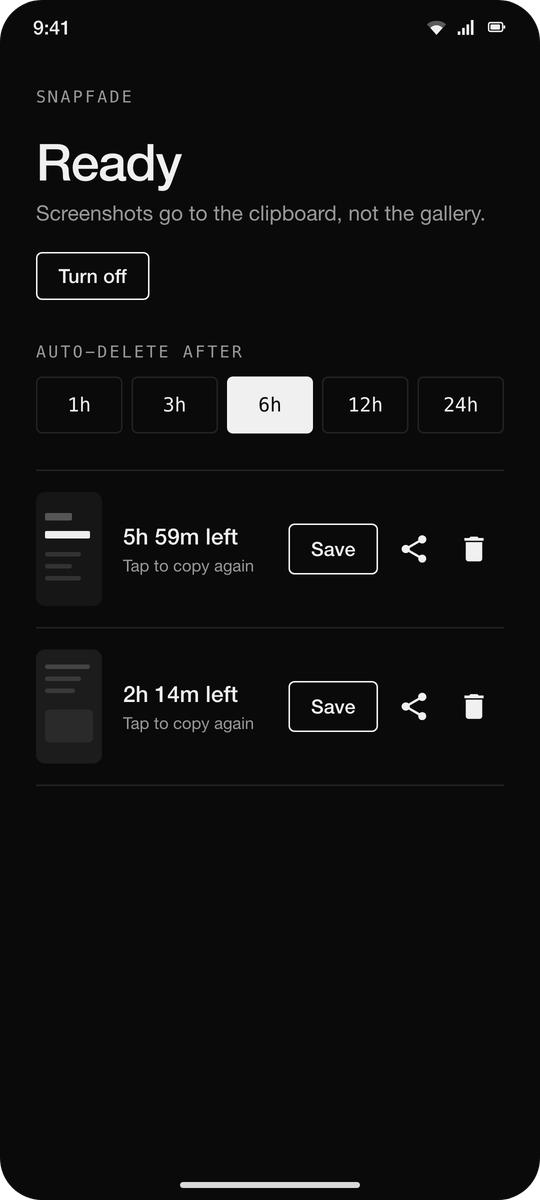
• Every pending screenshot is listed in the app with a countdown. Copy again, save, share or delete from there.
Permissions
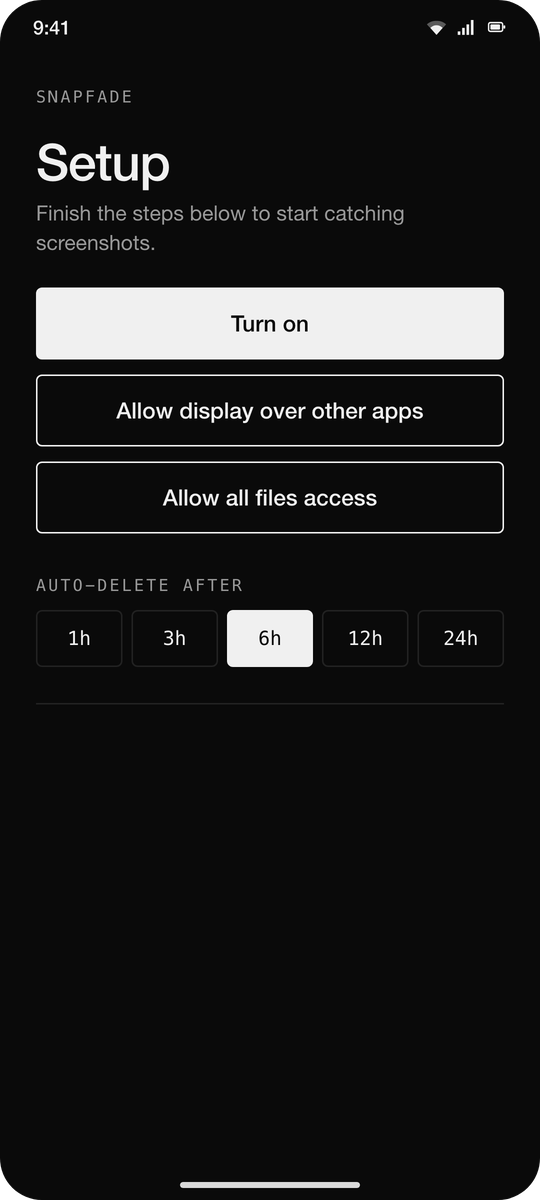
• All files access: to delete the original from the gallery without a prompt each time.
• Display over other apps: for the Save / Share popup. Optional.
• A quiet foreground service keeps it running; its notification is silent and minimised.
No ads, no analytics, no internet permission. Under 500 KB.
License: MIT
Take a screenshot the normal way. SnapFade moves it out of your gallery into its own private cache and puts it on the clipboard, so you can paste it straight into any app that accepts images. A small popup offers Save and Share. If you do nothing, the screenshot is deleted after the time you pick (1, 3, 6, 12 or 24 hours) and the clipboard entry goes dead with it.
How it works
• Uses the default screenshot shortcut. No new gesture to learn.
• Watches the media store for new screenshots and removes them from the gallery.
• The clipboard holds a content URI; the image lives in the app's private cache until it expires.
• Every pending screenshot is listed in the app with a countdown. Copy again, save, share or delete from there.
Permissions
• All files access: to delete the original from the gallery without a prompt each time.
• Display over other apps: for the Save / Share popup. Optional.
• A quiet foreground service keeps it running; its notification is silent and minimised.
No ads, no analytics, no internet permission. Under 500 KB.
License: MIT
| Release info | New Release on Oct 25, 2026 |
|---|---|
| Release notes | First F-Droid release. - No accessibility service any more: a plain Turn on button starts a quiet foreground service - Save / Share popup at the bottom right, clear of the system's own screenshot preview - Black and white UI, visible icons, segmented expiry picker - Service restarts after reboot and after app updates |
| Listing data | F-Droid |
Reviews
No reviews yet. Be the first to review SnapFade.
Used SnapFade? Tell other visitors what you thought.
Log in to write a reviewOther products by this publisher
- "No Distractions" for YouTube 4.10 ----
- #Bible 11.6 "Incredible App - My sister shared this app with me a few weeks ago and it is truly incredible.
- #filmphotography 1.4.2 So, you decided to shoot on film?
- $quirrel 1.5.1 $quirrel Budget & Finance helps you plan each paycheck, track spending, manage debt, and see what is safe to spend before the next payday.
- % Percentage Calculator Pro 1.41 This is the Pro version of % Percentage Calculator.
Most viewed Android System
-
1
 Work Profile VPN Switcher 1.2.1
Automatically manage work profile when VPN connects or disconnects
-
2
 GrayPause 1.5
Keep your phone in grayscale, take short color breaks that end by themselves
- 3 Contacts 4 Contacts Organised by Group
- 4 LibChecker 2.5.5.1 View the third-party libraries used by applications
-
5
 SDK Monitor 2.1
Display and monitor the targetSDK from installed apps
- 6 MAXS Module Ringermode 0.5.19 A Module for MAXS
- 7 Sift 1.0.7 A minimalist recipe keeper.
- 8 TouchDroid 2.0.1 Use your Android Device as Touchpad.
- 9 Coffee 2.27 Keep display awake
-
10
 Tideo Auto Brightness 1.15.2
A glass-box replacement for Android's adaptive brightness
Most downloaded Android System
-
1
 Sapio 2.10.0
Android apps that respect you!
-
2
 Restoid 0.8.0
Root-based Android app backup tool powered by restic
-
3
 StudFinder - Stud Finder for Android 17
Find wall studs with your Android's built-in magnetometer. Free, no ads.
- 4 Discord Timestamp Inserter 1.0.2 Input method for quickly inserting Discord timestamps
- 5 DBZ Battery Widget 1.7 View your battery status with your favorite DBZ character
-
6
 openCook 0.4
Recipe manager to scan cookbook photos, plan your week and share the list
-
7
 Voki Bot 0.8.0
Android automation tool
-
8
Work Profile VPN Switcher 1.2.1
Automatically manage work profile when VPN connects or disconnects
- 9 QuickShot: Share Screenshot 3.9 Replace the assistant gesture with quick screenshot share. Quickest way to share
-
10
 Middor 0.2.0
Mirror applications for HUD display with horizontal flip.