
Tideo Auto Brightness 1.15.2
A glass-box replacement for Android's adaptive brightness
Download
24.94 MB · app-release.apk
46downloads
4this week
FreeFreeware
0reviews
Screenshots
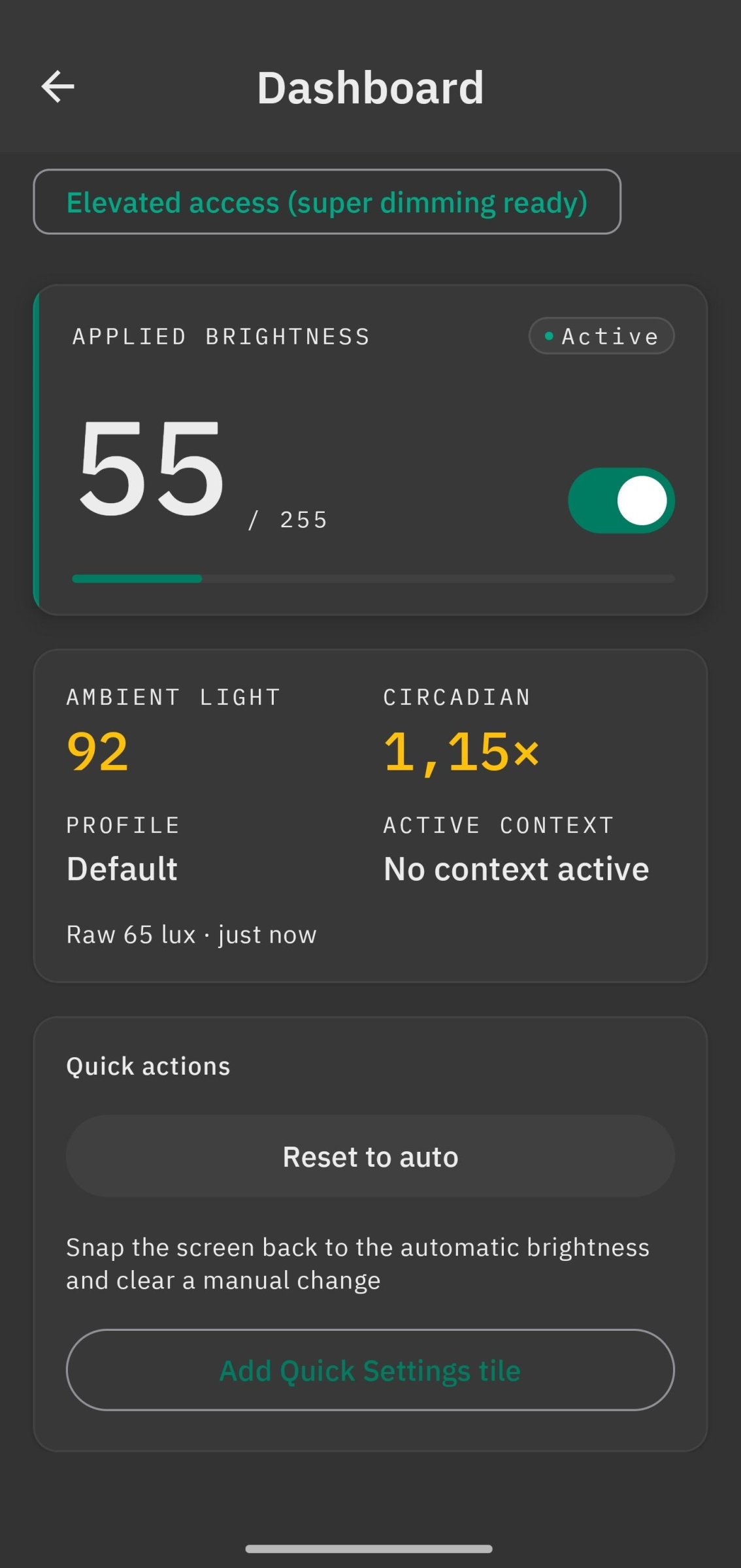
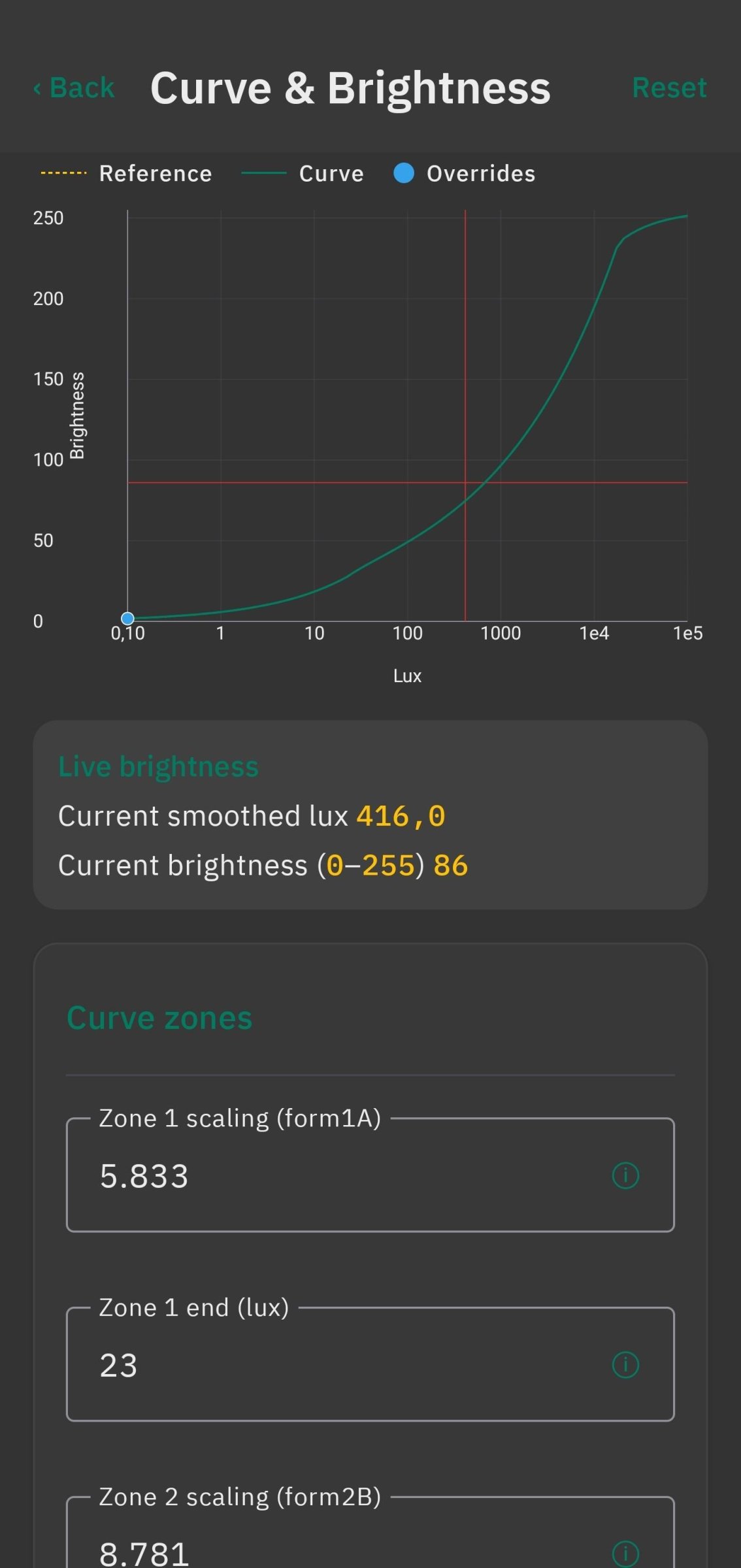
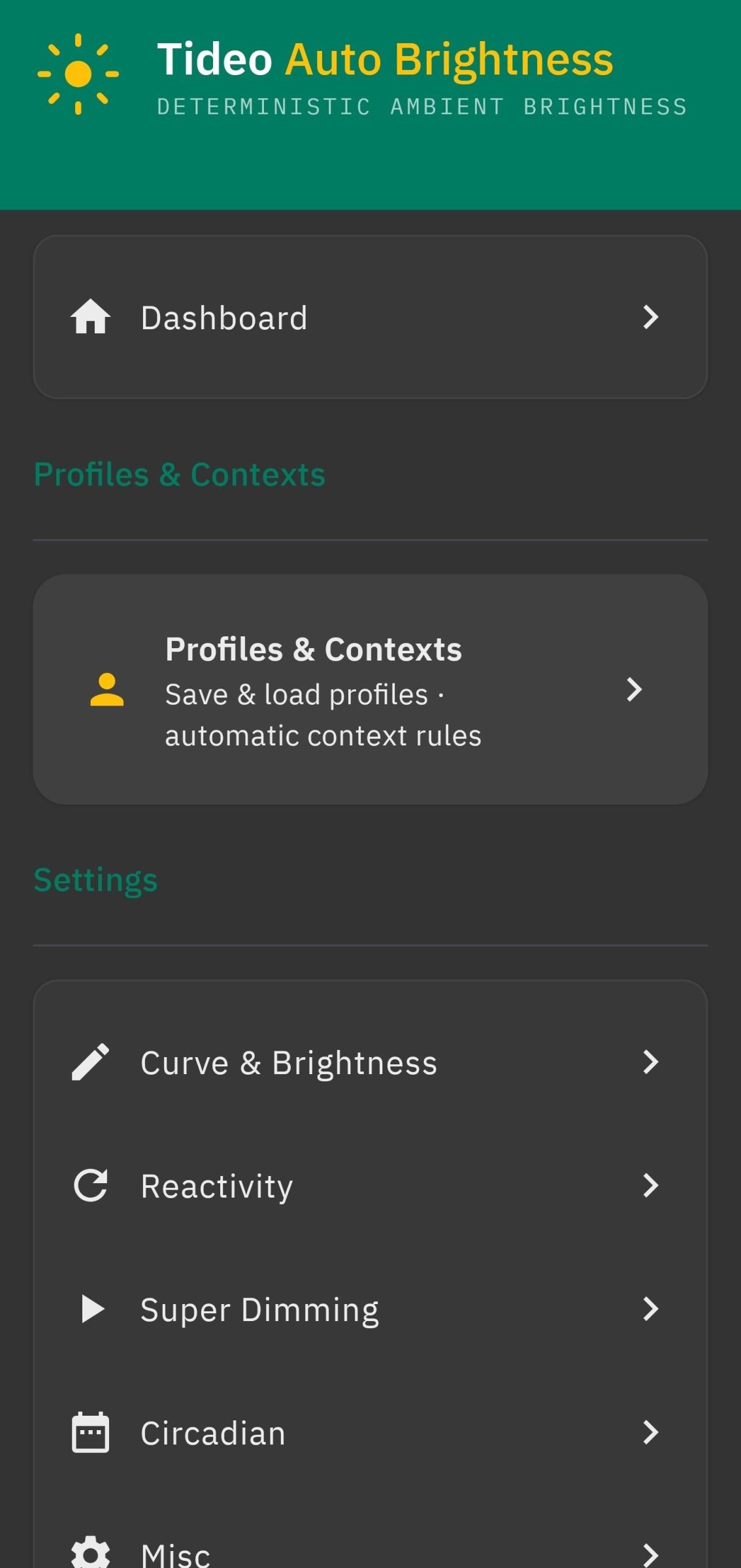
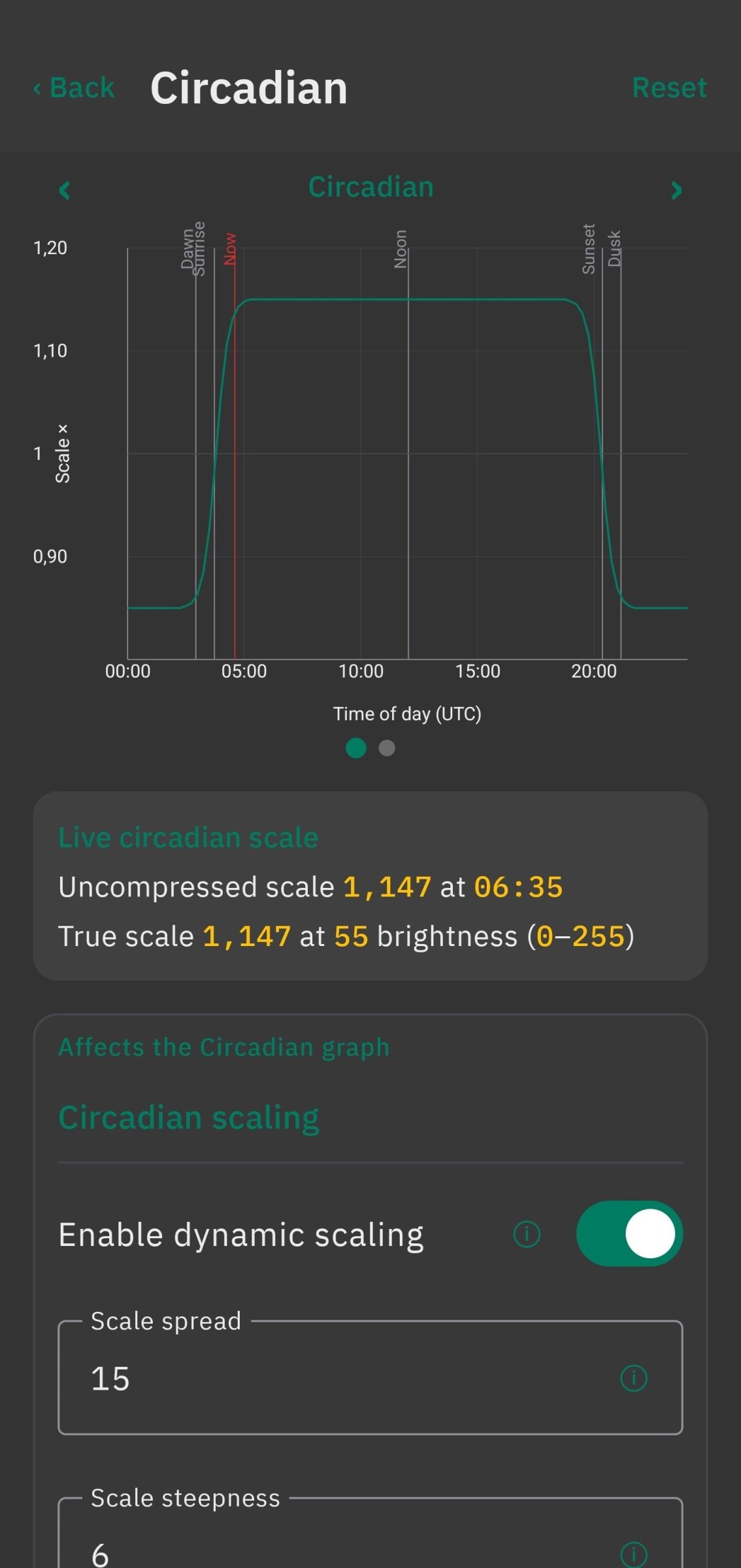
About Tideo Auto Brightness
You taught Android your brightness preferences and it is still wrong. Tideo
replaces the opaque on-device ML of stock adaptive brightness with deterministic,
inspectable math: a tunable lux-to-brightness curve you can see and shape, smooth
animated transitions, circadian (time-of-day) scaling, per-context overrides, and
an optional privileged "super dimming" mode that takes the screen below the system
minimum.
To use it, first disable the system's stock Adaptive/Auto Brightness
(Settings > Display), then launch Tideo, complete onboarding, and toggle the main
service on from the Dashboard.
Features:
* Three-zone perceptual brightness curve with a live, editable graph.
* Automatic curve fitting: adjust brightness by hand during normal use and, after
a handful of points across varied lighting, the wizard suggests a fitted curve.
* Reactivity control: per-range dead zones that kill sensor jitter without making
the screen sluggish.
* Smooth animated transitions with override detection: drag the system slider and
Tideo steps aside, then resumes per your rules.
* Circadian scaling synced to local sunrise/sunset, shifting the whole curve
across the day.
* Super dimming (privileged): drives Android's Reduce Bright Colors below the
hardware floor, plus a PWM-flicker-aware software-dimming mode.
* Context automation: load profiles automatically by foreground app, time window,
location, charging state, Wi-Fi SSID, or day of week.
* Profiles: five built-in presets plus save / overwrite / factory-restore and
JSON import/export.
* Live Debug scene: a glass-box readout of every runtime variable and decision.
* Emergency recovery: flip the phone upside-down and shake to force brightness to
max with an SOS vibration.
* Surfaces: foreground-service notification with actions, a Quick Settings tile, a
home-screen widget, and boot-start.
Privilege tiers:
The core pipeline is fully functional at the BASIC tier, which uses only the
user-grantable WRITE_SETTINGS permission. The optional ELEVATED tier unlocks super
dimming and requires a one-time WRITE_SECURE_SETTINGS grant that YOU perform via
adb, Shizuku, or root. It is never granted automatically.
About the permissions Tideo requests:
* Background location and location: used only by the optional location-aware
context rules and the once-a-day sunrise/sunset refresh for circadian scaling.
* Usage access (PACKAGE_USAGE_STATS): used only by per-app context rules to read
the foreground app; granted from a Settings screen, not a runtime dialog.
* Accessibility service: optional and presentation-only. It draws the debug/context
flash overlay system-wide. It does not read screen content and does not consume
input events. With it off, Tideo falls back to a foreground toast.
Privacy:
Tideo is local-first with no analytics, ads, or accounts. It makes one outbound
network request, and only as a last resort: if you opt in and enable circadian
scaling and no on-device location is available, it falls back to a single HTTPS
request to ipwho.is to estimate your city from your public IP. This fallback is off
by default and can be turned off under Circadian > Date & location. Automatic lookup
runs at most once per day, and the resolved coordinates are saved only on-device;
the user-triggered Use current location action can make an additional request after
on-device location fails. Everything else runs entirely on-device.
Tideo is a ground-up Kotlin/Compose rebuild of the Advanced Auto Brightness Tasker
project, ported with exact behavioural parity. It is not affiliated with Tasker.
License: MIT
replaces the opaque on-device ML of stock adaptive brightness with deterministic,
inspectable math: a tunable lux-to-brightness curve you can see and shape, smooth
animated transitions, circadian (time-of-day) scaling, per-context overrides, and
an optional privileged "super dimming" mode that takes the screen below the system
minimum.
To use it, first disable the system's stock Adaptive/Auto Brightness
(Settings > Display), then launch Tideo, complete onboarding, and toggle the main
service on from the Dashboard.
Features:
* Three-zone perceptual brightness curve with a live, editable graph.
* Automatic curve fitting: adjust brightness by hand during normal use and, after
a handful of points across varied lighting, the wizard suggests a fitted curve.
* Reactivity control: per-range dead zones that kill sensor jitter without making
the screen sluggish.
* Smooth animated transitions with override detection: drag the system slider and
Tideo steps aside, then resumes per your rules.
* Circadian scaling synced to local sunrise/sunset, shifting the whole curve
across the day.
* Super dimming (privileged): drives Android's Reduce Bright Colors below the
hardware floor, plus a PWM-flicker-aware software-dimming mode.
* Context automation: load profiles automatically by foreground app, time window,
location, charging state, Wi-Fi SSID, or day of week.
* Profiles: five built-in presets plus save / overwrite / factory-restore and
JSON import/export.
* Live Debug scene: a glass-box readout of every runtime variable and decision.
* Emergency recovery: flip the phone upside-down and shake to force brightness to
max with an SOS vibration.
* Surfaces: foreground-service notification with actions, a Quick Settings tile, a
home-screen widget, and boot-start.
Privilege tiers:
The core pipeline is fully functional at the BASIC tier, which uses only the
user-grantable WRITE_SETTINGS permission. The optional ELEVATED tier unlocks super
dimming and requires a one-time WRITE_SECURE_SETTINGS grant that YOU perform via
adb, Shizuku, or root. It is never granted automatically.
About the permissions Tideo requests:
* Background location and location: used only by the optional location-aware
context rules and the once-a-day sunrise/sunset refresh for circadian scaling.
* Usage access (PACKAGE_USAGE_STATS): used only by per-app context rules to read
the foreground app; granted from a Settings screen, not a runtime dialog.
* Accessibility service: optional and presentation-only. It draws the debug/context
flash overlay system-wide. It does not read screen content and does not consume
input events. With it off, Tideo falls back to a foreground toast.
Privacy:
Tideo is local-first with no analytics, ads, or accounts. It makes one outbound
network request, and only as a last resort: if you opt in and enable circadian
scaling and no on-device location is available, it falls back to a single HTTPS
request to ipwho.is to estimate your city from your public IP. This fallback is off
by default and can be turned off under Circadian > Date & location. Automatic lookup
runs at most once per day, and the resolved coordinates are saved only on-device;
the user-triggered Use current location action can make an additional request after
on-device location fails. Everything else runs entirely on-device.
Tideo is a ground-up Kotlin/Compose rebuild of the Advanced Auto Brightness Tasker
project, ported with exact behavioural parity. It is not affiliated with Tasker.
License: MIT
| Release info | Update on Oct 26, 2026 |
|---|---|
| Release notes | This is a bit embarassing, but my fix in 1.15.1 didn't actually fix the problem where Night Light briefly showed the old temperature before correcting. The reason for that is that the debug app behaves differently from the release app and I only found out after releasing... The OnePlus 13 ignores Night Light temperature via Write Secure Settings, once Tideo notices this happening it uses Shizuku (or Root) instead to write the temperature (related: #148). When a context rule fires that returns to a Circadian Night Light profile, two Shizuku jobs run in quick succession. The first one shut down its helper, and the second tries to restart it before it is complete, which causes a 4 second timeout. Night Light briefly uses 4082 K before correcting to 7308 K after about 5 seconds. The debug app never learned that my phone ignores Night Light temperature writes via Write Secure Settings and therefore only fired one Shizuku job upon triggering such a context rule, meaning the bug I was fixing never triggered on the debug app in the first place and my device pass meant nothing(!). Tideo now reuses the same helper instead of restarting it between jobs. This means that the helper stays running while Tideo runs, but this is a trade-off that's worth it and will mostly be beneficial once the PRIVILEGED_FAST_PATHS.md plan lands. What's new Fixes: • with Shizuku, returning to a profile with Night Light on no longer shows the device's own temperature for several seconds first; Tideo keeps its Shizuku helper running instead of restarting it for every call What's Changed • fix: keep the Shizuku helper bound, no 4 s bind hang (1.15.2) by @faded-penguin021 in https://github.com/faded-penguin021/Tideo-Auto-Brightness/pull/155 Full Changelog: https://github.com/faded-penguin021/Tideo-Auto-Brightness/compare/v1.15.1...v1.15.2 |
| Listing data | F-Droid |
Reviews
No reviews yet. Be the first to review Tideo Auto Brightness.
Used Tideo Auto Brightness? Tell other visitors what you thought.
Log in to write a reviewOther products by this publisher
- "No Distractions" for YouTube 4.10 ----
- #Bible 11.6 "Incredible App - My sister shared this app with me a few weeks ago and it is truly incredible.
- #filmphotography 1.4.2 So, you decided to shoot on film?
- $quirrel 1.5.1 $quirrel Budget & Finance helps you plan each paycheck, track spending, manage debt, and see what is safe to spend before the next payday.
- % Percentage Calculator Pro 1.41 This is the Pro version of % Percentage Calculator.
Most viewed Android System
-
1
 Work Profile VPN Switcher 1.2.1
Automatically manage work profile when VPN connects or disconnects
-
2
 GrayPause 1.5
Keep your phone in grayscale, take short color breaks that end by themselves
- 3 Contacts 4 Contacts Organised by Group
- 4 Sift 1.0.7 A minimalist recipe keeper.
- 5 LibChecker 2.5.5 View the third-party libraries used by applications
- 6 MAXS Module Ringermode 0.5.19 A Module for MAXS
-
7
 SDK Monitor 2.1
Display and monitor the targetSDK from installed apps
- 8 TouchDroid 2.0.1 Use your Android Device as Touchpad.
- 9 Coffee 2.27 Keep display awake
- 10 Ril Control 1.0 Control the RIL-daemon process
Most downloaded Android System
- 1 Discord Timestamp Inserter 1.0.2 Input method for quickly inserting Discord timestamps
-
2
 Restoid 0.7.0
Root-based Android app backup tool powered by restic
-
3
Work Profile VPN Switcher 1.2.1
Automatically manage work profile when VPN connects or disconnects
- 4 DBZ Battery Widget 1.7 View your battery status with your favorite DBZ character
-
5
 Sapio 2.10.0
Android apps that respect you!
-
6
 openCook 0.4
Recipe manager to scan cookbook photos, plan your week and share the list
-
7
 StudFinder - Stud Finder for Android 17
Find wall studs with your Android's built-in magnetometer. Free, no ads.
- 8 Keep Screen On 1.29.1 A screen timeout quick settings tile
-
9
Tideo Auto Brightness 1.15.2
A glass-box replacement for Android's adaptive brightness
-
10
 Quick Ball 6.1.0
A Quick Action Ball that gives fast access to controls —volume, brightness, lock