SharePoint Project Timer 1.3.508.3
The SharePoint Project Timer includes a complete suite of adjustable visual settings, including choices between 5 different pre-designed themes, the ability to create new themes, and the capacity to upload images to set as the timer background.
Product Specifications
| User Rating: | item has less then 1 vote |
|
| FileCart Rating | ||
| Submitted by: | sharepointboost | |
| License | Shareware | |
| Expires | 30 Days | |
| Price | $449 | |
| Downloads | 400 | |
| OS Support | Windows Install and Uninstall | |
| File Name | ProjectTimerSetup.zip | |
| File Size | 0.75 MB ( 772 KB ) | |
| Published | Oct 22, 2009 (17 years ago) | |
| Updated | Oct 12, 2013 (13 years ago) | |
Latest Searches
winning powerball numbers saturday august 15 2026 1 minute ago
daftar hgu ptpn di sulawesi selatan 3 minutes ago
football teams to join near me 3 minutes ago
acqua sport club proximas aperturas 3 minutes ago
trariff zealand zone card 5 minutes ago
japan visa validity to filipinos 6 minutes ago
señor del fuego cosplay stl 7 minutes ago
apple store sandton 7 minutes ago
ms access questionare database 10 minutes ago
Popular Searches
id cards 602 times
2025 495 times
2024 386 times
Softperfect 329 times
2026 290 times
5g spf sonicwall compatible copper module 284 times
Gypsy 2.0 Onlyfans Leaked Photos 260 times
targetamazon credit card.asp?highlight=0 260 times
Database Workbench Pro 258 times
Product Details
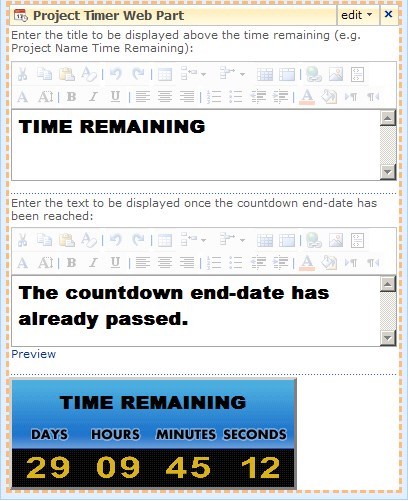
The SharePoint Project Timer also includes a complete suite of adjustable visual settings, including choices between 5 different pre-designed themes, the ability to create new themes, and the capacity to upload images to set as the timer background. The fully-modifiable countdown configuration settings offer further flexibility, from changing number-style settings to controlling whether the countdown includes seconds. And, once chosen, your target date & time are remembered automatically, so even if you close the web part and later reposition it on your web page, the proper countdown time will still be displayed.
SharePoint Project Timer is a SharePoint project time management web part to help you keep track of your deadlines. It allows you to set a countdown to the target date, and will then display a clock on your screen counting down to that specific date. It is very useful in project management environments, or to have tasks more structured and finished on time.
SharePoint Project Timer gives the user the option to choose from 5 preset styles, and one option to customize the style yourself. Customizing the style allows you to upload different styles of digits into the web part as well as selecting the background color for the time area and the text area of the web part.
| Requirements: | SharePoint |
| Release Info: | Minor Update on Aug 30, 2010 |
| Release Notes: | New Features: - Server License is available; - Announced compatibility with SharePoint 2010. |
Reviews
You must be logged in to write a review
Reviews of SharePoint Project Timer 1.3.508.3
You can be the first to write a review of SharePoint Project Timer!Most Viewed Windows Project Management
A VIP Task Manager Standard Edition 4.2.59
Project Planning and Management 3.2
10 Minute Action Plans 5.0.2
A VIP Team To Do List 2.9.68
FastReport.Net 2015
ActiveQuality Iso 9000 Software 2.7
MPMM Ultimate 5.2
TaskMerlin Project Management Software 5.0.0.8
DRoster Premium - Scheduling Software 6.6.20
Most Downloaded Windows Project Management
MPMM Ultimate 5.2
A VIP Task Manager Professional Edition 4.2.61
A VIP Simple To Do List 2.9.67
A VIP Team To Do List 2.9.68
actiTIME 2016
ActiveQuality Iso 9000 Software 2.7
FastReport.Net 2015
DRoster Premium - Scheduling Software 6.6.20
AllNetic Working Time Tracker 3.0