SharePoint Project Progress Monitor 1.1.111.50
A free SharePoint project management web part visually enhances the status of a SharePoint project or task by displaying numerical data via percentage-based bars graphically.
Product Specifications
| User Rating: | item has less then 1 vote |
|
| FileCart Rating | ||
| Submitted by: | sharepointboost | |
| License | Freeware | |
| Price | $0.00 | |
| Downloads | 363 | |
| OS Support | Windows Install and Uninstall | |
| File Size | 0.31 MB ( 314 KB ) | |
| Published | Oct 22, 2009 (17 years ago) | |
| Updated | Oct 09, 2013 (13 years ago) | |
Latest Searches
pisoi british 1 minute ago
asas vista real estate abu dhabi 2 minutes ago
Daily Info 3 minutes ago
trees that are non toxic to cats and humans 4 minutes ago
world.dox 5 minutes ago
how many singapore lives in australia 5 minutes ago
ver smiling friends online 8 minutes ago
lyrics AUD 20260730 WA0159
faye arnaiz 10 minutes ago
Popular Searches
id cards 602 times
2025 495 times
2024 386 times
Softperfect 329 times
2026 288 times
5g spf sonicwall compatible copper module 283 times
targetamazon credit card.asp?highlight=0 260 times
Gypsy 2.0 Onlyfans Leaked Photos 259 times
Database Workbench Pro 258 times
Product Details
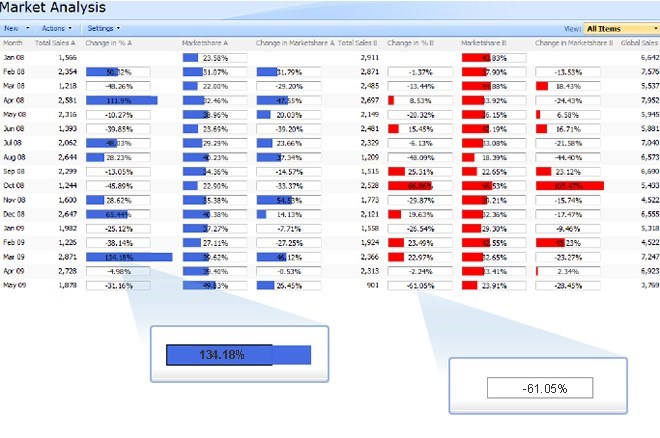
Two-way conversion between raw numerical data and eye-catching color-coded progress bars;
Fully customizable color options, bar length settings, and minimum and maximum allowed values;
Supports percentage values above 100% and below 0%;
Option to display colored progress bar and numerical percentage together.
SharePoint Project Progress Monitor makes monotonous SharePoint lists more visual, allowing you to display numerical data visually in the form of percentage-based progress bars. Fully customizable settings allow for your choice in foreground and background colors, bar length, and where to display the actual, numeric percentage. The corresponding percentage data is displayed with the colored progress bar to ensure both SharePoint data visualization and numerical precision.
SharePoint Project Progress Monitor also has the capacity to display percentage values above 100 percent, making it easier to see when milestones or project goals are achieved and surpassed. Negative percentage values are also supported, maximizing usability without sacrificing statistical accuracy.
SharePoint Project Progress Monitor is a new column type that adds a graphical component to standard SharePoint percentage data columns. This added functionality improves the usability of the SharePoint percentage data column by making it more user-friendly and intuitive. Two-way conversion between raw numerical data and color-coded progress bars makes it easy to use SharePoint Project Progress Monitor on already existing lists as well.
One of the most useful features of SharePoint Project Progress Monitor is its ability to convert other SharePoint column Types into the Project Progress Monitor column type. Just select the column you want to convert, and click Convert when you are done. Please keep in mind that this will only work for SharePoint Percentage Data column types.
| Requirements: | SharePoint |
| Release Info: | Major Update on Jan 14, 2010 |
| Release Notes: | Licensing module upgraded. |
Reviews
You must be logged in to write a review
Reviews of SharePoint Project Progress Monitor 1.1.111.50
You can be the first to write a review of SharePoint Project Progress Monitor!Most Viewed Windows Project Management
A VIP Task Manager Standard Edition 4.2.59
Project Planning and Management 3.2
10 Minute Action Plans 5.0.2
A VIP Team To Do List 2.9.68
FastReport.Net 2015
ActiveQuality Iso 9000 Software 2.7
MPMM Ultimate 5.2
DRoster Premium - Scheduling Software 6.6.20
TaskMerlin Project Management Software 5.0.0.8
Most Downloaded Windows Project Management
MPMM Ultimate 5.2
A VIP Task Manager Professional Edition 4.2.61
A VIP Simple To Do List 2.9.67
A VIP Team To Do List 2.9.68
actiTIME 2016
ActiveQuality Iso 9000 Software 2.7
FastReport.Net 2015
DRoster Premium - Scheduling Software 6.6.20
AllNetic Working Time Tracker 3.0