SharePoint AD Self Service 2.6.723.0
SharePoint AD Self Service allows for administrators to give users the ability to add, delete, edit, or view their own AD profile. Any adjustments made by users can have e-mail notifications, and will be recorded into a log.
Product Specifications
| User Rating: | item has less then 1 vote |
|
| FileCart Rating | ||
| Submitted by: | sharepointboost | |
| License | Shareware | |
| Expires | 30 Days | |
| Price | $599 | |
| Downloads | 364 | |
| OS Support | Windows Install and Uninstall | |
| File Name | ADSelfServiceSetup.zip | |
| File Size | 0.96 MB ( 981 KB ) | |
| Published | Oct 22, 2009 (17 years ago) | |
| Updated | Oct 10, 2013 (13 years ago) | |
Latest Searches
redditch australia 3 minutes ago
Textured Linen Upholstered Dining Chairs With Solid Wood Legs Set of 4 Beige 4 minutes ago
helluva boss lucifer 5 minutes ago
what roads will be closed for the dragon con parade 2026 5 minutes ago
como limpiar cabezales en epson l3210 6 minutes ago
SGT SOFT GOOD 8 minutes ago
michael chang was a feared player when in his prime 11 minutes ago
ROG strix g814 jr 12 minutes ago
Green Acres Spaniels 12 minutes ago
Popular Searches
id cards 602 times
2025 495 times
2024 386 times
Softperfect 329 times
2026 294 times
5g spf sonicwall compatible copper module 286 times
Gypsy 2.0 Onlyfans Leaked Photos 264 times
targetamazon credit card.asp?highlight=0 263 times
Database Workbench Pro 258 times
Product Details
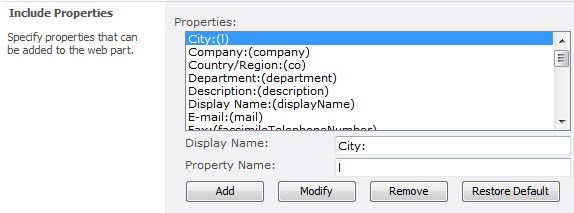
The admin can also customize SharePoint AD Self Service by dragging & dropping tabs and properties into a desired order; displaying properties in a dropdown list either preselected or from different lists; or leaving it empty for custom entries.
The SharePoint AD Self Service web part allows users to modify their personal Active Directory account information in an easy to use, user-friendly SharePoint web part.
By default, SharePoint users' profiles are stored and can only be managed in Active Directory. Except for IT administrators and members of Domain Admins, most users are unable to access Active Directory information, nor can they change their own AD properties. The SharePoint AD Self Service web part alleviates this burden on IT administrators by enabling individual users to maintain their own AD information in an intuitive interface.
To make changes to their AD properties, what users need to do is type in the user name and password to enter into the page where the AD Self Service web part being added. The web part will automatically detect current login user and domain, retrieving his/her information from AD and display them in the web part. Then, users can start to modify. Finally, by clicking "save", the whole process has been completed.
Moreover, IT administrators have complete control over which properties may be changed and by whom. IT administrators and domain admin members can configure settings in SharePoint Central Administration to restrict and exclude users from changing properties, as well as limiting the properties that are accessible in the web part itself.
| Requirements: | SharePoint |
| Release Info: | Major Update on Dec 12, 2010 |
| Release Notes: | New Feature - Support German. Bug Fixed: - Cannot work with another web part which using JQuery. |
Reviews
You must be logged in to write a review
Reviews of SharePoint AD Self Service 2.6.723.0
You can be the first to write a review of SharePoint AD Self Service!Most Viewed Windows Project Management
A VIP Task Manager Standard Edition 4.2.59
Project Planning and Management 3.2
10 Minute Action Plans 5.0.2
A VIP Team To Do List 2.9.68
FastReport.Net 2015
ActiveQuality Iso 9000 Software 2.7
MPMM Ultimate 5.2
TaskMerlin Project Management Software 5.0.0.8
DRoster Premium - Scheduling Software 6.6.20
Most Downloaded Windows Project Management
MPMM Ultimate 5.2
A VIP Task Manager Professional Edition 4.2.61
A VIP Simple To Do List 2.9.67
A VIP Team To Do List 2.9.68
actiTIME 2016
ActiveQuality Iso 9000 Software 2.7
FastReport.Net 2015
DRoster Premium - Scheduling Software 6.6.20
AllNetic Working Time Tracker 3.0