
SearchLauncher 0.1.5
Search apps, contacts and the web, and open results in an ad-free browser
Download
514.87 MB · app-play.apk
48downloads
19this week
FreeFreeware
0reviews
Screenshots
About SearchLauncher
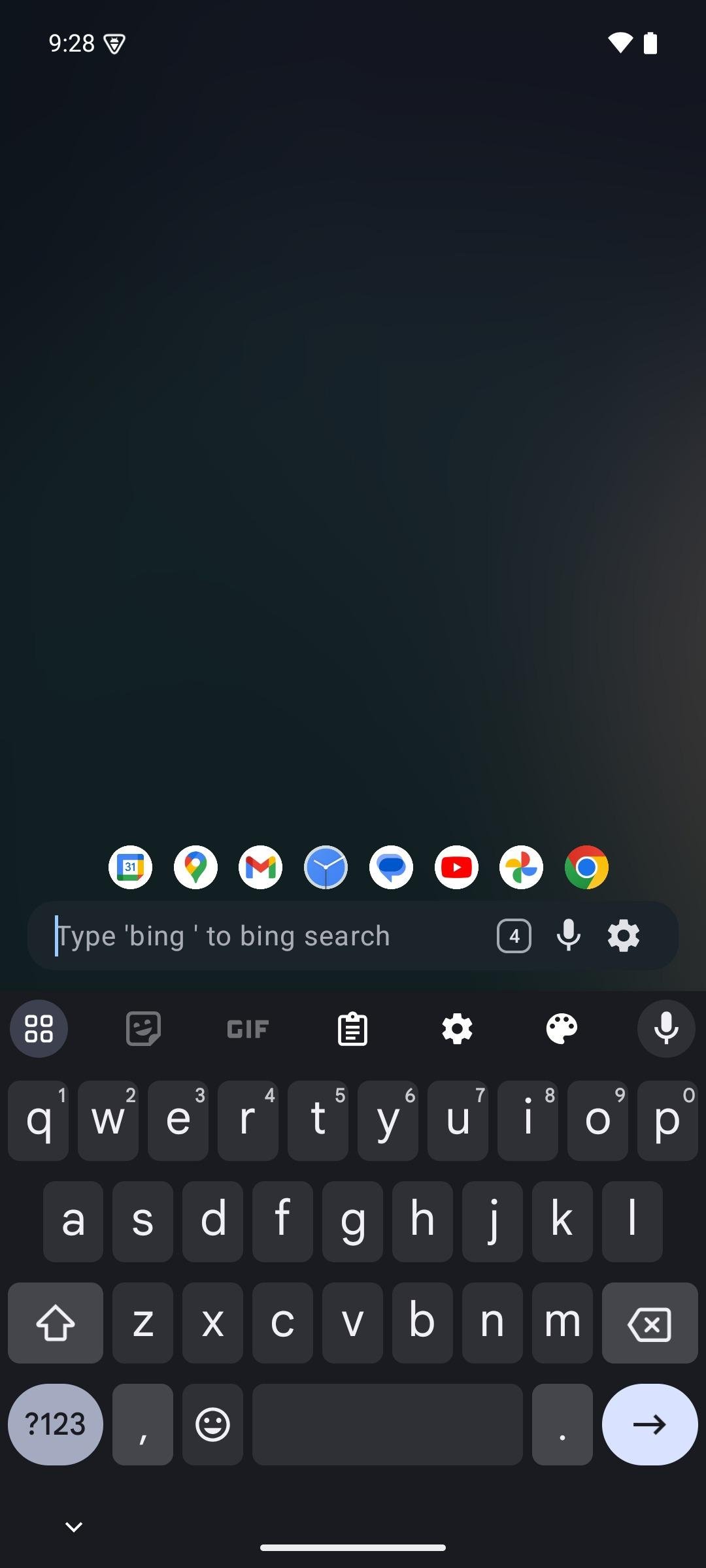
Your home screen opens with a keyboard. One bar finds everything on your phone and everything on the web, and opens what you find in a browser that blocks ads.
SEARCH ANYTHING
Apps, app shortcuts, contacts, device settings, downloads, calendar events for the coming week, text snippets and your own custom actions. Ranking learns from what you pick, so the next time is faster.
SEARCH INSIDE APPS, NOT JUST FOR THEM
Type y for YouTube, m for Maps, w for Wikipedia, then what you are looking for. Add a shortcut for any site with a search URL, and give it whatever letter you like.
ONE FIELD THAT KNOWS WHAT YOU TYPED
A sum gets an answer you can tap to copy. A web address opens. "5m pasta" sets a timer. A phone number offers to call it, message it, or save it as a contact. An email address offers to write to it.
A BROWSER WITH NO ADS
Web results open in the app, with ads and trackers blocked by default. Swipe the search bar sideways to move between tabs, or up to see them all as live previews. Both work from the home screen, so your tabs are one gesture away without opening a browser first. Save a page under a title you choose, and find visited pages back from the search bar. Private windows, file uploads, picture-in-picture video and hardware keyboard shortcuts are all included.
FEWER ICONS, MORE ROOM FOR WIDGETS
Add a widget by typing its name, resize it by dragging, and tap the wallpaper to show or hide them all. On a tablet they lay out in columns rather than one widget stretched across the display.
MAKE IT YOURS
Swipe through your own wallpapers. The theme colour can follow the wallpaper behind the search bar. Monochrome icons are optional. Dark mode, a true black OLED mode, a row of favourites, voice search, and export and import of everything you have set up.
Use it as your default launcher, or as a widget on the launcher you already have.
PRIVACY
Nothing is sent anywhere by default. Search suggestions are optional, and when you turn them on, what you type goes to whichever provider the shortcut names. Crash reporting is opt-in. Contacts and calendar entries are read on your device to answer what you typed and are never uploaded. The browser's blocklist is downloaded from the StevenBlack hosts project.
SearchLauncher is free and open source: [link removed]
License: MIT
SEARCH ANYTHING
Apps, app shortcuts, contacts, device settings, downloads, calendar events for the coming week, text snippets and your own custom actions. Ranking learns from what you pick, so the next time is faster.
SEARCH INSIDE APPS, NOT JUST FOR THEM
Type y for YouTube, m for Maps, w for Wikipedia, then what you are looking for. Add a shortcut for any site with a search URL, and give it whatever letter you like.
ONE FIELD THAT KNOWS WHAT YOU TYPED
A sum gets an answer you can tap to copy. A web address opens. "5m pasta" sets a timer. A phone number offers to call it, message it, or save it as a contact. An email address offers to write to it.
A BROWSER WITH NO ADS
Web results open in the app, with ads and trackers blocked by default. Swipe the search bar sideways to move between tabs, or up to see them all as live previews. Both work from the home screen, so your tabs are one gesture away without opening a browser first. Save a page under a title you choose, and find visited pages back from the search bar. Private windows, file uploads, picture-in-picture video and hardware keyboard shortcuts are all included.
FEWER ICONS, MORE ROOM FOR WIDGETS
Add a widget by typing its name, resize it by dragging, and tap the wallpaper to show or hide them all. On a tablet they lay out in columns rather than one widget stretched across the display.
MAKE IT YOURS
Swipe through your own wallpapers. The theme colour can follow the wallpaper behind the search bar. Monochrome icons are optional. Dark mode, a true black OLED mode, a row of favourites, voice search, and export and import of everything you have set up.
Use it as your default launcher, or as a widget on the launcher you already have.
PRIVACY
Nothing is sent anywhere by default. Search suggestions are optional, and when you turn them on, what you type goes to whichever provider the shortcut names. Crash reporting is opt-in. Contacts and calendar entries are read on your device to answer what you typed and are never uploaded. The browser's blocklist is downloaded from the StevenBlack hosts project.
SearchLauncher is free and open source: [link removed]
License: MIT
| Release info | Update on Nov 04, 2026 |
|---|---|
| Release notes | Install app-play.apk for the same signing identity as Google Play. GitHub and Play can update this installation interchangeably when the version code permits. app-release.apk is the F-Droid build, for existing legacy GitHub/F-Droid installs. It uses Android's system WebView instead of the Gecko browser engine, so the built-in browser has fewer features. Its older signing key is incompatible with Play. Switching from that copy requires exporting your data, removing it from every Android user/profile, and importing into the Play-signed app. SearchLauncher 0.1.5: custom swipes, number row, accent-free search What changed • Choose what each swipe does. A new Gestures card in Settings has a row per home-screen swipe (up, down on the left, down on the right, left, right). Each can open notifications, Quick Settings, the app drawer, the next or previous background, an app of your choice, or do nothing. Keyboard swipes and pulling down on widgets follow the same choices. The old "Separate Quick Settings swipe" toggle is replaced by the down-right choice, and its saved value still sets that swipe's default. Closes #161. Includes PR #199. • Number row on the built-in keyboard. Settings > Keyboard can add a row of digits above the letters. Letter keys keep their size; the keyboard grows a little. With the row on, the top letter row long-presses to symbols instead of digits. Closes #165. Includes PR #197. • Search ignores accents. "tel" finds "Téléphone" and "tél" finds "Telegram". A result whose accents match the query ranks just ahead of one that differs. This also applies to open tabs, history, widget search and contact subtitles. Closes #190. Includes PR #200. • Always request desktop sites. A browser setting, off by default, starts new tabs in desktop mode. Each tab can still switch from its menu. Closes #193. Includes PR #196. • Rounded icons in favorites. Bookmark, tab and contact icons in the favorites row get rounded corners, like app icons. Includes PR #179. •… |
| Listing data | F-Droid |
Reviews
No reviews yet. Be the first to review SearchLauncher.
Used SearchLauncher? Tell other visitors what you thought.
Log in to write a reviewOther products by this publisher
- "No Distractions" for YouTube 4.10 ----
- #Bible 11.6 "Incredible App - My sister shared this app with me a few weeks ago and it is truly incredible.
- #filmphotography 1.4.2 So, you decided to shoot on film?
- $quirrel 1.5.1 $quirrel Budget & Finance helps you plan each paycheck, track spending, manage debt, and see what is safe to spend before the next payday.
- % Percentage Calculator Pro 1.41 This is the Pro version of % Percentage Calculator.
Most viewed Android Launcher
- 1 Entropy's Defiance 3.4.0 Minimalist launcher and time-horizon task manager.
- 2 Cyclauncher 1.0.0 Ergonomic one-handed launcher with side alphabet grid, tags & widgets
- 3 Alt Launcher 1.0.6 Launch apps on boot and fastboot on Phoenix Android (and similar) radios
- 4 DroidOS Launcher 5.0 Cover-screen launcher and window manager for DroidOS.
- 5 G2L 2.2 Gesture Launcher
- 6 Scratchpad Launcher 2026.10.5 A minimal launcher with an always-visible scratchpad. Zero ads.
- 7 Defang 0.1.25 Launcher that puts speed bumps between you and the apps engineered against you
-
8
 Dragon Launcher 4.6.1
Launch your apps via gesture
- 9 Slauncher 0.1.5 I use this launcher.
- 10 Activity Launcher 2.5.0-alpha.1 Create shortcuts for apps and activities
Most downloaded Android Launcher
- 1 Cyclauncher 1.0.0 Ergonomic one-handed launcher with side alphabet grid, tags & widgets
- 2 Focus Launcher 1.1.55 A text-only, black and white launcher with app timers and a weekly review
-
3
 Slate 1.6
Minimal text-only Android home screen. No icons. No analytics. Zero network.
-
4
SearchLauncher 0.1.5
Search apps, contacts and the web, and open results in an ad-free browser
- 5 Defang 0.1.25 Launcher that puts speed bumps between you and the apps engineered against you
- 6 Launch - Minimalist Launcher 8.0 A clean, efficient, and minimalist Android launcher.
- 7 Murine Launcher 1.3.0 A modern, lightweight Launcher3 fork for an enhanced stock++ Android experience.
- 8 Fokus Launcher 1.9.8 Minimal launcher with clock, weather, fast app search, and gesture navigation.
- 9 Launcher314 0.0.28-beta Launcher with deep customization on a single screen
-
10
 Blue Line Console 1.2.26
Keyboard based launcher