Focus Launcher 1.1.55
A text-only, black and white launcher with app timers and a weekly review
Download
1.33 MB
55downloads
14this week
FreeFreeware
0reviews
Screenshots
About Focus Launcher
Focus is a minimalist launcher: a home screen built to be looked at as little as possible. No icons, no colour, no feed. Black and white text, the time, the few apps you chose, and an honest picture of where your day is going.
Home screen
* The clock and one section next to it (your next events, or today's screen time), with a single line between them. A ring that shows the battery, or a plain clock, are one setting away.
* Up to five apps, as words. Phone and camera in the corners.
* Tap the clock to open an app of your choice. Long-press almost anything to change it.
Every app, one swipe away
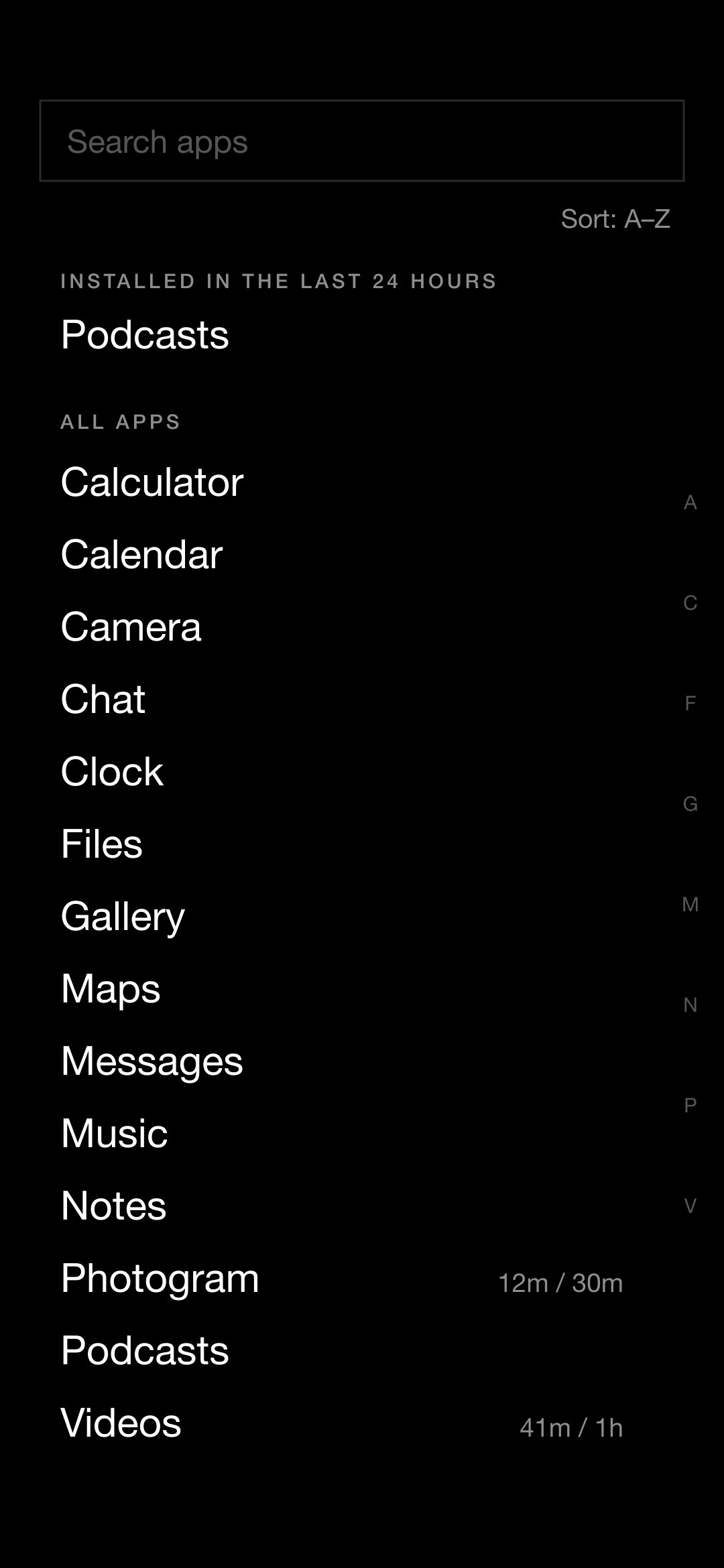
* A plain list with a search that understands names, initials and typos.
* Apps installed in the last 24 hours sit on top.
* Sort A to Z, by most used or by most recent. With a work profile, personal and work apps get their own tabs.
* Rename apps, hide them, pin them to the home screen.
Limits that hold
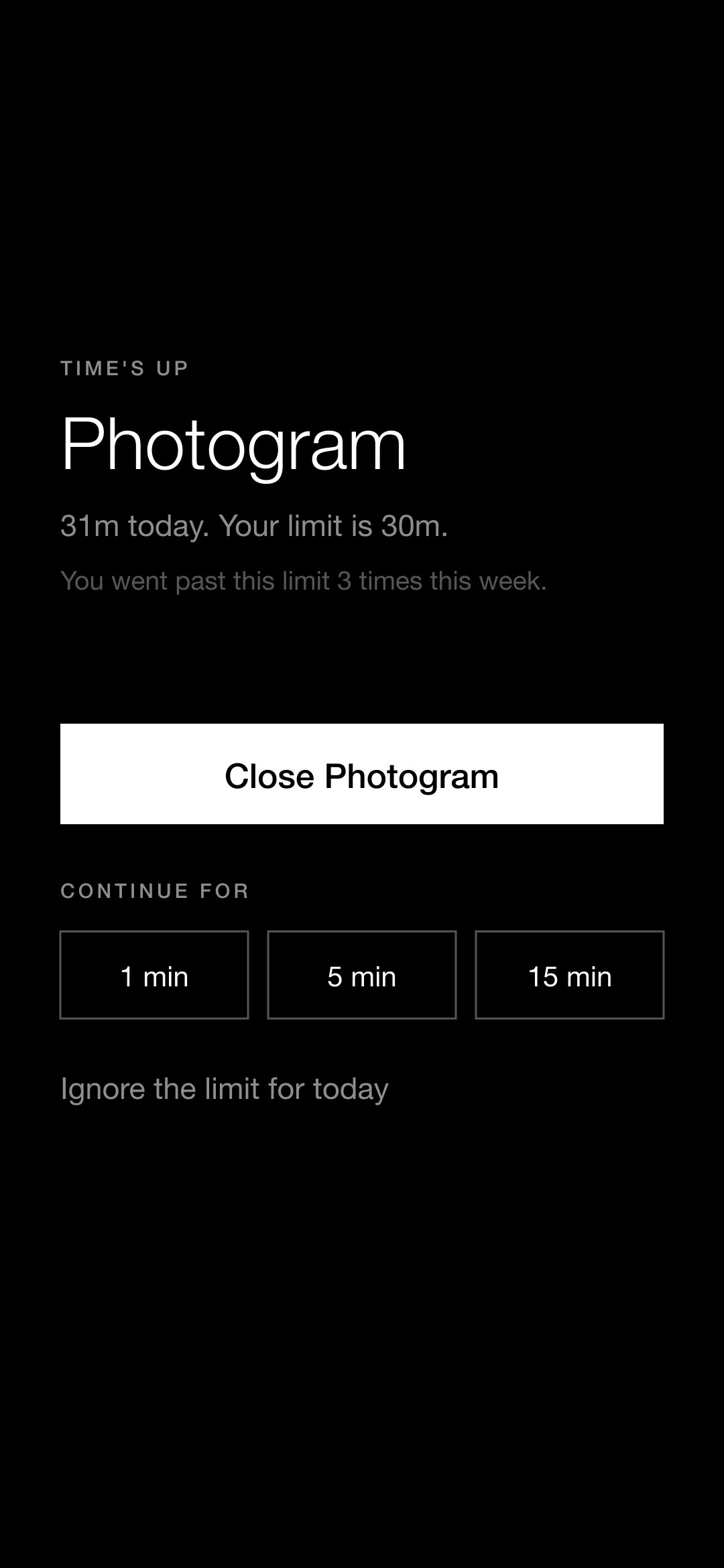
* Social media apps and games get a daily allowance (30 minutes by default). Any other app can have one too. Mail, browsers and messengers are never limited automatically.
* When the time is used up the app locks. You can still get in, but only after a pause and only by saying so, and Focus keeps asking before every visit for the rest of the day.
* How often you went past a limit is counted and shown back to you.
A weekly look back
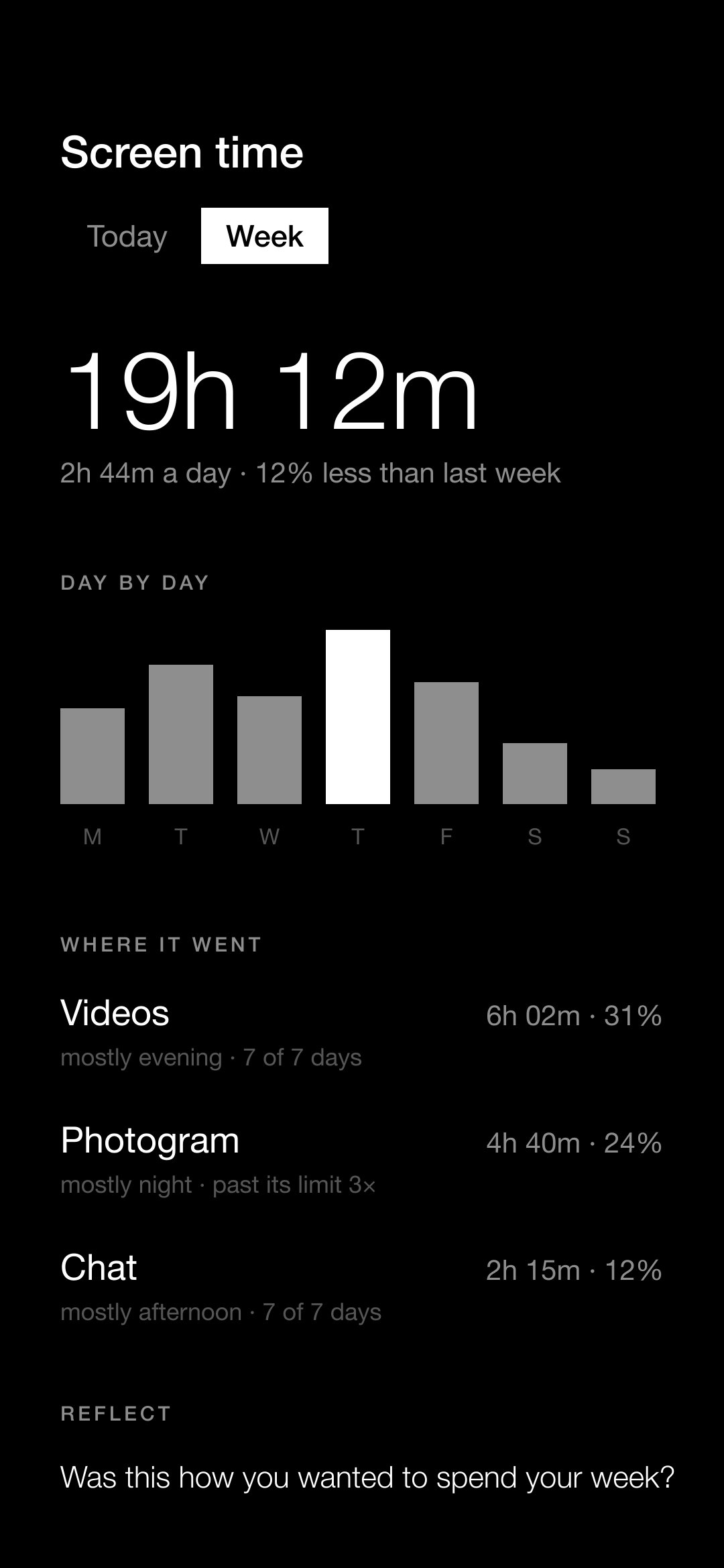
* Once a week, one screen: how long, which apps, what time of day, how often you pushed past a limit. Then a single question, and one line to write for next week.
Private by construction
* No internet permission: nothing can leave the phone. No account, no ads, no analytics.
* Usage access is used to count screen time. The optional accessibility service only learns which app is in front, so that it can lock it; it cannot read the screen.
* Calendar access is optional and only used to show your next events.
Website: [link removed]
License: GPL-3.0-or-later
Home screen
* The clock and one section next to it (your next events, or today's screen time), with a single line between them. A ring that shows the battery, or a plain clock, are one setting away.
* Up to five apps, as words. Phone and camera in the corners.
* Tap the clock to open an app of your choice. Long-press almost anything to change it.
Every app, one swipe away
* A plain list with a search that understands names, initials and typos.
* Apps installed in the last 24 hours sit on top.
* Sort A to Z, by most used or by most recent. With a work profile, personal and work apps get their own tabs.
* Rename apps, hide them, pin them to the home screen.
Limits that hold
* Social media apps and games get a daily allowance (30 minutes by default). Any other app can have one too. Mail, browsers and messengers are never limited automatically.
* When the time is used up the app locks. You can still get in, but only after a pause and only by saying so, and Focus keeps asking before every visit for the rest of the day.
* How often you went past a limit is counted and shown back to you.
A weekly look back
* Once a week, one screen: how long, which apps, what time of day, how often you pushed past a limit. Then a single question, and one line to write for next week.
Private by construction
* No internet permission: nothing can leave the phone. No account, no ads, no analytics.
* Usage access is used to count screen time. The optional accessibility service only learns which app is in front, so that it can lock it; it cannot read the screen.
* Calendar access is optional and only used to show your next events.
Website: [link removed]
License: GPL-3.0-or-later
| Release info | Update on Oct 25, 2026 |
|---|---|
| Release notes | Focus 1.1.55: the same APK as on how2me.me/focusapp. It installs over any earlier version from the site or this page and keeps your settings. • SHA-256 of focus-launcher-1.1.55.apk: 898c1b16b4b88615729910aea757d5ea92765edc90ca54221306d329aa6f5dd0 • Signed with the project's release key (certificate SHA-256 526a00b874660af4266699d5795a457ddebe958a78484820fac4b61b2a4852a2). Check it with apksigner verify --print-certs focus-launcher-1.1.55.apk. • Built, signed and published by the Publish workflow from commit a20db02, after the owner approved the run. What's Changed • ci: bump gradle/actions/setup-gradle from 6.3.0 to 6.4.0 by @dependabot[bot] in https://github.com/C-P-S-P/focus-launcher/pull/23 New Contributors • @dependabot[bot] made their first contribution in https://github.com/C-P-S-P/focus-launcher/pull/23 Full Changelog: https://github.com/C-P-S-P/focus-launcher/compare/v1.1.52...v1.1.55 |
| Listing data | F-Droid |
Reviews
No reviews yet. Be the first to review Focus Launcher.
Used Focus Launcher? Tell other visitors what you thought.
Log in to write a reviewOther products by this publisher
- "No Distractions" for YouTube 4.10 ----
- #Bible 11.6 "Incredible App - My sister shared this app with me a few weeks ago and it is truly incredible.
- #filmphotography 1.4.2 So, you decided to shoot on film?
- $quirrel 1.5.1 $quirrel Budget & Finance helps you plan each paycheck, track spending, manage debt, and see what is safe to spend before the next payday.
- % Percentage Calculator Pro 1.41 This is the Pro version of % Percentage Calculator.
Most viewed Android Launcher
- 1 Entropy's Defiance 3.4.0 Minimalist launcher and time-horizon task manager.
- 2 Cyclauncher 1.0.0 Ergonomic one-handed launcher with side alphabet grid, tags & widgets
- 3 Alt Launcher 1.0.6 Launch apps on boot and fastboot on Phoenix Android (and similar) radios
- 4 DroidOS Launcher 5.0 Cover-screen launcher and window manager for DroidOS.
- 5 G2L 2.2 Gesture Launcher
- 6 Scratchpad Launcher 2026.10.5 A minimal launcher with an always-visible scratchpad. Zero ads.
- 7 Defang 0.1.25 Launcher that puts speed bumps between you and the apps engineered against you
-
8
 Dragon Launcher 4.6.1
Launch your apps via gesture
- 9 Slauncher 0.1.5 I use this launcher.
- 10 Activity Launcher 2.5.0-alpha.1 Create shortcuts for apps and activities
Most downloaded Android Launcher
- 1 Cyclauncher 1.0.0 Ergonomic one-handed launcher with side alphabet grid, tags & widgets
- 2 Focus Launcher 1.1.55 A text-only, black and white launcher with app timers and a weekly review
-
3
 Slate 1.6
Minimal text-only Android home screen. No icons. No analytics. Zero network.
-
4
 SearchLauncher 0.1.5
Search apps, contacts and the web, and open results in an ad-free browser
- 5 Defang 0.1.25 Launcher that puts speed bumps between you and the apps engineered against you
- 6 Launch - Minimalist Launcher 8.0 A clean, efficient, and minimalist Android launcher.
- 7 Murine Launcher 1.3.0 A modern, lightweight Launcher3 fork for an enhanced stock++ Android experience.
- 8 Fokus Launcher 1.9.8 Minimal launcher with clock, weather, fast app search, and gesture navigation.
- 9 Launcher314 0.0.28-beta Launcher with deep customization on a single screen
-
10
 Blue Line Console 1.2.26
Keyboard based launcher