
SafeDot 5.0.0
alerts you when a third-party application uses your device camera or microphone
Download
1.89 MB · app-5.0.0.apk
41downloads
16this week
FreeFreeware
0reviews
Screenshots
About SafeDot
Do you feel envious about the new iOS 14's privacy feature that shows a dot indicator whenever CAMERA or MICROPHONE is accessed?
Safe Dots adds the same iOS 14 style indicators (few pixels light up as a dot) to the top right (default) corner of your screen whenever any third-party app or service uses your phone's camera or microphone.
Safe Dots will be visible even on your lock screen. Configuring the App is as simple as enabling the Safe Dots Accessibility Service (Toggle switch in the App › (More) Downloaded Services/Installed Services › Dot › Enable).
By default, the App is configured to show iOS 14 style colored access dots - green for camera access, orange for microphone access. The App itself does not request for the camera or microphone access so, don't worry!.
The app displays Safe Dots whenever the phone's camera or microphone is engaged by a third-party App.
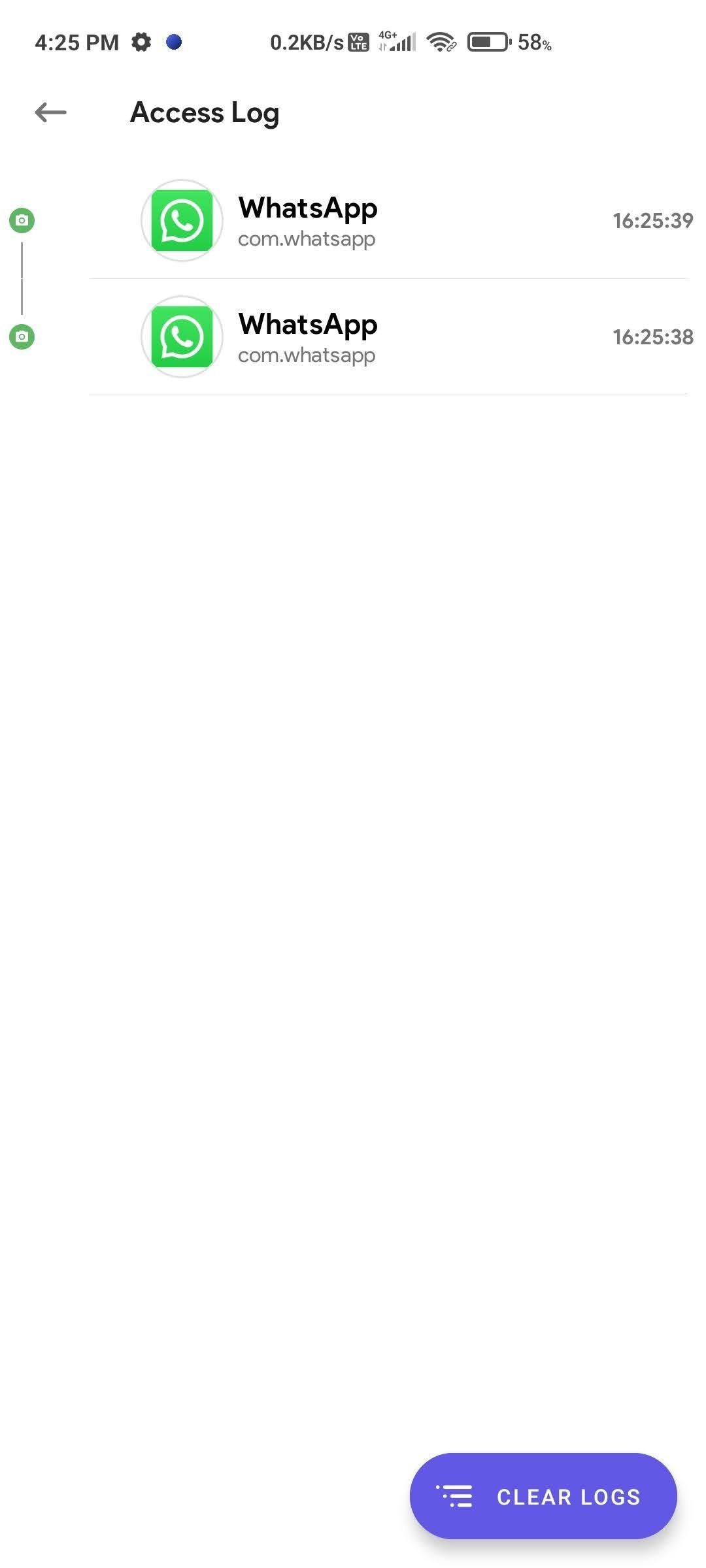
Maintain an Access Log, which can be accessed from the App's main settings screen. The Access Log shows when the camera/microphone was accessed, which App was in the foreground at the time of access initiation and how long did the access last.
License: GPL-3.0-or-later
Safe Dots adds the same iOS 14 style indicators (few pixels light up as a dot) to the top right (default) corner of your screen whenever any third-party app or service uses your phone's camera or microphone.
Safe Dots will be visible even on your lock screen. Configuring the App is as simple as enabling the Safe Dots Accessibility Service (Toggle switch in the App › (More) Downloaded Services/Installed Services › Dot › Enable).
By default, the App is configured to show iOS 14 style colored access dots - green for camera access, orange for microphone access. The App itself does not request for the camera or microphone access so, don't worry!.
The app displays Safe Dots whenever the phone's camera or microphone is engaged by a third-party App.
Maintain an Access Log, which can be accessed from the App's main settings screen. The Access Log shows when the camera/microphone was accessed, which App was in the foreground at the time of access initiation and how long did the access last.
License: GPL-3.0-or-later
| Release info | Update on Nov 04, 2026 |
|---|---|
| Release notes | What's Changed • kotlin rewrite by @kamaravichow in https://github.com/kamaravichow/safe-dot-android/pull/34 • Target Android 17 (API 37) and ship SafeDot 4.0.0 by @kamaravichow in https://github.com/kamaravichow/safe-dot-android/pull/49 • Wire indicator settings and merge Android 17 by @kamaravichow in https://github.com/kamaravichow/safe-dot-android/pull/50 Full Changelog: https://github.com/kamaravichow/safe-dot-android/compare/v3.1.5...v5.0.0 |
| Listing data | F-Droid |
Reviews
No reviews yet. Be the first to review SafeDot.
Used SafeDot? Tell other visitors what you thought.
Log in to write a reviewOther products by this publisher
- "No Distractions" for YouTube 4.10 ----
- #Bible 11.6 "Incredible App - My sister shared this app with me a few weeks ago and it is truly incredible.
- #filmphotography 1.4.2 So, you decided to shoot on film?
- $quirrel 1.5.1 $quirrel Budget & Finance helps you plan each paycheck, track spending, manage debt, and see what is safe to spend before the next payday.
- % Percentage Calculator Pro 1.41 This is the Pro version of % Percentage Calculator.
Most viewed Android Security & Privacy
- 1 OTG Master 0.5.0 Mount VeraCrypt and LUKS encrypted USB drives on non-rooted Android
- 2 Vault Explorer 1.50.0 Encrypted container explorer: VeraCrypt, LUKS, BitLocker, Cryptomator, gocryptfs
-
3
 Pass 0.4.7
Private tools: deterministic passwords, 2FA codes, calculator and clock.
-
4
 Arcanum 1.7.0
Encrypted container manager compatible with VeraCrypt
-
5
 PaperCript 1.3.5
Encrypted passwords on printable QR cards. No network, stores nothing.
- 6 KeePassVault 2.1.0 Client app for KeePass databases
-
7
 PassVault 2.2.3
A secure, lightweight, and 100% offline password manager.
- 8 Sidestep 1.2.7 Intercept URLs, remove tracking, and redirect to privacy-friendly frontends.
- 9 DroidCrypt 1.1 A file and text encryption tool for Android
- 10 Port Authority 2.4.5 Port scanner
Most downloaded Android Security & Privacy
-
1
 PassPony: Git Password Manager 2.1.0
Password manager for pass and passage stores, synced with git
-
2
 Keyholm 0.1.0
Single-device passkeys on secure hardware
- 3 Flauth 1.2.0 Privacy-first, open-source TOTP authenticator for 2FA token management.
-
4
 Pocket2FA 0.11.0
Secure 2FA code client of 2FAuth server that works offline
-
5
 Tokn - MFA / 2FA authenticator 1.8.3
Open-source 2FA authenticator. Encrypted on-device. No accounts.
- 6 HiddenProtectedWorkProfile 94.0 Hidden Profile owner Android security app.
-
7
PaperCript 1.3.5
Encrypted passwords on printable QR cards. No network, stores nothing.
- 8 GPG Key Manager 2.0.0 GPG Tool for Android
- 9 DNS Toggle 3.1.0 Easily toggle and automate Private DNS through the Quick Settings panel.
-
10
Arcanum 1.7.0
Encrypted container manager compatible with VeraCrypt