River Past Screen Recorder 7.8
Easy-to-use and fast screen recording software. Capture full screen, window, or region to AVI files, with choices of video codec. Option to capture audio from varies sources, including microphone or speakers. Full control over the codec settings.
Product Specifications
| User Rating: | item has less then 1 vote |
|
| FileCart Rating | ||
| Submitted by: | riverpast | |
| License | Shareware | |
| Price | $39.95 | |
| Downloads | 548 | |
| OS Support | Windows Install and Uninstall | |
| File Name | screenrecorder_setup.exe | |
| File Size | 2.07 MB ( 2,121 KB ) | |
| Published | Jul 08, 2003 (23 years ago) | |
| Updated | Dec 14, 2013 (12 years ago) | |
Latest Searches
maravilla sinonimo 5 minutes ago
Honda CR V ES 2WD 6 minutes ago
philiphenri card 6 minutes ago
Redmi a5 rct tool 7 minutes ago
cooked 13 minutes ago
PAPAGO N291s 13 minutes ago
sinonimos de apoyarme 13 minutes ago
moodle ebc 16 minutes ago
fox network 1990 sketcfhab 17 minutes ago
Popular Searches
id cards 602 times
2025 412 times
2024 385 times
Softperfect 317 times
Database Workbench Pro 258 times
TeraByte Drive Image Backup and Restore 255 times
Elcomsoft Phone Breaker 251 times
Elcomsoft Phone Viewer 232 times
SAM Broadcaster Cloud 223 times
Product Details
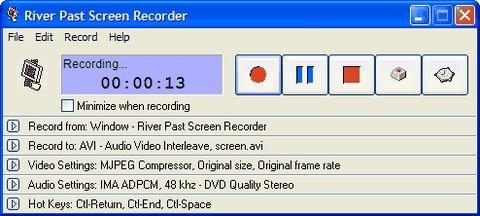
Record full screen, window (even if you drag it around the screen), fixed region, or cursor area. Output to AVI files, with choices of video codec with quality setting. It loads the video compressors dynamically on your system for the best power and flexibility. Common codecs include Cinepak, Indeo 3, 4, 5, Microsoft Video 1, Motion JPEG, DivX and XviD. Use the latter two for the best speed and quality.
Optionally audio can be recorded from any sources, including microphone, line-in, or speakers. Recording volume can be adjusted manually even during the recording. Full control over the audio codec, sample rate, channle, bits per sample, and bitrate.
It has a built-in scheduler for unattended recording. You can set the start time and/or the stop time. Record your e-learning sessions from the web or scheduled broadcasts when you cannot attend.
It has been tested to be up to four times faster than other programs. Ideal for making demo, tutorial, and training videos.
You can upgrade to River Past Screen Recorder Pro for additional output options - including DivX, XviD, WMV, MKV (Matroska) or OGM (OGG Media).
No adware or spyware. DirectX 8 required. Compatible with Windows Vista.
30 day MONEY BACK GUARANTEE
| Requirements: | 1 GIG PC, DirectX 8.0 |
| Release Info: | Major Update on Feb 28, 2010 |
| Release Notes: | River Past Screen Recorder 5.0 now has a built-in scheduler for unattended recording, great for recording e-learning sessions and scheduled video broadcasts. |
Reviews
You must be logged in to write a review
Reviews of River Past Screen Recorder 7.8
You can be the first to write a review of River Past Screen Recorder!