
FileView.Net 2012
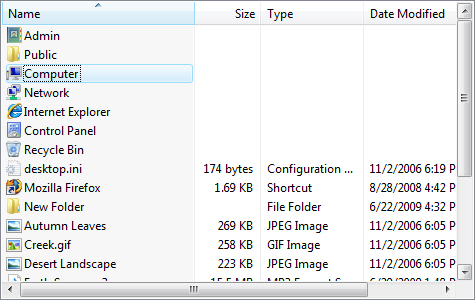
FileView.Net Control brings a drop-in Windows Explorer-like listview to your application complete with Thumbnail, Details and GroupView, AutoUpdate, dragdrop, icons, contextmenus, non-filesystem items, default key-handling, infotips and renaming.
Download
3.26 MB · megapacknet.exe
591downloads
1this week
$129Commercial
0reviews
Screenshots
About FileView.Net
FileView.Net Control brings a drop-in Windows Explorer file and folder browsing functionality to your app. This UI component is a perfect replacement for the plain, inflexible, modal APIs which developers are currently limited to. It offers complete support for Thumbnail, Details and GroupView, AutoUpdate, dragdrop, icons, contextmenus, non-filesystem items, default key-handling, infotips and renaming. It features powerful behavior control and customization functionality that takes it miles ahead of Windows Explorer by adding features like filtering, checkboxes, custom items, custom columns and dragdrop control and customization of default contextmenus, displaynames, icons and infotips. When combined with FolderView and ShComboBox controls, it recreates the entire Windows Explorer UI in your app. FileView.Net is written in 100% C# managed code; it fully supports Visual Studio 2010 and Net 4.0; it has a royalty-free redistribution license; it has no external dependencies and it comes with comprehensive documentation and numerous samples. The new version has features and functionality, new API, improved Windows 7, Windows 2003 and x64 support and more!
Fileview.Net has following prominent features
======================================
Complete Windows Explorer look, feel and behavior
?2-line integration with FolderView and ShComboBox brings complete Windows Explorer functionality to your application.
?Identical displaynames, icons and overlay icons shown for files/folders.
?Identical dragdrop functionality.
?Identical renaming functionality.
?Identical display of infotips for files/folders.
?Identical display of contextmenus ( including 'Send To' and any other submenus) for files/folders.
?Identical support for various display modes( Large Icon, Small Icon,etc.) including full support for 'Details Mode'.
?Complete 'Thumbnail View' support similar to Windows Explorer.
?Complete 'Group View' support similar to Windows Explorer.
Fileview.Net has following prominent features
======================================
Complete Windows Explorer look, feel and behavior
?2-line integration with FolderView and ShComboBox brings complete Windows Explorer functionality to your application.
?Identical displaynames, icons and overlay icons shown for files/folders.
?Identical dragdrop functionality.
?Identical renaming functionality.
?Identical display of infotips for files/folders.
?Identical display of contextmenus ( including 'Send To' and any other submenus) for files/folders.
?Identical support for various display modes( Large Icon, Small Icon,etc.) including full support for 'Details Mode'.
?Complete 'Thumbnail View' support similar to Windows Explorer.
?Complete 'Group View' support similar to Windows Explorer.
| Requirements | .Net Framework 1.1 or higher. |
|---|---|
| Release info | New Release on Sep 14, 2011 |
| Release notes | The new version has features and functionality, new API, improved Windows 7, Windows 2003 and x64 support and more! |
| Related tags | fileview activex control shell namespace |
Reviews
No reviews yet. Be the first to review FileView.Net.
Used FileView.Net? Tell other visitors what you thought.
Log in to write a reviewOther products by this publisher
- CryptoLicensing For .Net 2013 R2 CryptoLicensing is a licensing management and copy protection software featuring trials, activation, floating/leased licenses, hardware-locking for .Net, Windows Forms (WinForms) and WPF applications, components and controls and ASP.Net web sites.
- CryptoLicensing For ActiveX 2013 R2 CryptoLicensing For ActiveX adds licensing, copy-protection, activation and hardware-locking capabilities to your VB6, VBA, RealBasic, Delphi, Borland, MFC, ATL, C++, etc applications, libraries, components and controls.
- CryptoLicensing For MFC 2013 R2 Add licensing, copy-protection, activation and usage-reporting to your software with CryptoLicaensing for MFC. CryptoLicensing supports all MFC, ATL or C++ applications, libraries, components and controls.
- EZNamespaceExtensions.Net 2013 EZNamespaceExtensions.Net is a framework for rapid development of shell namespace extensions in .Net. It supports features including sub-folders, custom views, details/column view, contextmenus, drag-drop & integrates smoothly into Windows Explorer.
- EZNamespaceExtensionsMFC 2013 EZNamespaceExtensionsMFC is a framework for rapid development of shell namespace extensions in MFC. It supports features including sub-folders, custom views, details/column view, contextmenus, drag-drop & integrates smoothly into Windows Explorer.
Most viewed Windows Specialized Tools
-
1
 Project: Merge 1.0.1338
Project: Merge is a Windows? application for comparing and merging XML files. Comparing two or three XML files allows you to see what's changed, while merging allows you to integrate the differences from the input files into a single output file.
Project: Merge 1.0.1338
Project: Merge is a Windows? application for comparing and merging XML files. Comparing two or three XML files allows you to see what's changed, while merging allows you to integrate the differences from the input files into a single output file.
-
2
 Advanced BAT to EXE Converter 2.61
Convert BATch files to EXE format with encryption. . Select EXE Icon. Run Invisible. Embed dependency files. Select EXE version properties, print centered color text, gather user input, do math. Option to Password Protect EXE.
Advanced BAT to EXE Converter 2.61
Convert BATch files to EXE format with encryption. . Select EXE Icon. Run Invisible. Embed dependency files. Select EXE version properties, print centered color text, gather user input, do math. Option to Password Protect EXE.
-
3
 Speed Test Pro Silver 1.0.736
Monitor your website's bandwidth speed, response time and errors completely free, without registering. The only software that does an actual full Speed Test of your Internet connection and many other features.
Speed Test Pro Silver 1.0.736
Monitor your website's bandwidth speed, response time and errors completely free, without registering. The only software that does an actual full Speed Test of your Internet connection and many other features.
-
4
 Active File Compare 2.0
Active File Compare is an advanced utility for the comparison and synchronization of any text files in visual mode. Use this tool to compare two versions of the same file or to correct the source code versions.
Active File Compare 2.0
Active File Compare is an advanced utility for the comparison and synchronization of any text files in visual mode. Use this tool to compare two versions of the same file or to correct the source code versions.
-
5
 Quick Batch File Compiler 4.0.0.0
Quick Batch File compiler convert batch files into actual program (EXE format) in one click. This program may be run on Windows 98/Millenium/2000/2003/XP without any limitations. Content of batch file will be encripted and protected from changes.
Quick Batch File Compiler 4.0.0.0
Quick Batch File compiler convert batch files into actual program (EXE format) in one click. This program may be run on Windows 98/Millenium/2000/2003/XP without any limitations. Content of batch file will be encripted and protected from changes.
-
6
 1D Barcode VCL Components 7.1.0.2075
The components set is designed for generating and printing barcode in your Delphi or C++ Builder application. Most popular linear and postal barcode symbologies are supported. Database functionality and most popular reports are supported.
1D Barcode VCL Components 7.1.0.2075
The components set is designed for generating and printing barcode in your Delphi or C++ Builder application. Most popular linear and postal barcode symbologies are supported. Database functionality and most popular reports are supported.
-
7
 eCover Engineer 6.3.1
Create professional ebook covers, CD covers, DVD covers and software box covers. Edit pictures using eCover Engineer's build in image editor and take advantage of almost 100 free templates.
eCover Engineer 6.3.1
Create professional ebook covers, CD covers, DVD covers and software box covers. Edit pictures using eCover Engineer's build in image editor and take advantage of almost 100 free templates.
- 8 Neat Wizards 1.1 High-quality images for creating professional user wizards and dialog boxes.
-
9
 Crystal FLOW for C 4.60
Crystal FLOW is valuable for reviewing C/C++ source. It has: Flowcharts, Rich Trees, Visio/JPEG exports, Browser
Editions:
Docs: HTML docs + flowcharts, trees
Professional: Call/Data Flows, RichTree, Object/Stack Size, DataDependency
Crystal FLOW for C 4.60
Crystal FLOW is valuable for reviewing C/C++ source. It has: Flowcharts, Rich Trees, Visio/JPEG exports, Browser
Editions:
Docs: HTML docs + flowcharts, trees
Professional: Call/Data Flows, RichTree, Object/Stack Size, DataDependency
-
10
 Batch Replacer 4.0
Batch Replacer is a multi-string search-and-replace converter necessary for webmasters, programmers and everybody who is concerned with computers. Both text and binary files can be processed by the program. Many options are available.
Batch Replacer 4.0
Batch Replacer is a multi-string search-and-replace converter necessary for webmasters, programmers and everybody who is concerned with computers. Both text and binary files can be processed by the program. Many options are available.
Most downloaded Windows Specialized Tools
-
1
Project: Merge 1.0.1338
Project: Merge is a Windows? application for comparing and merging XML files. Comparing two or three XML files allows you to see what's changed, while merging allows you to integrate the differences from the input files into a single output file.
-
2
Advanced BAT to EXE Converter 2.61
Convert BATch files to EXE format with encryption. . Select EXE Icon. Run Invisible. Embed dependency files. Select EXE version properties, print centered color text, gather user input, do math. Option to Password Protect EXE.
-
3
Speed Test Pro Silver 1.0.736
Monitor your website's bandwidth speed, response time and errors completely free, without registering. The only software that does an actual full Speed Test of your Internet connection and many other features.
-
4
Active File Compare 2.0
Active File Compare is an advanced utility for the comparison and synchronization of any text files in visual mode. Use this tool to compare two versions of the same file or to correct the source code versions.
- 5 ABCupload.NET V5.1 ABCUpload .NET enhances the basic .NET file upload functionality. Advanced features like Pure HTML Progress Bar ™ support, GigUpload ™ technology for truly massive uploads and MacBinary decoding. All in 100% Managed Code. Free license available
- 6 BMDFM 5.9.9_R15_b1701 BMDFM (Binary Modular DataFlow Machine) is software, which enables running an application in parallel on shared memory symmetric multiprocessors (SMP) using the multiple processor cores to speed up the execution of single applications.
-
7
1D Barcode VCL Components 7.1.0.2075
The components set is designed for generating and printing barcode in your Delphi or C++ Builder application. Most popular linear and postal barcode symbologies are supported. Database functionality and most popular reports are supported.
-
8
Crystal FLOW for C 4.60
Crystal FLOW is valuable for reviewing C/C++ source. It has: Flowcharts, Rich Trees, Visio/JPEG exports, Browser
Editions:
Docs: HTML docs + flowcharts, trees
Professional: Call/Data Flows, RichTree, Object/Stack Size, DataDependency
-
9
Batch Replacer 4.0
Batch Replacer is a multi-string search-and-replace converter necessary for webmasters, programmers and everybody who is concerned with computers. Both text and binary files can be processed by the program. Many options are available.
-
10
Quick Batch File Compiler 4.0.0.0
Quick Batch File compiler convert batch files into actual program (EXE format) in one click. This program may be run on Windows 98/Millenium/2000/2003/XP without any limitations. Content of batch file will be encripted and protected from changes.