ExtraWebcam 3.0.1.250
Software that turns Canon PowerShot and EOS digital cameras into webcams
Product Specifications
| User Rating: | item has less then 1 vote |
|
| FileCart Rating | Not yet Rated | |
| Submitted by: | extrawebcam3 | |
| Homepage | Visit Homepage | |
| License | Shareware | |
| Price | $9.95 | |
| Downloads | 1,905 | |
| OS Support | Windows Install and Uninstall | |
| File Name | ExtraWebcam_Setup.exe | |
| File Size | 4.20 MB ( 4,300 KB ) | |
| Published | Feb 04, 2011 (16 years ago) | |
| Updated | May 27, 2012 (14 years ago) | |
Follow Us!
Latest Searches
Which is a series of interconnected membranous tubules that collectively modify proteins and synthesize lipids?highlight=0 2 minutes ago
fistra 9f 3 minutes ago
CC110 4 minutes ago
powersync pricing 7 minutes ago
garmin watch website 11 minutes ago
ShinSoKo Sushi Platforms 11 minutes ago
what food to avoid shingles 16 minutes ago
summaries of reading materials 17 minutes ago
byd battery 21 minutes ago
Popular Searches
id cards 602 times
2025 495 times
2024 386 times
Softperfect 329 times
2026 297 times
5g spf sonicwall compatible copper module 292 times
Gypsy 2.0 Onlyfans Leaked Photos 277 times
targetamazon credit card.asp?highlight=0 267 times
Data Protection Strategy (Sweet 261 times
Product Details
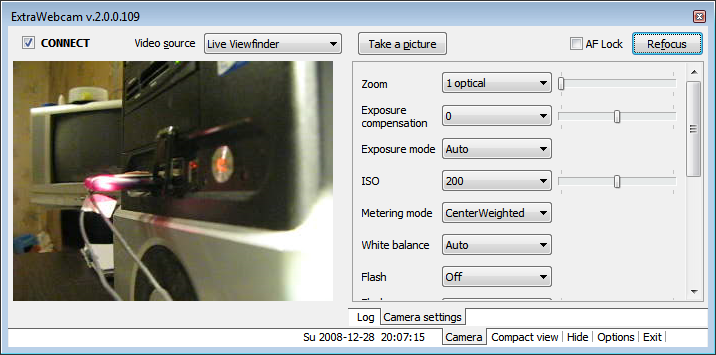
It supports any Windows software that take a standard video capture source as input such as Skype, MSN, AIM, Yahoo Messenger as well as online services like Ustream, Veetle, YouTube. You only need to select ExtraWebcam video source, connect your camera via USB and power it on, the rest will be done automatically - search for a connected camera and taking control over it.
ExtraWebcam has a tray icon utility that helps you to work with your camera. You have the live viewfinder window there and camera settings controls like shooting mode, shutter, aperture, ISO, white balance, zoom. You can use ExtraWebcam for automatic interval time-lapse shooting, it's possible to record video stream and time-lapse sequences into MJPEG AVI files.
List of supported cameras:
Canon PowerShot A60/A70/A75/A80/A85/A95/A300/A310/A400/A510/A520/A620/A640
Canon PowerShot G2/G3/G5/G6/G7/G9/G10
Canon PowerShot Pro1
Canon PowerShot S1 IS/S2 IS/S3 IS/S5 IS
Canon PowerShot S30/S40/S45/S50/S60/S70/S80/S400/S410/S500
Canon PowerShot SD100/SD110
Canon PowerShot SX100 IS/SX110 IS
Canon IXY 200a/300a/320
Canon IXY PS S200/PS S330/PS S230
Canon IXY IXUS v2/IXUS 330/IXUS v3
Canon IXY DIGITAL 400/500
Canon DIGITAL IXUS 400/430/500/II/IIs
Canon EOS 1000D/1100D/450D/500D/550D/600D/40D/50D/60D/7D/5DM2/1DM4
Canon EOS Rebel XS/XSi/T1i/T2i/T3/T3i
| Requirements: | Canon PowerShot digital camera |
| Release Info: | Minor Update on Dec 14, 2011 |
| Release Notes: | EOS cameras support, new WDM driver |
| Related Tags: | canon powershot eos web camera webcam |
Reviews
You must be logged in to write a review
Reviews of ExtraWebcam 3.0.1.250
You can be the first to write a review of ExtraWebcam!