Easy Frame Creator 2.3
Easy Frame Creator is intended for quick and easy creation of image frames and unique collages on basis of prepared templates. Re-sizing, image rotation, different frame forms and styles, effects for image and texture, simultaneous use several frames
Product Specifications
| User Rating: | item has less then 1 vote |
|
| FileCart Rating | ||
| Submitted by: | nick200 | |
| Homepage | Visit Homepage | |
| License | Shareware | |
| Price | $23.00 | |
| Downloads | 875 | |
| OS Support | Windows Install and Uninstall | |
| File Name | frame.zip | |
| File Size | 6.45 MB ( 6,606 KB ) | |
| Published | Nov 28, 2003 (23 years ago) | |
| Updated | Dec 16, 2013 (13 years ago) | |
Follow Us!
Latest Searches
14 cny to myr 42 seconds ago
american classic 2 minutes ago
cs 1 6 download free for pc 4 minutes ago
gisele schmidt 5 minutes ago
cardinals starting qb 8 minutes ago
Treja Beauty1818 La Plaza, Suite 100Cotati 9 minutes ago
larkspur colorado town 12 minutes ago
ibis paris porte dorléans hotel to versailles transportation 13 minutes ago
horaario fi 13 minutes ago
Popular Searches
id cards 602 times
2025 495 times
2024 386 times
Softperfect 329 times
5g spf sonicwall compatible copper module 304 times
2026 300 times
Gypsy 2.0 Onlyfans Leaked Photos 297 times
targetamazon credit card.asp?highlight=0 272 times
ds1628 compatible 10gb sfp cards 268 times
Product Details
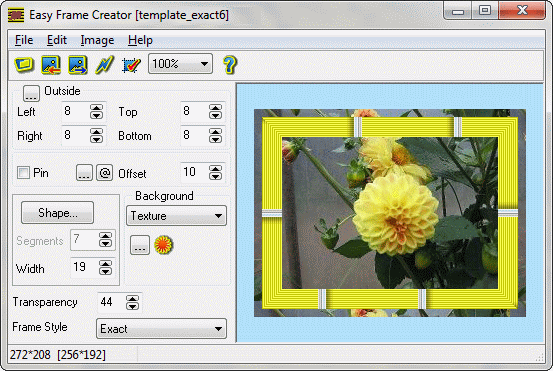
Program features:
- loads source image from BMP, JPEG (JPG), GIF, PCX, PSD, PNG - files;
- rotates, flips, changes the size of the image, crops rectangular image patch;
- applies effects and corrects the image and texture;
- creates frame images on basis of prepared templates;
- adds new templates to the list;
- deletes templates from the list;
- adds background color, gradient or texture from BMP, JPEG ( JPG ), PSD, PCX, PNG and GIF - files;
- creates rectangular frames with opaque background outside of the source image;
- creates frames of the different forms and styles inside the source image;
- sets shape of inside frame and its parameters ( width and number of linear segments in curved shape of frame );
- sets style of inside frame and edits its parameters;
- allows to fill image area around inside frame by color, gradient or texture with different values of transparency;
- gives possibility to apply several frames and effects to the source image simultaneously;
- adds pin to the image;
- copies created image to clipboard in BMP - format;
- pastes image from clipboard;
- saves created image as GIF, BMP, PNG, SWF or JPEG - file;
- sets JPEG compression quality;
- supports internationalization.
| Requirements: | No special requirements |
| Release Info: | Minor Update on May 22, 2016 |
| Release Notes: | * Windows 10 - compatibility; * Feature added: Export to PDF files. |
| Related Tags: | frame easy frame frame creator frame image frame maker |
Reviews
Reviews of Easy Frame Creator 2.3
You can be the first to write a review of Easy Frame Creator!Other products submitted by this publisher
Easy Button Creator is intended for easy creation of 3D buttons on basis of prepared templates. You can edit parameters of the button,caption,light source,shade and save created image to GIF, JPEG, BMP, PNG. Also you can create your own templates.
Easy Watermark CreatorEasy Watermark Creator is easy-to-use tool for adding visible watermarks to your pictures and photos. Watermarks can contain text (phrase, file name and number), image, date (current values or from EXIF), and can be solid or semi-transparent.
MakeGIFMakeGIF creates animated GIFs from command line in batch mode. You can use pictures created by MS Paint, Adobe Photoshop and dozens of others programs. MakeGIF has optimization tools for making your GIFs smaller. You can add hidden signatures to GIF.