DiskBoost 1.0.1
Speed up hard drive operations with a virtual RAM disk! DiskBoost maintains a blazing-fast virtual disk in your computer's RAM, allowing you to make your computer faster by storing frequently accessed files and data in the operative memory.
Product Specifications
| User Rating: | item has less then 1 vote |
|
| FileCart Rating | ||
| Submitted by: | seebibvd | |
| License | Shareware | |
| Expires | 15 Days | |
| Price | $49.95 | |
| Downloads | 733 | |
| OS Support | Windows Install and Uninstall | |
| File Name | diskboost.exe | |
| File Size | 1.58 MB ( 1,622 KB ) | |
| Published | Jul 08, 2008 (18 years ago) | |
| Updated | Feb 04, 2014 (12 years ago) | |
Latest Searches
6 u rack floor standing boltable 18 seconds ago
solo one tv series 1976 episodes vk.com 19 seconds ago
bi en linea dolares 23 seconds ago
do i need my passport for domestic flights 23 seconds ago
Formato de recibo de nómina editable colombia 02795144 57 seconds ago
how to install azure cli 1 minute ago
Russian Naval Base near finland 2 minutes ago
walk of life price history 4 minutes ago
GETTING TO WASHINGTON DC FROM NY VIA US 301 5 minutes ago
Popular Searches
id cards 602 times
2025 492 times
2024 386 times
Softperfect 328 times
2026 278 times
Database Workbench Pro 258 times
TeraByte Drive Image Backup and Restore 255 times
5g spf sonicwall compatible copper module 253 times
ia que faz video com imagem 18 252 times
Product Details
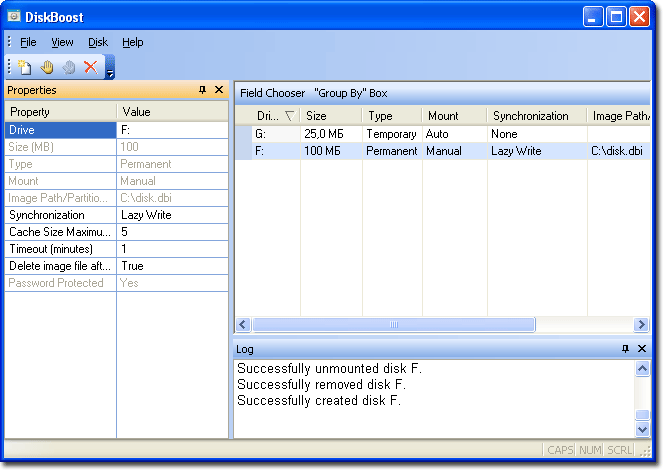
Unlike competitors, DiskBoost supports both volatile and non-volatile RAM drives. The difference? Volatile disks disappear when you reboot or turn off your PC along with any data stored on them, while non-volatile permanent disks back up the data onto the hard drive. The two kinds of disks serve for very different purposes.
Have any data temporary by its nature? Internet cache, browsing history, cookies and similar traces must be cleaned up regularly. Why bother with periodic cleanings when you can simply move the Temporary Internet Files folder onto a RAM disk that'll disappear completely and with no traces when you reboot your PC?
Work sets, databases or frequently accessed files that you cannot afford losing? DiskBoost offers a perfect opportunity to speed up access dramatically while maintaining the same level of safety and greater security. It automatically backs up the contents of the RAM drive into a file on your hard disk periodically and on system shutdown, taking care of the data integrity.
Busy server of workstation? Map the entire hard drive partition into the computer's RAM! DiskBoost offers tremendous performance benefits under heavy load while maintaining the safety and security of your data.
Sensitive information? DiskBoost encrypts everything stored on the RAM drives on-the-fly, making your data impossible to intercept and unusable if accessed without authorization. Hard disk images can be encrypted, making the virtual partitions impossible to mount without a password.
DiskBoost works transparently and automatically as a low-level system device. It mounts the RAM drives when your system boots, giving you immediate performance boost.
| Requirements: | Windows Vista, 2003 Server, XP, 2000. No any special requirements to hardware. |
| Release Info: | New Release on Nov 03, 2010 |
Reviews
You must be logged in to write a review
Reviews of DiskBoost 1.0.1
You can be the first to write a review of DiskBoost!Most Viewed Windows File Managers
SE-Explorer 1.31.1
EaseUS Partition Master Server Edition 9.1
Add PST into MS Outlook 3.1
Recover My Files Data Recovery Software 5.1.0.1872
Easy Duplicate File Finder 5.8.0.978
WinZip 21.0.22288.0
Stellar Phoenix Photo Recovery 6.0
DiskInternals CD and DVD Recovery 3.5
BKF Repair 6.0
Most Downloaded Windows File Managers
WinNc 7.7.1.0
Recover My Files Data Recovery Software 5.1.0.1872
DriveScan Bulk File Manager 1.3
DiskInternals CD and DVD Recovery 3.5
Stellar Phoenix Photo Recovery 6.0
AB Commander 7.5.5
Auslogics File Recovery 6.1.2
WinZip 21.0.22288.0
BKF Repair 6.0