
AVS Video Editor 26.0.2.17
Create cool videos with AVS Video Editor. Work with 2K Quad HD and 4K Ultra HD,DVD, MPEG,AVI,Blu-ray, MKV, FLV, TS, etc. Edit HD-Video fast. Choose between dozens of effects. Make slideshows, burn DVD/Blu-ray discs or upload videos to web hostings.
Download
137.82 MB · AVSVideoEditor.exe
2.7Kdownloads
0this week
$39Shareware
0reviews
Screenshots
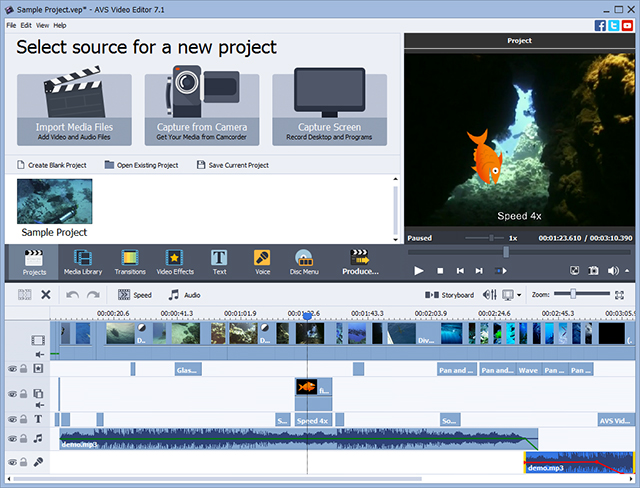
About AVS Video Editor
Video editing becomes much easier. Create unique videos with AVS Video Editor.
AVS Video Editor supports all key video formats. Edit & save video files in AVI, VOB, MP4, DVD, WMV, 3GP, MOV, MKV, using popular codecs H.264, MPEG-4, H.263 etc.
Process video with different frame sizes: HD, Full HD, 2K Quad HD and 4K Ultra HD. Trim, cut, split, merge, rotate and mix videos with AVS Video Editor.
Select between 300 innovative video effects and transitions. Insert menus, audio, text comments and subtitles. Stabilize video camera shaky recordings.
Edit AVI HD, WMV HD, TOD, AVCHD, MOD, MTS/M2TS, etc. Due to the integrated video cache technology, HD-video editing becomes faster.
Transfer video from DV/HDV cameras, webcams or VHS cameras and save video on hard drive or burn DVD discs.
Record media files from your PC screen and create video guides, training videos or demos. Capture memorable events and turn them into amazing slideshows.
Import images, add your voice or favourite audio tracks, captions and impressive video effects and transitions.
Open and edit your Blu-ray videos with AVS Video Editor. Apply effects and add specially designed menus. Add audio, video and images to your videos. Choose between numerous themes and stylish menu templates.
Tell your story in different ways: save the newly-made video in the desired format on your computer, burn a DVD/Blu-ray disc, adjust video for your iOS and Android devices or publish your creative work in social networks.
AVS Video Editor is a part of AVS4YOU.com package. Register once at avs4you.com and work with all tools from the AVS4YOU.com package. Subscribe for $39/year or $59/lifetime.
AVS4YOU tools let you easily rip, convert and edit audio/video files, edit images, burn DVDs, create ringtones, upload videos to portable devices, players, phones and much more!
AVS Video Editor supports all key video formats. Edit & save video files in AVI, VOB, MP4, DVD, WMV, 3GP, MOV, MKV, using popular codecs H.264, MPEG-4, H.263 etc.
Process video with different frame sizes: HD, Full HD, 2K Quad HD and 4K Ultra HD. Trim, cut, split, merge, rotate and mix videos with AVS Video Editor.
Select between 300 innovative video effects and transitions. Insert menus, audio, text comments and subtitles. Stabilize video camera shaky recordings.
Edit AVI HD, WMV HD, TOD, AVCHD, MOD, MTS/M2TS, etc. Due to the integrated video cache technology, HD-video editing becomes faster.
Transfer video from DV/HDV cameras, webcams or VHS cameras and save video on hard drive or burn DVD discs.
Record media files from your PC screen and create video guides, training videos or demos. Capture memorable events and turn them into amazing slideshows.
Import images, add your voice or favourite audio tracks, captions and impressive video effects and transitions.
Open and edit your Blu-ray videos with AVS Video Editor. Apply effects and add specially designed menus. Add audio, video and images to your videos. Choose between numerous themes and stylish menu templates.
Tell your story in different ways: save the newly-made video in the desired format on your computer, burn a DVD/Blu-ray disc, adjust video for your iOS and Android devices or publish your creative work in social networks.
AVS Video Editor is a part of AVS4YOU.com package. Register once at avs4you.com and work with all tools from the AVS4YOU.com package. Subscribe for $39/year or $59/lifetime.
AVS4YOU tools let you easily rip, convert and edit audio/video files, edit images, burn DVDs, create ringtones, upload videos to portable devices, players, phones and much more!
| Requirements | Intel/AMD CPU at 2500 MHz or higher, 1 GB RAM, sound card |
|---|---|
| Release info | Update on Sep 26, 2017 |
| Release notes | Scalable GUI; Improved setup wizard; New MP4 profile "Samsung Galaxy S8/S7/S6/S5, Note 7/5/4/3 - 4K UHD - (H.264, 3840x2160, 30 fps); New settings - "Frame size Step" and "Load available external AVI codecs"; Improved screen capturing and video recording utilities; optimized preview player. |
| Related tags | video editor edit video capture video burn DVD iPod |
| Listing data | winget |
Reviews
No reviews yet. Be the first to review AVS Video Editor.
Used AVS Video Editor? Tell other visitors what you thought.
Log in to write a reviewOther products by this publisher
-
 AVS Audio Converter 26.0.2.17
Convert audio between MP3, WMA, WAV, M4A, AMR, OGG, FLAC, MP2 and other popular audio formats. Export and convert audio from your video files. Create ringtones and audio-books for iPhone. Use a command line mode for automatic conversion process.
AVS Audio Converter 26.0.2.17
Convert audio between MP3, WMA, WAV, M4A, AMR, OGG, FLAC, MP2 and other popular audio formats. Export and convert audio from your video files. Create ringtones and audio-books for iPhone. Use a command line mode for automatic conversion process.
-
 AVS Audio Editor 26.0.2.17
Edit your audio collection, record audio data and create unique ringtones for iPhone. Remove background noises. Apply effects. Edit and save audio files in MP3, FLAC, WAV, M4A,WMA, AAC, MP2, AMR, OGG,etc. Edit audio directly in your video recordings.
AVS Audio Editor 26.0.2.17
Edit your audio collection, record audio data and create unique ringtones for iPhone. Remove background noises. Apply effects. Edit and save audio files in MP3, FLAC, WAV, M4A,WMA, AAC, MP2, AMR, OGG,etc. Edit audio directly in your video recordings.
-
 AVS Firewall 2.1.2.241
Protect your PC against unauthorized intrusions. Get detailed information on your connections and Internet traffic. Protect your PC's registry. Block unwanted online ads and enable parent control. Set up security levels.
AVS Firewall 2.1.2.241
Protect your PC against unauthorized intrusions. Get detailed information on your connections and Internet traffic. Protect your PC's registry. Block unwanted online ads and enable parent control. Set up security levels.
-
 AVS Image Converter 26.0.2.17
Convert and save tons of images between such formats as JPEG, PDF, RAW, TIFF, etc. Use Batch mode to speed up the conversion process. Apply correction settings to improve images quality. Select among various effects and watermark converted images.
AVS Image Converter 26.0.2.17
Convert and save tons of images between such formats as JPEG, PDF, RAW, TIFF, etc. Use Batch mode to speed up the conversion process. Apply correction settings to improve images quality. Select among various effects and watermark converted images.
-
 AVS Media Player 26.0.2.17
Open videos with almost any file extension such as AVI, MPEG, WMV, MP4, DVR-MS, MKV, FLV, OGG, etc. with AVS Media Player. Add audio tracks of any format such as WAV, MP3, FLAC, M4A, OGG, AAC, AMR, etc. View images in PNG, JPEG, TIFF, GIF, etc.
AVS Media Player 26.0.2.17
Open videos with almost any file extension such as AVI, MPEG, WMV, MP4, DVR-MS, MKV, FLV, OGG, etc. with AVS Media Player. Add audio tracks of any format such as WAV, MP3, FLAC, M4A, OGG, AAC, AMR, etc. View images in PNG, JPEG, TIFF, GIF, etc.
Most viewed Windows Video Tools
-
1
 RoboRealm 2.73.4
RoboRealm is a vision software based application for use in machine vision, image analysis, and image processing systems. Using an easy to use point and click interface complex image analysis becomes easy!
RoboRealm 2.73.4
RoboRealm is a vision software based application for use in machine vision, image analysis, and image processing systems. Using an easy to use point and click interface complex image analysis becomes easy!
-
2
 Total Video Converter 3.71
Total solution for the video conversion
Total Video Converter 3.71
Total solution for the video conversion
-
3
 FLV to AVI MPEG WMV 3GP MP4 iPod Convert 6.0.0202
Convert FLV to AVI, FLV to MPEG, FLV to WMV, Youtube to iPod Converter
FLV to AVI MPEG WMV 3GP MP4 iPod Convert 6.0.0202
Convert FLV to AVI, FLV to MPEG, FLV to WMV, Youtube to iPod Converter
-
4
 1AVCenter 2.4.0.10
Capture, record, broadcast, and remotely monitor your computer screen and webcam, record audio from any source, securely share files on your own personal web site, grab screenshots, send and upload files, and more all quickly and easely.
1AVCenter 2.4.0.10
Capture, record, broadcast, and remotely monitor your computer screen and webcam, record audio from any source, securely share files on your own personal web site, grab screenshots, send and upload files, and more all quickly and easely.
-
5
 Prism Plus Edition 2.63
Prism Plus Edition for Windows is the most comprehensive and stable multi-format video converter available. You can convert or compress video files in quickly. Use Prism's batch conversion feature to convert thousands of videos.
Prism Plus Edition 2.63
Prism Plus Edition for Windows is the most comprehensive and stable multi-format video converter available. You can convert or compress video files in quickly. Use Prism's batch conversion feature to convert thousands of videos.
-
6
 Xilisoft 3GP Video Converter 6.6.0.0623
It is a powerful 3GP and 3G2 Converter, which can convert video formats including MOV, RM, AVI, MPEG, WMV, MPEG to 3GP, 3G2, MPEG4, RM, Xvid, and also convert audio-only 3GP file to MP3, WAV, RA, AAC, M4A and vice versa.
Xilisoft 3GP Video Converter 6.6.0.0623
It is a powerful 3GP and 3G2 Converter, which can convert video formats including MOV, RM, AVI, MPEG, WMV, MPEG to 3GP, 3G2, MPEG4, RM, Xvid, and also convert audio-only 3GP file to MP3, WAV, RA, AAC, M4A and vice versa.
-
7
 Movavi Video Converter 3D 24.5.1
Movavi Video Converter 3D turns 2D to striking 3D for watching with polarization, shutter (NVIDIA technology) and anaglyph glasses. You are sure to enjoy instant preview of 3D output and ready-made predefined settings for various devices and the web.
Movavi Video Converter 3D 24.5.1
Movavi Video Converter 3D turns 2D to striking 3D for watching with polarization, shutter (NVIDIA technology) and anaglyph glasses. You are sure to enjoy instant preview of 3D output and ready-made predefined settings for various devices and the web.
-
8
 iCoolsoft Total Video Converter 5.0.8
You are able to convert your videos to other fashionable videos as you like with iCoolsoft Total Video Converter. It enables you to edit the output video with the editing functions freely. You can finish your conversion within several clicks.
iCoolsoft Total Video Converter 5.0.8
You are able to convert your videos to other fashionable videos as you like with iCoolsoft Total Video Converter. It enables you to edit the output video with the editing functions freely. You can finish your conversion within several clicks.
- 9 Debut Pro Edition 4.08 Debut is a professional screen capture software. Record videos from your screen or take screenshots. With Debut you can capture your entire desktop or a selected portion. Save the image or recorded video as avi, flv, wmv and other video file formats.
-
10
 WMV to AVI Converter 3.1.9.6
WMV to AVI Converter includes a powerful video converter which can convert WMV to AVI, convert WMV to DivX or XviD. Convert other video formats MPEG, MPG, ASF, VCD, SVCD, DAT to avi file also. WMV to AVI Convert is also an WMV splitter, WMV editor.
WMV to AVI Converter 3.1.9.6
WMV to AVI Converter includes a powerful video converter which can convert WMV to AVI, convert WMV to DivX or XviD. Convert other video formats MPEG, MPG, ASF, VCD, SVCD, DAT to avi file also. WMV to AVI Convert is also an WMV splitter, WMV editor.
Most downloaded Windows Video Tools
-
1
Total Video Converter 3.71
Total solution for the video conversion
-
2
FLV to AVI MPEG WMV 3GP MP4 iPod Convert 6.0.0202
Convert FLV to AVI, FLV to MPEG, FLV to WMV, Youtube to iPod Converter
-
3
Prism Plus Edition 2.63
Prism Plus Edition for Windows is the most comprehensive and stable multi-format video converter available. You can convert or compress video files in quickly. Use Prism's batch conversion feature to convert thousands of videos.
-
4
RoboRealm 2.73.4
RoboRealm is a vision software based application for use in machine vision, image analysis, and image processing systems. Using an easy to use point and click interface complex image analysis becomes easy!
-
5
Movavi Video Converter 3D 24.5.1
Movavi Video Converter 3D turns 2D to striking 3D for watching with polarization, shutter (NVIDIA technology) and anaglyph glasses. You are sure to enjoy instant preview of 3D output and ready-made predefined settings for various devices and the web.
-
6
Xilisoft 3GP Video Converter 6.6.0.0623
It is a powerful 3GP and 3G2 Converter, which can convert video formats including MOV, RM, AVI, MPEG, WMV, MPEG to 3GP, 3G2, MPEG4, RM, Xvid, and also convert audio-only 3GP file to MP3, WAV, RA, AAC, M4A and vice versa.
-
7
1AVCenter 2.4.0.10
Capture, record, broadcast, and remotely monitor your computer screen and webcam, record audio from any source, securely share files on your own personal web site, grab screenshots, send and upload files, and more all quickly and easely.
-
8
 Ultra MP4 Video Converter 6.1.1208
Ultra MP4 Video Converter is a powerful MP4 converter which can convert almost all popular video formats to ASF/WMV/AVI/DivX/MP4/H264 fromats such as AVI to MP4 Converter, MPEG to MP4 Converter, WMV to MP4 Converter, ect.
Ultra MP4 Video Converter 6.1.1208
Ultra MP4 Video Converter is a powerful MP4 converter which can convert almost all popular video formats to ASF/WMV/AVI/DivX/MP4/H264 fromats such as AVI to MP4 Converter, MPEG to MP4 Converter, WMV to MP4 Converter, ect.
- 9 Video Converter & Extractor 4.18 It is a piece of extremely powerful and full-featured video converter software that supports almost all video and audio formats.
- 10 Debut Pro Edition 4.08 Debut is a professional screen capture software. Record videos from your screen or take screenshots. With Debut you can capture your entire desktop or a selected portion. Save the image or recorded video as avi, flv, wmv and other video file formats.