AVCWare iPhone Transfer 4.0.3.0311
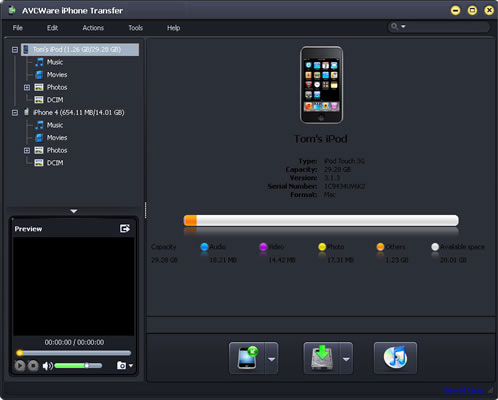
AVCWare iPhone Transfer is the ideal iPhone file transferring tool to transfer movies/music/photos from iPhone to PC, copy iPhone contents to iTunes as well as copy audio and video files from PC to iPhone.
Product Disabled!
This product has been disabled by the site staff.Reason:
dead download link
Product Specifications
| User Rating: | User Rating Disabled | |
| FileCart Rating | Staff Rating Disabled | |
| Submitted by: | Link Disabled | |
| License | Shareware | |
| Price | $19.95 | |
| Downloads | 325 | |
| OS Support | Windows Install and Uninstall | |
| File Name | avc-iphone-transfer.exe | |
| File Size | 33.28 MB ( 34,081 KB ) | |
| Published | Jan 14, 2011 (15 years ago) | |
| Updated | Jun 04, 2012 (14 years ago) | |
Latest Searches
depth strider 1 minute ago
Lubelski Program Wczesnego Wykrywania, Leczenia i ...raport 1 minute ago
iorin Onlyfans Leaked Photos 2 minutes ago
riot games sign up 3 minutes ago
ramada limited south springfield illinois 3 minutes ago
vrrp vrid 90 virtual ip 10.170.18.78 vrrp vrid 90 priority 120 vrrp vrid 90 preempt mode timer delay 180 vrrp vrid 90 track interface Vlanif90 reduced 30 3 minutes ago
The reason for the patient to seek care from the provider is calledGroup of answer choicesPMH.CC.ROS.HPI.primary encounter. 3 minutes ago
4209 union hill rd 27018 4 minutes ago
is olivet presbyterian church in west elizabeth pa closed 5 minutes ago
Popular Searches
id cards 602 times
2025 445 times
2024 385 times
Softperfect 323 times
Database Workbench Pro 258 times
TeraByte Drive Image Backup and Restore 255 times
Elcomsoft Phone Breaker 251 times
ia que faz video com imagem 18 242 times
Elcomsoft Phone Viewer 232 times
Product Details
New features:
1. Support iOS 4.3.
2. Support CDMA iPhone 4
3. Add iPhone ringtone management feature.
4. Add eBook management feature.
Features:
1.Copy iPhone music, movies, videos, pictures, podcasts and other files to you computer and vice versa. Also support photos and videos recorded by the device.
2.Not only does it support between iPhone/iPod and computer, but it also syncs with iTunes. We are always updated with the latest version to suit your needs. iTunes 10 is also supported.
3.Supports all generations of iPhone and iPod touch: iPhone, iPhone 3G, iPhone 3GS, iPhone 4, iPod touch. You can connect them and transfer files between them simultaneously.
4.Explore your iPhone files by treating it as a hard disk, browse through files using your Windows Explorer.
5.View your device's properties and information on the main interface: type, generation, serial number, format, version and others.
6.Create playlists for your iPhone, edit them as you wish. Playlists are good for the gym, office, travel and others.
7.Manage and organize photos and other digital pictures by creating and editing photo albums.
8.View your iPhone/iPod files in thumbnails mode like album artwork or list view for easier organizing.
9.Search through your files by genre, artist's name, album name, album year and others. For searching your library, just type in a keyword or the beginning of a title to filter through songs and files.
10.Manage several iOS Devices simultaneously without conflicting each other's files. Copy files from other iPods without erasing other iPod files.
| Requirements: | 1GHz Intel/AMD processor or above, 256MB RAM, 30MB space for installation |
| Release Info: | Major Update on Apr 21, 2011 |
| Release Notes: | Support iOS 4.3;support CDMA iPhone 4;add iPhone ringtone management and eBook management feature. |
Reviews
We have disabled this product, you can not write reviews of this product
Reviews of AVCWare iPhone Transfer 4.0.3.0311
You can be the first to write a review of AVCWare iPhone Transfer!