Apache Directory Studio 2.0.0.v20210717-M17
A complete directory tooling platform
15downloads
0this week
FreeFreeware
0reviews
Screenshots
About Apache Directory Studio
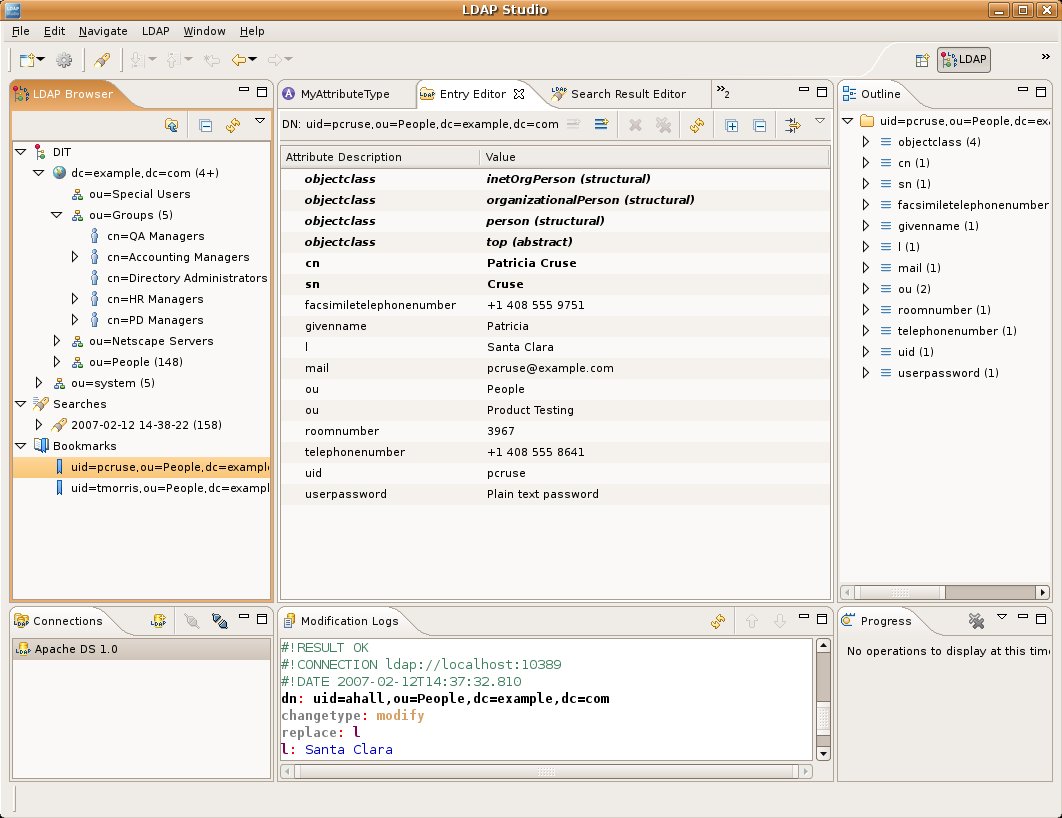
Apache Directory Studio is a complete directory tooling platform intended to be used with any LDAP server however it is particularly designed for use with ApacheDS. It is an Eclipse RCP application, composed of several Eclipse (OSGi) plugins, that can be easily upgraded with additional ones.
The LDAP Browser has been designed to work with almost any LDAP server available. It not only permits to read and display the tree of your LDAP Server but also allows you to modify it by creating, editing or removing entries.
The LDIF Editor is a tool for editing LDIF files. It provides syntax highlighting and content assistance.
The Schema Editor has been designed to edit the schema files in the OpenLDAP format. It allows you to edit easily attribute types and object classes for Apache Directory Server and OpenLDAP.
Apache Directory Studio bundles the latest version of the LDAPV3 certified ApacheDS. Creating and launching a new LDAP server now takes less than 10 seconds!
The ApacheDS Configuration Editor can be used to edit the server configuration ('server.xml' and 'config.ldif' files) of an Apache Directory Server installation.
The ACI Editor allows you to define, for an entry or a set of entries, graphically or manually (in souce code mode), an ACI (Access Control Information) item specification for Apache Directory Server.
License: Apache-2.0
The LDAP Browser has been designed to work with almost any LDAP server available. It not only permits to read and display the tree of your LDAP Server but also allows you to modify it by creating, editing or removing entries.
The LDIF Editor is a tool for editing LDIF files. It provides syntax highlighting and content assistance.
The Schema Editor has been designed to edit the schema files in the OpenLDAP format. It allows you to edit easily attribute types and object classes for Apache Directory Server and OpenLDAP.
Apache Directory Studio bundles the latest version of the LDAPV3 certified ApacheDS. Creating and launching a new LDAP server now takes less than 10 seconds!
The ApacheDS Configuration Editor can be used to edit the server configuration ('server.xml' and 'config.ldif' files) of an Apache Directory Server installation.
The ACI Editor allows you to define, for an entry or a set of entries, graphically or manually (in souce code mode), an ACI (Access Control Information) item specification for Apache Directory Server.
License: Apache-2.0
| Release info | New Release on Jul 23, 2021 |
|---|---|
| Release notes | The Apache Directory Team is pleased to announce the release of Apache Directory Studio 2.0.0-M17, the next milestone release of the version 2.0 of its Eclipse based LDAP Browser and Directory client. |
| Related tags | ldap ldif |
| Listing data | Flathub |
Reviews
No reviews yet. Be the first to review Apache Directory Studio.
Used Apache Directory Studio? Tell other visitors what you thought.
Log in to write a reviewOther products by this publisher
- "No Distractions" for YouTube 4.10 ----
- #Bible 11.6 "Incredible App - My sister shared this app with me a few weeks ago and it is truly incredible.
- #filmphotography 1.4.2 So, you decided to shoot on film?
- $quirrel 1.5.1 $quirrel Budget & Finance helps you plan each paycheck, track spending, manage debt, and see what is safe to spend before the next payday.
- % Percentage Calculator Pro 1.41 This is the Pro version of % Percentage Calculator.
Most viewed Linux Office
-
1
 Scrolex 0.13.1
Read PDFs and ebooks horizontally
-
2
 WPS 365 12.1.2.29183_807310
WPS 365 Suite
-
3
 Scribe 0.3.50
Markdown editor with live rendering
-
4
 Super Productivity v20.0.0
To-do list and time tracker
-
5
 Foliate 3.3.0
Read e-books in style
-
6
 Feishu 7.72.23
A collaboration platform
-
7
 Actual Budget 26.11.0
Your Finances made simple
-
8
 Adobe Reader 9.5.5
PDF viewer
-
9
 Quick Lookup 2.1.2
Look up words quickly
-
10
 Blockstream 3.6.1
A simple and secure Bitcoin and Liquid Network wallet
Most downloaded Linux Office
- 1 sleek 2.1.1 todo manager based on the todo.txt syntax for Linux, free and open-source (FOSS)
- 2 Textosaurus 0.9.13 Simple cross-platform text editor based on Qt and QScintilla
-
3
 Fingrom 7.3.2
Platform-agnostic financial accounting application for personal finance management
-
4
Scribe 0.3.50
Markdown editor with live rendering
-
5
 TreeSheets 2.23.10
Free Form Data Organizer
-
6
 Nottodbox 0.2.3
Organize notes, to-dos and diaries
-
7
 Skribisto 3.3.1
Plan, write, manage your novels
-
8
 Invoice Ninja 5.1.24
Invoices, payments and expenses
-
9
 Linwood Butterfly 2.6.2
Infinite-canvas notes and sketches
-
10
 OpenDeck 2.14.2
Use stream controllers