Z2Term 1.0.83
Rootless Linux terminal with a GUI, SSH, automation and a Japanese IME.
Download
27.47 MB
0downloads
0this week
FreeFreeware
0reviews
Screenshots
About Z2Term
Z2Term is a terminal for Android that is also a way to drive Android.
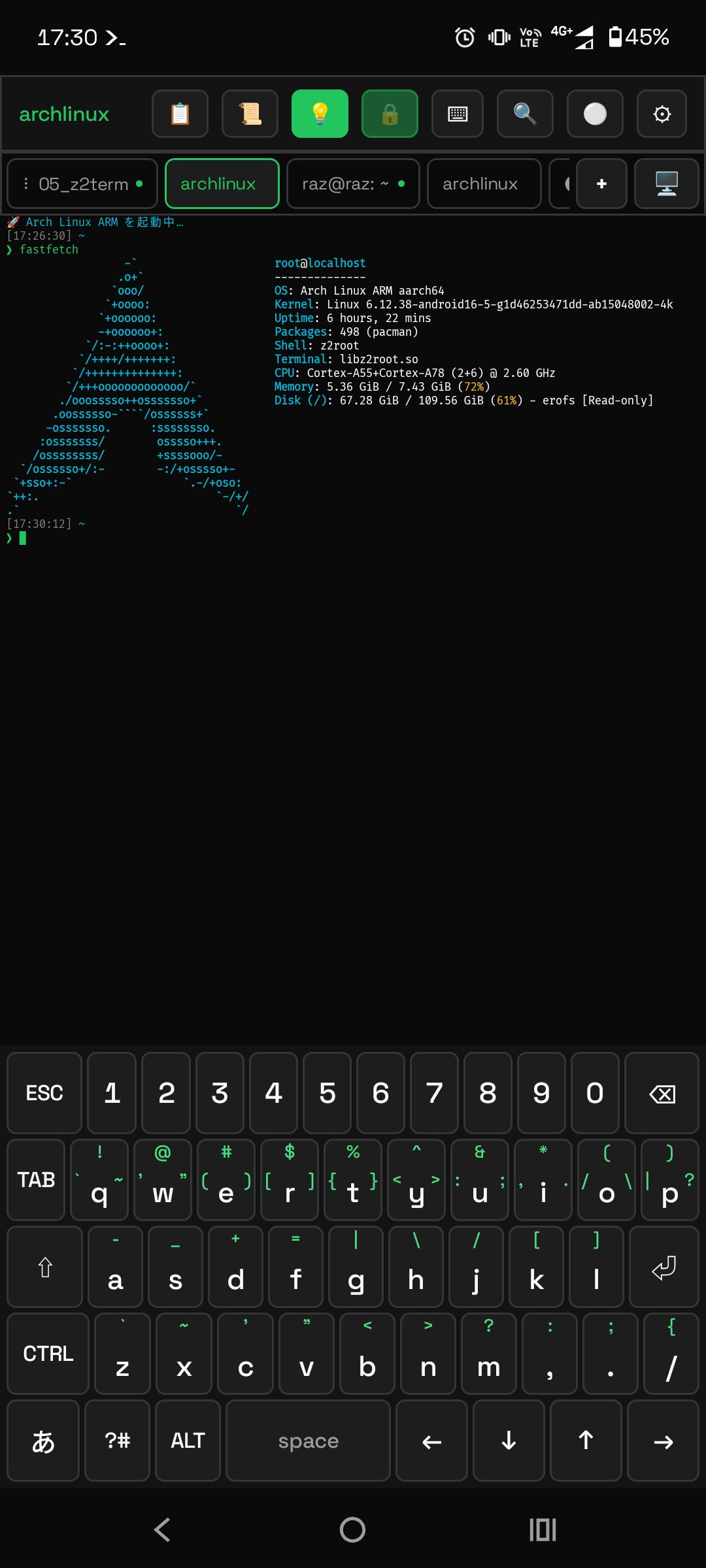
It runs Alpine, Ubuntu, Arch and Kali without root, opens a Linux desktop in a tab, and lets the shell reach the phone itself: read a notification, ask you a question in the notification shade, or run a script when the battery, the network or an incoming SMS changes.
* Linux distributions without root: z2root is a ptrace-based userspace implementation written for this app and built from source. A real chroot is optionally available on rooted devices.
* Terminal emulator: VT100/xterm, 256-colour and true colour, alternate screen, East Asian Width (CJK / emoji) rendered as 2 cells, OSC 4/7/8/10/11/12/52
* 9 built-in themes plus a custom theme editor, and custom font loading
* 5,000-line scrollback (configurable 500-50,000) with search
* Multi-tab sessions with independent emulators, drag to reorder
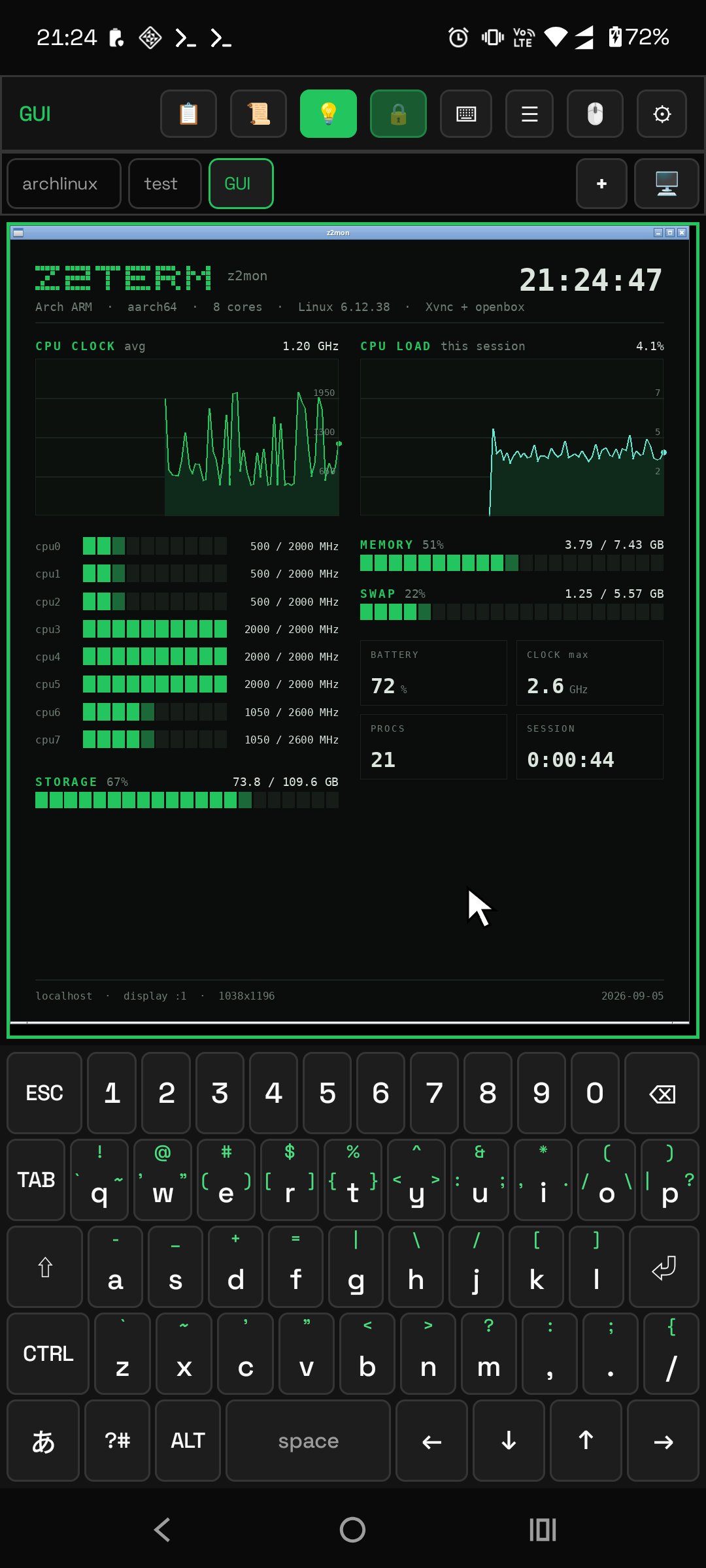
* Linux GUI: Xvnc + openbox with an RFB client built into the app, with audio and video. "z2gui" starts a desktop, "z2run " launches a GUI program. The same screen also connects to another machine over VNC or RDP.
* SSH client and SFTP built in (public-key auth, secrets encrypted by the Android Keystore), port forwarding in both directions that can outlive the tab, plus a built-in sshd that binds to localhost only by default
* Android bridge: around 40 "z2-*" helpers call host features from the shell (notifications, clipboard, battery, sensors, torch, intents, alarms, text-to-speech, and wireless adb to the device itself)
* It can ask you things: "z2-ask" puts a question in the notification shade and reads your reply into a shell variable
* Automation hub: "z2-when" runs scripts on device events (charging, battery level, time or cron, Wi-Fi, connectivity, boot, a share from another app, an incoming SMS, sensors, an arriving notification, a new file), narrowed by filters. Rules are plain text and survive reboots without opening the app.
* Resident servers: register any server as a start command and keep it running in the background without the app being open
* Edge panels: "z2-edge" builds a panel that floats over other apps. It holds commands, macros and app launches as buttons, plus notes and a mini terminal. Open it by swiping the bar at the screen edge; it can be edited on screen as well
* Screen actions: "z2-action" sends taps, swipes and gestures from the shell. Steps live in a plain text file with repeats, conditions and calls to other step files. They can also be edited on screen or recorded by tracing with a finger, and run from a tile, a widget or an edge panel
* QR tools: scan and create QR codes offline, with a history; "z2-qr" makes one from the terminal as well
* Screenshots of just what you want: "z2-shot" grabs the screen, you draw around the part to keep, then save or share it
* Read what you built: "z2-view" opens a page made on the terminal inside the app, with JavaScript and network loads switched off
* Japanese IME: kana-kanji conversion with prediction and learning, and a custom on-screen keyboard that can also be enabled as an OS-wide input method. Its key layout is editable on every face (kana, letters, symbols) and can be saved under a name
* Terminal log: record what a tab shows to a plain text file with one tap
* Home screen widgets: a status and macro launcher, and a live tail of any file
* Receive from other apps' share sheet (inserted into the input line, never executed)
* Backup and restore: settings, SSH connections, snippets, automation rules and macros in one file
* Built-in help ("z2help") and self-diagnosis ("z2doctor") that answers "why isn't it working?" with a next step on every NG line
* A foreground service keeps your session alive, physical keyboards work (Bluetooth, Chromebook), and there is long-press selection, copy/paste and pinch-to-zoom
100% local - no telemetry, no analytics. This build bundles no third-party prebuilts: the Linux distribution is downloaded from the official CDN on first launch and verified by S
License: GPL-3.0-only
It runs Alpine, Ubuntu, Arch and Kali without root, opens a Linux desktop in a tab, and lets the shell reach the phone itself: read a notification, ask you a question in the notification shade, or run a script when the battery, the network or an incoming SMS changes.
* Linux distributions without root: z2root is a ptrace-based userspace implementation written for this app and built from source. A real chroot is optionally available on rooted devices.
* Terminal emulator: VT100/xterm, 256-colour and true colour, alternate screen, East Asian Width (CJK / emoji) rendered as 2 cells, OSC 4/7/8/10/11/12/52
* 9 built-in themes plus a custom theme editor, and custom font loading
* 5,000-line scrollback (configurable 500-50,000) with search
* Multi-tab sessions with independent emulators, drag to reorder
* Linux GUI: Xvnc + openbox with an RFB client built into the app, with audio and video. "z2gui" starts a desktop, "z2run " launches a GUI program. The same screen also connects to another machine over VNC or RDP.
* SSH client and SFTP built in (public-key auth, secrets encrypted by the Android Keystore), port forwarding in both directions that can outlive the tab, plus a built-in sshd that binds to localhost only by default
* Android bridge: around 40 "z2-*" helpers call host features from the shell (notifications, clipboard, battery, sensors, torch, intents, alarms, text-to-speech, and wireless adb to the device itself)
* It can ask you things: "z2-ask" puts a question in the notification shade and reads your reply into a shell variable
* Automation hub: "z2-when" runs scripts on device events (charging, battery level, time or cron, Wi-Fi, connectivity, boot, a share from another app, an incoming SMS, sensors, an arriving notification, a new file), narrowed by filters. Rules are plain text and survive reboots without opening the app.
* Resident servers: register any server as a start command and keep it running in the background without the app being open
* Edge panels: "z2-edge" builds a panel that floats over other apps. It holds commands, macros and app launches as buttons, plus notes and a mini terminal. Open it by swiping the bar at the screen edge; it can be edited on screen as well
* Screen actions: "z2-action" sends taps, swipes and gestures from the shell. Steps live in a plain text file with repeats, conditions and calls to other step files. They can also be edited on screen or recorded by tracing with a finger, and run from a tile, a widget or an edge panel
* QR tools: scan and create QR codes offline, with a history; "z2-qr" makes one from the terminal as well
* Screenshots of just what you want: "z2-shot" grabs the screen, you draw around the part to keep, then save or share it
* Read what you built: "z2-view" opens a page made on the terminal inside the app, with JavaScript and network loads switched off
* Japanese IME: kana-kanji conversion with prediction and learning, and a custom on-screen keyboard that can also be enabled as an OS-wide input method. Its key layout is editable on every face (kana, letters, symbols) and can be saved under a name
* Terminal log: record what a tab shows to a plain text file with one tap
* Home screen widgets: a status and macro launcher, and a live tail of any file
* Receive from other apps' share sheet (inserted into the input line, never executed)
* Backup and restore: settings, SSH connections, snippets, automation rules and macros in one file
* Built-in help ("z2help") and self-diagnosis ("z2doctor") that answers "why isn't it working?" with a next step on every NG line
* A foreground service keeps your session alive, physical keyboards work (Bluetooth, Chromebook), and there is long-press selection, copy/paste and pinch-to-zoom
100% local - no telemetry, no analytics. This build bundles no third-party prebuilts: the Linux distribution is downloaded from the official CDN on first launch and verified by S
License: GPL-3.0-only
| Release info | New Release on Nov 11, 2026 |
|---|---|
| Release notes | 1.0.83 - Flicking ? left on the accessory bar no longer starts voice input. |
| Listing data | F-Droid |
Reviews
No reviews yet. Be the first to review Z2Term.
Used Z2Term? Tell other visitors what you thought.
Log in to write a reviewOther products by this publisher
- "No Distractions" for YouTube 4.10 ----
- #Bible 11.6 "Incredible App - My sister shared this app with me a few weeks ago and it is truly incredible.
- #filmphotography 1.4.2 So, you decided to shoot on film?
- $quirrel 1.5.1 $quirrel Budget & Finance helps you plan each paycheck, track spending, manage debt, and see what is safe to spend before the next payday.
- % Percentage Calculator Pro 1.41 This is the Pro version of % Percentage Calculator.
Most viewed Android Developer Tools
- 1 HTTP Request Shortcuts 4.9.0 Submit HTTP Requests from Shortcuts on your Home Screen
- 2 ADB Captain 1.6 Run ADB commands on your phone. No root, no PC — via Shizuku.
-
3
 RandomFileMaker 1.0
Make random files with SecureRandom. For KeePass keyfile, shredding disk, etc
- 4 DadosD 20160914_V4 Generate Brazilian test IDs for development/test
-
5
 AutoPie 0.20.3-beta
Turn Linux commands into Android apps.
-
6
 TermuC 0.2.4
A simple C/C++ IDE backed on Termux
- 7 Turtle 2.0.12 A Platform with Pythonic language to practice CPU/GPU programming on mobile
- 8 Squircle CE - Code Editor 2025.1.3 Fast and powerful code editor & file manager for over 30 programming languages
- 9 Fall 1.3 Lets your phone scream if it moves too fast
-
10
 QR Code Displayer 1.4.1
Reconstruct damaged or blurry QR codes entirely on-device for easy scanning.
Most downloaded Android Developer Tools
- 1 ADB Captain 1.6 Run ADB commands on your phone. No root, no PC — via Shizuku.
-
2
AutoPie 0.20.3-beta
Turn Linux commands into Android apps.
-
3
QR Code Displayer 1.4.1
Reconstruct damaged or blurry QR codes entirely on-device for easy scanning.
-
4
 Shellwave 1.10.0
Open-source SSH client and terminal with SFTP, port forwarding and jump hosts
- 5 ELM327 Emulator 31 OBD-II ELM327 adapter emulator for testing diagnostic apps
-
6
 Taiga Mobile Nova 2.2.3
Unofficial Android client for Taiga.io project management
- 7 TIC-80 1.4.1 TIC-80 is a fantasy video game console for making,
-
8
 Terminator 3.4.1
Multi-session terminal emulator with Material UI theming and root support
- 9 Turtle 2.0.12 A Platform with Pythonic language to practice CPU/GPU programming on mobile
- 10 JekyllEx 0.2.6 The mobile IDE to create, build, edit, preview, and publish Jekyll sites.