74downloads
0this week
FreeFreeware
0reviews
Screenshots
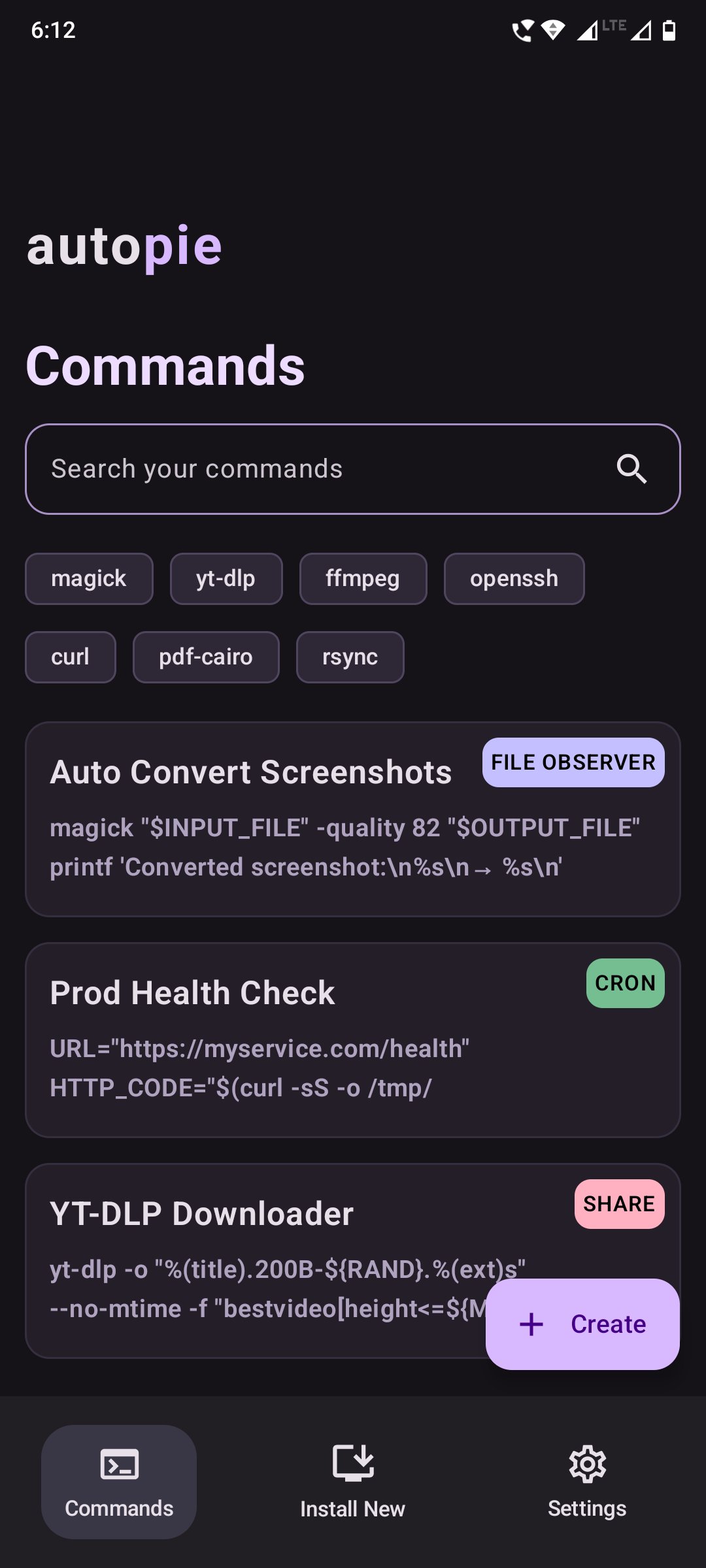
About AutoPie
AutoPie is a command automation hub for Android. It gives you a Linux environment where you can create, run, and automate Bash commands or Python scripts without using a terminal.
Use it to build small Android utilities for file conversion, downloads, monitoring, backups, web requests, AI tooling, device workflows, and any other task you would normally solve with Linux packages or scripts.
Highlights
• Embedded Termux environment
• Run Linux commands directly from AutoPie without the Terminal
• Install extra Termux packages with pkg install package-name.
• Install Python packages with pip install package-name.
• Includes useful tooling such as Python, pip, openssh and other utilities out of the box.
• Command and script automation
• Create custom applets that lives on your homescreen.
• Create applets from Bash commands and Python scripts.
• Add commands to the Android share sheet for quick file, text, and URL workflows.
• Watch folders and automatically process new files.
• Schedule commands with cron-style automation.
• Use interactive command mode when a script needs a live shell session.
• Custom applet creation forms
• Add text inputs, switches, selectors, file inputs, and other extras to your commands.
• Turn scripts into simple Android workflows that are easy to reuse.
• Use placeholders for files, URLs, text, filenames, directories, random values, and more.
• Ready for practical phone automation
• Convert videos, audio, images, screenshots, GIFs, and documents with command-line tools.
• Upload, download, rename, compress, and organize files automatically.
• Run web checks, API calls, health monitors, notifications, and custom background jobs.
• Keep the command output and logs accessible from the app.
• Open source Android app
• Built with Kotlin, Jetpack Compose, and Material 3.
• Designed for users who want powerful local automation without ads or clutter.
Permissions
• All files access: AutoPie runs terminal commands and scripts against files in shared storage. This permission is required so those commands can read, create, modify, monitor, and organize user files and folders.
• Battery optimization exemption: AutoPie requests permission to run without battery optimizations so long-running terminal commands, scheduled jobs, and folder observers can continue working reliably in the background.
License: Apache-2.0
| Release info | Update on Nov 17, 2026 |
|---|---|
| Release notes | What's New - Added "Show only my tags" in Settings to hide automatic tags on the Commands screen and in the share picker. - Fixed the Termux wake lock and unlock commands, including for secondary Android users. Open a new terminal session after updating to repair existing installations. Full Changelog: https://github.com/cryptrr/AutoPie/compare/v0.20.3-beta...v0.20.4-beta |
| Listing data | F-Droid |
Reviews
No reviews yet. Be the first to review AutoPie.
Used AutoPie? Tell other visitors what you thought.
Log in to write a reviewOther products by this publisher
- "No Distractions" for YouTube 4.10 ----
- #Bible 11.6.1 "Incredible App - My sister shared this app with me a few weeks ago and it is truly incredible.
- #filmphotography 1.4.2 So, you decided to shoot on film?
- #LookBusy Fake Calendar Events 1.0.6 Look Busy scans your work calendar for open time slots and fills them with realistic-looking (but secretly fake) work events.
- #Small Talk Is Canceled 1.0.2 #Small Talk Is Canceled — Conversations That Matter
Most viewed Android Developer Tools
- 1 HTTP Request Shortcuts 4.10.0 Submit HTTP Requests from Shortcuts on your Home Screen
-
2
 RandomFileMaker 1.0
Make random files with SecureRandom. For KeePass keyfile, shredding disk, etc
- 3 ADB Captain 1.6 Run ADB commands on your phone. No root, no PC — via Shizuku.
-
4
 AutoPie 0.20.4-beta
Turn Linux commands into Android apps.
-
5
 Shellwave 1.10.0
Open-source SSH client and terminal with SFTP, port forwarding and jump hosts
-
6
 TermuC 0.2.4
A simple C/C++ IDE backed on Termux
- 7 Turtle 2.0.12 A Platform with Pythonic language to practice CPU/GPU programming on mobile
- 8 DadosD 20160914_V4 Generate Brazilian test IDs for development/test
-
9
 DevSwitch 1.3
Toggle developer options, USB and wireless debugging, with Quick Settings tiles
- 10 Squircle CE - Code Editor 2025.1.3 Fast and powerful code editor & file manager for over 30 programming languages
Most downloaded Android Developer Tools
-
1
 Micro REPL 4.0.0
MicroPython IDE
-
2
Shellwave 1.10.0
Open-source SSH client and terminal with SFTP, port forwarding and jump hosts
- 3 JekyllEx 0.2.6 The mobile IDE to create, build, edit, preview, and publish Jekyll sites.
- 4 ELM327 Emulator 31 OBD-II ELM327 adapter emulator for testing diagnostic apps
-
5
 OMN-Go 26.11.16f
Self-hosted Markdown notes with git sync, LAN sharing, and SQL scripting
-
6
 Taiga Mobile Nova 2.2.3
Unofficial Android client for Taiga.io project management
-
7
 Terminator 3.4.1
Multi-session terminal emulator with Material UI theming and root support
-
8
 QR Code Displayer 1.4.1
Reconstruct damaged or blurry QR codes entirely on-device for easy scanning.
- 9 HexViewer 1.60.01 Hexadecimal viewer for Android
- 10 Cookie Extractor 1.3.0 Extract your own session cookies after a manual login