Wondershare PPT2Video Pro 6.1.6
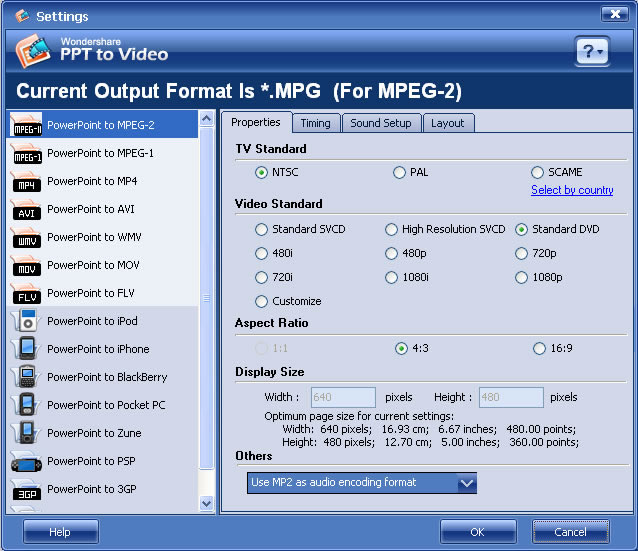
Wondershare PPT2Video Pro is an all-in-one PowerPoint to video converter to convert PowerPoint presentation to video of up to 130 formats such as and HD videos of excellent quality with all the original animations and sound effects retained.
Product Specifications
| User Rating: | item has less then 1 vote |
|
| FileCart Rating | Not yet Rated | |
| Submitted by: | wondersharehm2 | |
| Homepage | Visit Homepage | |
| License | Shareware | |
| Expires | 30 Days | |
| Price | $49.95 | |
| Downloads | 1,448 | |
| OS Support | Windows Install and Uninstall | |
| File Size | 8.95 MB ( 9,164 KB ) | |
| Published | May 27, 2010 (16 years ago) | |
| Updated | Dec 14, 2013 (13 years ago) | |
Follow Us!
Latest Searches
lirio persa 3 minutes ago
Id like to focus on improving my confidence when speaking translate to spanish 4 minutes ago
recommrnded hatchbox petg settings anycubic kobravs1 5 minutes ago
andres bonifacio sword 5 minutes ago
date place of issuance in pds 5 minutes ago
koneurakointi rantamaula 6 minutes ago
ppt downloader 6 minutes ago
"andres" trujillo barrera 7 minutes ago
Gakko No Monogatari School Story 8 minutes ago
Popular Searches
id cards 602 times
2025 495 times
2024 386 times
Softperfect 329 times
2026 291 times
5g spf sonicwall compatible copper module 284 times
Gypsy 2.0 Onlyfans Leaked Photos 260 times
targetamazon credit card.asp?highlight=0 260 times
Database Workbench Pro 258 times
Product Details
Benefits of converting PowerPoint to video:
1.View your presentations without the need of MS PowerPoint ?
2.Burn the converted video to DVD/VCD
3.Upload it to youtube.com or myspace.com for wide-sharing
4.Broadcast your presentations via online video sharing site like YouTube
5.By converting PowerPoint to MP4, you can view your presentations on portable device such as iPod, Zune, iPhone, Apple TV and Pocket PC.
6.Reduce PowerPoint file size by up to 90% to easily email
Feature highlights of Wondershare PPT to video:
1.Retain all the animations, transitions, sounds and movie clips in the original PowerPoint
2.Works smoothly with Microsoft PowerPoint? 2000/2002/2003/2007 and Vista
3.Supports converting PPT, PPS, PPTX and PPTM
4.Flexible output formats: MPEG, AVI, MP4, WMV, MOV and 3GP
5.Superior batch conversion: up to 12 PowerPoint files can be converted at a time
6.Flexible settings for different screen size meet specific needs
7.Friendly user interface lets you enjoy your conversion course
| Requirements: | CPU: Pentium III / Athlon 500 MHz or above; RAM: 256 MB or above: 2 GB Free Space |
| Release Info: | Major Update on May 24, 2010 |
| Release Notes: | 1.Compatible with Office 2010. 2. Fixed the bug of conversion failure under Office 2000. |
| Related Tags: | powerpoint to video ppt to video convert powerpoint to video convert powerpoint to AVI ppt to video converter |
Reviews
You must be logged in to write a review
Reviews of Wondershare PPT2Video Pro 6.1.6
You can be the first to write a review of Wondershare PPT2Video Pro!Other products submitted by this publisher
Wondershare PPT2D is a powerful tool designed for converting PowerPoint presentations to DVD retaining animations, sounds, videos and even links between slides. It also empowers you to easily create eye-catiching DVD menus for quick easy navigation.
Most Viewed Windows Presentations
DOC to JPG/TIFF/BMP/PNG/EPS converter 5.0
Autoplay Menu Designer 5.30
Picture To Video Converter 1.4.6.2
AlbumMe 5.9.0
PicturesToExe 7.5.1
PowerFlashPoint - PPT TO FLASH Converter 4.2
Able Photo Slide Show 2.20.8.11
PowerFlashPoint - PowerPoint to Flash 6.0
Life Poster Maker 3.7
Most Downloaded Windows Presentations
PPTonTV (PowerPoint to Video Converter) 1.21
DOC to JPG/TIFF/BMP/PNG/EPS converter 5.0
Wondershare PPT2DVD Pro 6.1.5
PowerFlashPoint - PPT TO FLASH Converter 4.2
Picture To Video Converter 1.4.6.2
iSpring Pro 7
AlbumMe 5.9.0
Able Photo Slide Show 2.20.8.11
Life Poster Maker 3.7