
16downloads
2this week
FreeCommercial
0reviews
Screenshots


About Vanta
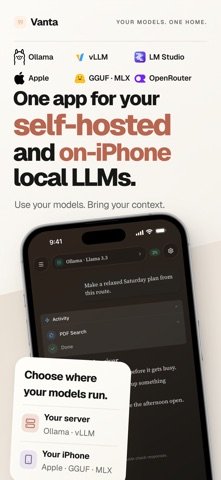
Bring your own AI to iPhone and iPad. Connect to Ollama, vLLM or LM Studio, download supported models to run on-device, or use cloud providers with your own API keys. Ask questions about PDFs, compare models and switch models without switching apps.
Buy Vanta once. No Vanta account. No Vanta subscription. Your purchase covers the app; cloud APIs and optional third-party services may charge separately.
CONNECT TO YOUR SELF-HOSTED MODELS
Use Ollama, vLLM, LM Studio or any compatible chat API endpoint on your computer, homelab or remote server. Add its address and any required API key, choose a model, and chat from your phone or tablet.
Your server does the processing, so you can use models that do not fit on your phone. Vanta gives you a mobile interface for chatting, working with files and using tools.
RUN MODELS DIRECTLY ON YOUR IPHONE OR IPAD
No server required. Browse Hugging Face inside Vanta and download supported GGUF and MLX models, or import your own GGUF file. Run models from families including Llama, Qwen, Gemma, Phi and Mistral, plus DeepSeek distills.
Once downloaded, on-device models work offline with no API key or per-token fees. Model compatibility and performance depend on your device and available memory.
You can also chat with the existing Apple Intelligence on-device model when available, without a separate model download in Vanta.
CONNECT CLOUD APIS AND CUSTOM ENDPOINTS
Add your own API keys for your cloud providers. You are not limited to a fixed provider list: Vanta supports custom compatible chat API endpoints. Switch providers and models mid-conversation.
CHAT WITH PDFS, DOCUMENTS AND PHOTOS
Ask questions about a PDF, summarize documents, compare files, or analyze photos and screenshots with a compatible vision model. Use on-device or self-hosted models, or choose a cloud provider.
CONNECT TOOLS AND SEARCH THE WEB
Add Model Context Protocol (MCP) servers for web search, documentation, live data and your own custom tools. Choose which servers to connect and use their tools with compatible models.
Deep Search researches a topic across web sources and brings back answers with citations inside your conversation.
PUT MULTIPLE MODELS IN ONE CONVERSATION
Assign roles, compare answers and let models challenge each other. Build a panel from on-device, self-hosted and cloud models instead of copying questions between separate apps.
MEMORY AND VOICE
Let Vanta remember useful details across conversations. Keep memory on-device, configure how it works, or turn it off.
Speak instead of typing with Whisper-based, on-device speech recognition. Transcription works offline. Optional ElevenLabs text-to-speech adds spoken replies.
CONTROL YOUR PROMPTS AND CONTEXT
Generate system prompts from plain English, then edit, save and reuse them. Adjust temperature, top-p, penalties and context limits where supported. Inspect message, tool and system token usage, and automatically summarize long conversations to manage context.
Markdown, syntax-highlighted code, themes and appearance controls are included.
KNOW WHERE YOUR DATA GOES
For offline chats with on-device models, your prompts and responses stay on your device. Server and cloud chats go to the endpoints you choose, with no Vanta AI server in between. External tools and online services receive the data needed to handle your requests.
GETTING STARTED
Choose an on-device model, connect a reachable server, or add a provider API key. You only need one of these to start. Apple Intelligence requires a supported device and an available system model. Features such as vision and tools depend on your selected model and provider.
License: Commercial
Buy Vanta once. No Vanta account. No Vanta subscription. Your purchase covers the app; cloud APIs and optional third-party services may charge separately.
CONNECT TO YOUR SELF-HOSTED MODELS
Use Ollama, vLLM, LM Studio or any compatible chat API endpoint on your computer, homelab or remote server. Add its address and any required API key, choose a model, and chat from your phone or tablet.
Your server does the processing, so you can use models that do not fit on your phone. Vanta gives you a mobile interface for chatting, working with files and using tools.
RUN MODELS DIRECTLY ON YOUR IPHONE OR IPAD
No server required. Browse Hugging Face inside Vanta and download supported GGUF and MLX models, or import your own GGUF file. Run models from families including Llama, Qwen, Gemma, Phi and Mistral, plus DeepSeek distills.
Once downloaded, on-device models work offline with no API key or per-token fees. Model compatibility and performance depend on your device and available memory.
You can also chat with the existing Apple Intelligence on-device model when available, without a separate model download in Vanta.
CONNECT CLOUD APIS AND CUSTOM ENDPOINTS
Add your own API keys for your cloud providers. You are not limited to a fixed provider list: Vanta supports custom compatible chat API endpoints. Switch providers and models mid-conversation.
CHAT WITH PDFS, DOCUMENTS AND PHOTOS
Ask questions about a PDF, summarize documents, compare files, or analyze photos and screenshots with a compatible vision model. Use on-device or self-hosted models, or choose a cloud provider.
CONNECT TOOLS AND SEARCH THE WEB
Add Model Context Protocol (MCP) servers for web search, documentation, live data and your own custom tools. Choose which servers to connect and use their tools with compatible models.
Deep Search researches a topic across web sources and brings back answers with citations inside your conversation.
PUT MULTIPLE MODELS IN ONE CONVERSATION
Assign roles, compare answers and let models challenge each other. Build a panel from on-device, self-hosted and cloud models instead of copying questions between separate apps.
MEMORY AND VOICE
Let Vanta remember useful details across conversations. Keep memory on-device, configure how it works, or turn it off.
Speak instead of typing with Whisper-based, on-device speech recognition. Transcription works offline. Optional ElevenLabs text-to-speech adds spoken replies.
CONTROL YOUR PROMPTS AND CONTEXT
Generate system prompts from plain English, then edit, save and reuse them. Adjust temperature, top-p, penalties and context limits where supported. Inspect message, tool and system token usage, and automatically summarize long conversations to manage context.
Markdown, syntax-highlighted code, themes and appearance controls are included.
KNOW WHERE YOUR DATA GOES
For offline chats with on-device models, your prompts and responses stay on your device. Server and cloud chats go to the endpoints you choose, with no Vanta AI server in between. External tools and online services receive the data needed to handle your requests.
GETTING STARTED
Choose an on-device model, connect a reachable server, or add a provider API key. You only need one of these to start. Apple Intelligence requires a supported device and an available system model. Features such as vision and tools depend on your selected model and provider.
License: Commercial
| Release info | New Release on Oct 04, 2026 |
|---|---|
| Release notes | Bug fixes and improvements to the chat experience. Have a feature request or suggestion? Go to Settings -> About -> Contact developer. |
| Listing data | App Store |
Reviews
No reviews yet. Be the first to review Vanta.
Used Vanta? Tell other visitors what you thought.
Log in to write a reviewOther products by this publisher
- "No Distractions" for YouTube 4.10 ----
- #Bible 11.5 "Incredible App - My sister shared this app with me a few weeks ago and it is truly incredible.
- #filmphotography 1.4.2 So, you decided to shoot on film?
- $quirrel 1.5.1 $quirrel Budget & Finance helps you plan each paycheck, track spending, manage debt, and see what is safe to spend before the next payday.
- % Percentage Calculator Pro 1.41 This is the Pro version of % Percentage Calculator.
Most viewed iOS Developer Tools
-
1
 ZScripter 12.2.0
ZScripter plays compatible Ren'Py, RealLive, NScripter, (PONS)ONScripter-EN/RU/JH/Yuri, Artemis, Siglus, AI5 and UK2 games as well as KiriKiri (+Kirikiroid2 patches) and RPG Maker MV/MZ & XP, VX and VX Ace support.
ZScripter 12.2.0
ZScripter plays compatible Ren'Py, RealLive, NScripter, (PONS)ONScripter-EN/RU/JH/Yuri, Artemis, Siglus, AI5 and UK2 games as well as KiriKiri (+Kirikiroid2 patches) and RPG Maker MV/MZ & XP, VX and VX Ace support.
-
2
 Shader Playground 1.0
Shader Playground is a powerful real-time shader editor built for iPhone and iPad.
Shader Playground 1.0
Shader Playground is a powerful real-time shader editor built for iPhone and iPad.
-
3
 GitHub 1.283.0
There’s a lot you can do on GitHub that doesn’t require a complex development environment – like sharing feedback on a design discussion, or reviewing a few lines of code.
GitHub 1.283.0
There’s a lot you can do on GitHub that doesn’t require a complex development environment – like sharing feedback on a design discussion, or reviewing a few lines of code.
-
4
 Agents Anywhere 2.1.0
Agents Anywhere is a developer tools mobile application for remotely controlling your local computer to complete coding tasks.
Agents Anywhere 2.1.0
Agents Anywhere is a developer tools mobile application for remotely controlling your local computer to complete coding tasks.
-
5
 Code Workspace 0.9.1
Code Workspace is a free, agent-first development environment for iPad and iPhone.
Code Workspace 0.9.1
Code Workspace is a free, agent-first development environment for iPad and iPhone.
-
6
 LocalDevVPN 1.3.0
LocalDevVPN is a developer tool for creating and managing local network tunnels directly on iOS.
LocalDevVPN 1.3.0
LocalDevVPN is a developer tool for creating and managing local network tunnels directly on iOS.
-
7
 Termius 8.0.7
Termius is a modern SSH client designed for productivity and collaboration.
Termius 8.0.7
Termius is a modern SSH client designed for productivity and collaboration.
-
8
 Cursor 1.16.0
Introducing Cursor for iOS: the best way to build, review, and ship software from anywhere.
Cursor 1.16.0
Introducing Cursor for iOS: the best way to build, review, and ship software from anywhere.
-
9
 Rulify 1.0.7
Rulify ????? iOS App ????,???????? App ????,???????????????
Rulify 1.0.7
Rulify ????? iOS App ????,???????? App ????,???????????????
-
10
 C/C++$-LLVM Clang 2.7
This is a learning tool for efficient C/C++ learning, fast programming, ?(LLVM+Clang)offline compilation and local execution?, Git fetching, iCloud storage, and efficient transfer and sharing via LAN HTTP/FTP multi-point connections.
C/C++$-LLVM Clang 2.7
This is a learning tool for efficient C/C++ learning, fast programming, ?(LLVM+Clang)offline compilation and local execution?, Git fetching, iCloud storage, and efficient transfer and sharing via LAN HTTP/FTP multi-point connections.
Most downloaded iOS Developer Tools
-
1
Agents Anywhere 2.1.0
Agents Anywhere is a developer tools mobile application for remotely controlling your local computer to complete coding tasks.
-
2
 a-Shell mini 2.3.2
a-Shell mini is a complete local terminal emulator, allowing to run most Unix commands on you iOS device.
a-Shell mini 2.3.2
a-Shell mini is a complete local terminal emulator, allowing to run most Unix commands on you iOS device.
-
3
Rulify 1.0.7
Rulify ????? iOS App ????,???????? App ????,???????????????
-
4
 LadderTouch 2.1.5
LadderTouch is an app to learn the basics of ladder logic, which is a graphical programming language.
LadderTouch 2.1.5
LadderTouch is an app to learn the basics of ladder logic, which is a graphical programming language.
-
5
 FSNotes 7.5.1
FSNotes is a fast, modern notes manager for macOS and iOS.
FSNotes 7.5.1
FSNotes is a fast, modern notes manager for macOS and iOS.
-
6
C/C++$-LLVM Clang 2.7
This is a learning tool for efficient C/C++ learning, fast programming, ?(LLVM+Clang)offline compilation and local execution?, Git fetching, iCloud storage, and efficient transfer and sharing via LAN HTTP/FTP multi-point connections.
-
7
 HTTP Debugger+ 1.2.3
HTTP Debugger+ is a professional HTTP traffic inspector designed for developers and QA engineers.
HTTP Debugger+ 1.2.3
HTTP Debugger+ is a professional HTTP traffic inspector designed for developers and QA engineers.
-
8
 Expo Go 58.0.5
Start learning to build projects using web technologies with just your iOS device.
Expo Go 58.0.5
Start learning to build projects using web technologies with just your iOS device.
-
9
 Airswitch 1.1
Airswitch is a VPN focused on connection speed and reliable server infrastructure.
Airswitch 1.1
Airswitch is a VPN focused on connection speed and reliable server infrastructure.
-
10
 Sekai 1.75.31
Don’t just watch content—play with it.
Sekai 1.75.31
Don’t just watch content—play with it.