
11downloads
1this week
FreeCommercial
0reviews
Screenshots
About SSH Term X
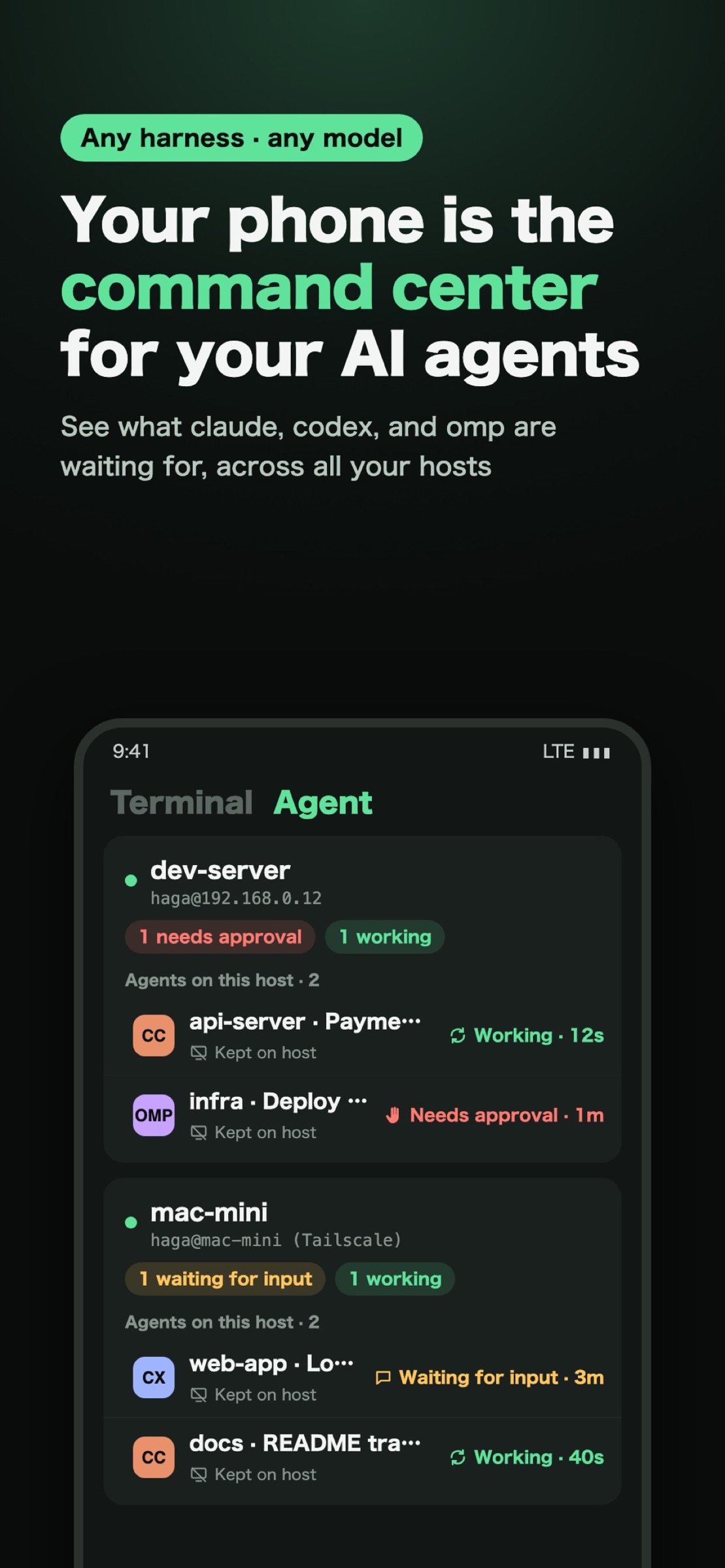
Your phone is the command center for your AI agents. Any harness, any model, any language. Japanese, Korean, and Chinese input won't break.
CONNECTING IS NOT ENOUGH
Agents run for a long time and stop to wait for approval or input. SSH Term lists the agents of supported harnesses on a card for each saved host, with their state: Working, Waiting for input, or Needs approval. See which one is waiting for what, and answer it on the spot.
NOT LOCKED TO A HARNESS OR A MODEL
Start any agent that runs in a terminal and give it instructions. Models and providers (API keys, Bedrock, and so on) stay as configured on your host. Agents run on your own host, and their conversations stay there instead of going through a third-party service.
SUPPORTED HARNESSES
The status list and chat view support Claude Code, Codex, Oh My Pi, Pi, and Copilot CLI.
YOUR PHONE IS THE COMMAND CENTER
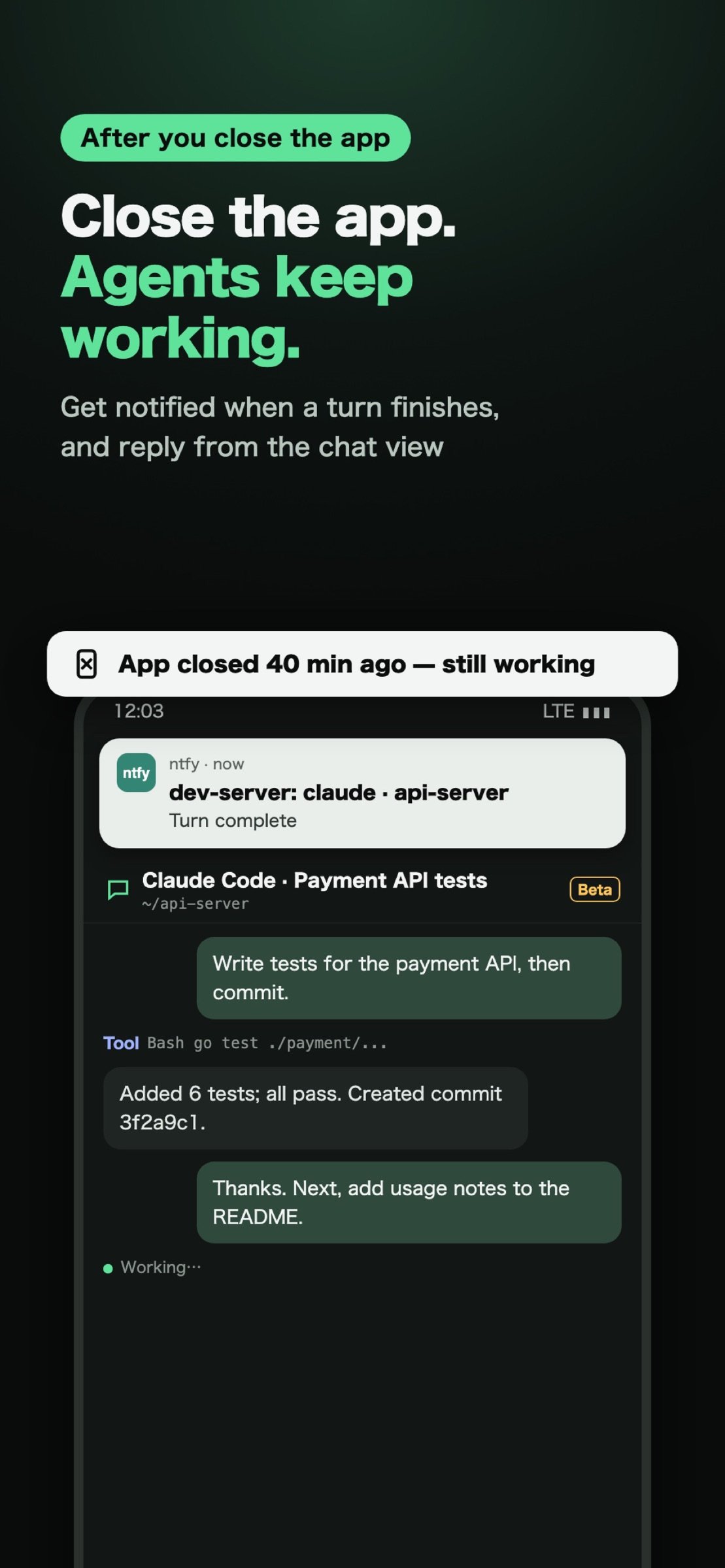
Close the app and your agents keep running on the host (kept shells). Reopen it and the tab comes back with the output you missed. Approval requests, input waits, and finished turns reach you as push notifications through the free ntfy app, even with SSH Term closed (Slack, Discord, and Telegram also work). Send the next instruction to a running agent from the chat view.
ANY LANGUAGE
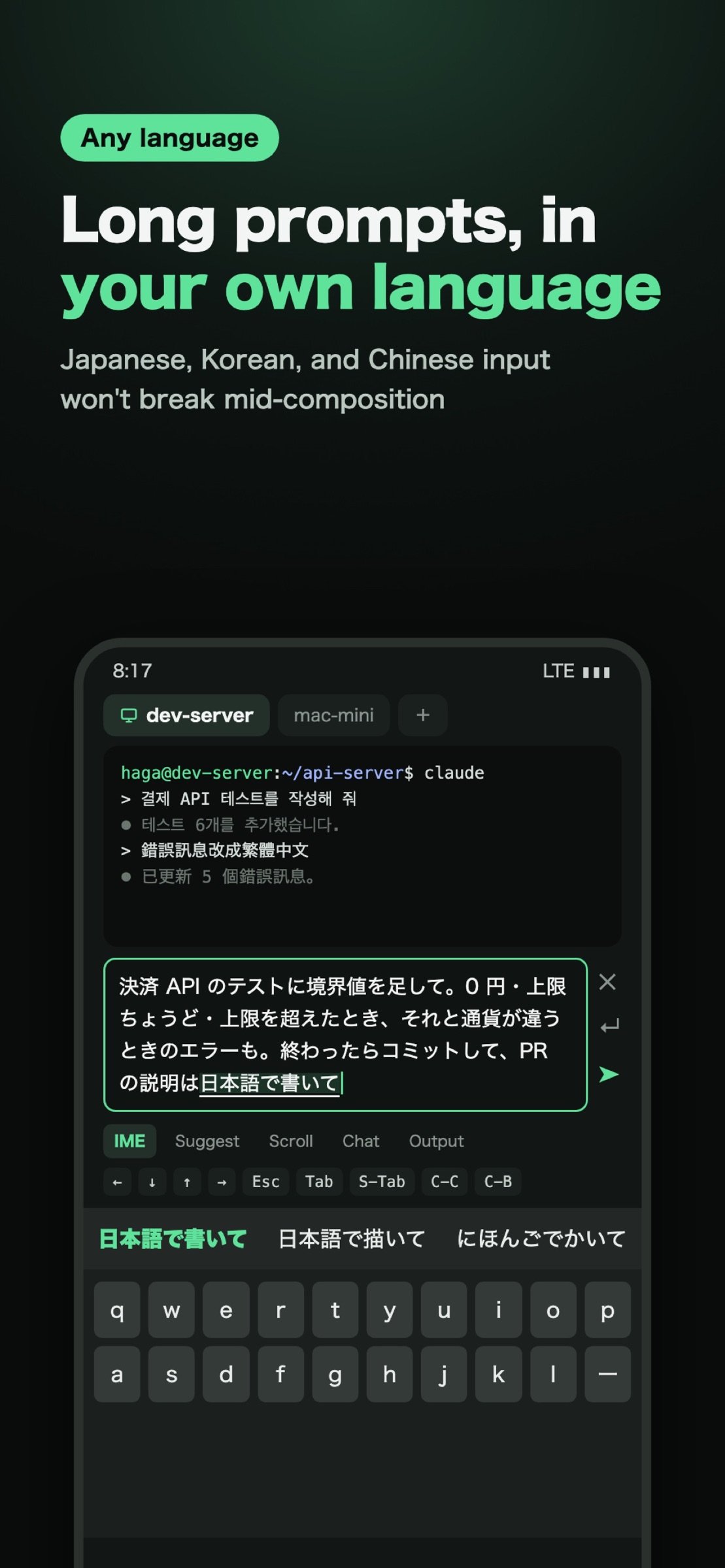
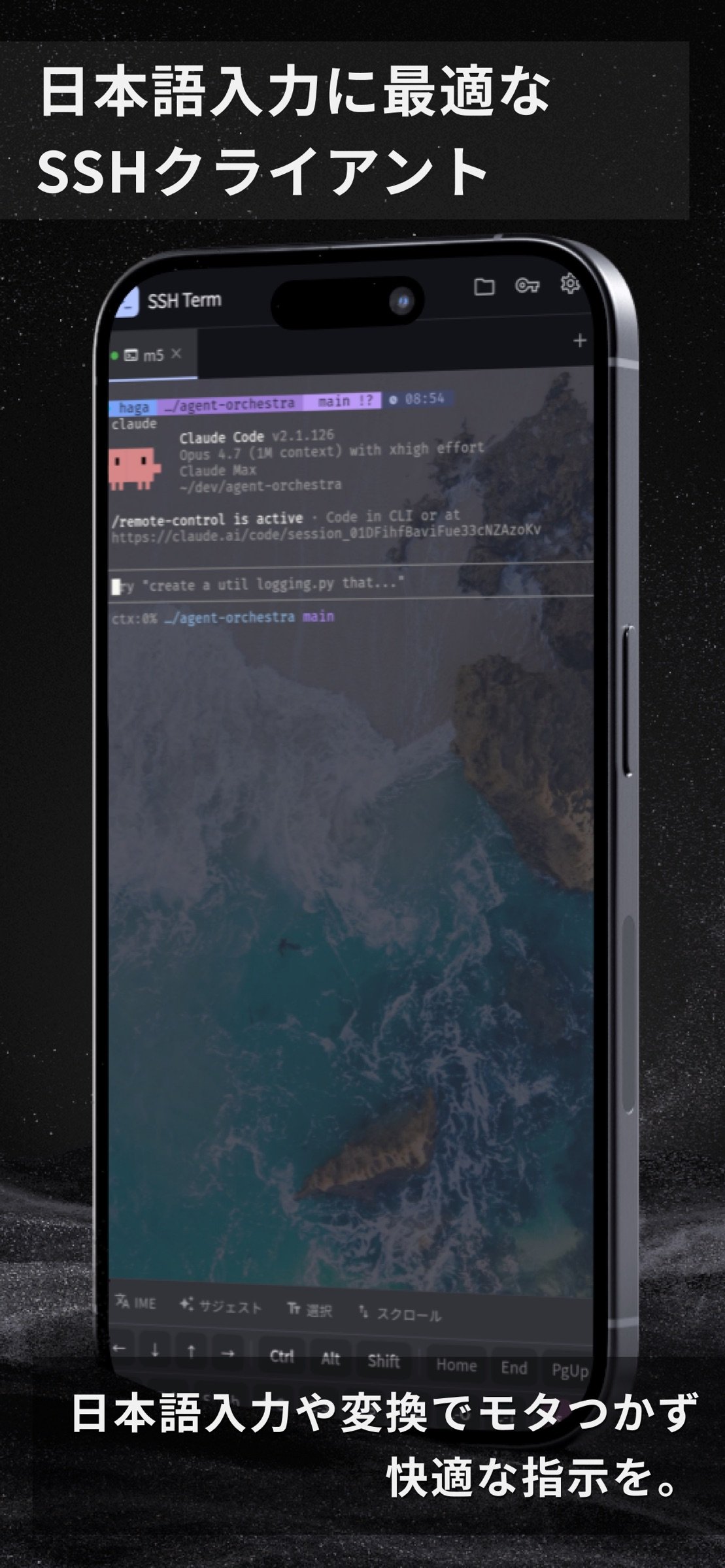
Instructions to an agent are prose in your own words. Japanese, Korean, and Chinese text often breaks in SSH apps; in SSH Term's IME mode it doesn't break mid-composition, so you can write long, detailed instructions in your own language.
ONE-TIME PURCHASE. FEATURES DON'T DISAPPEAR LATER
No account and no license server, so features don't disappear later. Every feature is included in the price; the only in-app purchase is an optional way to support development. No subscription, no ads, no telemetry. Your credentials stay on your device.
----------
AGENT LIST AND CHAT VIEW (BETA)
Prepare a host once, and agents of supported harnesses started in a PC terminal show up on your phone too. Read a running conversation as a chat and reply or approve from there; what you send never mixes with text half-typed on the PC.
KEPT SHELLS (NO TMUX, NO MOSH NEEDED)
When the connection drops, the shell stays on the host. Switching between Wi-Fi and mobile data or locking the screen won't stop your work. On reconnect the tab reattaches by itself and shows what you missed. The host only needs a small helper, stagent, which the app installs to ~/.ssh-term/agent after verifying its sha256 (Linux, macOS, and Windows hosts).
AI AGENT SESSIONS
Resume conversations of supported harnesses from a list, in a kept shell, tmux, zellij, screen, or herdr.
CJK INPUT (IME MODE)
Compose text in the input box and send it to the terminal in one go; characters still being composed never leak out as commands.
ON THE BIG SCREEN OF AN IPAD OR AN OPEN IPHONE DUO
Two tabs side by side, a home screen with each host's agent cards, a sidebar of open tabs with those waiting for approval first, and a two-pane filer. With a hardware keyboard, type just like on a PC. Split View works too.
SFTP FILE BROWSER AND PREVIEW
Check files an agent created or edited without leaving the terminal. Sort, rename, delete, and bookmark folders per host. Syntax-highlighted preview.
AUTO-RECONNECT, MULTI-TAB
Reconnects automatically when the network drops (up to 3 attempts). Run several connections side by side in tabs. Works over Tailscale SSH.
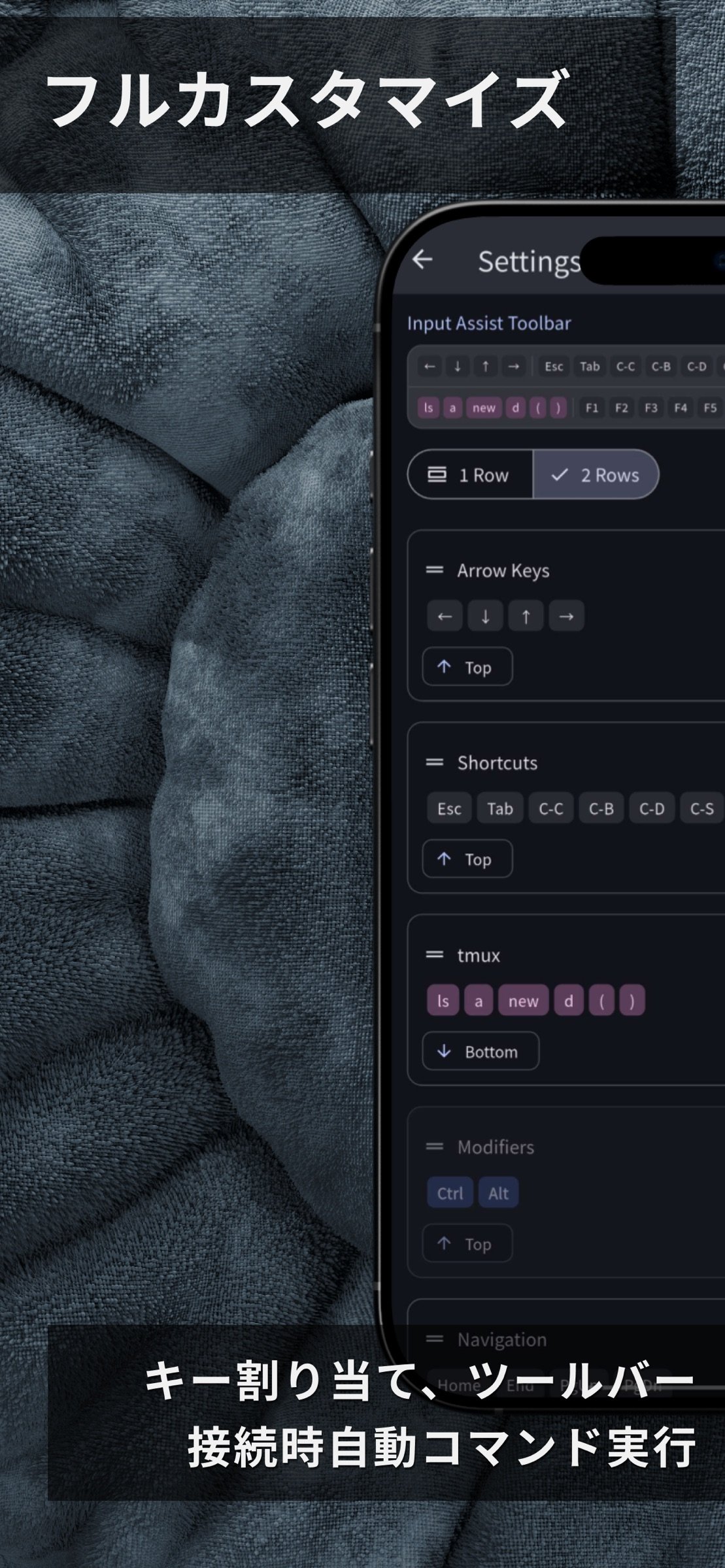
INPUT ASSIST TOOLBAR
One-tap Ctrl+C, Tab, Escape, arrow keys, F1–F12, Home/End/PageUp/PageDown, plus your own custom keys and commands.
AUTH, KEYS, THEMES
Password, public key, and keyboard-interactive auth. Generate Ed25519 or RSA keys in the app and copy the public key with one tap. Themes such as Dracula, Nord, and Tokyo Night; fonts such as Fira Code and JetBrains Mono, plus CJK fonts.
SECURITY
- Credentials stored encrypted on the device
- Host key verification (pinned on first connection)
- Lock the app with a PIN, Face ID, or Touch ID
- No cloud sync, no telemetry, no account required
License: Commercial
CONNECTING IS NOT ENOUGH
Agents run for a long time and stop to wait for approval or input. SSH Term lists the agents of supported harnesses on a card for each saved host, with their state: Working, Waiting for input, or Needs approval. See which one is waiting for what, and answer it on the spot.
NOT LOCKED TO A HARNESS OR A MODEL
Start any agent that runs in a terminal and give it instructions. Models and providers (API keys, Bedrock, and so on) stay as configured on your host. Agents run on your own host, and their conversations stay there instead of going through a third-party service.
SUPPORTED HARNESSES
The status list and chat view support Claude Code, Codex, Oh My Pi, Pi, and Copilot CLI.
YOUR PHONE IS THE COMMAND CENTER
Close the app and your agents keep running on the host (kept shells). Reopen it and the tab comes back with the output you missed. Approval requests, input waits, and finished turns reach you as push notifications through the free ntfy app, even with SSH Term closed (Slack, Discord, and Telegram also work). Send the next instruction to a running agent from the chat view.
ANY LANGUAGE
Instructions to an agent are prose in your own words. Japanese, Korean, and Chinese text often breaks in SSH apps; in SSH Term's IME mode it doesn't break mid-composition, so you can write long, detailed instructions in your own language.
ONE-TIME PURCHASE. FEATURES DON'T DISAPPEAR LATER
No account and no license server, so features don't disappear later. Every feature is included in the price; the only in-app purchase is an optional way to support development. No subscription, no ads, no telemetry. Your credentials stay on your device.
----------
AGENT LIST AND CHAT VIEW (BETA)
Prepare a host once, and agents of supported harnesses started in a PC terminal show up on your phone too. Read a running conversation as a chat and reply or approve from there; what you send never mixes with text half-typed on the PC.
KEPT SHELLS (NO TMUX, NO MOSH NEEDED)
When the connection drops, the shell stays on the host. Switching between Wi-Fi and mobile data or locking the screen won't stop your work. On reconnect the tab reattaches by itself and shows what you missed. The host only needs a small helper, stagent, which the app installs to ~/.ssh-term/agent after verifying its sha256 (Linux, macOS, and Windows hosts).
AI AGENT SESSIONS
Resume conversations of supported harnesses from a list, in a kept shell, tmux, zellij, screen, or herdr.
CJK INPUT (IME MODE)
Compose text in the input box and send it to the terminal in one go; characters still being composed never leak out as commands.
ON THE BIG SCREEN OF AN IPAD OR AN OPEN IPHONE DUO
Two tabs side by side, a home screen with each host's agent cards, a sidebar of open tabs with those waiting for approval first, and a two-pane filer. With a hardware keyboard, type just like on a PC. Split View works too.
SFTP FILE BROWSER AND PREVIEW
Check files an agent created or edited without leaving the terminal. Sort, rename, delete, and bookmark folders per host. Syntax-highlighted preview.
AUTO-RECONNECT, MULTI-TAB
Reconnects automatically when the network drops (up to 3 attempts). Run several connections side by side in tabs. Works over Tailscale SSH.
INPUT ASSIST TOOLBAR
One-tap Ctrl+C, Tab, Escape, arrow keys, F1–F12, Home/End/PageUp/PageDown, plus your own custom keys and commands.
AUTH, KEYS, THEMES
Password, public key, and keyboard-interactive auth. Generate Ed25519 or RSA keys in the app and copy the public key with one tap. Themes such as Dracula, Nord, and Tokyo Night; fonts such as Fira Code and JetBrains Mono, plus CJK fonts.
SECURITY
- Credentials stored encrypted on the device
- Host key verification (pinned on first connection)
- Lock the app with a PIN, Face ID, or Touch ID
- No cloud sync, no telemetry, no account required
License: Commercial
| Release info | Update on Nov 05, 2026 |
|---|---|
| Release notes | • Coming back to the app after a while, the terminal now reconnects reliably: a failed attempt is retried, and a host that does not answer no longer leaves it stuck on "Connecting". • With a Korean keyboard you can now type Hangul straight into the terminal, including on hardware keyboards. New Korean installs use the D2Coding monospace font so Hangul is evenly spaced. • When a connection fails, the reason is now shown in your language. |
| Listing data | App Store |
Reviews
No reviews yet. Be the first to review SSH Term X.
Used SSH Term X? Tell other visitors what you thought.
Log in to write a reviewOther products by this publisher
- "No Distractions" for YouTube 4.10 ----
- #Bible 11.6 "Incredible App - My sister shared this app with me a few weeks ago and it is truly incredible.
- #filmphotography 1.4.2 So, you decided to shoot on film?
- $quirrel 1.5.1 $quirrel Budget & Finance helps you plan each paycheck, track spending, manage debt, and see what is safe to spend before the next payday.
- % Percentage Calculator Pro 1.41 This is the Pro version of % Percentage Calculator.
Most viewed iOS Developer Tools
-
1
 ZScripter 12.2.0
ZScripter plays compatible Ren'Py, RealLive, NScripter, (PONS)ONScripter-EN/RU/JH/Yuri, Artemis, Siglus, AI5 and UK2 games as well as KiriKiri (+Kirikiroid2 patches) and RPG Maker MV/MZ & XP, VX and VX Ace support.
-
2
 GitHub 1.283.0
There’s a lot you can do on GitHub that doesn’t require a complex development environment – like sharing feedback on a design discussion, or reviewing a few lines of code.
-
3
 Shader Playground 1.0
Shader Playground is a powerful real-time shader editor built for iPhone and iPad.
-
4
 Agents Anywhere 2.1.0
Agents Anywhere is a developer tools mobile application for remotely controlling your local computer to complete coding tasks.
-
5
 Code Workspace 0.9.1
Code Workspace is a free, agent-first development environment for iPad and iPhone.
-
6
 LocalDevVPN 1.3.0
LocalDevVPN is a developer tool for creating and managing local network tunnels directly on iOS.
-
7
 Termius 8.0.7
Termius is a modern SSH client designed for productivity and collaboration.
-
8
 Cursor 1.17.0
Introducing Cursor for iOS: the best way to build, review, and ship software from anywhere.
-
9
 HTTP Debugger+ 1.2.3
HTTP Debugger+ is a professional HTTP traffic inspector designed for developers and QA engineers.
-
10
 Rulify 1.0.7
Rulify ????? iOS App ????,???????? App ????,???????????????
Most downloaded iOS Developer Tools
-
1
Agents Anywhere 2.1.0
Agents Anywhere is a developer tools mobile application for remotely controlling your local computer to complete coding tasks.
-
2
Rulify 1.0.7
Rulify ????? iOS App ????,???????? App ????,???????????????
-
3
 a-Shell mini 2.3.2
a-Shell mini is a complete local terminal emulator, allowing to run most Unix commands on you iOS device.
-
4
 LadderTouch 2.1.5
LadderTouch is an app to learn the basics of ladder logic, which is a graphical programming language.
-
5
 FSNotes 7.6.0
FSNotes is a fast, modern notes manager for macOS and iOS.
-
6
 C/C++$-LLVM Clang 2.7
This is a learning tool for efficient C/C++ learning, fast programming, ?(LLVM+Clang)offline compilation and local execution?, Git fetching, iCloud storage, and efficient transfer and sharing via LAN HTTP/FTP multi-point connections.
-
7
 python3$ 6.6
This is a Python 3.13 learning tool for efficient learning, fast programming, local execution, breakpoint debugging, precise error reporting, Git fetching, iCloud access, and efficient transfer and sharing via LAN HTTP/FTP multi-point connections.
-
8
 websta$-learn html css and js 3.2
This is a learning tool for efficient HTML, CSS, and JS learning, fast programming, local execution, Git retrieval, iCloud storage, efficient transfer and sharing via LAN HTTP/FTP multi-point connections.
-
9
HTTP Debugger+ 1.2.3
HTTP Debugger+ is a professional HTTP traffic inspector designed for developers and QA engineers.
-
10
 Expo Go 58.0.5
Start learning to build projects using web technologies with just your iOS device.