
SaverTuner 1.1.6
Extension to the built-in Android Battery Saver
Download
1.67 MB · s1m.savertuner_13.apk
15downloads
1this week
FreeFreeware
0reviews
Screenshots
About SaverTuner
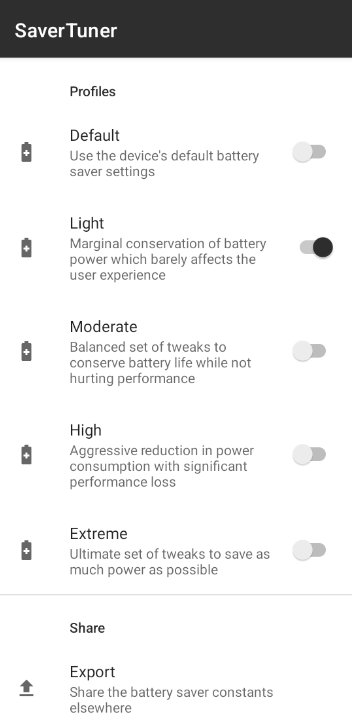
Android's built-in battery saver can be set quite finely. However, it is not configurable out of the box. SaverTuner allows you to take advantage of this built-in battery saver. You can now set different profiles that save the battery more or less aggressively. From a daily optimization that does not affect performance to an extreme optimization that saves power as much as possible.
This application is based on Buoy: [link removed].
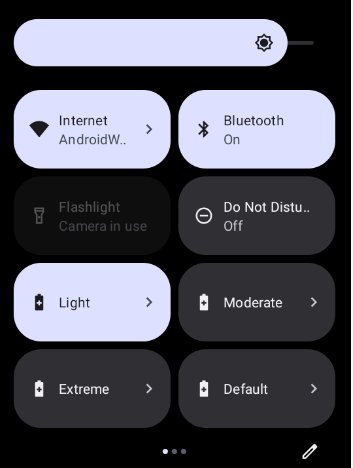
It adds support for Android 12+, save and restore profiles and improves the settings tiles.
Note that this app requires the WRITE_SECURE_SETTINGS permission that can be granted with EITHER a PC using ADB or root. Root is NOT required for this app, it is optional. Android 8.0+ is supported, with more features enabled on Android 10+.
Uninstalling the app will not reset the battery saver configuration. You must set the Default profile to undo all changes before uninstalling.
Features:
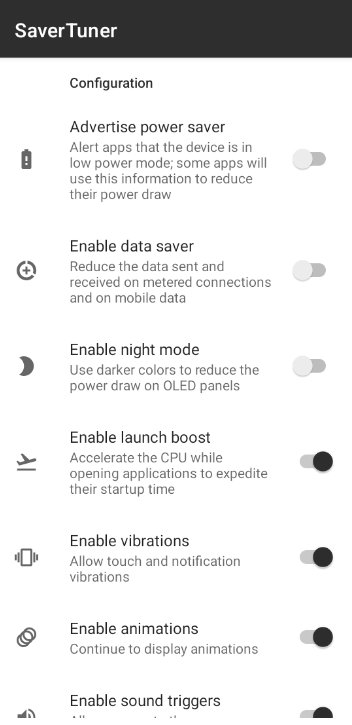
- Advertising to other apps that low power mode is enabled
- Android's data saver for metered WiFi or mobile data connections
- The built-in dark mode
- Launch boost to accelerate app starts
- Vibration
- Showing window and activity animations
- Allowing apps to use the SoundTrigger HAL
- Deferring full device backups for later
- Deferring app setting backups for later
- Using the built-in web firewall to protect against possibly malicious sites
- Changing the location access mode restrictions for apps
- Reducing the max brightness of the panel
- Forcing all apps into standby mode
- Forcing all apps to not check data in the background
- Disabling unnecessary sensors
- Using the Always-On-Display
- Putting the device into deep sleep as soon as the screen turns off
It also enables something called "sticky" low power mode. Usually, when the device is plugged in and unplugged, the low power mode is then disabled. However, sticky mode re-applies low power mode afterwards to continue saving battery.
License: BSD-2-Clause
This application is based on Buoy: [link removed].
It adds support for Android 12+, save and restore profiles and improves the settings tiles.
Note that this app requires the WRITE_SECURE_SETTINGS permission that can be granted with EITHER a PC using ADB or root. Root is NOT required for this app, it is optional. Android 8.0+ is supported, with more features enabled on Android 10+.
Uninstalling the app will not reset the battery saver configuration. You must set the Default profile to undo all changes before uninstalling.
Features:
- Advertising to other apps that low power mode is enabled
- Android's data saver for metered WiFi or mobile data connections
- The built-in dark mode
- Launch boost to accelerate app starts
- Vibration
- Showing window and activity animations
- Allowing apps to use the SoundTrigger HAL
- Deferring full device backups for later
- Deferring app setting backups for later
- Using the built-in web firewall to protect against possibly malicious sites
- Changing the location access mode restrictions for apps
- Reducing the max brightness of the panel
- Forcing all apps into standby mode
- Forcing all apps to not check data in the background
- Disabling unnecessary sensors
- Using the Always-On-Display
- Putting the device into deep sleep as soon as the screen turns off
It also enables something called "sticky" low power mode. Usually, when the device is plugged in and unplugged, the low power mode is then disabled. However, sticky mode re-applies low power mode afterwards to continue saving battery.
License: BSD-2-Clause
| Release info | New Release on Jun 30, 2025 |
|---|---|
| Release notes | - Fix crash while importing config |
| Listing data | F-Droid |
Reviews
No reviews yet. Be the first to review SaverTuner.
Used SaverTuner? Tell other visitors what you thought.
Log in to write a reviewOther products by this publisher
- "No Distractions" for YouTube 4.10 ----
- #Bible 11.6 "Incredible App - My sister shared this app with me a few weeks ago and it is truly incredible.
- #filmphotography 1.4.2 So, you decided to shoot on film?
- $quirrel 1.5.1 $quirrel Budget & Finance helps you plan each paycheck, track spending, manage debt, and see what is safe to spend before the next payday.
- % Percentage Calculator Pro 1.41 This is the Pro version of % Percentage Calculator.
Most viewed Android System
-
1
 Work Profile VPN Switcher 1.2.1
Automatically manage work profile when VPN connects or disconnects
-
2
 GrayPause 1.5
Keep your phone in grayscale, take short color breaks that end by themselves
- 3 LibChecker 2.5.5.1 View the third-party libraries used by applications
- 4 Contacts 4 Contacts Organised by Group
-
5
 SDK Monitor 2.1
Display and monitor the targetSDK from installed apps
- 6 Sift 1.0.7 A minimalist recipe keeper.
- 7 MAXS Module Ringermode 0.5.19 A Module for MAXS
- 8 TouchDroid 2.0.1 Use your Android Device as Touchpad.
- 9 Coffee 2.27 Keep display awake
- 10 OnePlus Laser Tool 1.0.4 Professional laser rangefinder for OnePlus devices with Laser AF hardware.
Most downloaded Android System
-
1
 openCook 0.4
Recipe manager to scan cookbook photos, plan your week and share the list
-
2
 Restoid 0.8.0
Root-based Android app backup tool powered by restic
-
3
 Sapio 2.10.0
Android apps that respect you!
- 4 Discord Timestamp Inserter 1.0.2 Input method for quickly inserting Discord timestamps
-
5
 StudFinder - Stud Finder for Android 17
Find wall studs with your Android's built-in magnetometer. Free, no ads.
-
6
Work Profile VPN Switcher 1.2.1
Automatically manage work profile when VPN connects or disconnects
-
7
 Voki Bot 0.8.0
Android automation tool
- 8 DBZ Battery Widget 1.7 View your battery status with your favorite DBZ character
-
9
 Middor 0.2.0
Mirror applications for HUD display with horizontal flip.
- 10 Keep Screen On 1.29.1 A screen timeout quick settings tile