River Past Video Slice 5.8
Trim or split videos from 3GPP/3GPP2, ASF, AVI, DAT, DivX, DV, MOV, MP4, MPEG-1, RM/RAM, WMV, and Xvid to AVI, WMV, DivX, XviD, or DV. Frame accurate. Preview video to set the exact frame. Easy to use operations to set the trim and split timecode
Product Specifications
| User Rating: | item has less then 1 vote |
|
| FileCart Rating | ||
| Submitted by: | riverpast | |
| License | Shareware | |
| Price | $29.95 | |
| Downloads | 536 | |
| OS Support | Windows Install and Uninstall | |
| File Name | videoslice_setup.exe | |
| File Size | 2.13 MB ( 2,177 KB ) | |
| Published | Mar 08, 2004 (22 years ago) | |
| Updated | Dec 17, 2013 (12 years ago) | |
Latest Searches
Joto Curry tokyo 6 minutes ago
annova etf singapore 7 minutes ago
Nextrue Con Bold download 11 minutes ago
republica de peru cdmx 100 12 minutes ago
Complete the sentence.Chemical nutrients must in water so that they can pass through tissues. 12 minutes ago
juninho manella live 12 minutes ago
tarkov elektronik 14 minutes ago
ultra106five 17 minutes ago
Where is magnesium (Mg) on theperiodic table relative to calcium (Ca) 17 minutes ago
Popular Searches
id cards 602 times
2025 425 times
2024 385 times
Softperfect 318 times
Database Workbench Pro 258 times
TeraByte Drive Image Backup and Restore 255 times
Elcomsoft Phone Breaker 251 times
Elcomsoft Phone Viewer 232 times
SAM Broadcaster Cloud 223 times
Product Details
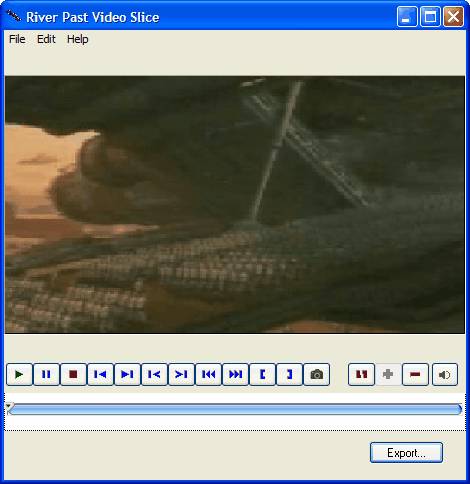
It provides a preview window with full control, including play, pause, stop, and frame accurate step backward and step forward. This allows you to get to the exact frame for the editing. It features a clear time line editing window, allowing you to trim video and/or cut video into segments. Both continuous and discontinuous segments are allowed.
It accepts a wide range of video formats, including 3GPP/3GPP2, ASF, AVI, DAT(VCD), DivX, DV, FLC/FLI Flic animation, animated GIF, Matroska MKV, QuickTime MOV, MP4 (MPEG-4), MPEG-1, OGG Media OGM, RealMedia RM/RAM, WMV, and XviD. You can either output to AVI, WMV, DivX, XviD, DV, MKV or OGM. You can choose your video and/or audio codecs, video quality, video size, frame rate, audio sample rate, channel, and bitrate.
For AVI input, you can remultiplex the file to AVI without reencoding with super fast speed. The original video quality is preserved, and it takes less than 1% (often just seconds, depending on the length of the video) of the time if the video is decoded and reencoded.
With Animated GIF Booster Pack, you can output the video to animated GIF files. This is the easiest way for web masters to create moving thumbnails for the video. You can output the video to FLIC animation file.
With Image Sequence Booster Pack, you can output the video to still images, including BMP, GIF, or JPEG files.
With MOV Booster Pack, you can convert to QuickTime MOV movies. With MPEG-4 Booster Pack, you can convert to MP4 movies. With the optional 3GP Booster Pack, you can output to 3GPP or 3GPP2 video.You have
Now, you can add a DirectShow decoding method (file reader, splitter, decoder) to expand the input file format support.
No adware or spyware. DirectX 8 and WMF9 required (download link available on the web site).
30 day MONEY BACK GUARANTEE.
| Requirements: | 500 mhz PC, DirectX 8.0 and WMF9 |
| Release Info: | Major Update on Feb 28, 2010 |
| Release Notes: | Now can convert from Matroska MKV and OGG Media OGM. Also added MKV and OGM as output formats. |
Reviews
You must be logged in to write a review
Reviews of River Past Video Slice 5.8
You can be the first to write a review of River Past Video Slice!Most Viewed Windows Video Tools
Total Video Converter 3.71
FLV to AVI MPEG WMV 3GP MP4 iPod Convert 6.0.0202
1AVCenter 2.4.0.10
Prism Plus Edition 2.63
Xilisoft 3GP Video Converter 6.6.0.0623
Movavi Video Converter 3D 1.2
iCoolsoft Total Video Converter 5.0.8
Debut Pro Edition 4.08
WMV to AVI Converter 3.1.9.6
Most Downloaded Windows Video Tools
FLV to AVI MPEG WMV 3GP MP4 iPod Convert 6.0.0202
Prism Plus Edition 2.63
RoboRealm 2.73.4
Movavi Video Converter 3D 1.2
Xilisoft 3GP Video Converter 6.6.0.0623
1AVCenter 2.4.0.10
Ultra MP4 Video Converter 6.1.1208
Video Converter & Extractor 4.18
Debut Pro Edition 4.08