Read Me Offline 1.1.1
Share an article or text, trim it, and hear it read aloud on-device
Download
15.61 MB
14downloads
14this week
FreeFreeware
0reviews
Screenshots



About Read Me Offline
Read Me Offline reads articles and text aloud with the text-to-speech voice already on your phone. Share a link from your browser or selected text from any app, cut the parts you don't want, and listen with the screen off.
Share it, trim it, listen to it
• Share a link and Read Me Offline fetches the page once and keeps only the article.
• Share selected text from any app and it is ready to read straight away.
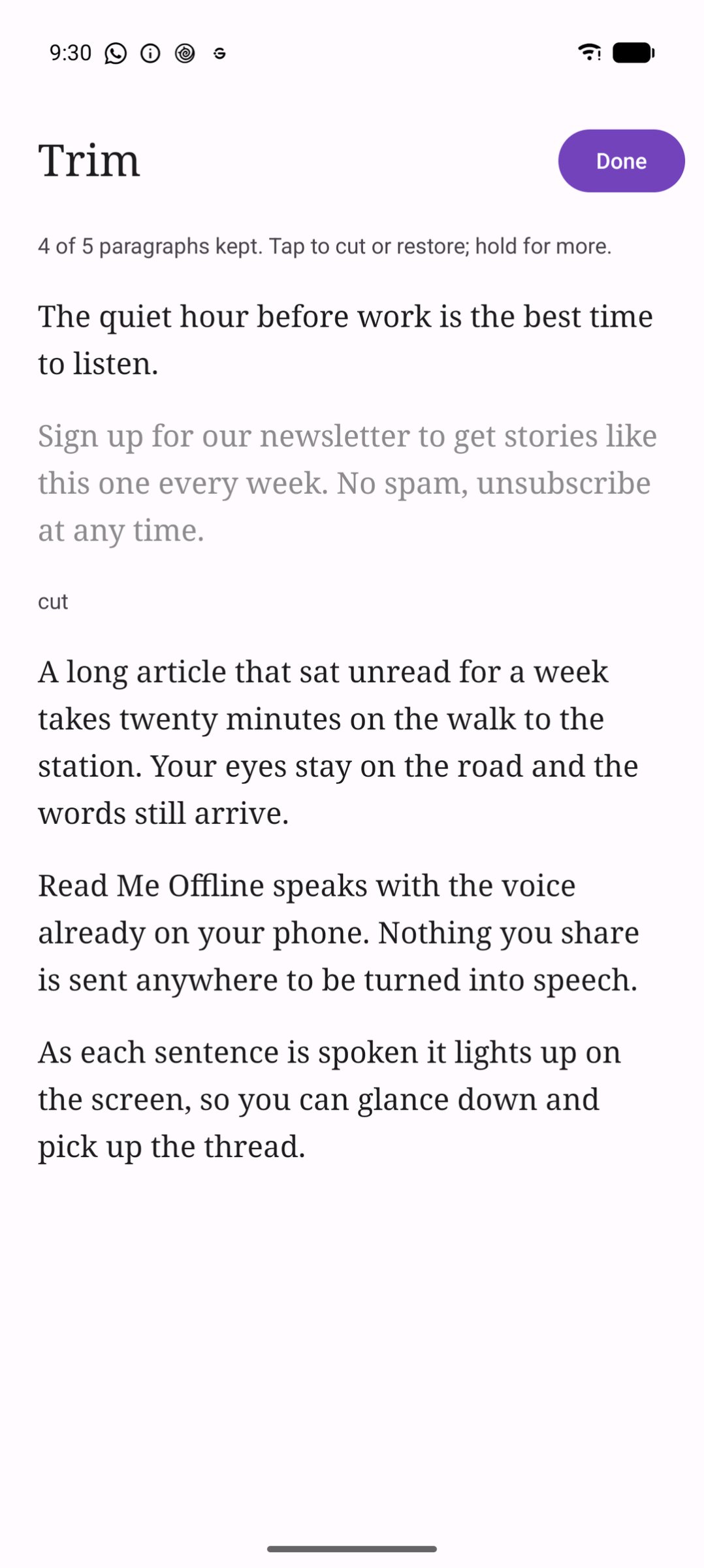
• Trim before you listen: tap a paragraph to cut it (a newsletter plug, a comment section), or cut everything before or after a point. Cuts are never destructive; tap again to restore.
• The sentence being read is highlighted, and playback keeps going with the screen off. Media buttons and headset controls work.
• Speed from 0.5x to 4x. Your place is saved as you go, and finished items move to the Archive.
Private by design
• Speech is made on your phone by Android's text-to-speech engine. Voices that need a network connection are never offered or used.
• The only network request is fetching a link you shared, or retrying one when you ask. No accounts, analytics, crash reporting, ads or update checks.
• What you save stays in the app's private storage and is never written to logs. Deleting an item deletes its text.
A voice for Obsidian on Android
Obsidian on Android gives plugins no way to use the phone's speech engine. Read Me Offline can run a small speech service, reachable only from the phone itself, that the local-tts-reader Obsidian plugin uses to read your notes aloud with the same on-device voices. It is off until you turn it on in Settings.
Read Me Offline needs a text-to-speech engine with at least one offline voice. Most phones have one; if yours doesn't, the app tells you and links to Android's speech settings.
License: MIT
Share it, trim it, listen to it
• Share a link and Read Me Offline fetches the page once and keeps only the article.
• Share selected text from any app and it is ready to read straight away.
• Trim before you listen: tap a paragraph to cut it (a newsletter plug, a comment section), or cut everything before or after a point. Cuts are never destructive; tap again to restore.
• The sentence being read is highlighted, and playback keeps going with the screen off. Media buttons and headset controls work.
• Speed from 0.5x to 4x. Your place is saved as you go, and finished items move to the Archive.
Private by design
• Speech is made on your phone by Android's text-to-speech engine. Voices that need a network connection are never offered or used.
• The only network request is fetching a link you shared, or retrying one when you ask. No accounts, analytics, crash reporting, ads or update checks.
• What you save stays in the app's private storage and is never written to logs. Deleting an item deletes its text.
A voice for Obsidian on Android
Obsidian on Android gives plugins no way to use the phone's speech engine. Read Me Offline can run a small speech service, reachable only from the phone itself, that the local-tts-reader Obsidian plugin uses to read your notes aloud with the same on-device voices. It is off until you turn it on in Settings.
Read Me Offline needs a text-to-speech engine with at least one offline voice. Most phones have one; if yours doesn't, the app tells you and links to Android's speech settings.
License: MIT
| Release info | Update on Nov 01, 2026 |
|---|---|
| Release notes | Read Me Offline 1.1.1 • Sharing a link that is already in your unread list opens that item instead of adding it again. • New shares go to the bottom of the list. Long-press an unread item and drag it to put it where you want; TalkBack offers Move to top, up, down and to bottom. Existing items are listed oldest first. • Trim's long-press menu is the app's own sheet, and the Reader's controls stay on screen on narrow phones and at large font sizes. • Articles drop citation markers, "[edit]" links and image captions. • Settings links the Obsidian plugin and gives setup steps. Reading a note from Obsidian with the screen off needs Local TTS Reader 0.3.0 or newer. • An unknown web address now says "not found" instead of "offline" when you are online, and the Obsidian bridge stays off (and Settings says why) while Read Me's notifications are turned off. One APK per ABI; most phones want arm64-v8a. Check them against SHA256SUMS. |
| Listing data | F-Droid |
Reviews
No reviews yet. Be the first to review Read Me Offline.
Used Read Me Offline? Tell other visitors what you thought.
Log in to write a reviewOther products by this publisher
- "No Distractions" for YouTube 4.10 ----
- #Bible 11.5 "Incredible App - My sister shared this app with me a few weeks ago and it is truly incredible.
- #filmphotography 1.4.2 So, you decided to shoot on film?
- $quirrel 1.5.1 $quirrel Budget & Finance helps you plan each paycheck, track spending, manage debt, and see what is safe to spend before the next payday.
- % Percentage Calculator Pro 1.41 This is the Pro version of % Percentage Calculator.
Most viewed Android Books & Reference
- 1 EbookConverter 1.5.0 Android ebook converter — epub, mobi, azw3, docx and more. No Calibre needed.
- 2 Futon 9.9 Manga reader with online catalogues ( kotatsu fork )
-
3
 Markdown Reader - PilcrowMD 1.1.1
Read & edit Markdown beautifully. No ads, no account, open source.
- 4 Archiv 0.2.0 Smart document scanner with tagging and fast search.
- 5 DeepL 10.1 Unofficial Android App for DeepL Translator
-
6
 MarkReader - Markdown Reader 1.1.0
Offline markdown, notes, and code reader with syntax highlighting
-
7
 Shelf 1.5.0
Offline book catalogue: search, track streaks, read your own files.
-
8
 MJ PDF 3.1.0
A simple PDF viewer
-
9
 Openshelf 1.4.1
Free, open-source personal library manager and book tracker.
- 10 Baby Books 0.9.2 Make your own picture books using images and words from Wikipedia
Most downloaded Android Books & Reference
-
1
Openshelf 1.4.1
Free, open-source personal library manager and book tracker.
- 2 Baby Books 0.9.2 Make your own picture books using images and words from Wikipedia
-
3
 Quote Unquote 4.58.0-fdroid
A Quotations / Affirmations App Widget
- 4 Jotdown 3.1.23 Offline PDF reader with OCR and academic annotations.
-
5
 RZR 0.6.9
Beautifully made mobile code and markdown reader.
-
6
MJ PDF 3.1.0
A simple PDF viewer
-
7
 AndBible: Bible Study 5.1.1117
Powerful Bible study toolkit: commentaries, bookmarks, notes, AI tools
- 8 Archiv 0.2.0 Smart document scanner with tagging and fast search.
- 9 Badreads 0.2.2 Book tracking for logging books and looking them up at OpenLibrary
- 10 EbookConverter 1.5.0 Android ebook converter — epub, mobi, azw3, docx and more. No Calibre needed.