28downloads
1this week
FreeFreeware
0reviews
Screenshots
About MJ PDF
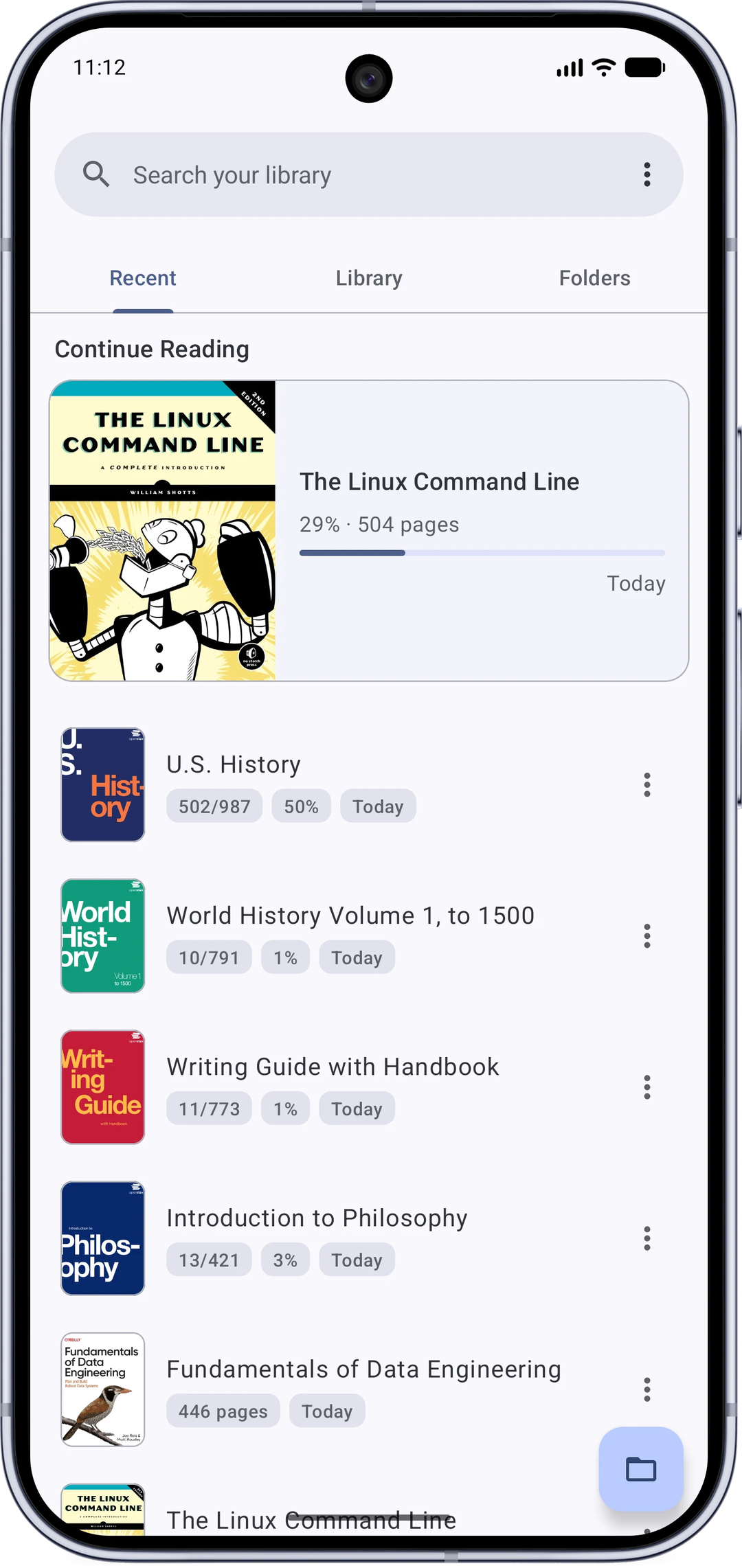
MJ PDF is a fast, simply, yet powerful and totally free PDF reader. It pairs a powerful reader with a full library manager, and it respects your privacy.
Library
* Home screen with Recent, Library and Folders tabs.
* Continue reading right where you left off, with a detailed reading history.
* Organize with reading statuses (to-read, reading, completed and more).
* Browse your device like a file manager, including SD cards.
* Search every PDF on your device.
Reader
* Fast and smooth, with dark mode for the app and the PDF itself.
* True full screen with configurable shortcut buttons.
* Highlight text, add notes, and save them into the PDF.
* Draw handwritten signatures and save them into the PDF as sharp vector strokes.
* Fill PDF forms.
* Select text with copy, share, web search, translate, and dictionary actions.
* Share quotes as images, with the book's name and a choice of themes.
* Text Mode: read any PDF like an e-book, with reflow, fonts and themes.
* Dual page mode that pairs pages like an open book.
* Powerful search with live results and next/previous navigation inside the reader.
* Table of contents, user bookmarks, embedded links, and browser-like navigation history.
* Right-to-left reading, hide margins, auto-scroll, brightness control, zoom lock.
* Open password-protected and online PDFs, share and print.
* Incognito mode that saves nothing about what you read.
* Backup and restore your settings and reading progress.
Permissions and privacy
This app does not collect any data.
The following permissions are required to provide specific features in the app:
* Internet: for opening PDFs through links.
* Storage / all-files access: to scan, open and manage the PDFs on your device.
Links
* Official page: [link removed]
* Source code: [link removed]
* Issues and requests: [link removed]
Author
* MJ PDF is made by Mudlej ([link removed]).
License
MJ PDF uses the GPLv3 license.
License: GPL-3.0-only
Library
* Home screen with Recent, Library and Folders tabs.
* Continue reading right where you left off, with a detailed reading history.
* Organize with reading statuses (to-read, reading, completed and more).
* Browse your device like a file manager, including SD cards.
* Search every PDF on your device.
Reader
* Fast and smooth, with dark mode for the app and the PDF itself.
* True full screen with configurable shortcut buttons.
* Highlight text, add notes, and save them into the PDF.
* Draw handwritten signatures and save them into the PDF as sharp vector strokes.
* Fill PDF forms.
* Select text with copy, share, web search, translate, and dictionary actions.
* Share quotes as images, with the book's name and a choice of themes.
* Text Mode: read any PDF like an e-book, with reflow, fonts and themes.
* Dual page mode that pairs pages like an open book.
* Powerful search with live results and next/previous navigation inside the reader.
* Table of contents, user bookmarks, embedded links, and browser-like navigation history.
* Right-to-left reading, hide margins, auto-scroll, brightness control, zoom lock.
* Open password-protected and online PDFs, share and print.
* Incognito mode that saves nothing about what you read.
* Backup and restore your settings and reading progress.
Permissions and privacy
This app does not collect any data.
The following permissions are required to provide specific features in the app:
* Internet: for opening PDFs through links.
* Storage / all-files access: to scan, open and manage the PDFs on your device.
Links
* Official page: [link removed]
* Source code: [link removed]
* Issues and requests: [link removed]
Author
* MJ PDF is made by Mudlej ([link removed]).
License
MJ PDF uses the GPLv3 license.
License: GPL-3.0-only
| Release info | New Release on Aug 19, 2026 |
|---|---|
| Listing data | F-Droid |
Reviews
No reviews yet. Be the first to review MJ PDF.
Used MJ PDF? Tell other visitors what you thought.
Log in to write a reviewOther products by this publisher
- "No Distractions" for YouTube 4.10 ----
- #Bible 11.5 "Incredible App - My sister shared this app with me a few weeks ago and it is truly incredible.
- #filmphotography 1.4.2 So, you decided to shoot on film?
- $quirrel 1.5.1 $quirrel Budget & Finance helps you plan each paycheck, track spending, manage debt, and see what is safe to spend before the next payday.
- % Percentage Calculator Pro 1.41 This is the Pro version of % Percentage Calculator.
Most viewed Android Books & Reference
- 1 Futon 9.9 Manga reader with online catalogues ( kotatsu fork )
- 2 EbookConverter 1.5.0 Android ebook converter — epub, mobi, azw3, docx and more. No Calibre needed.
-
3
 Markdown Reader - PilcrowMD 1.1.1
Read & edit Markdown beautifully. No ads, no account, open source.
- 4 Archiv 0.2.0 Smart document scanner with tagging and fast search.
-
5
 MarkReader - Markdown Reader 1.1.0
Offline markdown, notes, and code reader with syntax highlighting
- 6 DeepL 10.1 Unofficial Android App for DeepL Translator
-
7
 Shelf 1.5.0
Offline book catalogue: search, track streaks, read your own files.
-
8
 MJ PDF 3.1.0
A simple PDF viewer
-
9
 Openshelf 1.4.1
Free, open-source personal library manager and book tracker.
- 10 Baby Books 0.9.2 Make your own picture books using images and words from Wikipedia
Most downloaded Android Books & Reference
-
1
Openshelf 1.4.1
Free, open-source personal library manager and book tracker.
- 2 Baby Books 0.9.2 Make your own picture books using images and words from Wikipedia
-
3
 Quote Unquote 4.58.0-fdroid
A Quotations / Affirmations App Widget
- 4 Jotdown 3.1.23 Offline PDF reader with OCR and academic annotations.
-
5
 RZR 0.6.9
Beautifully made mobile code and markdown reader.
-
6
MJ PDF 3.1.0
A simple PDF viewer
-
7
 AndBible: Bible Study 5.1.1117
Powerful Bible study toolkit: commentaries, bookmarks, notes, AI tools
- 8 Archiv 0.2.0 Smart document scanner with tagging and fast search.
- 9 Badreads 0.2.2 Book tracking for logging books and looking them up at OpenLibrary
- 10 EbookConverter 1.5.0 Android ebook converter — epub, mobi, azw3, docx and more. No Calibre needed.